

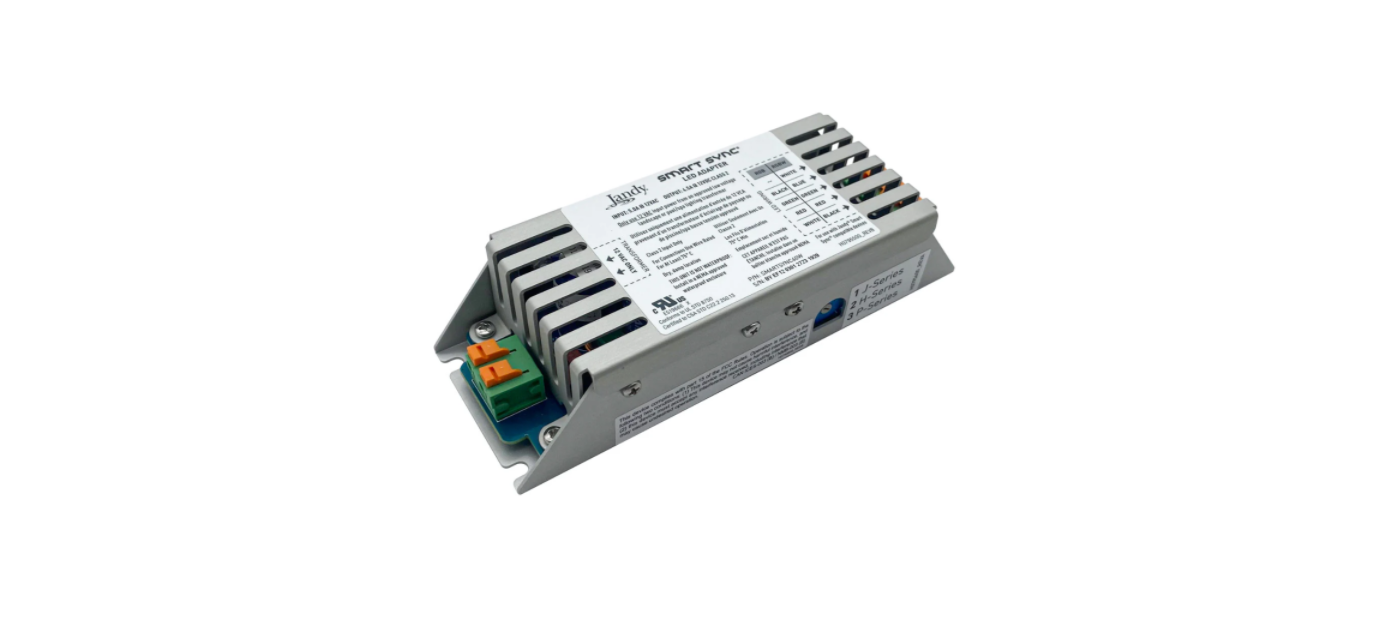

Jandy SMARTSYNC60W Smart Sync LED Adapter
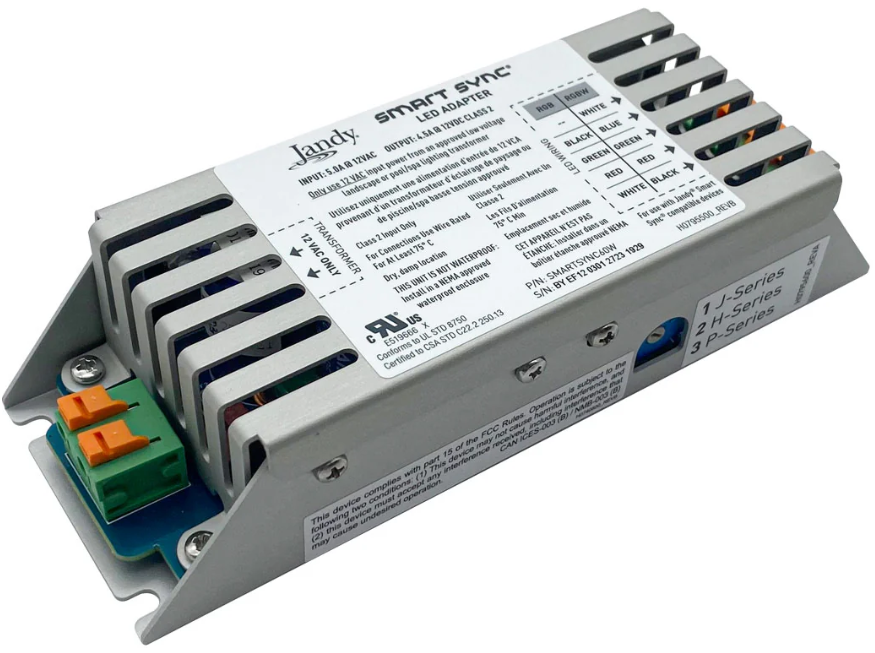
Installation
Select Series
Each of the three series has a distinct color/show sequence and matches with a different type of lighting.
- Determine which series to use based on the type of lighting the Smart Sync LED Adapter will be controlling:

- Jandy®: J-Series (1)
- Hayward® Industries: H-Series (2)
- Pentair® Water Pool and Spa, Inc.: P-Series (3)
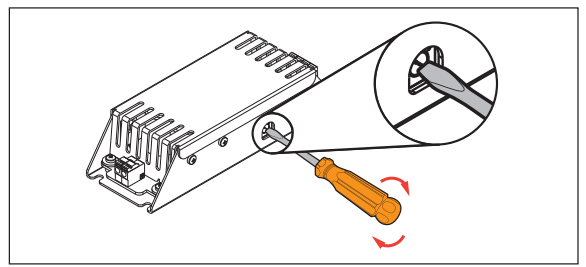
- Using a flathead screwdriver, rotate the dial on the side of the Smart Sync LED Adapter to the corresponding number for the series you want to select (see sticker on LED adapter).

Mount the Smart Sync LED Adapter
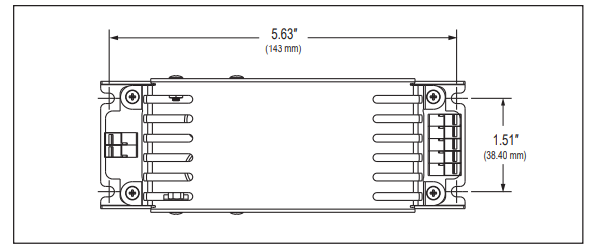
Mount the Smart Sync LED Adapter in a NEMA-approved weatherproof enclosure using the included mounting screws, as shown in Figure 3. Enclosure is not included. Minimum Enclosure Size (Internal): 9″ x 3″ x 4″ (228 mm x 100 mm x 75 mm)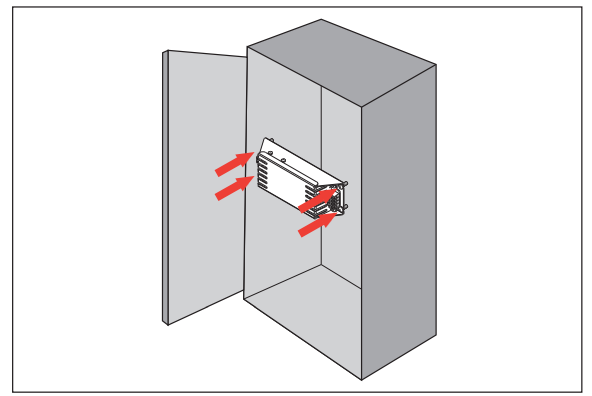
Attach Wiring
Wiring Steps
- Plug into the Smart Sync compatible device.
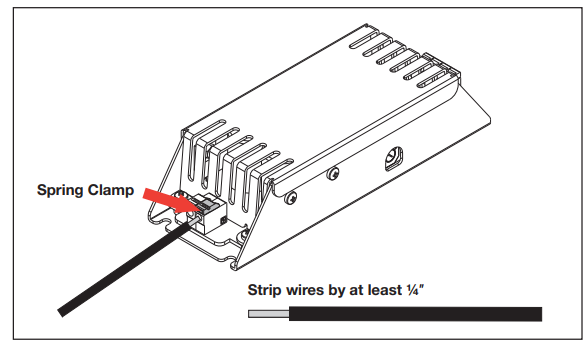
- Attach each of the four or five wires to the Smart Sync LED Adapter by pushing back an orange spring clamp and inserting the correct wire below.
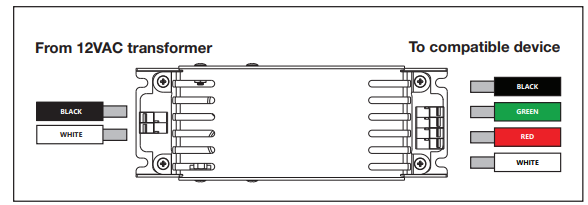
- Repeat steps 1 and 2 to connect wiring from the listed Class 2 12VAC transformer.

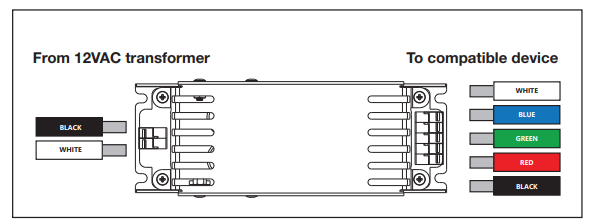
System Wiring Examples
Adjust Brightness
- Turn off all power to the Smart Sync LED Adapter before opening the enclosure.
- Open the enclosure door. Adjust brightness by rotating the dimmer dial.
- There are eight brightness settings from 0 to 7, with 0 being the brightest setting.
Operation
J-Series (Factory Default)
- Turn the light ON.
- Turn the light OFF and ON within three seconds repeatedly until you reach the desired color or show.
- See Table 1 for the color sequence.
Reset J-Series Lights
To reset the light to the beginning of the color sequence (Alpine White):
- 3. Turn the light OFF.
- 4. Wait four to six seconds.
- 5. Turn the light ON.
Table 1. J-Series Colors and Shows Sequence
| Sequence Order | Color/Show |
| 1 | Alpine White |
| 2 | Sky Blue (primary blue) |
| 3 | Cobalt Blue (dark blue) |
| 4 | Caribbean Blue (light blue) |
| 5 | Spring Green (light green) |
| 6 | Emerald Green (primary green) |
| 7 | Emerald Rose (warm yellow) |
| 8 | Magenta |
| 9 | Violet |
| 10 | Slow Color Splash (slow fading color show) |
| 11 | Fast Color Splash (fast fading color show) |
| 12 | America the Beautiful (red/white/blue show) |
| 13 | Fat Tuesday (blue/pink/light green show) |
| 14 | Disco Tech (rapid, exciting color show) |
H-Series
- Turn the light ON.
- Turn the light OFF and ON within ten seconds repeatedly until you reach the desired color or show. See Table 2 for the color sequence.
Sync H-Series Lights
If some lights are displaying different colors or out-of-sync shows, follow these steps to sync them again:
- Turn the light OFF.
- Wait between 11 and 14 seconds.
- Turn the light ON.
Table 2. H-Series Colors and Shows Sequence
| Sequence Order | Color/Show |
| 1 | Voodoo Lounge (fast fading color show) |
| 2 | Deep Blue Sea (dark purple/blue) |
| 3 | Royal Blue |
| 4 | Afternoon Skies |
| 5 | Aqua Green |
| 6 | Emerald (green) |
| 7 | Cloud White |
| 8 | Warm Red |
| 9 | Flamingo (pink) |
| 10 | Vivid Violet |
| 11 | Sangria (purple) |
| 12 | Twilight (slow fading color show) |
| 13 | Tranquility (blue tones show) |
| 14 | Gemstone (green/blue/red show) |
| 15 | USA (red/white/blue show) |
| 16 | Mardi Gras (purple/orange/green show) |
| 17 | Cool Cabaret (medium fading color show) |
P-Series
- Turn the light ON.
- Turn the light OFF and ON the required number of times to display the desired color or show. See Table 3 for required numbers
Hold and Recall Features
- To save a unique color, turn the light OFF and ON 13 times, starting when the light is displaying the desired color effect.
- To display the saved color, turn the light OFF and ON 14 times.
Table 3. P-Series Colors and Shows
| Number | Color/Show |
| 1 | SAm® Mode (blue/magenta/white/green show) |
| 2 | Party Mode (fast fading color show) |
| 3 | Romance Mode (medium fading color show) |
| 4 | Caribbean Mode (green/white/blue show) |
| 5 | American Mode (red/white/blue show) |
| 6 | California Sunset Mode (warm tone color show) |
| 7 | Royal Mode (purple/orange/green show) |
| 8 | Blue |
| 9 | Green |
| 10 | Red |
| 11 | White |
| 12 | Magenta |
| 13 | Hold Feature |
| 14 | Recall Feature |
Customer Support
- Address: Zodiac Pool Systems LLC 2882 Whiptail Loop # 100 Carlsbad, CA 92010, EE. UU.
- Website: Jandy.com
- Ph: 1.800.822.7933