



Labkotec Labcom 221 BAT Data Transfer Unit

Safety Instructions
The plant owner is responsible for the planning, installation, commissioning, operation, maintenance, and disassembly at the location. Neglecting these instructions will void any warranty and absolve the manufacturer from any liability.
All installation work must be carried out without voltage. Appropriate tools and protective equipment must be used during installation. Other risks at the installation site must be taken into account as appropriate.
General Information
This manual is an integral part of the product.
- Please read the manual before using the product.
- Keep the manual available for the entire duration of the product’s life span.
- Provide the manual to the next owner or user of the product.
- Please report any errors or discrepancies related to this manual before commissioning the device.
Symbols
Safety-related signs and symbols
- DANGER!
This symbol indicates a warning about a possible fault or danger. In case of ignoring the consequences may range from personal injury to death. - WARNING!
This symbol indicates a warning about a possible fault or danger. In case of ignoring the consequences may cause personal injury or damage to the property. - CAUTION!
This symbol warns of a possible fault.
Intended Use
The positioning functionalities require a satellite connection to the GPS. The positioning (GPS) antenna is always internal, and there is no support for an external antenna. A more specific description of the product’s operation, installation, and use is provided later in this guide.
Product Description

- Internal external antenna connector
- SIM card slot
- Device serial number = device number (also on the device cover)
- Batteries
- Additional card
- TEST button
- External antenna connector (option)
- Connection wire lead-throughs
Installation and Commissioning
The device features screw holes for installation, as shown in the measurement drawing.
 The device features preset configurations and parameters and comes with a SIM card installed. DO NOT remove the SIM card. Ensure the following in the context of commissioning before installing batteries,
- If installed, the internal antenna wire in the device has stayed connected.
Connections
- Read the section General safety instructions before installation.
- Make the connections when the device is de-energised.
Passive mA sensor
Labcom 221 BAT supplies the measuring circuit of the passive transmitter/sensor with the operating voltage required by the sensor.

Active mA sensor

Switch Output
 The Labcom 221 BAT device has one digital output. The approved voltage range is 0.. 4.0VDCC and the maximum current is 1A.
Switch Inputs
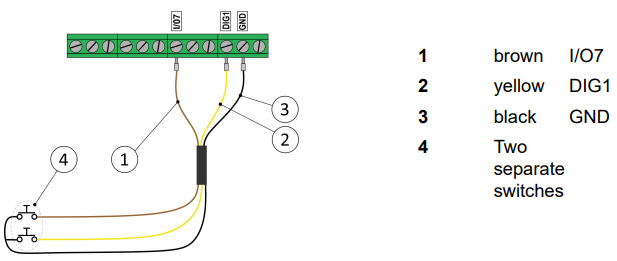
Example Connections
ID Oil-LIQl-LIQ
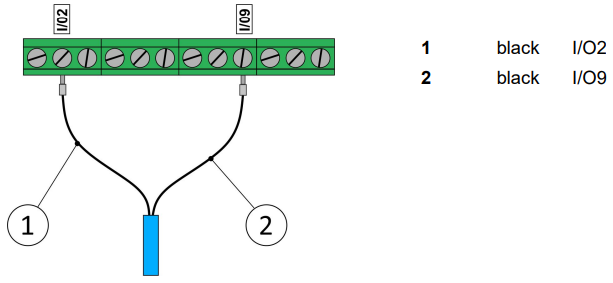
The Labcom 221 BAT data transfer unit + idOil-LIQ sensor must not be installed in potentially explosive atmospheres.
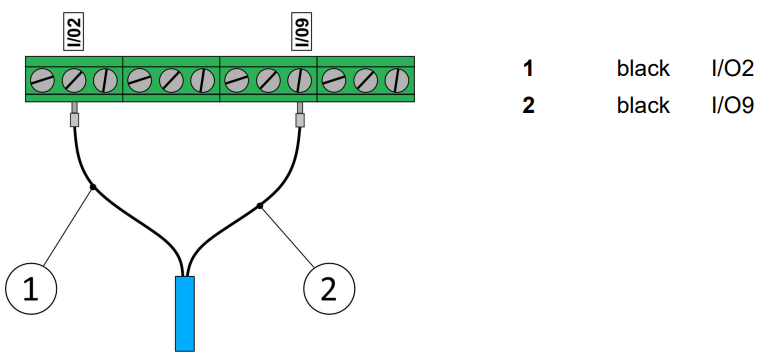
ID Oil-OIL
The Labcom 221 BAT data transfer unit + idOil-OIL sensor must not be installed in potentially explosive atmospheres.
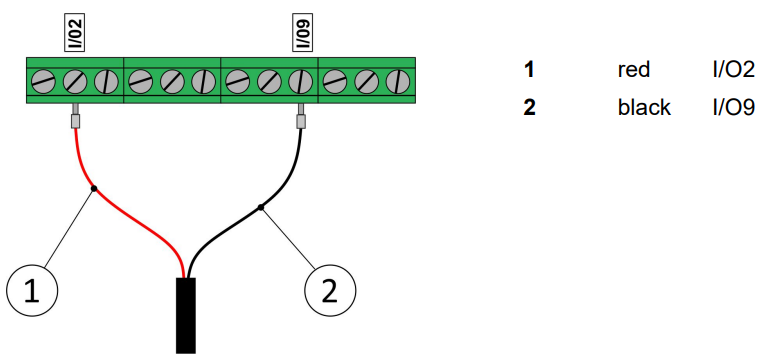
GA-SG1
SGE25
1-wire Temperature Sensor
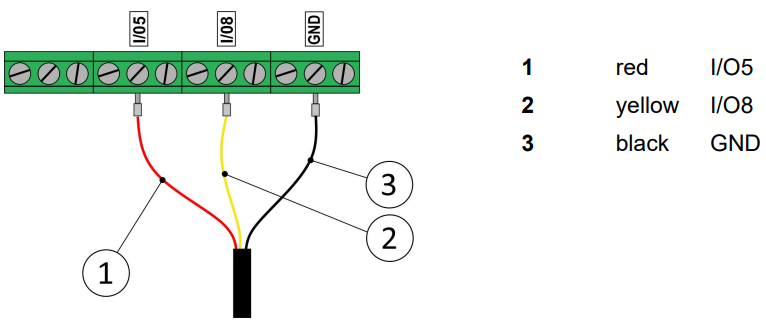
DMU-08 and L64
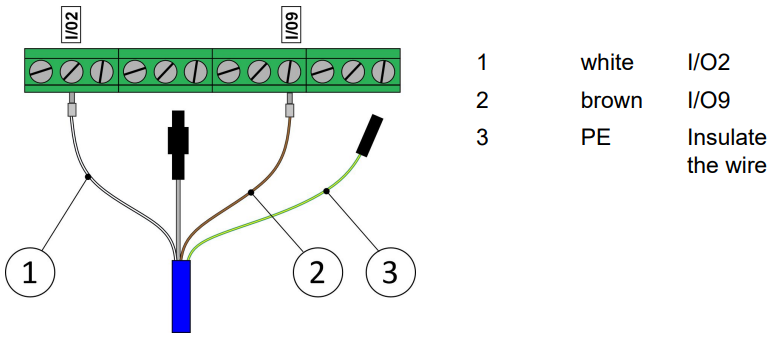
Nivusonic CO 100 S
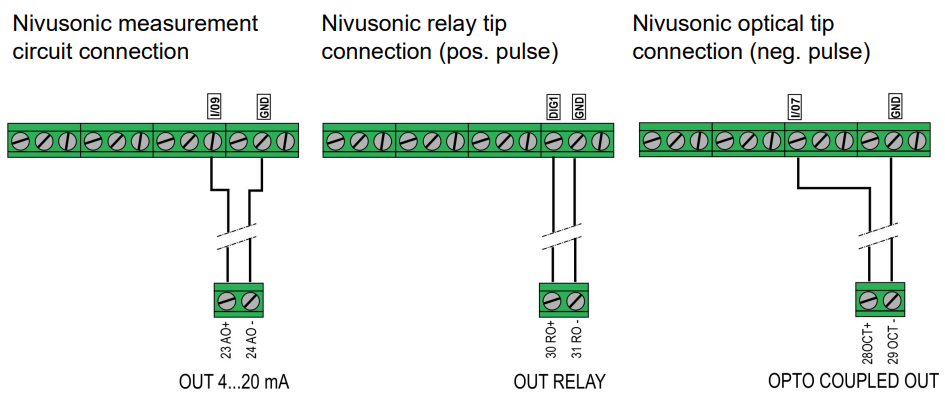
Connection MiniSET/MaxiSET

Batteries
The Labcom 221battery-powered battery-powered. The batteries are easily replaceable.

Battery information
- Type: Lithium
- Size: D/R20
- Voltage: 3.6V
- Amount: Two (2) pcs
- Max. power: At least 200mA
Troubleshooting FAQ
| PROBLEM | SOLUTION |
| The device does not contact the LabkoNet server = connection failure | Open the device cover and press the TEST button on the right side of the circuit board (if the device is in the vertical position) for three (3) seconds. This forces the device to contact the server. |
| The device is connected to the server, but the measurement/accrual data is not updated to the server. | Make sure that the sensor/transmitter is in order. |
| The device is connected to the server, but the positioning data is not updated. | Change the installation location of the device so that it connects to the positioning satellite. |
Technical specifications Labcom 221 BAT
| TECHNICAL SPECIFICATIONS Labcom 221 BAT | |
| Dimensions | 185 mm x 150 mm x 30 mm |
| Enclosure | IP 68 IP 67 when using an external antenna (option) IK08 (Impact protection) |
| Weight | 310 g |
| Lead-throughs | Cable diameter 2.5–6.0 mm |
| Operating environment | Temperature: -30ºC…+60ºC |
| Supply voltage | Internal 2 pcs 3.6V Lithium batteries (D,R20) External 6–28 VDC, however, over 5 W |
| Antennas (*) | GSM antenna internal/external GPS antenna internal |
| Data transfer | LTE-M / NB-IoT Encryption AES-256 and HTTPS |
| Positioning | GPS |
| Measurement inputs (*) | 1 pc 4–20 mA +/-10 µA 1 pc 0–30 V +/- 1 mV |
| Digital inputs (*) | 2 pcs 0–40 VDC, alarm and counter function for inputs |
| Switch outputs (*) | 1 pc digital output, max 1 A, 40 VDC |
| Other connections (*) | SDI12, 1-wire, i2c-bus and Modbus |
| Approvals: | |
| Health and Safety | IEC 62368-1 EN 62368-1 EN 62311 |
| EMC | EN 301 489-1 EN 301 489-3 EN 301 489-19 EN 301 489-52 |
| Radio Spectrum Efficiency | EN 301 511 EN 301 908-1 EN 301 908-13 EN 303 413 |
| RoHS | EN IEC 63000 |
| Article 10(10) and 10(2) | No operating restrictions in any EU Member State. |
Transport and Storage
- Check the packaging and its contents for Labkotec Labcom 221 BAT Data Transfer Unit any possible damage.
- Ensure that you have received all the ordered products and that they are as intended.
- Keep the original package.
- Always store and transport the device in the original packaging.
- Store the device in a clean and dry space. Observe the permitted storage temperatures.
Decommissioning and Disposal
- The device must be decommissioned and disposed of in compliance with local laws and regulations.
Conformity of the product
- The EU declaration of conformity and the product’s technical specifications are integral parts of this document.
- Labkotec Oy has a certified ISO 9001 quality management system and ISO 14001 environmental management system.
Limitation of liability
Labkotec Oy reserves the right to make changes to this user guide. Labkotec Oy cannot be held liable for direct or indirect damage caused by neglecting the instructions provided in this manual or directives, standards, laws, and regulations regarding the installation location.
Customer Service
- E-mail: labkonet@labkotec.fi
- Tel: +358 29 006 6066.
- Address: Myllyhaantie 6, FI-33960 Pirkkala, Finland
© 2025 Labkotec.fi.
FAQs
What is the primary function of the Labcom 221 BAT Data Transfer Unit?
The Labcom 221 BAT is a battery-operated data transmission device that uses GSM/GPRS connectivity to provide measurement or alarm data from distant locations to a central monitoring system.
How is the Labcom 221 BAT powered?
It is perfect for places without a mains power supply because it runs on an internal battery. Environmental factors and gearbox frequency affect battery life.
How do I know when the battery needs replacing?
When the voltage drops below the operational threshold, a low battery alert is activated.
Can the Labcom 221 BAT be installed outdoors?
Yes, an IP67-rated enclosure that is appropriate for outdoor settings houses the unit.
Is firmware updating possible remotely?
The majority of versions require manual firmware updates over a USB connection. Verify whether your model supports OTA (over-the-air) updates by consulting Labkotec or the user handbook.