

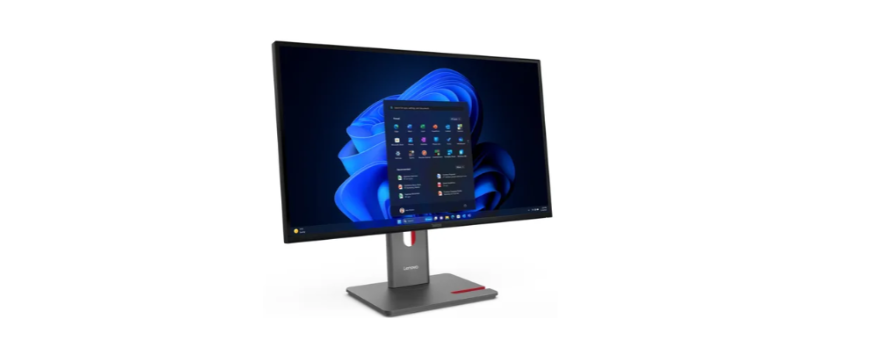

Lenovo ThinkVision P27QD-40 Monitor

Performance
Panel
- Panel
4-side Ultra Thin, In-Plane Lenovo ThinkVision P27QD-40 Monitor Switching - Backlight
WLED - Display Size
27 inches - Max View Area
Active Area: 596.7 x 335.7 mm
Screen Dimension: 608.8 x 352.4 mm - Resolution
2560 x 1440 - Aspect Ratio
16:9 - Pixel Pitch
0.2331 x 0.2331 mm - Dot / Pixel Per Inch
109 dpi - Brightness
350 cd/m² - Contrast Ratio
Contrast Ratio (Typical): 1500:1
Dynamic Contrast Ratio (Typical): 3000000:1 - View Angle (H / V)
Horizontal: 178°, Vertical: 178° - Response Time
Extreme Mode: 4 ms
Normal Mode: 6 ms - Refresh Rate
24Hz – 120Hz - Color Gamut
Coverage Ratio: 99% sRGB (CIE 1931)
Coverage Ratio: 98% DCI-P3 (CIE 1976)
Coverage Ratio: 99% BT.709 (CIE 1931) - Color Suppor
1.07 Billion - Color Depth
10-bit (8-bit+FRC) - Screen Surface Treatment
Anti-glare - Curvature
Flat Panel
Operating System
- Operating System
Windows® 11 Support
Windows® 10 Support
Multi-Media Camera
ThinkVision® VoIP Stack MC60 monitor webcam Lenovo ThinkVision P27QD-40 Monitor (For models 64B3ZAR2 and 64B3ZAT2) No bundled webcam (Support ThinkVision® VoIP Stack MC60 Monitor Webcam, sold separately)
- Microphone
No microphone - Speakers
No Sperakers (Support MS30 Monitor Soundbar, sold separately)
Power Supply
Power Consumption
- Typical / Max: 15.5W / 200W
- Switch-off Mode: <0.5W
- Switch-off Mode: <0.3W
- Energy Star Power On: 13.4W
- Energy Star TEC: 45.5kWh
- Internal Power Supply
- Voltage Required: AC 100 to 240 V (50-60Hz)
Special Features
- Factory Calibration: Avg. Delta E<2 at sRGB and DCI-P3
- Picture In Picture (PIP) / Picture By Picture (PBP) Support
- Lenovo® ThinkColour (Lenovo® Accessories and Display Manager) Support
Lenovo® ThinkColour supports Windows® 10 & 11, Mac OS (functions vary across systems). Lenovo® Accessories and Display Manager is formerly Lenovo® Display Control Centre.
- KVM Switch (with eKVM)
- Multi-sync
- Natural Low Blue Light
- Smart Power
The Smart Power function intelligently detects overall power consumption and dynamically manages the power delivery to each device
Design
Mechanical
ThinkCentre® M Series Support
To support Tiny devices, an additional ThinkCentre® Tiny Mounting Kit (PN:4XF1R07369) is required (sold separately).
Bezel Width
- Side: 2.0mm
- Top: 2.0mm
- Bottom: 11.5mm
Cable Management
- Support
Case Color
- Raven black
Dimensions (WxDxH)[1
| Models | Dimensions |
| Head Only | 613.4 x 46 x 357 mm (24.15 x 1.81 x 14.06 inches) |
| Highest Position | 613.4 x 195 x 539.1 mm (14.8 x 7.68 x 21.22 inches) |
| Lowest Position | 613.4 x 195 x 384.1 mm (24.15 x 7.68 x 15.12 inches) |
Packaging Dimensions (WxDxH)
693.0 x 150.0 x 422.0 mm (27.28 x 5.91 x 16.61 inches)
Weight
| Models | Weight |
| Monitor With Stand | 6.8 kg (15.0 lbs) |
| Monitor Head Only | 4.6 kg (10.1 lbs) |
Packaging Weight
- 9.4 kg (20.7 lbs)
Mounting
- Supports VESA mount 100mm
Stand
- Supports -5° to +23.5° tilt, left & right 45 swivel, -90° to +90° pivot, up to 155mm lift
In the Box
- 1x DP cable (1.8m)
- 1x USB-C® to USB-C® cable (1.5m, 10Gbps)
- 1x USB-A to USB-B cable (1.8m)
- 1x Power cable (1.5m)
- ThinkVision® VoIP Stack MC60 monitor webcam (For models 64B3ZAR2 and 64B3ZAT2) • 1x Quick setup guide
- Factory calibration report
- Warranty booklet
The system dimensions may vary depending on configurations. The system weight is approximate and based on results in Lenovo® lab, which varies depending on the source of the component, the variance of the distribution of each component, and the manufacturing process. It may not be the exact weight for each specific model.
Connectivity
Network Ethernet
2.5GbE Ethernet, 1x RJ-45
Ports[1]
Rear Ports[2]
- 1x USB-C® (USB 5Gbps / 3.2 Gen 1) with USB PD 3.1 140W and DisplayPort™ 1.4 Alt Mode HBR3, USB upstream
- 1x USB-C® (USB 5Gbps / USB 3.2 Gen 1) with 15W PD, data transfer only, USB downstream
- 4x USB-A (USB 5Gbps / USB 3.2 Gen 1), 1x BC1.2, USB downstream
- 1x USB-B (USB 5Gbps / USB 3.2 Gen 1), USB upstream
- 1x HDMI® 2.1 TMDS, supports 2560×1440@120Hz
- 1x DisplayPort™ 1.4 (HBR3), supports max. bandwidth 32.4Gbps
- 1x DisplayPort™ 1.4 (Out)
- 1x Ethernet (2.5GbE RJ-45)
- USB 2.0: 480 Mbit/s;
- USB 3.2 Gen 1 (SuperSpeed USB 5Gbps, formerly USB 3.0 / USB 3.1 Gen 1): 5 Gbit/s;
- USB 3.2 Gen 2 (SuperSpeed USB 10Gbps, formerly USB 3.1 Gen 2): 10 Gbit/s;
- USB4® 20Gbps / USB 3.2 Gen 2×2 (SuperSpeed USB 20Gbps): 20 Gbit/s;
- USB4® 40Gbps (USB 40Gbps): 40 Gbit/s; Thunderbolt™ 3/4: 40 Gbit/s.
Security & Privacy
Security
Physical Locks
- Kensington® Security Slot™ (2.5 mm x 6 mm)
Green Certifications
- ENERGY STAR® Certified
- EPEAT™ Gold Registered
- EU Energy Label (D-class)
- TCO Certified 10.0
- TCO Edge 2.1
Other Certifications
- Eyesafe® Certified 2.0
- TÜV Rheinland® Eye Comfort Certification (5-star)
Lenovo reserves the right to change specifications or other product information without notice. Lenovo is not responsible for photographic or typographical errors. Some jurisdictions do not allow disclaimer of express or implied warranties in certain transactions; therefore, this disclaimer may not apply to you. The specifications on this page may not be available in all regions, and may be changed or updated without notice.

Base Warranty
Included with the systems you purchase, a default 1- or 3-year coverage window.
Warranty Extensions & Upgrades
Service and protection that’s right for your circumstances.
- Pick Up & Return Courier
- Onsite Support
- Technician Installed Customer
- Replaceable Unit Service
- International Warranty Upgrade
Lenovo may not offer the products, services, or features discussed in this document in all regions. Lenovo may withdraw an offering at any time. Information is subject to change without notice. Consult your local representative for information on offerings available in your area.
FCC Compliance Statement
This device complies with Part 15 of the FCC Rules. Operation is subject to the following two conditions:
- This device may not cause harmful interference, and
- This device contains licence-exempt transmitter(s)/receiver(s) that comply with Innovation,
- Science and Economic Development Canada’s licence-exempt RSS(s).
- Operation is subject to the following two conditions:
- This device may not cause interference.
Customer Service
- Website: https://www.lenovo.com/
- Ph: 1-855-253-6686