

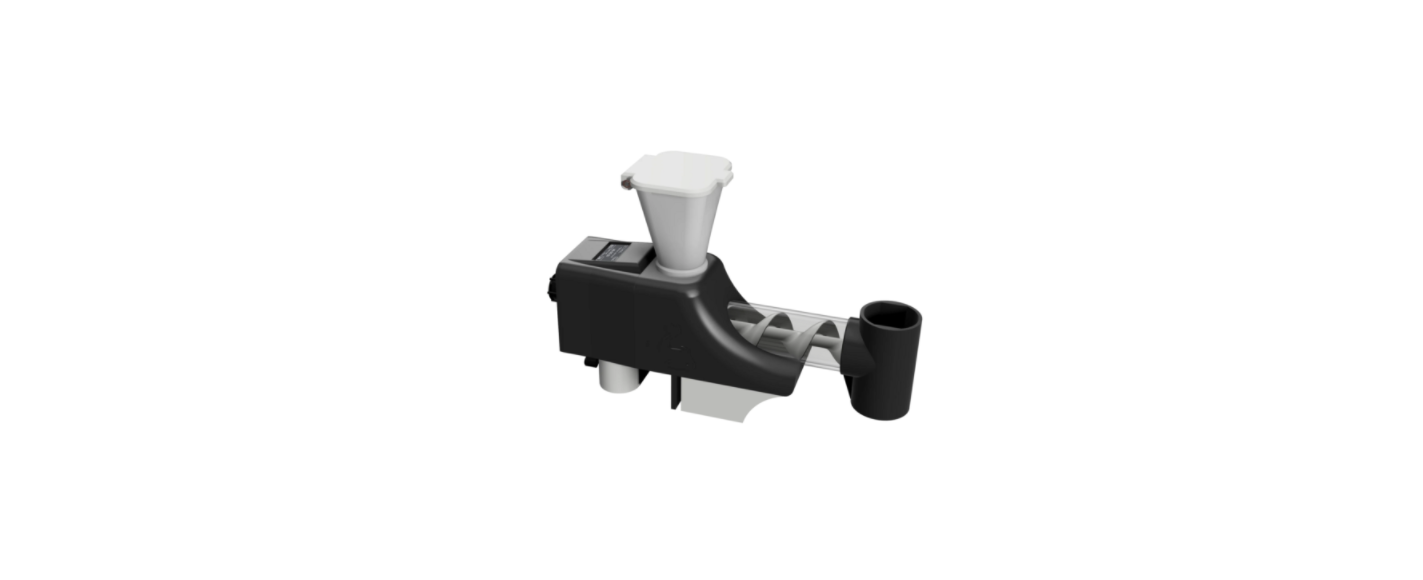

MaaS Automatic Fish Feeder Food Dispenser
User instructions

The Fish Feeder is powered by 5V USB, making it safer near water. To power on, insert the supplied USB cable into the USB Port on the back of the Fish Feeder (Just below the Rotary Switch) and plug the opposite end of the Lead into a standard USB plug adapter (not supplied).
Once power is given to the Fish Feeder, the Screen will display, and the clear tube (Barrel) will illuminate white.
The Feeding is very slow to help the food distribute into your tank slowly and evenly, which helps with the
circulation of the food and prevents clumps of food from entering the tank in one place.
The Fish Feeder is designed to feed more accurately, improving the dispensed food amounts.
- Less food wastage
- Consistent food amounts
- Consistent feeding times
- No requirement for Holiday/Weekend tablets when you’re away
Main Screen

To change settings on the Fish Feeder: From the Main Screen, press the Rotary Switch on the rear of the Fish Feeder. This will bring up the Main Menu. To move up and down the menu options, turn the Rotary Switch clockwise/anti-clockwise. To select an option, press the Rotary Switch until it clicks. This will activate the option that is identified by an arrow (=>).
Menu Options
- Exit Manual Feed Restart Countdown Set Feed Hours Set Feed Seconds Prime Feeder
Exit
- Pressing the Rotary Switch on Exit will return you to the Main Screen display.
Manual Feed
- This is for a Manual Feed. You will be asked to confirm your selection. Yes, to continue – No, to cancel.
- Pressing YES will feed for the desired time set in the Set Feed Seconds menu option.
- This does not affect the automatic feed time interval. It will still feed when the countdown hits 00:00:00.
- Manual feeding does not change the countdown to the next feed.
- When feeding, you can cancel the feed at any time by pressing the Rotary Switch; this will cancel the manual feed and return to the Main Screen.
- The illuminated Barrel will flash during both Manual Feeding and Automatic Feeding times.
- When feeding, the Feed Screw turns more slowly than Priming.
Restart Countdown
This will restart the Countdown to the programmed Feed Hours. You will be asked to confirm your selection. Yes, to continue – No, to cancel
E.g., Restart the countdown from 12 hours (if Feed Hours is set to 12 in the Set Feed Hours menu option)
Feed Hours
You will be asked to confirm your selection. Yes, to continue – No, to cancel Change the Feed Hours by turning the Rotary Switch. The Fish Feeder has four feeding time intervals. The countdown to the next feed will be every:
- 6 hours
- 8 hours
- 12 hours
- 24 hours
E.g., If the required Feed Hours is set to 24, the Fish Feeder will feed every 24 hours (Once a day)
Feed Seconds
You will be asked to confirm your selection. Yes, to continue – No, to cancel. The number of seconds ranged from second of feeding time up to 200 seconds. These changes are made in 1-second
increments by turning the Rotary Switch clockwise or anti-clockwise. E.g., Setting the Feed Seconds to 60 (1 minute) will release fish food for 1 minute.
Place a small plate under the end spout of the feeder to catch and check the amount of food that is
dispensed.
Prime Feeder
You will be asked to confirm to continue. Yes, to continue – No, to cancel. If you are using Fish Food Flakes in the Feeder, you must use the Fish Flake Crusher before MaaS Automatic Fish Feeder Food Dispenser placing the food into the Hopper. You will find the Crusher in the Box when you receive it.
Separate the Crusher, but keep the larger side at the bottom, and remove the smaller side (three spikes) upwards. Carefully pour the crushed flakes into the Hopper.
Repeat until you have enough food in the Hopper.
Never use damp Fish Food; this will block the Hopper!
This is done by priming the Fish Feeder. The Feeder will move the food forward until it starts dropping out of the End Spout.
If the food has not reached the end of the Barrel and Feed Screw, then priming can be repeated.
It is recommended to Prime the Feeder twice to make sure the food chambers are mostly full.
Remember to keep the Hopper filled.
Screen Saver
This is to help extend the life of the screen. The Screen Saver mode will only activate when the Main Screen is displaying. Do not leave the screen for a prolonged period in any of the options or on the Main Menu.
Turning or pressing the Rotary Switch will bring the Fish Feeder out of Screen Saver mode and back to
displaying the Main Menu.T he Screen Saver will deactivate 10 seconds before a feed to show the countdown to feeding time. 10 minutes after the dispensing of food, the Screen Saver mode will reactivate.
Power Failure
- In the event of a power failure, the Fish Feeder MaaS Automatic Fish Feeder Food Dispenser will no longer continue to work.
Cleaning the Fish Feeder
- Clear the Fish Feeder of any food.
- Remember to place a small plate under the spout.
- Repeat priming until the Hopper and Barrel are empty.
- Remove the power cable from the Fish Feeder before proceeding to Step 4.
- Holding the Main Body, remove the Hopper by twisting and lifting.
- Holding the Barrel, remove the End Spout by twisting it away from the Barrel.
- Holding the Main Body, remove the Barrel by gripping and twisting whilst pulling the ttube forwardrd

- Do not use any mechanical grips, as this can cause the tube to break and cause injuries.
- Holding the Main Body, remove the Feed Screw by gently pulling on the end. You may need to give it a little wiggle to help it out.
Assembling the Fish Feeder
All parts must be completely dry before reassembling the Feeder.
To reassemble the Feeder, follow the instructions above (cleaning) in reverse order. When assembling the Feed Screw, gently push the Feed Screw into position and slightly turn until it slides onto the motor fixing. Do not overexert the Feed Screw onto the motor fixing. You will know when it is in position, as it will be harder to manually turn with your fingers. Do MaaS Automatic Fish Feeder Food Dispenser not continuously turn the Feed Screw manually, as this could damage the motor.
Attaching the Fish Feeder to the glass of the tank
Use the underside clamp (see diagram) to attach the Feeder to the glass of your Fish Tank. Firstly, unscrew the Nut at the bottom back leg of the Feeder until the Clamping Plate between the Front and Back Legs opens enough for the thickness of your glass. Place the glass between the Clamp and the Front Legs. Screw the Clamp using the Nut and your fingers, until the Feeder is secure over the tank.

Troubleshooting 
Declaration of Conformity
We declare this product complies with the relevant UK legislation on condition that it is used in the
manner intended, and in accordance with the current installation standards and/or the manufacturer’s
recommendations.
Customer Service
- Website: https://www.maasinc.com/
- Address: MAAS International Inc. 7101 Adams Street, Building 3. Willowbrook, IL 60527 USA
- Tel: 630.654.4743.
- Fax: 630.654.9050.
- Hours of Business: 8:00-4:00 CST …