

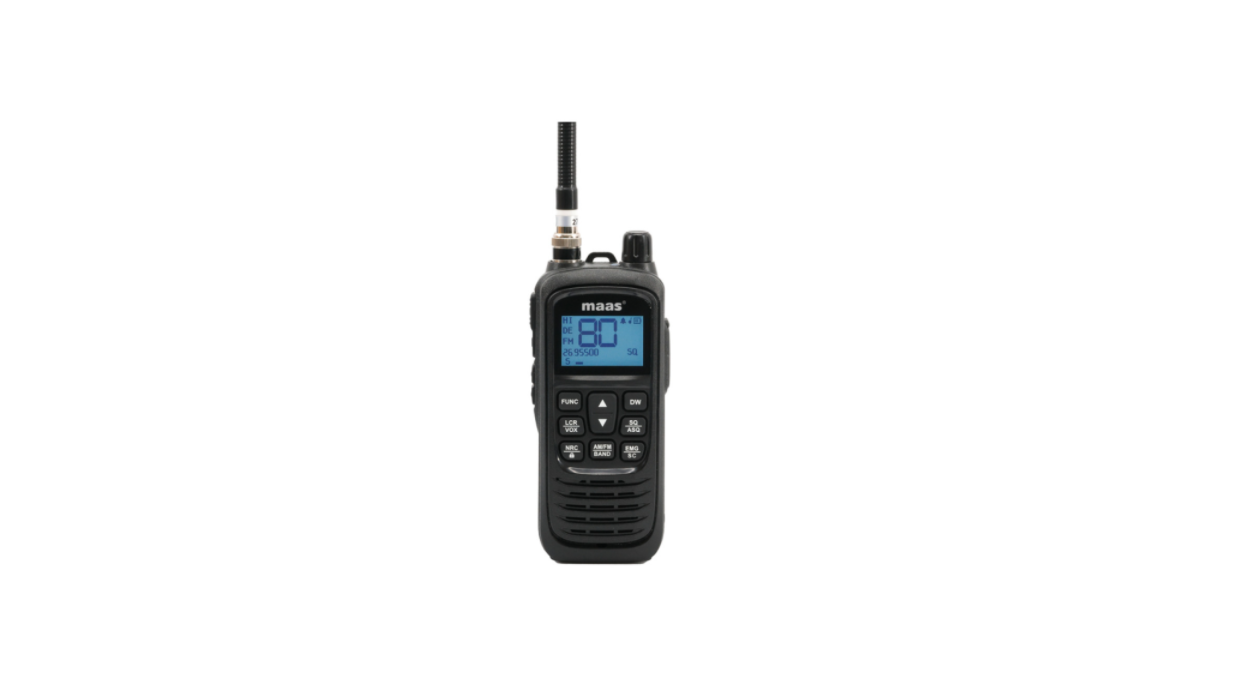

Maas KCB-H-1000 Portable CB Radio
Safety Instructions
- Read the following warnings to prevent fire, personal injury, or damage to the CB radio or antenna.
- Do not try to adjust the CB radio while driving; it is dangerous.
- Do not position the CB radio on an excessively dusty, wet, or unstable surface.
- Do not connect the antenna during transmission; risk of burns or electric shock.
- Keep your distance from devices that create interference (such as TV, generator, etc.)
- Do not bring metal objects close to the internal electrical part of the CB radio; danger of electric shock.
- Do not expose the CB radio to sunlight for a long time.
- Do not put anything on the CB radio; it will prevent it from cooling down.
- Check if you have a sufficiently charged car battery to avoid a rapid discharge.
- When replacing the fuse, you must use a fuse of the same type as the original one.
- If an abnormal smell or smoke comes out of the CB radio, turn off the power immediately.
- Do not transmit for a long time; the CB radio may heat up and malfunction.
Keys and Functions
| Description | Short press | Long press | |
| Antenna | |||
| Volume On/Off | |||
| Status LED | |||
| LCD screen | |||
| PTT | Transmission | ||
| HI/LO | High/low power selection | ||
| Backlight On/Off | |||
| Monitor | |||
| FUNC | Menu | ||
| Increase channel number | Continuous increase in channel number | ||
| DW | Enable/Disable Dual Watch | Dual Watch setting | |
| LCR/VOX | Last channel recall | VOX control | |
| Decrease channel number | Continuous decrease in channel number |
Usage Instructions
Turn the radio on/off
- Turn the knob on the top of the CB radio [2] clockwise to Maas KCB-H-1000 Portable CB Radio turn it on.
- The CB radio starts from the previous mode of use. Turn the knob on the top of the CB radio [2] counterclockwise to turn it off.
Volume control
- After turning the CB radio on, continue to turn the knob [2] to adjust the volume to the desired level.
Channel selection
- Briefly press the CH or CH key to increase or decrease the channel number until you reach the desired channel. Long-press the CH or CH key to quickly increase or decrease the channel number.
Squelch (SQ) level selection
- Briefly press the SQ/ASQ [14] key. On the screen, the SQ icon and the digits corresponding to the level flash. 25 levels of manual squelch are available, from 00 (squelch off ) to 25 (highest level).
- When the digits corresponding to the level are flashing, press the or keys to select the desired level. To confirm the selection, press the SQ/ASQ key or wait 5 seconds.
Automatic squelch (ASQ) level selection
- Long-press the SQ/ASQ [14] key to switch to ASQ mode. On the screen, the SQ icon becomes ASQ. On the screen, the ASQ icon and the digits corresponding to the level flash.
- There are 5 levels of manual squelch available, from 01 (the lowest level) to 05 (the highest level).
- When the digits corresponding to the level are flashing, press the or keys to select the desired Maas KCB-H-1000 Portable CB Radio level.
- To confirm the selection, press the SQ/ASQ key or wait 5 seconds.
AM/FM selection
- Press the EMG/SC [17] key to switch to channel 09. The EMG icon appears on the screen. Press the EMG/SC key again to switch to channel 19.
- Press the EMG/SC key again to exit Emergency mode. The EMG icon disappears from the screen.
Key lock
- Long-press the NRC/LOOK key to activate the key lock function. The icon appears on the screen.
- When pressing any key, you will hear a warning beep, and the icon will blink. All radios’ keys are locked, except the PTT key.
- Long-press the NRC/LOOK key again to disable the key lock function. The icon will disappear from the screen.
Channel scan
- Long-press the EMG/SC [17] key. The SC icon blinks on the screen. The channel scanning starts immediately.
- During scanning, you can press the or key to change the scanning direction. Long-press the EMG/SC key or the PTT key to stop scanning. The SC icon disappears from the screen.
- Briefly press the HI/LO [6] key on the side of the CB radio to change between high (4 W) and low (1.5 W) transmission power. The HI or LO icon will appear on the screen.
Dual Watch
- Long-press the DW [11] key. The DW icon and the digits corresponding to the channel blink on the screen. Press the or key to choose the second channel you want to monitor.
- Press the DW key again to save and exit. To activate the Dual Watch mode, briefly press the DW key.
- The two channels set for simultaneous monitoring will be displayed successively on the screen. The DW icon is blinking. Short-press the DW key to exit.
NCR (Noise Reduction Circuit)
- Briefly press the NRC/LOOK [15] key to activate the background noise reduction function.
- The NRC icon appears on the screen. Briefly press the NRC/LOOK key again to disable the NRC function. The NRC icon disappears from the screen.
LCR (Last Channel Recall)
- Briefly press the LCR/VOX [12] key to return to the last channel you stayed on for more than 5 seconds. Press LCR/VOX again to return to the original channel.
VOX
- Long-press the LCR/VOX [12] key to activate the VOX function. The VOX icon appears on the screen.
- By activating the VOX function, you can transmit the Maas KCB-H-1000 Portable CB Radio without pressing the PTT key.
- The VOX sensitivity level can be set from the menu. Long-press the LCR/VOX [12] key to disable the VOX function. The VOX icon disappears from the screen.
Menu
Key beep
- Briefly press the FUNC key [9] to access the menu. The icon and the current setting (On or Off ) blink. Press CH or CH to change the setting.
- On – key beep enabled (the icon appears on the screen) Off – key beep disabled (the icon disappears from the screen)
VOX level
- Press the FUNC [9] key twice to access the VOX menu. On the screen, the VOX icon and the digits corresponding to the level blink.
- Press the CH or CH key to change the VOX level. There are 5 levels available: 01 – low VOX sensitivity, 05 – high VOX sensitivity.
Roger Beep
- Press the FUNC [9] key three times to access the Roger Beep menu. The icon and the current setting (On or Off ) blink. Press CH or CH to change the setting.
- On – roger beep enabled (the icon appears on the screen) Off – roger beep disabled (the icon disappears from the screen)
TOT (Timeout timer)
- Turn off the CB radio. Hold down the AM/FM/BAND key [16] while restarting the CB radio. “150 TIME OUT TIMER” appears on the screen. Use the CH or CH keys to set the maximum continuous transmission time.
Reset
- With the CB radio turned off, hold down the SQ/ASQ [14] key while turning back on the radio.
- The message Rest Default and the firmware version will be displayed on the screen.
- After the reset, the CB radio returns to the factory settings.
Standard selection
| Frequency range | 26.965 MHz – 27.405 MHz |
| Frequency tolerance | ±300 Hz |
| Power supply | 12 V (by the car adapter)
7.4 V ±0.4 V (by battery) |
| Emission power | 4 W AM/FM |
| Consumption | < 1.3 A |
| Frequency response | 300–3000 Hz |
| Distortion | < 8% |
| Impedance | 50 Ω |
| Reception sensitivity | 0.25 uv @ 12 dB |
| Interference rejection | 60 dB |
| Audio power | 1 W |
| Operating temperature | –26°C ~ +80°C |
Bands and Frequencies
| Norm | Frequency MHz | Channel Kanal | Country Land | EMG (9/19) |
| EU | 26.965– 27.405 | 40 CH
(4 W) AM/FM |
AT, BE, BG, CH,
CY, DK, EE, ES, FI, FR, GR, HR, HU, IE, IS, IT, LT, LU, LV, NL, NO, PT, RO, SE, SI |
CH 09:
27.065 MHz AM/FM CH 19: 27.185 MHz AM/FM |
| CE | 26.965– 27.405 | 40 CH
(4 W) FM |
RO, MT | CH 09:
27.065 MHz AM/FM CH 19: 27.185 MHz AM/FM |
| UK | 27.60125– 27.99125 | 40 CH (4W)
FM |
UK | CH 09:
27.060 MHz AM/FM CH 19: 27.180 MHz AM/FM |
| PL | 26.960-
27.400 |
– 5kHz
40 CH (4W) AM/FM |
PL | CH 09:
27.060 MHz AM/FM CH 19: 27.180 MHz AM/FM |
| DE | 26.965-
27.405 |
01 CH-40
CH (4W) AM/FM |
DE | CH 09:
27.065 MHz AM/FM CH 19: 27.185 MHz AM/FM |
| 26.965-
27.405 |
41 CH-80
CH (4W) FM |
Declaration of Conformity
We declare this product complies with the relevant UK legislation on condition that it is used in the
manner intended, and in accordance with the current installation standards and/or the manufacturer’s
recommendations.
Customer Service
- Website: https://www.maasinc.com/
- Address: MAAS International Inc. 7101 Adams Street, Building 3. Willowbrook, IL 60527 USA
- Tel: 630.654.4743.
- Fax: 630.654.9050.
- Hours of Business: 8:00-4:00 CST