



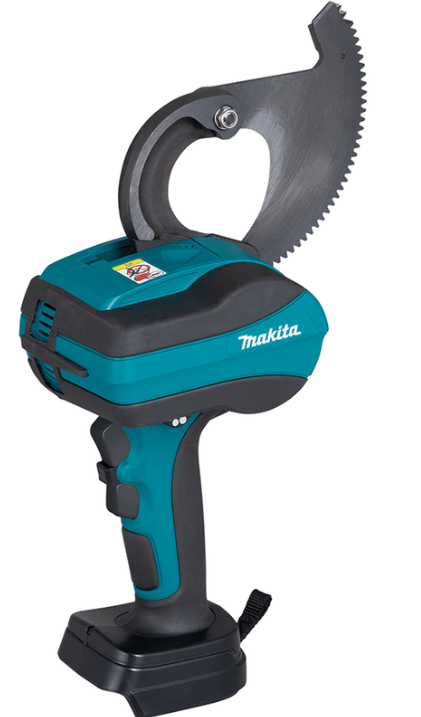
Makita DTC100 Cordless Cable Cutter
Safety Instructions
To safely operate your Makita DTC100 Cordless Cable Cutter, follow these instructions carefully:
- Do not disassemble or tamper with the battery cartridge.
- If operating time has become excessively shorter, stop operating immediately.
- It may result in a risk of overheating, possible burns, and even an explosion.
- Do not touch the terminals with any conductive material.
- Avoid storing the battery cartridge in a container with other metal objects such as nails, coins, etc.
- Do not expose the battery cartridge to water or rain.
- A battery short can cause a large current breakdown. Do not use a damaged battery.
- Do not incinerate the battery cartridge even if it is severely damaged or is completely worn out.
- If the tool is not used for a long period of time, the battery must be removed from the tool.
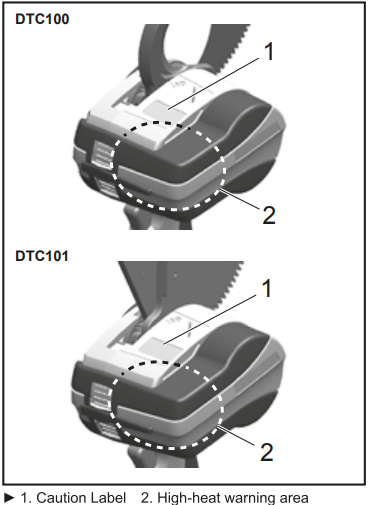
- Do not touch the terminal of the tool immediately after use, as it may get hot enough to cause burns.
- It may result in a malfunction or breakdown of the tool or battery cartridge.
- Keep the battery away from children.
Applicable Battery Cartridge and Charger

- Some of the battery cartridges and chargers listed above may not be available depending on your region of residence.
- To charge the battery, please read the instruction manual for the battery charger.
Battery Life
- Charge the battery cartridge before completely discharged.
- Always stop the tool operation and charge the battery cartridge when you notice less tool power.
- Never recharge a fully charged battery cartridge.
- Overcharging shortens the battery’s service life.
- Charge the battery cartridge at room temperature at 10°C – 40°C (50°F – 104°F).
- Let a hot battery cartridge cool down before charging it.
- When not using the battery cartridge, remove it from the tool or the charger.
- Charge the battery cartridge if you do not use it for a long period (more than six months).
Names and Accessories
DTC100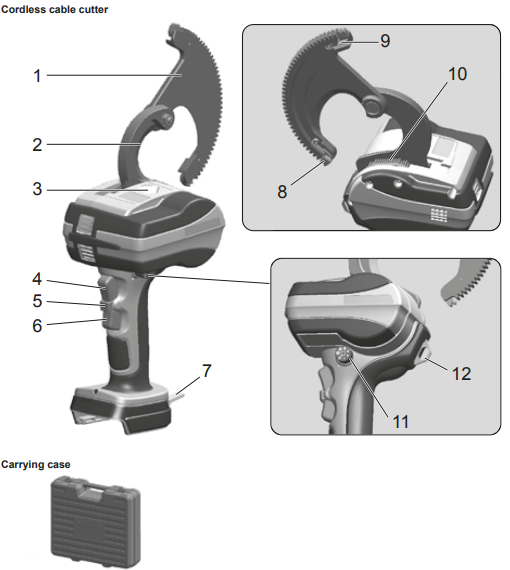
This tool is designed for the Makita 18V lithium-ion battery
- Moving blade
- Stationary blade
- LED work light
- Forward-mode switch
- Switch lock
- Reverse-mode switch
- Hanging strap
- Gear guide (A)
- Gear guide (B)
- Brush (for dusting)
- Dial knob
- Hanging ring
DTC101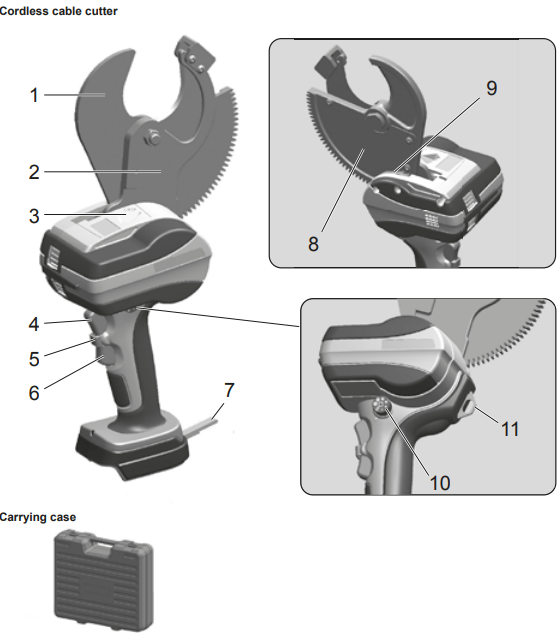 This tool is designed for the Makita 18V lithium-ion battery
- Moving blade
- Stationary blade
- LED work light
- Forward-mode switch
- Switch lock
- Reverse-mode switch
- Hanging strap
- Movable blade plate
- Brush (for dusting)
- Dial knob
- Hanging ring
Battery
- Correctly charge the battery with the rapid charger before use.
- Attach the battery cover when not using the product.
- It will help protect the battery from water and dust.
- When not using the product for a long period, store it with the battery removed.
Increasing Battery Life
- When you sense that the force of the tool has become weak, stop using it and charge the battery.
- Charge the battery in an ambient temperature range of 10°C to 40°C.
- Please take the battery to the store where you purchased the product or the Makita office.
Attach/Detach the Battery
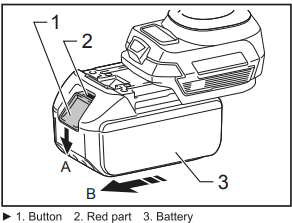
- To detach the battery from this product,
- A. Hold down the button on the battery front, and B. slide the battery to remove it.
- When attaching the battery, align the battery with the grooves in the product and then insert it all the way by performing the procedure in reverse.
- If the red part at the top of the button is visible at this time, the battery is not fully locked into place.
- Insert the battery properly all the way until all of the red part cannot be seen.
Indicating the Remaining Battery Capacity
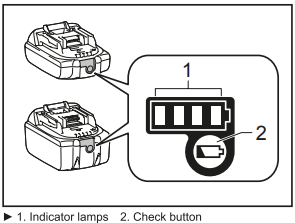
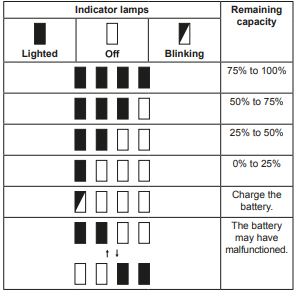
Press the check button on the battery cartridge to indicate the remaining battery capacity. The indicator lamps light up for a few seconds.
How to Use the Tool
Attaching the battery pack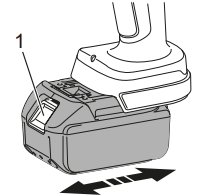
- While pressing the latch, pull out the battery pack. To replace the battery pack, push the new pack.
- After sliding a battery pack on, check if it is securely in place by pulling it gently. Do not press the latch when pulling the battery.y
Switch Operations
Sys safety purposes, the tool has a two-action switch. To asa hich, tast press the sich red and note press the forward/reverse-mode switch.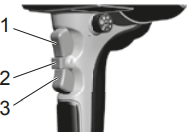
Work assistance LED lamp.
This tool has an LED lamp that illuminates the periphery of the cutter blade. It illuminates when either the forward 10 seconds after the switch is released.
Low battery alarm
If the remaining capacity of the battery is low, the LED light blinks 5 times as an alarm when the forward-mode switch is turned on. Charge the battery or replace it with a spare.
Cutting Operations
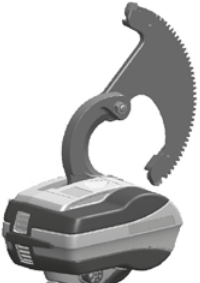
[ DTC100 ]
- Activate the switch to open the moving blade. Use the forward- and reverse-mode switches to set the moving blade to neutral.
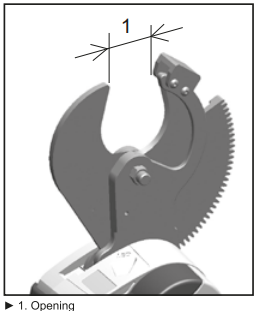
[ DTC101 ]
- Make sure the opening is large enough to set a cable. If the opening is too narrow, press the reverse-mode switch to open it.
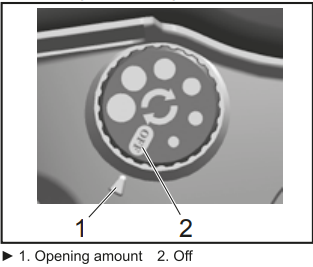
- Use the dial knob to enable or disable auto reverse. Move the dial to the desired position to enable auto reverse, or move it to off it disable.
The Auto-Reverse Function
[ DTC100 ]
- Insert the electric cable into the moving blade opening. Feed the moving blade by hand so that the gear teeth engage the drive mechanism of the unit.
[ DTC101 ]
- I am inserting the electric cable into the moving blade opening. Place the cable to be cut into the blade opening and onto the stationary blade side.
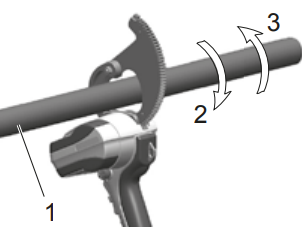
- Operating the forward-mode switch and cutting the electric cable. Hold down the forward-mode switch until cutting is complete.
- Removing debris after cutting. After you are finished cutting, remove any scraps or debris from the blade.
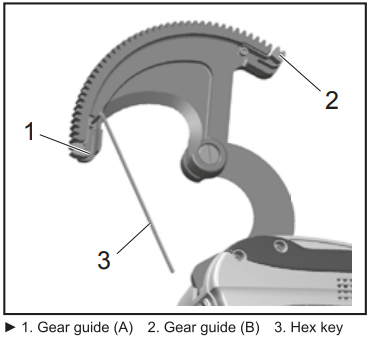
Replacing with Spare Parts (DTC100)
To replace the gear guide by yourself, follow the procedure below.
Replacing the gear guide
- Removing the gear guide. Use a hex key to unscrew the bolt with a hexagonal hole (M3 × 3) and remove the gear guide.
- Mount the gear guide. Mount the new gear guide and tighten the bolt securely.
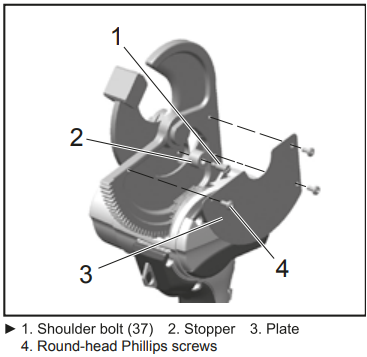
(DTC101)
To replace the stopper by yourself, follow the procedure below.
Replacing the stopper
- Remove the roundhead Phillips screws, plate, and
- Attach the new stopper with the shoulder bolt, apply screw locking adhesive to the screw, then tighten completely.
- Attach the plate and screw in the round-head Phillips screws.
Specifications
| Cordless cable cutter | DTC100 | DTC101 |
| Maximum cuttable diameter | Non-ferrous materials only (AL or Cu) | |
| Electric motor | DC motor | |
| Dimensions | 117 (D) × 320 (H) × 197 (W) (mm) | 117 (D) × 380 (H) × 189 (W) (mm) |
| Weight | 2.2 kg | 2.9 kg |
Optional Accessories
Shoulder Belt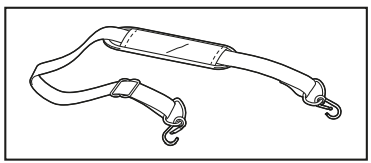
This shoulder strap is used by connecting the hanging strap of this tool.
For other Makita power tools, you may also check the Makita RP0900 8mm 900W Plunge Router Instruction Manual for detailed guidance on setup, operation, and maintenance.
Maintenance/Inspection
- Be aware that neglect of daily maintenance/inspection of your Makita DTC100 Cordless Cable Cutter may cause a malfunction of the tool.
- Please avoid storing the tool in a humid environment for smooth operation of the tool and the prevention of rust.
- When a resin part becomes dirty, use a soft cloth dampened with soapy water to wipe it.
- For safety inspection, we recommend submitting the tool to the manufacturer about once every two years (fee incurred). Contact your dealer for details.
Customer Service
- Website: https://www.makitauk.com/
- Ph: 1-800-462-5482
FAQs
Q: What is the Makita DTC100 Cordless Cable Cutter used for?
Electricians, utility workers, and industrial technicians frequently utilise it to install and maintain cables.
Q: What battery is compatible with the DTC100?
Makita 18V LXT® Lithium-Ion batteries are compatible with the DTC100. Use only authentic Makita batteries and chargers for the best results.
Q: What is the maximum cable cutting capacity?
Depending on the kind of material and cable structure, the DTC100 may cut up to 100 mm² of copper or aluminium cable. Prior to usage, always consult the technical specifications found in the handbook.
Q: Does the DTC100 require hydraulic oil or lubrication?
There is no need to replace the oil externally. To avoid corrosion, keep the cutting blades clean and gently lubricated.
Q: Can I use the DTC100 to cut steel or armored cables?
No, the DTC100 is solely intended for non-ferrous materials like cables made of copper and aluminium. Cutting armoured cable, wire rope, or steel could harm the blades and void the warranty.
Q: Can the cutting head be rotated?
Indeed. With its movable cutting head (usually 350–360°), the DTC100 offers more flexibility in confined or problematic settings.