

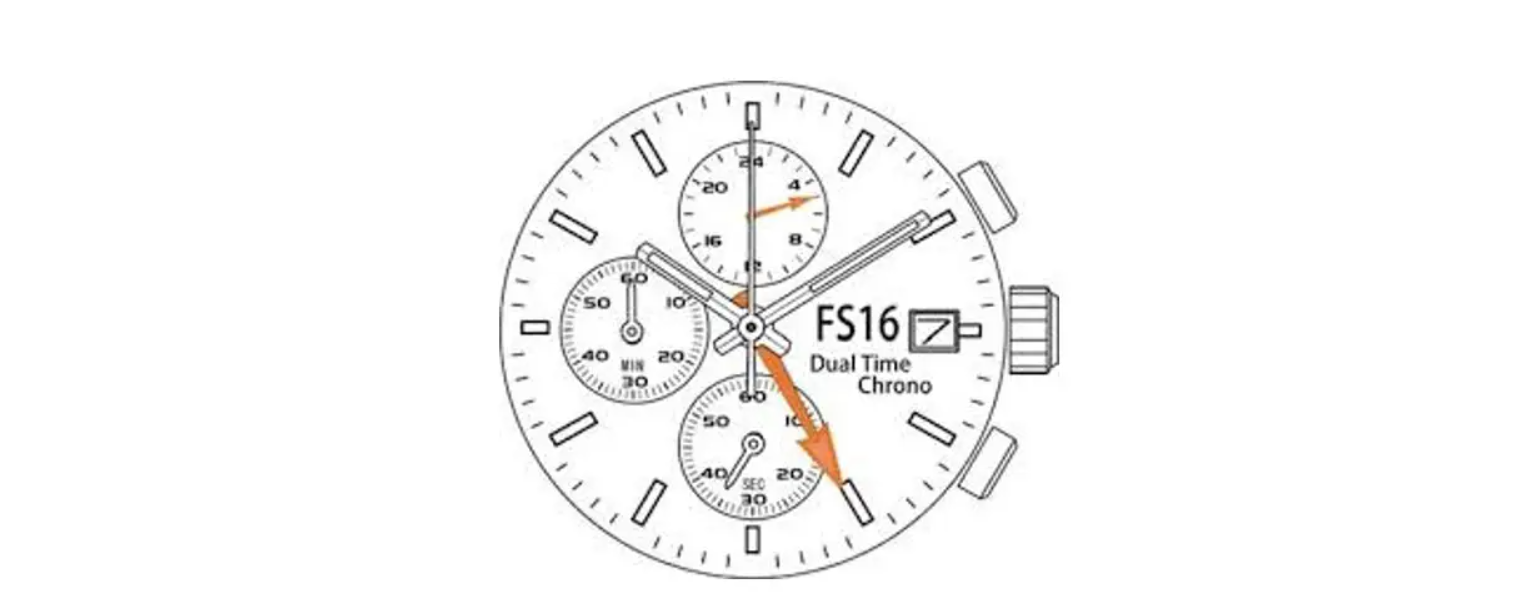

Miyota Cal. FS16/FS26 Dual Time Chronograph

Displays & Buttons


Reading the Watch

When the watch hands appear in the diagram, ・home time in GMT is 13:10:35 (12 hand (B) & 24 hand (C) display) ・local time in Tokyo is 10:10:35 (12 hand (A) display)
Setting the Time
There are 2 ways to use the 12 hand (B), and setting the time depends on which way to use. Please be very careful and follow the instructions below for setting the time for both ways Type 11, Type 2e2).
[ TYPE 1 ]
Using the hand (B) and 24 hand (C) for the “home time”. In other words, using the hour hand and minute hand to see the “local time”, while the 12 hand (B) and 24 hand (C) to see the “home time”. (When you use it domestically, the 12 hand (B) will be hidden under the normal hour hand.)
Setting The Home Time
- Pull the crown out to the second position when the second hand has reached the 0 position.
- Turn the crown to set the current time, paying attention to the motion of 12 hand (B) and 24 hand (C) and the minute hand.
- Return the crown to the normal position. Setting the 12-hour hand (B), 24 24-hour hand (C), and minute hand has now been completed.
- Pull the crown out to the first position when the second hand has reached the 0 position.
- Turn the crown anticlockwise to set the current time. ☆Please also set the date together.
- Please refer to the next page for more details on “the setting time”. The hour hand is linked with the calendar.
- Please be careful if it is in the morning or the afternoon when you set the time.
- Return the crown to the normal position.
[ TYPE 2 ]
When you use the 12-hour hand (B) and 24-hour hand (C) for the “local time”. In other word, you can select this type when using the 12 hour hand (B) and 24 hour hand (C) to see the “second time zone”(the time which has time lag), while the hour and minute hand and 12 hour hand (B) (linked with 24 hour hand (C) ) to see the “dual time”.
- Pull the crown out to the second position when the second hand has reached the 0 position.
- Turn the crown to set the current time, paying attention to the motion of 12 hand (B) and the 24-hour hand (C), and the minute hand.
- Return the crown to the normal position. Setting the 12 hand (B) and 24 hand (C), and the minute hand has now been completed.
- Pull the crown out to the first position when the second hand has reached the 0 position. Turn the crown anticlockwise to set the current time. ☆Please also set the date together. Please refer to the next page for more details on “the setting time”. The hour hand is linked with the calendar. Please be careful if it is in the morning or the afternoon when you set the time.
- Return the crown to the normal position
Setting the Date

- Pull the crown out to the first position when the second hand has reached the 0 position.
- Turn the crown clockwise to set the date. If the Miyota Cal. FS16/FS26 Dual Time Chronograph date is set between the hours of around 99:00 PM and 1:00 AM, the date may not change on the following date.
- After the date has been set, push the crown back to the normal position.
Using the Time Difference Connection
When moving to a country or area that is in a different time zone, the current time in the “local time” can be corrected. As the date calendar is linked with time, the date in the “local time” is also corrected.

- Pull the crown out to the first position when the second hand has reached the 0 position. Turn the crown anticlockwise to set the “second time zone”. ☆Date may gain in some countries or regions. In this case, please set the date when you set the time. As for details, please refer to the page “the setting date”.
- After the date has been set, push the Miyota Cal. FS16/FS26 Dual Time Chronograph crown back to the normal position.
The Difference between Cities & UTC Time

Using the Conograph
This chronograph can measure and display time from 1/1 second up to a maximum of 1 hour.
[ Measuring Time with a Chronograph ]
- The chronograph can be started and stopped each time the button (A) is pressed.
- To reset, press button (B) and the chronograph second & minute hands return to their 0 position.

Conograph Reset
This procedure should be performed when the chronograph second hand does not return to the 0-second position after the chronograph has been reset, including after the battery has been replaced.
- Pull the crown out to the 2nd position.
- Press button (A) to set the chronograph second hand to the 0 position.
- The chronograph hand can be advanced rapidly by continuously pressing the button (A).
- . Once the hand has reached, reset the time and return the crown to its normal position.
- Do not return the row to the normal position while the chronograph second hand returns to the noon (ZERO) position.
- Hand stops on the way when the crown is returned to the normal position, and these positions are recognized as the noon (ZERO) position
Customer Service
- Website: https://miyotamovement.com/
- Tel: +1 303-774-2221