Close Menu
onyxguides.comonyxguides.com

    Subscribe to Updates

    Get the latest creative news from FooBar about art, design and business.

    What's Hot

    How To Change Password Of Wi-Fi Router TP-Link

    March 16, 2026

    CHASING DORY 1080P Full HD Underwater Drone User Manual

    March 16, 2026

    BARCO QDX Rental Laser Projectors Instruction Manual

    March 13, 2026
    Facebook X (Twitter) Instagram
    onyxguides.comonyxguides.com
    Facebook X (Twitter) Instagram Pinterest
    • Home
    • About us
    • Terms & Conditions
    • Privacy Policy
    • FAQs
    • Contact us
    onyxguides.comonyxguides.com
    Home » N-GEAR FLASHBANGER 777 Portable Karaoke Speaker User Manual
    NGEAR

    N-GEAR FLASHBANGER 777 Portable Karaoke Speaker User Manual

    By Gabriel SmithOctober 13, 2025Updated:October 14, 2025No Comments5 Mins Read
    Facebook Twitter Pinterest LinkedIn Tumblr WhatsApp Telegram Email
    N-GEAR-FLASHBANGER-777-Portable-Karaoke-Speake-FEATURED
    Share
    Facebook Twitter LinkedIn Pinterest Email

    N-Gear logo

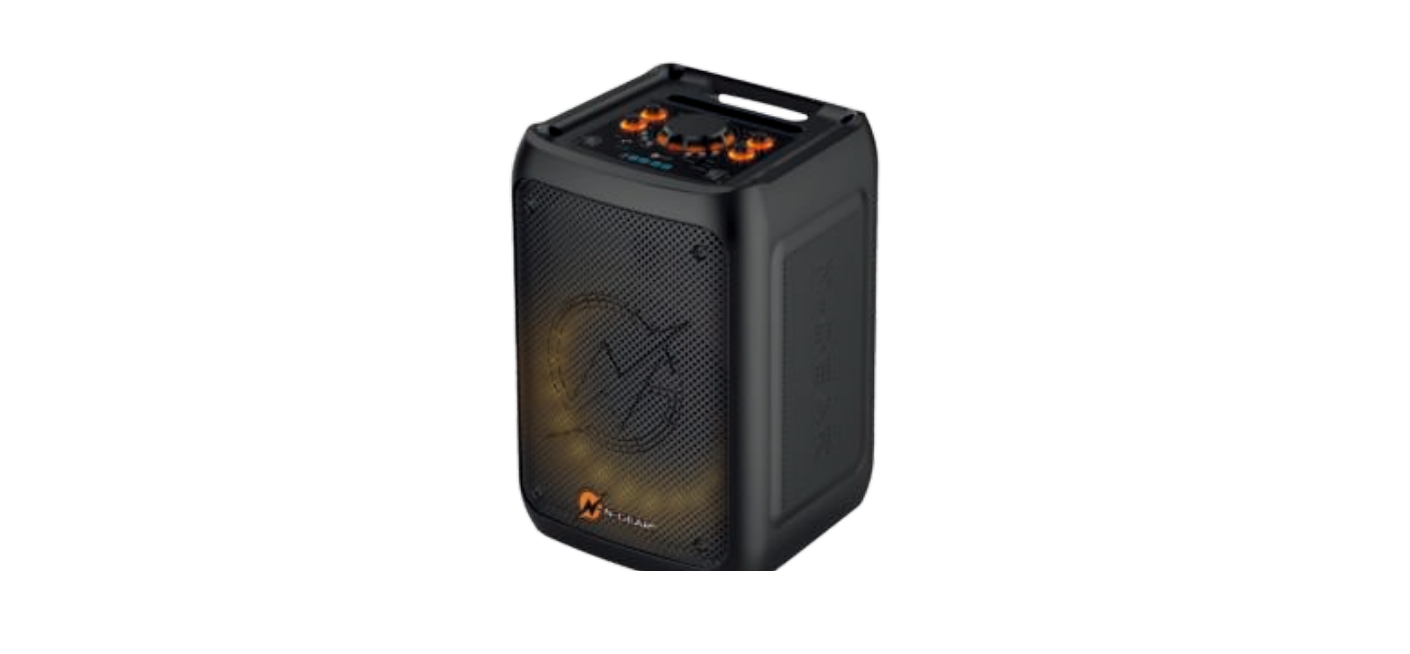
    N-GEAR FLASHBANGER 777 Portable Karaoke SpeakerN-GEAR-FLASHBANGER-777-Portable-Karaoke-Speake- product

    Safety Instructions

    1. Please read these instructions carefully before operating this device.
    2. Only use the power supply that came with the product. If not included, use the power supply indicated in this manual.
    3. Using an unauthorized power supply will invalidate your guarantee and may irrecoverably damage the product.
    4. Disconnect your karaoke speaker from the power supply during thunderstorms.
    5. Always check that you have completely switched off your karaoke.
      Speaker, before you change or disconnect the power supply.
    6. Do not leave it in low temperatures, as moisture can form inside the product, which may damage the circuit board.
    7. Keep away from heat sources and flames.
    8. Do not leave it in high temperatures, as electronic devices and plastic parts warp in heat.
    9. To avoid possible hearing damage, do not listen to this karaoke speaker at high volume levels for a long time.
    10. Always keep the volume within reasonable limits.

    Package Content

    • Portable Speaker x1
    • User Manual  x1
    • Remote Control  x1
    • USB Charging Cable -x1
    • Wired microphone  x1
    • Wireless microphone  x1

    Function Description

    CHARGING THE SPEAKER

    • Plug the included AC into any AC Charging Cable Charger and into the AC charging port.
    • The charge LED light will turn red, indicating the battery is being charged.
    • When using the speaker, it can be used on battery power or plugged into the AC charger.

    USB FUNCTION

    • Press the NEXT button to go to the next song.
    • Press the PREVIOUS button to restart the song or return to the previous song.

    MICRO SD FUNCTION

    • Insert a Micro SD, SD mode will start automatically.
    • For the speaker to recognize the song, these should be in MP3 or WAV format.
    • Press the PLAY/PAUSE button to play or pause the music.
    • Press the NEXT button to go to the next song.
    • Press the PREVIOUS button to restart the song or return to the previous song.

    FM RADIO FUNCTION

    • Press MODE on the speaker to switch to FM mode.
    • Press PLAY/PAUSE to enter automatic FM channel searching.
    • Press the NEXT button to go to the next frequency.
    • Press PREVIOUS to go back to the previous frequency.

    Bluetooth Function

    • Turn on the volume power of the speaker; the speaker is in Bluetooth mode.
    • Press MODE on the speaker to switch to Bluetooth mode.
    • Turn on your mobile device and search for ” THE FLASHBANGER 777″. Select it to pair.
    • You will get a voice prompt when your device is connected.

    AUX FUNCTION

    • Press MODE on the speaker to switch to AUX mode.
    • Press PLAY/PAUSE to play or pause the music.
    • Press the NEXT button to go to the next song.
    • Press the PREVIOUS button to restart the song or return to the previous song.

    WIRED MICROPHONE

    • Connect the supplied wired microphone N-GEAR FLASHBANGER 777 Portable Karaoke Speaker to the MIC input jack located on the front panel of the speaker.
    • Control the volume of the MIC by rotating the MIC knob.
    • Control the echo effect by rotating the Echo knob.

    WIRELESS MICROPHONE

    • switch on the wireless microphone
    • Control the volume of the MIC by rotating the MIC kno
    • Control the echo effect by rotating the Echo kn

    Part List
    N-GEAR-FLASHBANGER-777-Portable-Karaoke-Speake-FIGURE-1

    1. BASS Control
    2. Volume
    3. MIC Volume
    4. Repeat button
    5. Equalizer
    6. Mode
    7. MiCInput
    8. LED ON/OFF Switch
    9. Tablet/phone holder
    10. TREBLE Control
    11. ECHO Control
    12. NEXT Button
    13. PLAY/PAUSE Button
    14. PREVIOUS Button
    15. USB Input
    16. AUX Input
    17. Micro SD/TF Input
    18. System ON/OFF Switch
    19. LED Display
    20. DC 5V

    Remote Control

    N-GEAR-FLASHBANGER-777-Portable-Karaoke-Speake-FIGURE-2

    1. POWER
    2. MODE
    3. STOP
    4. MUTE
    5. Control prev key
    6. Play/pause control key
    7. VOL+
    8. Control next key
    9. VOL-
    10. REPE
    11. E/Q
    12. 0-9

    Specifications

    • Speaker Unit —8″
    • Output Power-20W
    • Frequency Response — 90HZ-20KHZ
    • Sensitivity Range – 87dB+3dB
    • Voltage Output 100V-240V
    • Battery – 7.4V 4400mAh

    Customer Support

    • Website: https://ngearsafe.com/

    FAQs

    Q: What are the main features of the FLASHBANGER 777 karaoke speaker?

    Ans: With its built-in karaoke feature, Bluetooth connectivity, LED lighting effects, and many input possibilities for a wide range of applications, the FLASHBANGER 777 has a robust sound output.

    Q: How do I connect my phone or device via Bluetooth?

    Ans: Switch the speaker on and turn on Bluetooth pairing. Look up “FLASHBANGER 777” in the Bluetooth settings on your phone or device, then connect.

    Q: Can I use the speaker with wired microphones?

    Ans: Indeed, the speaker has microphone inputs (often 1/4″ or XLR), so you may connect wired microphones for announcements or karaoke.

    Q: How do I adjust the echo and volume for the microphone?

    Ans: For the optimum karaoke experience, adjust the microphone sound using the speaker’s or remote control’s specialised echo and volume knobs.

    Q: What is the battery life of the FLASHBANGER 777?

    Ans: Generally, the rechargeable battery lasts 4 to 6 hours, depending on how many LED lights are used and at what volume.

    Q: How do I charge the karaoke speaker?

    Ans: Plug the speaker into a power outlet and attach the provided charger to the charging connector. Typically, charging takes three to five hours.

    Q: Can I connect external devices via AUX or USB?

    Ans: Indeed, the speaker has TF card slots for playing music straight from external devices, USB playback, and AUX input.

    Q: Are the LED lights customizable?

    Ans: Indeed, the speaker has multicoloured LED illumination effects that can be turned on and off or adjusted to various settings using the speaker buttons or remote control.

    FLASHBANGER 777 Portable Karaoke Speaker Guide N-GEAR FLASHBANGER 777 Installation Instructions N-GEAR FLASHBANGER 777 Setup Guide N-GEAR Karaoke Speaker Instructions OnyxGuides Manual Portable Karaoke Speaker User Manual User Manual
    Share. Facebook Twitter Pinterest LinkedIn Tumblr Email
    Gabriel Smith

      Related Posts

      Sony ILCE-6700 Interchangeable Lens Digital Camera User Guide

      December 7, 2025

      Bose MA12 Panaray Modular Line Array Loudspeaker User Manual

      December 4, 2025

      Bowers & Wilkins Px8 Wireless Headphones User Manual

      December 4, 2025

      Sonos Arc Black Voice Control Ultra Soundbar User Manual

      December 4, 2025

      JANAM GT1 Self Mobile Entry Head Unit Instruction Manual

      December 4, 2025

      Ronix 1250 Carpet Vacuum Cleaner Instruction Manual

      December 4, 2025
      Add A Comment

      Comments are closed.

      Don't Miss
      Other

      How To Change Password Of Wi-Fi Router TP-Link

      March 16, 2026

      Introduction The TP-Link router is used for several purposes. Because it is dependable and simple…

      CHASING DORY 1080P Full HD Underwater Drone User Manual

      March 16, 2026

      BARCO QDX Rental Laser Projectors Instruction Manual

      March 13, 2026

      CHRISTIE D4K2560 High Frame 4K Projector Instruction Guide

      March 13, 2026
      Stay In Touch
      • Facebook
      • Twitter
      • Pinterest
      • Instagram
      • YouTube
      • Vimeo

      Subscribe to Updates

      Subscribe to Updates

      Follow us

      Facebook X-twitter Instagram Pinterest

      © 2025 All rights reserved Onyx Guide.