

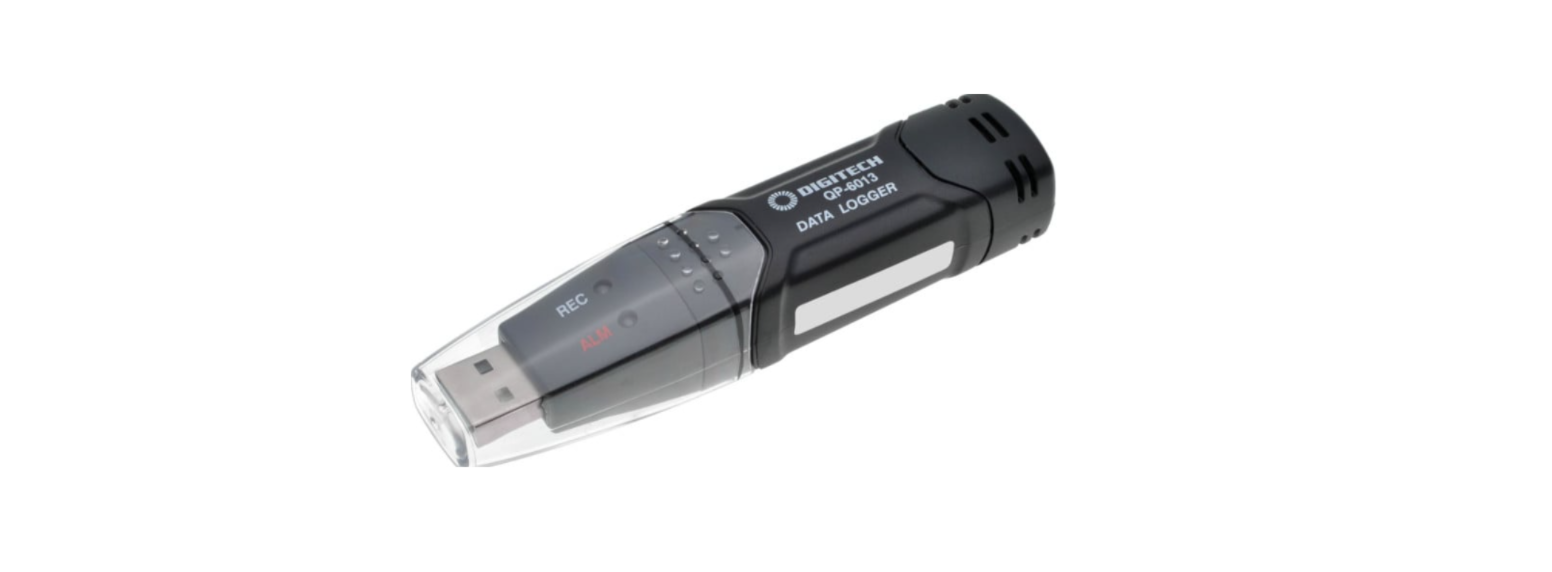

PROTECH QP6013 Temperature Humidity Data Logger
The PROTECH QP6013 Temperature Humidity Data Logger is a compact device designed to monitor temperature and humidity accurately for storage, labs, and industrial use. For other PROTECH devices, see the PROTECH TH1069 2000W Adjustable Heat Gun User Manual for setup and usage guidance.
Features
- Memory for 32,000 readings
- (16000 temperature and 16,000 humidity readings)
- Dew point indication
- Status Indication
- USB Interface
- User-Selectable Alarm
- Analysis software
- Multi-mode to start logging
- Long battery life
- Selectable measuring cycle: 2s, 5s, 10s, 30s, 1m, 5m, 10m, 30m, 1hr, 2hr, 3hr, 6hr, 12hr, 24hr
Description
- Protective cover
- USB connector to PC port
- Start button
- RH and Temperature sensors
- Alarm LED (red/yellow)
- Record LED (green)
- Mounting clip

LED Status

| LEDS | INDICATION | ACTION | |
| REC | ALM | Both LED lights are off. Logging is not active or low battery. | Start logging. Replace the battery and download the data. |
| REC | ALM | One green flash
every 10 sec. *Logging, no alarm condition**Green double flash every 10 sec. *Delayed start |
To start, hold the start button until the Green and Yellow LEDs flash |
| REC | ALM | Red single flash every 10 sec.* Logging, low alarm for RH*** Red double flash every 10 sec. * -Logging, high alarm for RH*** Red single flash every 60 sec.
– Low Battery**** |
Logging will stop automatically. No data will be lost. Replace the battery and download data. |
| REC | ALM | Yellow single flash every 10 sec. * -Logging, low alarm for TEMP*** Yellow double flash every 10 sec. * -Logging, high alarm for TEMP*** Yellow single flash every 60 sec. – Logger memory full | Download data |
To save power on the PROTECH QP6013 Temperature Humidity Data Logger, the logger’s flashing cycle can be changed to 20s or 30s via the supplied software. Alarm LEDs for temperature and humidity can also be disabled using the software. When both temperature and relative humidity readings exceed the alarm level synchronously, the LED status alternates every cycle.
For example, if there is only one alarm, the REC LED blinks for one cycle, and the alarm LED will blink for the next cycle. If there are two alarms, the REC LED will not blink. The first alarm will blink for the first cycle, and the next alarm will blink for the next cycle.
Installation
- Insert the Battery in the Data logger.
- Insert the data logger into the computer/Laptop.
- Open the setup.exe in the extracted folder and install it.
- Open the previously installed Datalogger software from the desktop or start menu and set up the datalogger according to your needs.
- If successful, you notice the LEDs are flashing.
- Setup complete.
Specifications
| Relative Humidity | Overall Range | 0 to 100% |
| Accuracy (0 to 20 and 80 to 100%) | ±5.0% | |
| Accuracy (20 to 40 and 60 to 80%) | ±3.5% | |
| Accuracy (40 to 60%) | ±3.0% | |
| Temperature | Overall Range | -40 to 70ºC (-40 to 158ºF) |
| Accuracy (-40 to -10 and +40 to +70ºC) | ±2ºC | |
| Accuracy (- -10 to +40ºC) | ±1ºC | |
| Accuracy (-40 to +14 and 104 to 158ºF) | ±3.6ºF | |
| Accuracy (+14 to +104ºF) | ±1.8ºF | |
| Dew point temperature | Overall Range | -40 to 70ºC (-40 to 158ºF) |
| Accuracy (25ºC, 40 to 100%RH) | ± 2.0 ºC (±4.0ºF) | |
| Logging rate | Selectable sampling interval: From 2 secs up to 24 hrs | |
| Operating temp. | -35 to 80ºC (-31to 176ºF) | |
| Battery type | 3.6V lithium(1/2AA)(SAFT LS14250, Tadiran TL-5101 or equivalent) | |
| Battery life | 1 year(typ.) depending on logging rate, ambient temperature & use of Alarm LEDs | |
| Dimensions/ Weight | 101x25x23mm (4x1x.9”) / 172g (6oz) | |
| Operating System | Compatible software Windows 10/11 | |
Battery Replacement
Only use 3.6V lithium batteries. Before replacing the battery, remove the model from the PC. Follow the diagram and explanation steps 1 through 4 below.
- With a pointed object (e.g., a small screwdriver or similar), open the casing.
- Lever the casing off in the direction of the arrow.
- Pull the data logger from the casing.
- Replace/Insert the battery into the battery compartment, observing the right polarity.
- The two displays briefly light up for control purposes (alternating, green, yellow, green).
- Slide the data logger back into the casing until it snaps into place.
- Now the data logger is ready for programming.

Sensor Reconditioning
Over time, the internal sensor may be compromised as a result of pollutants, chemical vapors, and other environmental conditions, which can lead to inaccurate readings. To recondition the internal sensor, please follow the procedure below: Bake the Logger at 80°C (176°F) at <5%RH 36 h for oursou, followed by 20-30°C (70- 90°F) at >74%RH for 48 hours (for rehydration).) If permanent damage to the internal sensor is suspected, replace the Logger immediately to ensure accurate readings.
One-Year Limited Warranty
Should your PROTECH product prove defective within one year from the date of purchase, contact PROTECH’s Customer Support Team with the serial number and proof of purchase to make a warranty claim.
Under this warranty, PROTECH will repair or replace any parts found defective with new or remanufactured parts or exchange the defective product with a new, refurbished, or remanufactured product at our discretion.
This warranty is not transferable. After the expiration of the warranty, the cost of labor and parts will be the responsibility PROTECH CDM-600BW Freestanding Refrigerator of the original owner.
Please package the product carefully in its original packaging to avoid damage in transit. PROTECH is not responsible for damage resulting from shipper mishandling or improper packaging. Please retain the original box and packaging materials.
Warranty Does Not Cover
- Acts of God, such as fire, flood, hurricanes, earthquakes, and tornadoes.
- Improper power supply, such as a power surge, low voltage, defective household wiring, or inadequate fuses.
- Damage, accidental or otherwise, to the product while in the possession of a consumer, not caused by a defect in material or workmanship.
- Damage caused by consumer misuse, PROTECH CDM-600BW Freestanding Refrigerator tampering, lack of maintenance, or failure to follow the care and special handling provisions in the instructions.
- Damage to the finish of the case or other appearance parts caused by wear.
- Damage caused by repairs or alterations to the product by anyone other than authorized by the
manufacturer. - Removal, Replacement, Packaging, Freight, and Insurance costs for the warranty service.
- Products sold AS IS or from an unauthorized reseller.
- Products that have had their serial numbers removed or defaced.
Customer Support
- Email: support@whynter.com
- Website: WWW.WHYNTER.COM
- Tel: 800-443-6153
Product contents and specifications may change without notice. Copyright © 2024
1 Comment
Pingback: PROTECH TL4590 Rechargeable Air Brush | Setup & User Guide