

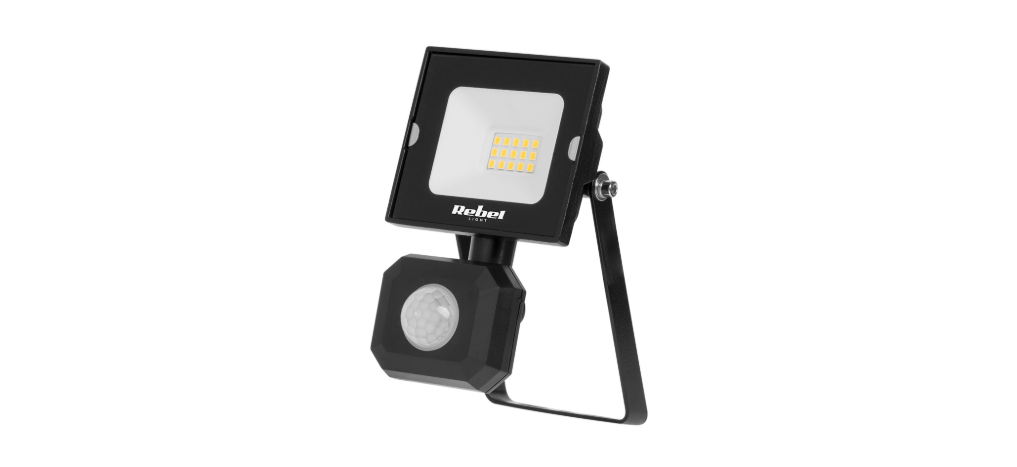

Rebel URZ3622 Dusk LED FloodLight

SAFETY INSTRUCTIONS
Please read these operating instructions carefully before first use, and keep them for future reference. If there are any doubts concerning correct installation, please consult a qualified specialist.
- If the device or any of its parts is damaged, do not use it and unplug it from the power source. Do not repair the device yourself. Contact an authorized service point for Rebel URZ3622 Dusfor for a check-up/repair.
- Prior to any maintenance services, disconnect the power supply and let the device cool down.
- Do not cover the device.
- WARNING: Do not look directly at the LED light beam!
- Clean the device with a soft and dry cloth. Do not use chemical detergents.
- Failure to follow these instructions may result in fire, burns, electrical shock, physical injury, and other damage.
- WARNING: Device may heat up to a higher temperature. Do not touch the device when it’s hot.
- Before connecting the device to the power supply socket, make sure the voltage indicated on the appliance corresponds to the voltage in the power supply socket.
FEATURES
- The device belongs to the group of energy-efficient products.
- Minimal distance of a light fixture (its light source) from the spots and objects that it’s illuminating- 0,5 m.
MOUNTING
Read the manual before mounting. Mounting should be performed by an appropriately qualified person. Check for proper mechanical fastening and connection to electrical power before first use.
- Remove the mounting bracket from the LED floodlight. Drill the wall and screw the bracket onto the wall using suitable plastic wall plugs, Rebel URZ3622 Dus,k and screws. Check that the bracket is securely fitted on the wall.
Note: Do not, at this stage, re-attach the floodlight to the bracket. - Connect the power cords:
- brown wire (ACL) of the floodlight with Live brown or red wire of the electrical wiring;
- blue wire (ACN) of the floodlight with Neutral blue or black wire of the electrical wiring;
- yellow-green wire of the floodlight with the earth wire of the electrical wiring.
- Re-attach the floodlight to the bracket and secure the cable to the wall using suitable clips. Ensure that the cable is not touching the body of the floodlight, and that there is sufficient slack in the cable to allow the floodlight to be tilted and adjusted as required, which should be done by grasping the metal body of the floodlight, not its rear wiring box.

Tips
- Do not install when it is raining.
- The unit can be installed only horizontally.
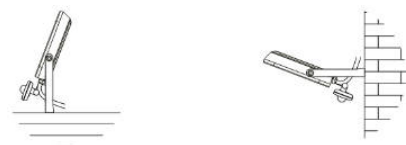
- For outdoor installation, a location under eaves is preferable.
- Avoid mounting the sensor in the vicinity of/directed at items/devices which may change temperature rapidly (heating vents, air conditioners, etc.). Try to avoid pointing the unit at trees or shrubs, or where the motion of pets may be detected.
- Do not allow sunlight to fall directly on the front of the unit. When placing or storing the device, make sure it faces upwards (see the illustration below) to avoid damaging the sensor.


SETTING ADJUSTMENT
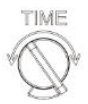
- TIME
Time adjustment knob (adjusts the duration of the time the device lights after detecting motion).
- SENS
Sensitivity adjustment knob (motion detection sensitivity degree).
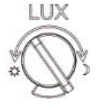
- LUX
Brightness adjustment knob (adjusts the level of ambient brightness at which the device turns on). Position means that the sensors will start work after dusk.
- Position means that the sensors will start work during the day.

TROUBLESHOOTING
Low sensitivity of detection, or the floodlight does not work:
- Check if there are any obstacles in front of the device.
- Check if the brightness settings are consistent with the ambient light.
- When the environmental temperature is similar to human body temperature, then detection sensitivity may slightly decrease.
The light does not turn off.
- Check if there is constant motion within the detection range.
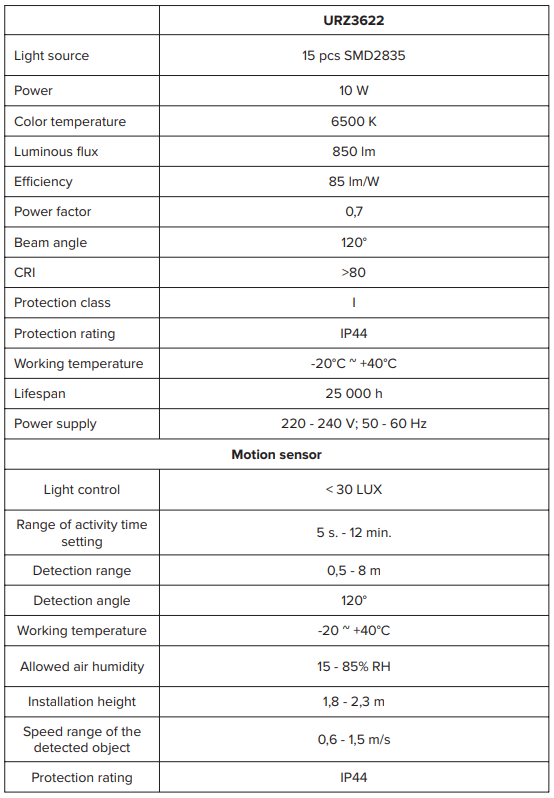
SPECIFICATION
Correct Disposal of This Product
To prevent possible harm to the environment or human health from uncontrolled waste disposal, please separate this from other types of waste and recycle it responsibly to promote the sustainable reuse of material resources.
Household users should contact either the retailer where they purchased this product or their local government office for details of where and how they can take this item for environmentally safe recycling. Business users should contact their supplier and check the terms and conditions of the purchase contract.
(Waste Electrical & Electronic Equipment)