


Zacurate JPD-100A Finger Pulse Oximeter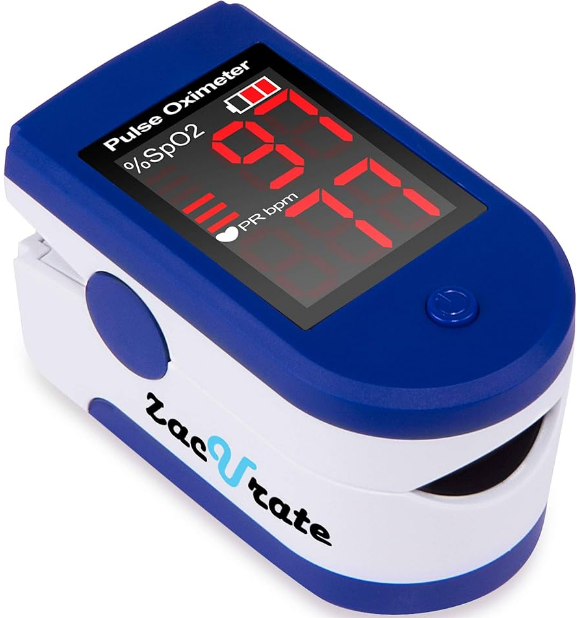
Safety Instructions
- Do not attempt to repair the pulse oximeter by yourself.
- Only certified engineers should maintain and repair it.
- This product is not designed to be used by newborn babies.
- The pulse oximeter uses infrared light (invisible to your eyes) to measure your SpO2 level.
- Ambient light intensity is too bright.
- Hence, please avoid direct exposure to strong light during measurement.
- The user suffers from hypotension, severe vascular atrophy, severe anemia, or low oxygen.
- The user is in sudden cardiac arrest or shock state.
- The user is wearing nail polish or artificial nails.
- Adult supervision is required; never leave children unattended with the unit or lanyard.
- Do not throw the batteries into a fire, as that may cause an explosion.
- Do not use the oximeter in an MRI or CT environment.
- Avoid moving the oximeter from a cold to a hot and humid environment.
- Install the batteries properly before powering on the oximeter for normal use.
- Please remove the batteries if you are not planning to use the oximeter for an extended period of time.
- Close the battery cover when the device is in use.
Product Overview
SpO2 stands for peripheral capillary oxygen saturation. Oxygen saturation is defined as the ratio of oxyhemoglobin (HbO2) to the total concentration of hemoglobin (i.e., Oxyhemoglobin + reduced hemoglobin) present in the blood. It is an important physiological parameter involved in respiration and circulation.
The Pulse Oximeter feature herein is small, portable, non-invasive, and easy to use. The user only needs to insert a finger into the chamber to measure his/her SpO2 level and pulse rate.
Working Principles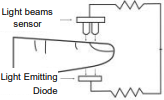
Oxygenated blood absorbs light preferentially at 905nm (near infrared light), whereas deoxygenated blood absorbs light preferentially at 660nm (red light). A pulse oximeter works by passing a beam of red and infrared light through a pulsating capillary bed and then measuring the amount of red and infrared light emerging from the tissues via a sensor.
Due to the sensitivity of the pulse oximeter, the finger should be kept stationary during measurement. It is recommended that you use this device for measurement before or after sports. Do not use for continuous monitoring.
Intended Use
The Zacurate® 500DL Finger Pulse Oximeter is a portable, non-invasive device intended for spot-checking of oxygen saturation of arterial hemoglobin (SpO2) and pulse rate (PR) of adults and children (>2 years old).
Product Features
- Lightweight, portable, and easy to use
- Large LED screen for easy reading
- Low Battery indicator
- Automatic shutdown if no signal is detected after 8seconds
Limitations
The pulse oximeter works by measuring the amount of oxygenated hemoglobin in your blood over time. Spot check pulse oximeter takes 1-2 readings every second and takes an average of 4-6 readings before displaying the result.
Hence, you will have to wait at least 4-6 seconds before a result will be displayed on the monitor. If the pulse oximeter fails to detect blood flow for the first few seconds, the results will be delayed accordingly.
The pulse oximeter does not work for people with naturally small fingers or low peripheral blood flow. This is because the pulse oximeter could not detect enough blood for a measurement. Please note that prolonged use of a pulse oximeter, hypotension, vasoconstriction, hypothermia, and certain medications can lead to low or restricted blood flow.
Nail polish can also impede the pulse oximeter from taking a reading. To know how much blood flow is being detected by the pulse oximeter, you will need a model that can display the plethysmograph (Model 500D). Finally, it is generally accepted that the saturation percentage is unreliable on the steep part (around 60 mm Hg) of the oxyhemoglobin dissociation curve.
Innovative Features of the 500DL
The 500DL is designed to address and alleviate some of the above problems by:
- Increasing the sensitivity of the sensor to allow the user to measure his/her SpO2 levels and Pulse Rate (PR) even at low blood perfusion.
- Using a self-adjusting smart spring system to fit the user’s finger snugly but not too tightly as to impede blood flow.
- Using soft, hypoallergenic medical-grade silicone in the finger chamber to minimize discomfort to the user’s finger.
- Using solid ABS plastic to block ambient light from reaching the sensor so that the signal-to-background ratio and accuracy of measurement are dramatically increased.
Schematic Structural Diagram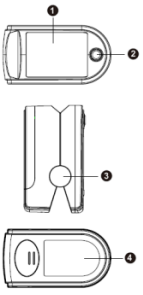
- LED screen
- Power-on key
- Shaft housing
- Battery cover
Schematic Diagram of Display
The following figure shows the information displayed on the LED screen of the Oximeter in normal detection state: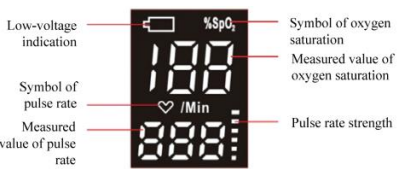
When the battery icon flickers continuously on the LED screen, the battery is low and needs to be replaced.
Operation Instructions
Battery Installation
Open the battery compartment. Install two AAA batteries by matching the plus (+) and minus (-) signs in the compartment. Slide the battery cover back until it snaps in place.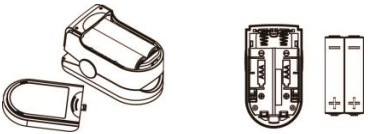 Using the Lanyard
Remove the silicone cover. Thread the thin end of the lanyard through the lanyard hole, thread the coarse end of the lanyard through the thin end of the lanyard, and tighten the Zacurate JPD-100A Finger Pulse Oximeter lanyard. Put the silicone cover back on.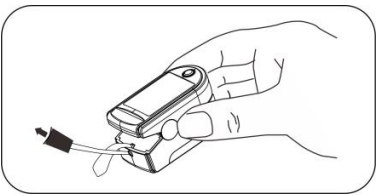
Taking SpO2 and Pulse Rate Readings
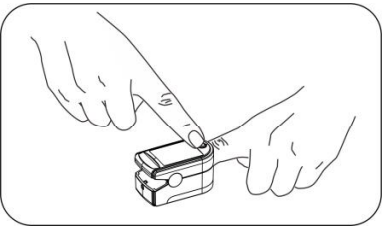
- Insert one of your fingers into the finger chamber of the Zacurate JPD-100A Finger Pulse Oximeter.
- Press the power-on key to turn the pulse oximeter on.
- Keep your hand and finger still for the reading.
- It is recommended that you do not move your body while taking a reading.
- Once the reading stabilizes, read the measured values of the oxygen saturation level and pulse rate on the LED screen.
- The pulse oximeter will automatically shut down in 8 seconds after the finger is removed from the chamber or if no signal is detected by the device.
Cleaning and Disinfection
It is recommended to clean the pulse oximeter regularly. The pulse oximeter can be disinfected as needed. To clean, use a soft cloth lightly dampened with water. To disinfect, use a soft cloth lightly dampened with isopropyl alcohol.
- Make sure that the device is off and remove the batteries.
- Wipe the outer surface of the device and the finger chamber using a lightly dampened soft cloth.
- Allow the device to air dry thoroughly before use.
- Do not use any strong dissolving agent such as acetone.
- Do not rub the body of the device using materials such as steel wire balls or polished metal objects.
- Do not immerse or soak any part of the device in any liquid.
- Do not pour or spray liquid onto the device.
- Do not allow any liquid to seep into the device during cleaning.
- Do not disinfect the device using high-temperature and/or high-pressure disinfecting gas.
Maintenance
- Remove the batteries from the battery compartment if the pulse oximeter will not be used for an extended period of time.
- Replace the batteries if they are low on power.
- Clean the pulse oximeter and the fingertip before every use to ensure accurate readings.
- Store the pulse oximeter between -1313°FF and 158°F (–25°C and +70°C) and at humidity levels no greater than 93%.
- Periodically check the pulse oximeter for damage.
- Do not use the pulse oximeter in an environment with flammable gases and/or where the temperature or humidity is excessively high or low.
Technical Description and Safety Type
- Dimensions: 58.0 mm (Width) × 32.0 mm (Depth) × 33.2 mm
Height: (Approximately 2.28 inch X 1.25 inch X 1.30 inch)
Weight: 49.5 g/1.7 oz (including the weight of two AAA batteries) - Peak wavelength range of the light emitted by the probe: red light 660 nm ± 3nm; infrared light 905 nm ± 10nm. Maximum optical output power of the probe: 2.4 mW for infrared light (905 nm), 3.2 mW for infrared light (660nm)
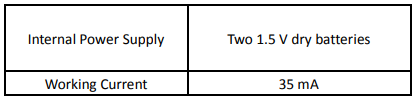
- Working power supply and current
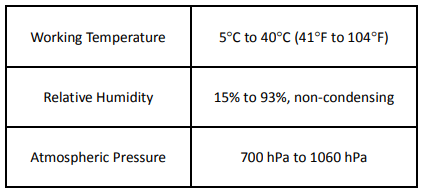
- Normal working conditions

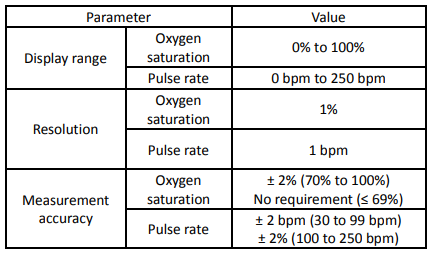
- Technical parameters
- Capability to resist ambient light interference. Comparing the measured value of oxygen saturation taken in indoor natural light or other illumination sources to that taken in a dark room condition, the deviation is smaller than ± 1%.
Technical Description</strong>
- Oxygen Saturation Accuracy
The accuracy is ±2% (in the absence of movement) between 70% to 100%. - Determination of Oxygen Saturation Accuracy
The claimed oxygen saturation is supported by coverage of the entire range of clinical research measurements. - Data Collection
In the clinical test process, data points are recorded with comparable density in the entire claimed range. - Data Analysis
The formula is as follows: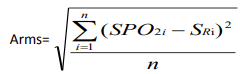
- Arms: accuracy A test sample quantity
- SPO2i: measured value of pulse oxygen saturation during the first measurement using the finger pulse Oximeter
- SRi: reference value of pulse oxygen saturation during the ith measurement using the carbon-monoxide-blood-gas analyzer
- Characteristics of the population under Clinical Research
The summary clinical research report for evaluating SpO2 accuracy should state whether the tested subject suffers from a disease or is healthy, and should state the skin color, age, and gender of the tested subject. - Data updating interval:
The display data updating interval is 1 second. - When the signal detected by the Pulse Oximeter is incomplete or weak, the readings of the oxygen saturation and pulse rate on the LED screen are “–” and “–“.
Safety Type
- Anti-electric-shock type: internal power supply device
- Anti-electric-shock degree: BF-type application part
- Running mode: continuous operation
- Liquid-intrusion protection class: IP22
Storage and Transportation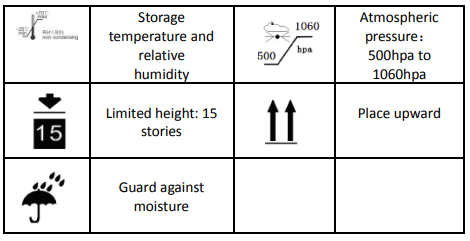
Troubleshooting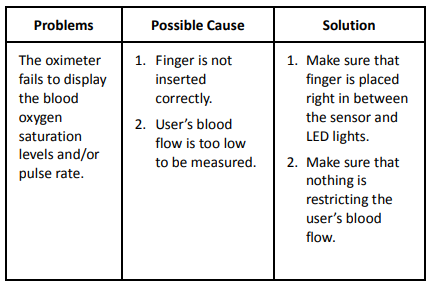
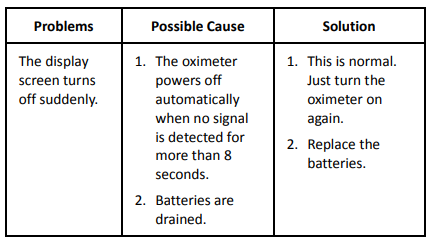
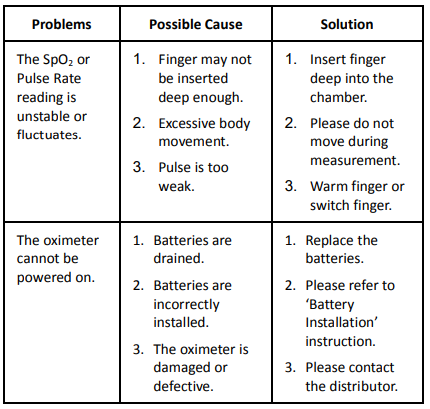
Customer Support
- Distributed by: Einstein Associates LLC 10101 Stafford Centre Drive, Suite B, Stafford, TX 77477
- Phone: +1-832-939-8290
- Website: http://www.beyondmedshop.com