

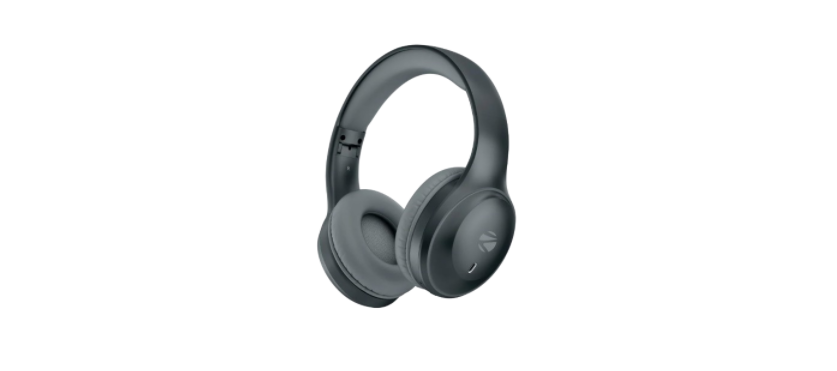

ZEBRONICS PARADISE NEOR Wireless Headphones
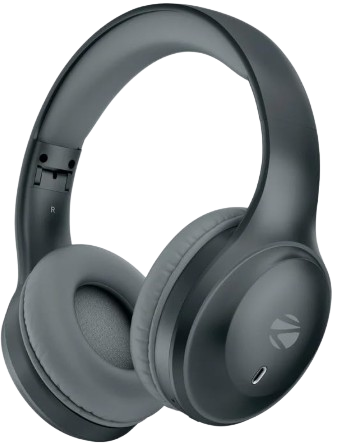
Features
- 40mm Drivers
- Up to SOh* Backup
- Rapid Charging (1 Omin charge for 7h* use)
- Gaming Mode (Low Latency)
- 3 EQ Modes
- Environmental Noise Cancellation (ENC)
- Dual Pairing
- Call Function
- BT vs.4 I AUX
- Voice Assistant Support Soft ear cushions
- Lightweight & Comfortable Type-C Charging
Built-in Rechargeable Battery
Representation
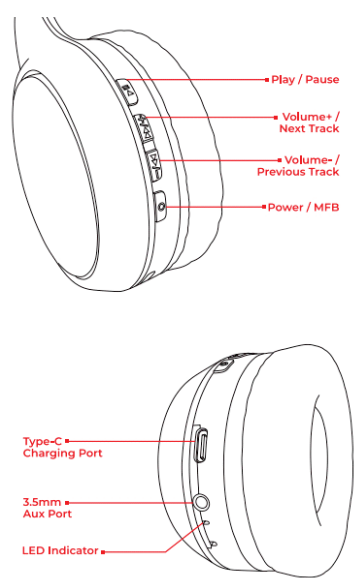
Button Controls
- Long pressLong-pressB or Power button to turn it on/off
- Single press “+” button: Increase Volume
- Single-press “-” button: Decrease Volume
- Press the “MFB or Power button to AanswerHang up the phone call
- Long press “+” button for Next Track • Long press “-” button for Previous Track
- Long-press “Play/Pause” until you hear a single beep to activate the Voice Assistant function
- Double-press the “MFB” to switch between the Gaming/Music mode
- Double-press the “Play/Pause” to switch the EQ mode.
Bluetooth Mode
- The headphone enters BT mode as soon as it is powered ON. (Refer LED indication and make sure the aux is not connected already)
- Now search for nearby BT devices in your audio source device.
- Tap on the BT name “ZEB-PARADISE NEO R” to pair.
Dual Pairing Mode
- Pair the headphones with one device and do not unpair. Now turn off the BT on the first device and pair the headphones with the second device.
- Now you can turn on the first device and the headphone will automatically pair with the first device (If your device is compatible), else tap on ZEB-PARADISE NEO R in the BT settings on your first device.
AUX Mode
- Connect one end of the 3.5mm aux cable to the headphone and connect the other end to any compatible audio source device. (Example: Mobile, Tablet, Laptop, Desktop Computer, etc.)
- Media controls can be done via the audio source device. (Make sure to power on the headphones in BT mode after removing the aux cable.)
Gaming Mode
- Press the MFB button to enable gaming ZEBRONICS PARADISE NEOR Wireless Headphones mode and repeat the process to enter music mode. Voice Assistant Support.
Voice Assistant Support
- When the headphone is connected to a smartphone, long-press the Play/Pause button for 2 seconds to activate the phone’s voice assistant function.
LED Indication
- Charging: Constant Red LED glows
- Full Charge: Red LED goes OFF
- Bluetooth Discover Mode: Blue and Red LEDs blink rapidly
- Bluetooth Connected: Constant Blue LED blinks
Specification
- Mode: ZEB-WHP 11 BT
- version: 5.4 Wireless range 10 Meters (Without obstacles) Driver
- Size:40mm Speaker
- Impedance: 29 Frequency
- Response : 20Hz – 20kHz Driver
- Sensitivity: 9dB‡3dB
- Charging time: 1 h
- Playback time: 50h
- Talk time 40h*
- Microphone Impedance: 2.2k
- Microphone Sensitivity:-38‡3d Net.
- Weight:161g
Dear Customer
Thank you for purchasing ZEB-PARADISE NEO R(ZEB-WHP 11) Wireless headphone. Please read this user manual carefully before operation & save this user manual for further reference.
Customer Support
- Website: www.zebronics.com
- Tel: 044 40000004
FAQs
Q: What type of wireless technology do the Paradise NEOR headphones use?
Ans: Bluetooth 5.0 technology is used by the ZEBRONICS Paradise NEOR headphones to provide a steady, low-latency connection with improved range and energy efficiency.
Q: What is the battery life on a full charge?
Ans: Depending on usage and volume levels, the Paradise NEOR may play music for up to 20 hours on a single charge. The standby period is roughly 200 hours.
Q: How long does it take to fully charge the headphones?
Ans: Using the provided Type-C USB charging cable, it takes roughly two to three hours to fully charge.
Q: Can I use these headphones with a wired connection?
Ans: Indeed! The NEOR includes a 3.5mm AUX input. For devices without Bluetooth or when the battery is low, you may still enjoy music using the included audio wire.
Q: Are the Paradise NEOR headphones foldable or adjustable?
Ans: Indeed. All head sizes can comfortably wear these headphones thanks to their folding construction and adjustable headband sliders.
Q: Can I connect to two devices at once (multi-point connection)?
Ans: Multi-point connectivity is not supported by the Paradise NEOR. Before linking one gadget with another, you must unplug the other.
Q: What is the wireless range of these headphones?
Ans: In an open area, the Bluetooth range is up to 10 meters (33 ft). Range may be marginally decreased by walls, interference, or other gadgets.
Q: Are these headphones waterproof or sweat-resistant?
Ans: No, don’t use the Paradise NEOR headphones in the rain or when working out because they aren’t rated for sweat or water resistance.
2 Comments
Pingback: whirlpool W11468670e French Door Bottom Mount User Guide
Pingback: AQUAPHOR Water Softener Instruction Manual