

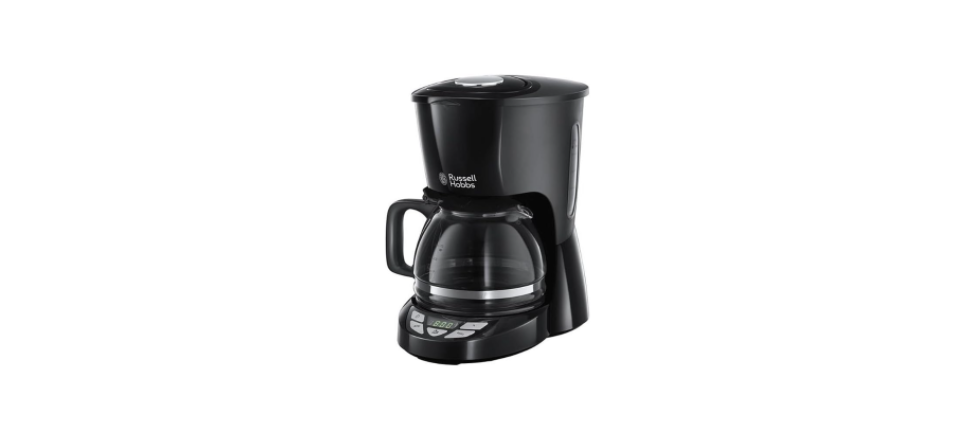

Russell Hobbs 22620-56 Texture Plus Coffee Maker

Safety Instructions
Follow basic safety precautions, including:
- Children shall not play with the appliance.
- Keep the appliance and cable out of reach of children under 8 years old.
- Misuse of the appliance may cause injury.
- The surfaces of the appliance will get hot. The residual heat will keep the surfaces hot after use.
- Don’t immerse the body of the appliance in liquid.
- The surface of the heating element is subject to residual heat after use.
- The coffee-maker shall not be placed in a cabinet during use.
- Use the appliance according to these instructions.
- Any misuse may cause potential injury, electric shock, or other hazards.
- This appliance is intended to be used in household and similar applications, such as:
- Staff kitchen areas in shops, offices and other working environments; by clients in hotels, motels, and other residential-type environments; bed and breakfast type environments; farm houses.
- Do not use this appliance near bathtubs, showers, basins, or other vessels containing water.
- Set the appliance on a stable, level, heat-resistant surface.
- Keep the appliance and cable away from the edges of worktops.
- Don’t use accessories or attachments other than those we supply.
- Don’t use the appliance for any purpose other than those described in these instructions.
- Don’t use the appliance if it’s damaged or malfunctions.
Parts

- Lid
- Water reservoir
- Paper filter #4 (not supplied)
- Filter holder
- Water gauge
- Scoop
- Hot plate
- Control panel
- Carafe
- PM light
- AUTO light
- Brewing light
Before First Use
Fill the reservoir to the max mark, and run the appliance without coffee.
- Remove the carafe from the hotplate.
- Use the grip to open the lid and expose the reservoir.
- Fill the reservoir with the exact amount of water required.
- Open up a #4 paper filter, and put it into the filter holder.
- Put 1 scoop of filter-ground coffee into the filter for each cup.
- Close the lid. Replace the carafe on the hotplate.
Set the Clock
- Put the plug into the power socket.
- Noon will blink on the display.
- Set the clock to the correct time.
- Use the h and min buttons to set the correct hour and minute.
- A small dot in the display indicates PM.
- The clock will retain its settings until the coffee maker is unplugged.
Making Coffee
- Press the W button. The brewing light will come on.
- Shortly afterwards, coffee will start to drip into the carafe.
- When it’s done, the hotplate will keep the carafe warm.
- After 40 minutes, the hotplate will shut down.
- If you want to stop the coffee maker while it’s brewing, press the button.
Coffee
- Set the timer to the time you want to start brewing.
- Press the T button.
- Use the h and min buttons to set the correct hour and minute.
- If you don’t press either the h or min buttons within 5 seconds, the coffee maker will revert to “normal”, and the time will show. You’ll have to press the Clock button and start again.
- Press the AUTO button until the auto light stops flashing and stays on.
- At the time you set, the brewing light will come on, and the coffee maker will start up.
- To cancel the timer before brewing has started, press the AUTO button again.
- If you forget what time you’ve set it to, press the Clock button.
Quick Cup
You can remove the carafe at any time. To prevent the filter holder from overflowing, replace the carafe on the hotplate within about 20 seconds.
Care & Maintainance
- Unplug the appliance and let it cool.
- Tip the contents of the filter holder into the bin.
- Clean the outside surfaces of the appliance with a damp cloth.
- Press the lever at the rear of the carafe lid, above the handle, to open the carafe lid.
- Hand-wash the carafe and filter holder.
- The lid will not close unless the filter holder is correctly fitted.
- Close the lid and press down to lock it.
Descale Regulatory
Descal the appliance at least monthly with a proprietary descaler. Follow the instructions on the package
of the descaler. Products returned under guarantee with faults due to scale will be subject to a repair charge.
Recycling
To avoid environmental and health problems due to hazardous substances, appliances, and rechargeable and non-rechargeable batteries marked with one of these symbols must not be disposed of with unsorted municipal waste. Always dispose of electrical and electronic products and, where applicable, rechargeable and non-rechargeable batteries at an appropriate official recycling/collection point.
Warranty Information
(Applies only in the United States and Canada) For service, repair, or any questions regarding your appliance, please call our Customer Service. Please DO NOT return the product to the place of purchase. Also, please DO NOT mail the product back to the manufacturer, nor bring it to a service centre.
What does it cover?
Any defect in material or workmanship provided; however, the liability of Spectrum Brands, Inc. will not exceed the purchase price of the product.
How long is the warranty valid?
- In the United States: Two years from the date of original purchase with proof of such purchase.
- In Canada: Two years from the date of original purchase with proof of such purchase.
What will we do to help you?
- Provide you with a reasonably similar replacement product that is either new or factory refurbished.
How do you get service?
- Save your receipt as proof of the date of sale.
What does your warranty not cover?
- Damage from commercial use
- Damage from misuse, abuse, or neglect
- Shipping and handling costs associated with the replacement of the unit
- Consequential or incidental damages (Please note, however, that some states do not allow the exclusion or limitation of consequential or incidental damages, so this limitation may not apply to you.)
How does state law relate to this warranty?
- This warranty gives you specific legal rights.
- You may also have other rights that vary from state to state or province to province.
Customer Service
- Website: www.prodprotect.com/russellhobbs
- Tel: 1-800-947-3744