

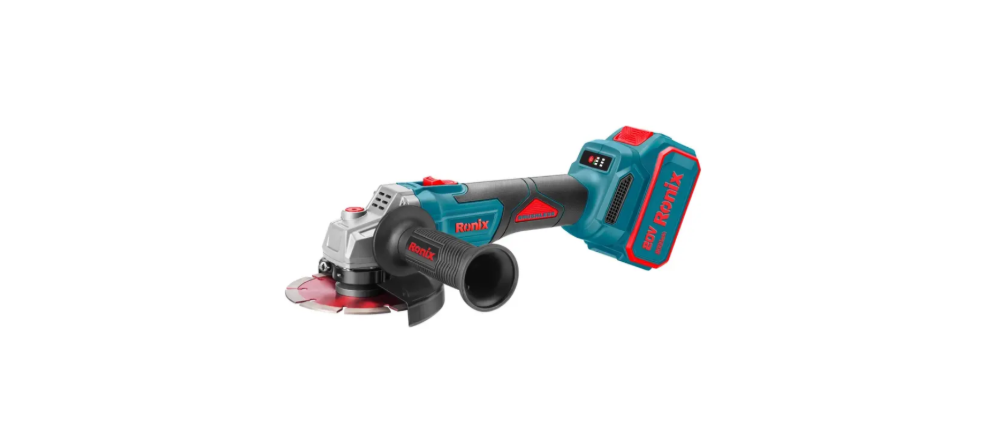

Ronix 8680 20V Brushless Cordless Grinder

Safety Instructions
- Keep the workplace clean and bright. Disordered and dark places can cause accidents.
- Do not operate electric tools in an explosive environment, such as flammable liquid, gas, or dust.
- Sparks generated by electric tools can ignite dust or gas.
- Keep away from children and bystanders when operating electric tools.
- Lack of concentration will make you lose control of the tools.
- The plug of the electric tool must match the socket. Never modify the plug in any way.
- Unmodified plugs and matching sockets will reduce the risk of electric shock.
- Avoid human contact with grounding surfaces, such as pipes, cooling fins, and refrigerators.
- If you touch the ground surface, you will increase the risk of electric shock.
- Do not expose electric tools to rain or a damp environment.
- Water entering electric tools will increase the risk of electric shock.
- Do not abuse the cord. Never carry, pull, or unplug electric tools with flexible cords.
- Keep the cord away from heat, oil, sharp edges, or moving parts.
- Damaged or twisted cords can increase the risk of electric shock.
- Don’t stretch your hands too far. Always pay attention to foothold and body balance.
- This can better control the electric tools in case of accidents.
- Dress appropriately. Do not wear loose clothes or accessories.
- The use of dust collection devices can reduce the danger caused by dust.
Part List

Specfificatons
- Model: 8680
- Battery Type: Lithium-ion
- Battery Capacity: 4.0 Ah / 20V
- Spindle Size: M14
- No-load Speed: 2600/8500RPM
- Wheel Diameter: 125mm
- Dimensions: 98×70×304mm
- Weight: 1.96Kg(with 1pc battery pack)
Battery Instructions
- Only use the charger specified by the manufacturer for charging.
- The charger used for one battery pack may cause a fire hazard when used with other battery packs.
- Only use electric tools with special battery packs.
- Using other battery packs may cause injury and a fire hazard.
- A short circuit at the end of the battery pack may cause combustion or fire.
- Charge the battery pack in time before it is completely discharged.
- When the power of the tool is low, please stop the tool operation and charge the battery pack.
- Do not recharge a fully charged battery pack. Overcharging will shorten the service life of the battery.
- Please charge the battery pack at a room temperature of 1O ° C – 40 ° C (50 ° F – 104 ° F).
- Please recharge after the hot battery pack cools down.
- Remove the battery pack from the tool or charger when not in use.
- If the battery is not used for a long time (more than six months), please charge it.
Functional Description
INSTALLING OR REMOVING THE BATTERY PACK
- Before installing or removing the battery pack, be sure to turn off the power supply of the tool.
- Please hold the tool and battery pack tightly when installing or removing the battery pack. Otherwise, they may slip from your hands, causing damage to tools and battery packs, and even personal injury.

- When removing the battery pack, press the button on the front side of the battery pack and pull the battery pack out of the tool at the same time.
- When installing the battery pack, align the tongue spring on the battery pack with the groove on the cover, and then push and slide it into place.
- If you can still see the red indicator on the upper side of the button after inserting it, it means that the battery pack is not fully locked.
- Be sure to fully install the battery pack until the clip is not visible. Otherwise, it may fall off accidentally from the tool and cause injury to yourself or others.
- Do not force the battery pack. If the battery pack is difficult to insert, the insertion method may be improper.
Protection System
OVERLOAD PROTECTION
- This protection function will be activated when the tool is operated in a way that causes an abnormally high current. In this case, close the tool and stop the application that caused the tool overload. Then start the tool and restart.
OVERHEAT PROTECTION
- When the tool overheats, the tool will automatically stop running, and the indicator will flash. In this case, please wait for the tool and battery to cool before restarting the tool.
OVER DISCHARGE PROTECTION
- This protection function will be activated when the remaining battery power becomes low. At this time, please take out the battery from the tool and charge it.
DISPLAYS THE REMAINING POWER OF THE BATTERY
- Push the switch Trigger to the I position to display the remaining battery power, the indicator will light up for several seconds, and push to the O position to turn off.

GREEN INDICATOR

Under different operating conditions and ambient temperatures, the power indicated by the indicator may be slightly different from the actual situation.
FAULT PROMPT
- LED flash
Undervoltage protection. - LED continuously flashes once
Short circuit protection. - LED full flash for 2 consecutive times
Battery pack over-temperature protection. - LED flashes three times continuously
Controller MOS tube over-temperature protection. - LED flashes four times continuously
Motor locked-rotor protection. - LED flashes continuously for 5 times
Overcurrent protection. - LED continuously flashes for 6 times
Protection against sudden power failure. - LED flashes continuously for 7 times
Fast car protection. - LED full flash for 8 consecutive times
Overvoltage protection and abnormal protection.

Shaft Lock
Do not activate the shaft lock while the main shaft is rotating. Otherwise, the tool may be damaged. When removing the saw blade, press the shaft lock switch to prevent the shaft from rotating. Use a wrench to remove the screw and replace the grinding blade.

Assembly

- At that time, when using a profile grinding wheel, blade, elastic grinding wheel, or wire wheel brush, the grinding wheel cover must be installed on the Ronix 8680 20V Brushless Cordless Grinder tool to ensure that the closed side of the grinding wheel cover always faces the operator’s position.
- Be sure to press the grinding wheel cover straight down. Otherwise, the grinding wheel cover cannot be fully pressed into place. Note: Make sure that the grinding wheel cover is fully pressed into place. Otherwise, the grinding wheel cover cannot be rotated. Install or remove the profile grinding wheel or blade.
- When a profile grinding wheel or vane is used, the grinding wheel cover must be installed on the tool to ensure that the closed side of the grinding wheel cover always faces the operator’s position.
- Make sure that the mounting parts of the inner flange are perfectly fitted to the inner diameter of the profile grinding wheel/blade. Installing the inner flange on the wrong side may cause dangerous vibration.
Operation
- Do not use excessive force when handling tools. The weight of the tool can exert sufficient pressure. Excessive pressure wcathe uthee anger of the grinding wheel.
- If the tool falls during grinding, the grinding wheel must be replaced.
- Do not strike the workpiece with a grinding disc or grinding wheel.
- During the processing of corners or sharp edges, the phenomenon of wheel bouncing and blocking shall be avoided to prevent the wheel from bouncing out of control.
Battery Pack

Protect the battery pack from moisture. The battery Ronix 8680 20V Brushless Cordless Grinder pack must be stored in an environment of 0 to 45 degrees Celsius. Do not leave the battery pack in the car in the summer. The service time of the battery pack is significantly shortened after charging, which means that the battery pack has been damaged and must be replaced with a new one.
- CONTINUOUS USE
When the machine is continuously used until the battery power is exhausted, please allow the machine to cool for 15 minutes before replacing the new battery pack. - OVER DISCHARGE PROTECTION
The machine is equipped with an over-discharge protection circuit. When the battery power is insufficient, the protection circuit will be opened and the machine will stop rotating. - DISPOSAL OF WASTE BATTERY PACKS
To protect natural resources, please properly recycle or dispose of the battery pack. The battery is a lithium battery. Please consult the relevant local authorities for information on recycling (/or) treatment.
Battery Pack Charging
- Please charge indoors.
- Only use the battery and charger matched with the electric tool.
- The battery is only partially charged at the time of delivery.
- The lithium battery can be charged at any time without shortening its service life.
- If the charging process is interrupted suddenly, the battery will not be damaged.
- It takes 2.0Ah 60 minutes, 4.0Ah 120 minutes, 6.0Ah 180 minutes, and 8.0Ah 240 minutes for the fully depleted battery to recharge at aahe temperature of 0-45 °C.
- Please pay attention to the regulations on the disposal of lithium batteries.

Customer Support
- Address: Lyoner Str. 36 60528 Frankfurt am Main
- Tel:+49 69 310 900 66
- Website: www.ronixtools.com
FAQs
What makes the Ronix 8680 grinder different from traditional models?
Compared to brushed grinders, the Ronix 8680’s strong brushless motor offers greater durability, longer runtime, lower maintenance costs, and increased efficiency.
What type of battery does the Ronix 8680 use?
With dependable performance and compatibility with other Ronix 20V cordless tools, it runs on a 20V lithium-ion battery.
How long does the grinder run on a full charge?
The tool usually runs for 25 to 40 minutes on a fully charged 20V battery, depending on the workload and material.
What types of materials can I use the grinder on?
With the right disc or wheel, the Ronix 8680 can cut, polish, or grind a wide range of materials, including plastic, stone, metal, and tiles.
Does the grinder feature variable speed control?
Yes, customers may customise the Ronix 8680’s performance to certain materials and applications thanks to its variable speed adjustment feature.