
Close Menu
onyxguides.comonyxguides.com

    Subscribe to Updates

    Get the latest creative news from FooBar about art, design and business.

    What's Hot

    Harman Kardan OMNI BAR Plus Bluetooth Soundbar User Manual

    January 14, 2026

    Aurzen D1R Roku TV Bluetooth Smart Projector User Manual

    January 13, 2026

    Aurzen EAZZE D1 MAX 1000 ANSI Lumens Projector User Manual

    January 12, 2026
    Facebook X (Twitter) Instagram
    onyxguides.comonyxguides.com
    Facebook X (Twitter) Instagram Pinterest
    • Home
    • About us
    • Terms & Conditions
    • Privacy Policy
    • FAQs
    • Contact us
    onyxguides.comonyxguides.com
    Home » Cleer ENDURO ANC Noise Cancelling Headphones User Guide
    Other

    Cleer ENDURO ANC Noise Cancelling Headphones User Guide

    By Gabriel SmithDecember 16, 20251 Comment5 Mins Read
    Facebook Twitter Pinterest LinkedIn Tumblr WhatsApp Telegram Email
    Cleer-ENDURO-ANC-Noise-Cancelling-Headphones-Featured
    Share
    Facebook Twitter LinkedIn Pinterest Email

    Cleer- logo

    Cleer ENDURO ANC Noise Cancelling Headphones

    Cleer-ENDURO-ANC-Noise-Cancelling-Headphones-product

    Box Contents 

    Cleer-ENDURO-ANC-Noise-Cancelling-Headphones-figure-1

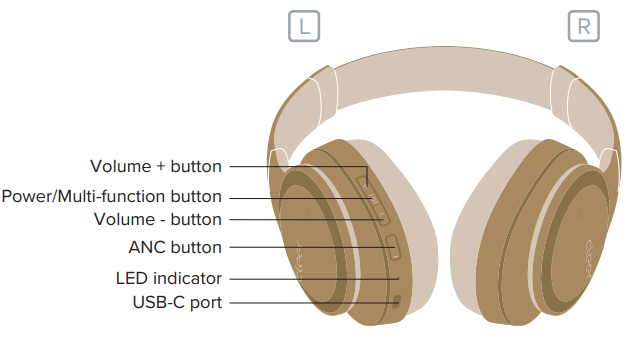
    Overview

    Cleer-ENDURO-ANC-Noise-Cancelling-Headphones-figure-2


    Fitting

    Slide to adjust the headband to fit your head.
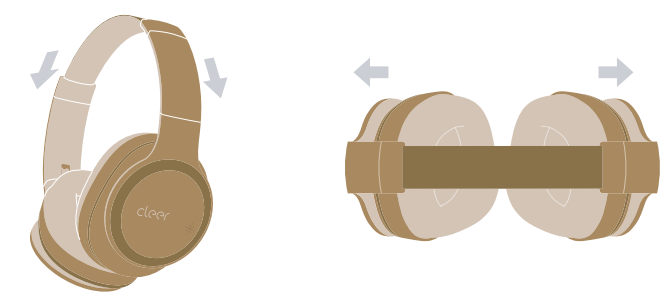
    Cleer-ENDURO-ANC-Noise-Cancelling-Headphones-figure-3

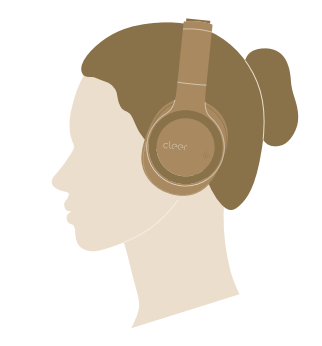
    Correct wearing position 

    Cleer-ENDURO-ANC-Noise-Cancelling-Headphones-figure-4

    Quick Start

    1. Press and hold the power button for 2 seconds to turn on your ENDURO ANC. * ENDURO ANC will go into pairing mode automatically when powered ON for the first time (if you need to manually go into pairing mode, please follow the steps on page 6). ** ENDURO ANC will automatically connect to the last connected device if it is in range and available for pairing
    2. Find “Cleer ENDURO ANC” on the Bluetooth
    3. Enjoy your ENDURO ANCCleer-ENDURO-ANC-Noise-Cancelling-Headphones-figure-5

    Cleer+ App 

    The Cleer+ app gives you more customized control of your ENDURO ANC. Download the Cleer+ app from the App Store (for iOS devices) or the Google Play (for Android devices).

    With the Cleer+ app, you can.

    • Turn on and off the Ambient Noise Control
    • Real-time tuning of the Ambient Noise Control level
    • Customize the equalizer setting of your ENDURO ANC
    • Choose preset music profiles to tune your ENDURO ANC to more accurately reproduce the style of music you listen to
    • Change the Bluetooth name of your ENDURO ANC
    • Receive software updates when new features and improvements are available
    • Check the playback time and battery level of your ENDURO ANC

    * Sound settings are saved in your ENDURO ANC, and can be enjoyed with any player you connect to your ENDURO ANC.

    Bluetooth Pairing

    Pairing Mode

    1. ENDURO ANC is OFF. Press and hold the power button until the LED blinks white & red.
    2. Find “Cleer ENDURO ANC” on the Bluetooth device list.
    3. ENDURO ANC is now paired.

    Cleer-ENDURO-ANC-Noise-Cancelling-Headphones-figure-6


    Multi-function button 

    Cleer-ENDURO-ANC-Noise-Cancelling-Headphones-figure-7

     ANC Button 

    Cleer-ENDURO-ANC-Noise-Cancelling-Headphones-figure-8

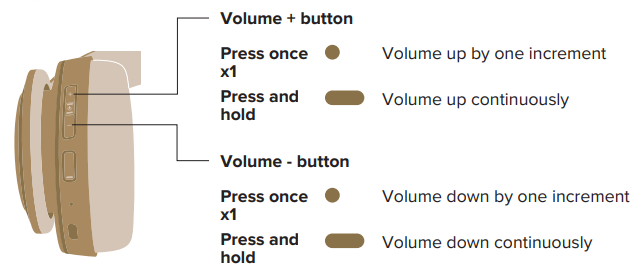
     Volume control 

    Cleer-ENDURO-ANC-Noise-Cancelling-Headphones-figure-9Line-in connection 

    Cleer-ENDURO-ANC-Noise-Cancelling-Headphones-figure-10

    ChargingCleer-ENDURO-ANC-Noise-Cancelling-Headphones-figure-11Connect ENDURO ANC to a power source with the provided USB-C cable. \ 10-minute charge will give hours of playtime. ENDURO ANC can be fully charged in 3 hours.

    LED behavior

    Cleer-ENDURO-ANC-Noise-Cancelling-Headphones-figure-12

    Specifications

    • Driver: 40mm Ironless Driver™
    • Audio CODEC support: SBC, AAC, aptX Adaptive
    • Frequency response range: 20-40KHz (Line in)/ 20-20KHz (Bluetooth) charging
    • Connections: USB-C to 3.5mm for audio, USB-C to USB-A for
    • Support: BT 5.0, SPP v1.0, HFP v1.6, A2DP v1.3.1, AVRCP v1.6
    • Charging: A 10-minute charge will give 2 hours of playtime.
    • Bluetooth transmission ENDURO ANC can be fully charged in 3 hours
    • Frequency range: 2.402-2.480GHz <4dBm
    • Bluetooth transmission power: Rechargeable lithium-ion rectangular cell (3.7V)
    • Playback time 60 hours 
    • Weight: (BT):280 g 

    Warranty

    Labor: For a period of (1) year from the original date of purchase of the product (“Labor Warranty”), Cleer Limited will, at its option, repair or replace with a new or refurbished product, the product determined to be defective. If Cleer Limited elects to replace the product after this Labor Warranty has expired but while the parts warranty is still in effect, it will do so for the applicable labor charge.

    Parts: For a period of (1) year from the original date of purchase of the product (“Parts Warranty”), Cleer Limited will supply new or refurbished replacement parts in exchange for parts determined to be defective.

    Repair / Replacement Warranty: This Limited Warranty shall apply to any repair, replacement, part, or replacement product for the remainder of the original Limited Warranty period or for (90) days, whichever is longer. Any product replaced under this.

    Customer Service

    • Website: www.cleeraudio.com
    • Ph: 1 888 672 5337 (67 CLEER)

    FAQs

    Q: Can I charge my phone or other devices from the speaker?

    No, USB charging output is not supported by the KASDBEATBLK. Its USB port allows you to play music from a USB drive (MP3) or charge the speaker directly.

    Q: Can I use the speaker while it’s charging?

    Yes, you can listen to music while charging because the speaker allows pass-through operation.

    Q: Does the speaker automatically reconnect to my device?

    Yes, if Bluetooth is active and within range, the speaker will try to automatically reconnect to the last connected device when it is turned on.

    Q: Can I connect multiple devices at the same time?

    No, it can only establish an active connection with one Bluetooth device at a time. To swap devices, pair with the new device after disconnecting the old one or turning off Bluetooth.

    Q: Can I use voice assistants (Siri/Google Assistant) through the speaker?

    Yes, you can use your phone to activate the assistant if the connected device supports voice assistants. For hands-free calls or commands, the speaker’s microphone records voice commands.

    Q: Can the speaker handle bass-heavy music?

    Indeed, it features a passive bass radiator that amplifies low-frequency sound. For extremely deep bass, though, think about utilising two speakers in TWS mode or adding a subwoofer for larger areas.

    Q: Can I carry it around easily?

    Yes, it is portable for both dry outdoor and indoor use because it is small and light (~420 g). Its design makes it suitable for a bag or pocket.

    Q: Can the speaker play continuously for long hours?

    Yes, playback at a moderate volume for up to 12 hours. Continuously playing at maximum volume may slightly shorten battery life.

    Share. Facebook Twitter Pinterest LinkedIn Tumblr Email
    Gabriel Smith

      Related Posts

      Aurzen D1R Roku TV Bluetooth Smart Projector User Manual

      January 13, 2026

      HAPPRUN KC7 Pro 2500 ANSI Lumens Projector User Manual

      January 11, 2026

      Kogan HSD01 8GB, 128GB Full HD Wi-Fi Speakers User Manual

      January 10, 2026

      Aurzen EAZZE D1R Cube Roku TV Smart Projector User Guide

      January 9, 2026

      Devialet Dione White Dolby Atmos Soundbar User Manual

      January 7, 2026

      Tribit BTH80 CallElite 81 Wireless Headset User Guide

      January 4, 2026
      View 1 Comment

      1 Comment

      1. binance registrieren on January 13, 2026 11:27 pm

        Your point of view caught my eye and was very interesting. Thanks. I have a question for you.

        Reply
      Leave A Reply Cancel Reply

      Don't Miss
      Harman Kardon

      Harman Kardan OMNI BAR Plus Bluetooth Soundbar User Manual

      January 14, 2026

      Harman Kardon OMNI BAR Plus Bluetooth Soundbar Introduction We’ve created a system that harnesses the…

      Aurzen D1R Roku TV Bluetooth Smart Projector User Manual

      January 13, 2026

      Aurzen EAZZE D1 MAX 1000 ANSI Lumens Projector User Manual

      January 12, 2026

      HAPPRUN KC7 Pro 2500 ANSI Lumens Projector User Manual

      January 11, 2026
      Stay In Touch
      • Facebook
      • Twitter
      • Pinterest
      • Instagram
      • YouTube
      • Vimeo

      Subscribe to Updates

      Subscribe to Updates

      Follow us

      Facebook X-twitter Instagram Pinterest

      © 2025 All rights reserved Onyx Guide.