Close Menu
onyxguides.comonyxguides.com

    Subscribe to Updates

    Get the latest creative news from FooBar about art, design and business.

    What's Hot

    Harman Kardan OMNI BAR Plus Bluetooth Soundbar User Manual

    January 14, 2026

    Aurzen D1R Roku TV Bluetooth Smart Projector User Manual

    January 13, 2026

    Aurzen EAZZE D1 MAX 1000 ANSI Lumens Projector User Manual

    January 12, 2026
    Facebook X (Twitter) Instagram
    onyxguides.comonyxguides.com
    Facebook X (Twitter) Instagram Pinterest
    • Home
    • About us
    • Terms & Conditions
    • Privacy Policy
    • FAQs
    • Contact us
    onyxguides.comonyxguides.com
    Home » Mixx Audio StreamBuds Dots Wireless Earbuds User Manual
    Mixx Audio

    Mixx Audio StreamBuds Dots Wireless Earbuds User Manual
    By Gabriel SmithAugust 3, 2025Updated:December 22, 2025No Comments5 Mins Read
    Facebook Twitter Pinterest LinkedIn Tumblr WhatsApp Telegram Email
    Mixx-Audio-StreamBuds-Dots-Wireless-Earbuds-featured
    Share
    Facebook Twitter LinkedIn Pinterest Email

    Mixx-logo

    Mixx Audio StreamBuds Dots Wireless Earbuds
    Mixx-Audio-StreamBuds-Dots-Wireless-Earbuds-product

    Let’s Start

    What’s in the box?

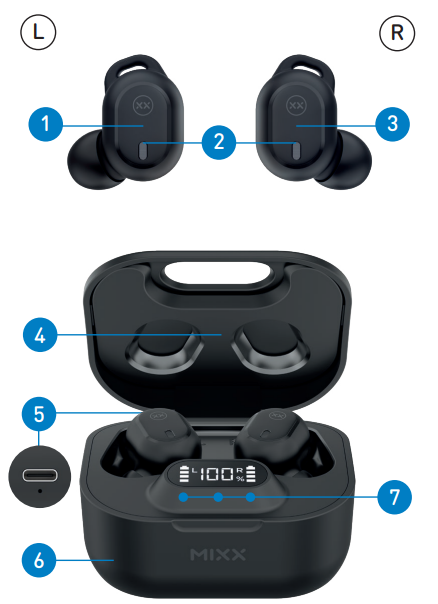
    A pair of earbuds

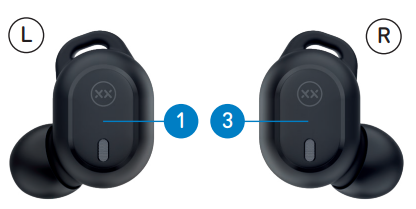
    1. Left Touch Sensor
    2. Earbud LED Lights / Microphones
    3. Right Touch Sensor
    4. Portable Charging Case
    5. USB Type-C Charging Port (Back)
    6. Qi Wireless Charging Surface (Base)
    7. LED Digital Display and Charge Indicators
    8. USB Type-C Charging CableMixx-Audio-StreamBuds-Dots-Wireless-Earbuds-figure-1Mixx-Audio-StreamBuds-Dots-Wireless-Earbuds-figure-2

    Let’s Connect

    First time pairingMixx-Audio-StreamBuds-Dots-Wireless-Earbuds-figure-2

    • When you open the Portable Charging Case 4, both earbuds will turn on and connect. A voice prompt will confirm with ‘Power on, pairing’.
    • One Earbud LED Light 2  will flash WHITE to indicate pairing mode.
    • Go to the Bluetooth settings on your audio device to select ‘MIXX StreamBuds Dots’ from the list.
    • Once paired successfully, you will hear ‘Connected’ and the Earbud LED Lights 2 will turn off.
    • You can now enjoy your music, watch a video, or take a call hands-free.
    • The earbuds will automatically reconnect to the last device they were paired with, confirming ‘Connected’.

    Let’s Stay Charged
    Mixx-Audio-StreamBuds-Dots-Wireless-Earbuds-figure-3

    The Earbuds

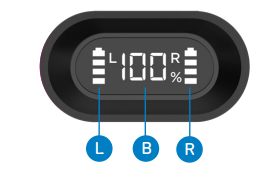
    A voice prompt ‘Battery low’ allows for 2 minutes of play time before the earbud powers down, stating ‘Battery low, power off’. The Earbuds LED Light 2 will flash WHITE for 1 second and will then switch off. Each LEFT and RIGHT earbud has a 4-line LED Charge Indicator on the case. Place the earbuds in the case and close the lid to charge. The 4 LED indicators will flash to show that the earbuds are charging. Each LED represents 25% charge. Once the earbuds are fully charged, the LED indicators will stop flashing and turn off.

    The Portable Charging Case

    To check the battery status of the case, open the lid of the Portable Charging Case. The LED Digital Display will show the percentage of the battery remaining for 30 seconds.

    You can charge the case in two ways:

    1. With a Type C charging cable
      Always connect the case to a suitable USB wall charger, computer USB port, or a power bank using the USB Type-C charging cable supplied. When the LED Digital Display number reaches 100 (i.e., 100%), the case is fully charged, and the display will switch off.
    2. Qi wireless charging
      At the base of the case is a Qi wireless charge surface. Place the case flat on a Qi Wireless Charger (sold separately). When the LED Digital Display number reaches 100(i.e., 100%), the case is fully charged, and the display will switch off. Charging the case may take up to 2 hours.

    Let’s Play
    Mixx-Audio-StreamBuds-Dots-Wireless-Earbuds-figure-4

    • First initial pairing: Remove both earbuds from the charging case. Go to the Bluetooth settings on your audio device to select ‘MIXX StreamBuds Dots’ from the list. Once paired, you will hear ‘Connected’.
    • Play / Pause.Long-presss for 1 second either the Touch Sensor or
    • Increase Volume Single tap RIGHT Touch Sensor
    • Decrease Volume Single tap LEFT Touch Sensor
    • Activate Siri / Google Assistant. Double-tap the RIGHT Touch Sensor. The voice assistant’s familiar ‘Beep’ will sound, then ask a question or state a command.
    • Change the Preset Equalisation (EQ) Settings. Double-tap the LEFT Touch Sensor to cycle through the Music, Bass Boost, and Voice modes to find your preferred sound.
    • Answer / End a call: Long-press for 1 second either the Touch Sensor or
    • Decline an Incoming Call: Double-tap either Touch Sensor or
    • Power On: Remove both earbuds from the case, and they will automatically turn on and pair together. To manually turn on, long-press for 2 seconds each Touch Sensor.
    • Power Off: Insert both earbuds into the case and close the lid. This will automatically turn off the earbuds and the Bluetooth.

    Technical Specifications

    • Playtime on a single charge: Up to 7 hours
    • Playtime with charging case: Up to 28 hours
    • Bluetooth: Version 5.1
    • Supported profiles: HSP, HFP, A2DP, AVRCP
    • Wireless range: 10m
    • Earbud capacity: 40mAh each side
    • Charge case capacity: 300mAh
    • Qi wireless charging: 3W
    • Standby: 120 days
    • Dynamic driver: 10mm
    • Frequency response: 20Hz – 20KHz
    • Weight including case: Total 56g (earbuds 4.8g each)
    • Portable case dims: 62 x 55 x 31 mm (L x H x D)

    Compatibility

    Suitable for most Bluetooth audio-supported smartphones, tablets, notebooks, laptops, and computers.

    Customer Support

    • Email: support@mixx-io.com
    • Visit: mixxaudio.com
    • Address: 5 The Pavilions, Brighton Road, Pease Pottage, West Sussex, RH11 9BJ. United Kingdom
    • Tel: 0844 800 3480

    FAQs

    Q: Can I use only one earbud independently?

    Ans: Yes, you can listen to music or make calls using just the left or right earpiece. After taking the preferred earbud out of its case, pair it with your gadget.

    Q: What is the battery life of the StreamBuds Dots?

    Ans: When fully charged, each earbud can play music continuously for up to five hours. Up to 25 hours of listening time can be obtained with extra charges from the charging case.

    Q: How do I charge the earbuds and charging case?

    Ans: For automatic charging, put the earbuds in the charging case. To charge the case, connect it to a USB-C power source using the USB-C connector that comes with it. Typically, a full charge takes one and a half to two hours.

    Q: How can I check the battery status?

    Ans: The charging case’s LED shows the battery level. Additionally, the Bluetooth settings on your linked device can display the earphones’ battery level.

    Q: How do I reset the StreamBuds Dots?

    Ans: Place the charging case over both earbuds. After that, hold down the touch sensors on both earphones for ten seconds, or until the LEDs flash to show that the reset was successful.

    Q: Are the StreamBuds Dots sweat or water-resistant?

    Ans: Although they are not waterproof and should not be submerged in water, they do have an IPX4 certification, which protects against perspiration and splashes.

    Q: How do I activate voice assistants?

    Ans: To activate the voice assistant on your device, like Google Assistant or Siri, press and hold either earbud for two seconds.

    Share. Facebook Twitter Pinterest LinkedIn Tumblr Email
    Gabriel Smith

      Related Posts

      Mixx Audio Rue Wireless Earbuds Instructions guide

      October 27, 2025

      Mixx Audio AX1 On-Ear Noise Cancelling Headphones Guide

      August 28, 2025

      Mixx Audio StreamBuds Micro M1 True Wireless Earbuds Guide

      August 28, 2025

      Mixx Audio Watch1 Colour Screen Watch Instructions Guide

      August 28, 2025

      Mixx Audio T28 Solo1 True Wireless Earbuds User Guide

      August 28, 2025

      Mixx StreamBuds Hybrid Charge 2 True Wireless Earbuds Guide

      August 3, 2025
      Add A Comment

      Comments are closed.

      Don't Miss
      Harman Kardon

      Harman Kardan OMNI BAR Plus Bluetooth Soundbar User Manual

      January 14, 2026

      Harman Kardon OMNI BAR Plus Bluetooth Soundbar Introduction We’ve created a system that harnesses the…

      Aurzen D1R Roku TV Bluetooth Smart Projector User Manual

      January 13, 2026

      Aurzen EAZZE D1 MAX 1000 ANSI Lumens Projector User Manual

      January 12, 2026

      HAPPRUN KC7 Pro 2500 ANSI Lumens Projector User Manual

      January 11, 2026
      Stay In Touch
      • Facebook
      • Twitter
      • Pinterest
      • Instagram
      • YouTube
      • Vimeo

      Subscribe to Updates

      Subscribe to Updates

      Follow us

      Facebook X-twitter Instagram Pinterest

      © 2025 All rights reserved Onyx Guide.