



InFocus LitePro 610 Conference Room Projector
Introduction
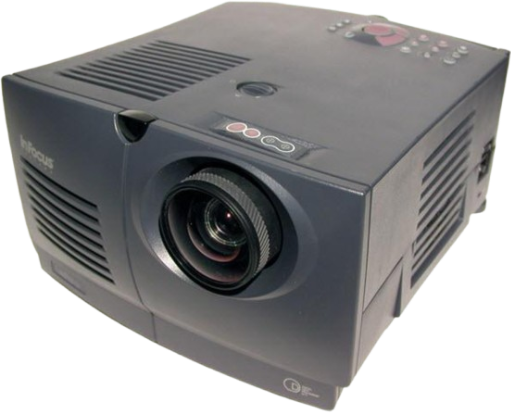
The In Focus Systems LitePro® 610 and 620 multimedia projectors combine powerful and sophisticated features with easy-to-use, intuitive controls. Built-in multimedia features includehigh-fidelityy stereo audio by JBL™, a palette of 16.7 million colors, and Digital Light Processing™ (DLP) technology. The 600 series projectors are ideal for high-performance business, training, ing, and imaging applications that demand exceptional color quality. The 610 has VGA graphics, the 620 has SVGA graphics. The user interfaces of the two products are identical; information in this User’s Guide applies to both products.
Image Resolution
LitePro 610 The VGA resolution of the projected image of the 610 is 640×480. The projector displays computer images that are 640×480 or lower, just as they appear on your computer’s monitor. The projector cannot compress screen resolutions above 800×600. If your computer’s screen resolution is higher than 800×600, reset it to a lower resolution before you connect the projector.
LitePro 620
The SVGA resolution of the projected image of the 620 is 800×600. The projector displays computer images that are 800×600 or lower, just as they appear on your computer’s monitor. The projector cannot compress screen resolutions above 1024×768. If your computer’s screen resolution is higher than 1024×768, reset it to a lower resolution before you connect the pro. jector
Compatibility
The projector is compatible with a wide variety of computers and video devices, including:
- IBM-compatible computers, including laptops, up to 800 x 600 resolution (LitePro 610) or 1024×768 resolution (LitePro 620) at 60Hz.
- IBM PS/2 in VGA and MCGA modes.
- Apple Macintosh and PowerBook computers up to 800 x 600 resolution (LitePro 610) or 1024×768 resolution (LitePro 620).
- Various VCRs, camcorders, and laser disc players. The projector is not compatible with these systems:
- IBM-compatible computers in CGA or EGA graphics mode.
- Macintosh 128, 512, Plus, SE, SE/30, oder Classic.
Unpacking the Projector
The projector comes with the parts. If any parts are missing, contact your In Focus dealer immediately. For complete details on connecting and operating the projector, refer to the appropriate sections of this User’s Guide.
- LitePro 610 or 620 projector
- LitePro 610/620 User’s Guide
- power cord
- remote and batteries
- RCA audio/video (A/V) cable
- CableWizard
- CableWizard computer cable
- CableWizard mouse cable
- CableWizard audio cable
Usage Guidelines
- The bright light may harm your eyes.
- The top and bottom of the projector can be very hot to the touch after use.
- Use extreme care or let it cool before lifting it.
- Do not block the grills at the front, side, top, or bottom of the projector.
- Restricting the air flow through the projector can cause it to overheat and turn off.
- Handle the projector as you would any product with glass components.
- Be especially careful not to drop it.
- Avoid leaving the projector in direct sunlight or extreme cold for extended periods of time.
- If this happens, allow it to reach room temperature before use.
- Transport the projector in a vendor-approved hard or soft case.
Warranty
These products are backed by a limited one-year warranty. The details of the warranty are printed on the back of this manual. Longer-term warranties can be purchased from your In Focus dealer.
Customer Service
- Tel: 1-800-799-9911.
- Timings: 6 a.m. and 5 p.m. PST, Monday through Friday.
- Website: http: www.infs.com