



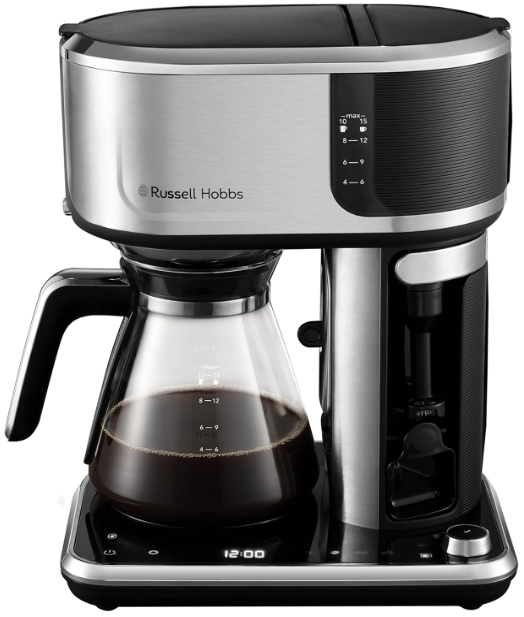
Russell Hobbs 26230-56 Attentive Coffee Maker
Safety Instructions
Follow basic safety precautions, including:
- Children shall not play with the appliance. Children shall not do cleaning and user maintenance unless they are older than 8 and supervised.
- This appliance is intended to be used in household and similar applications such as:
- staff kitchen areas in shops, offices, and other working environments;
- by clients in hotels, motels, and other residential-type environments;
- bed and breakfast type environments;
- farm houses.
- Set the appliance on a stable, level, heat-resistant surface.
- Don’t use the appliance for any purpose other than those described in these instructions.
- Don’t use the appliance if it’s damaged or malfunctions.
Parts
- Filter
- Filter holder
- Filter compartment lid
- Water tank lid
- Water level gauge
- Anti-drip lever
- Milk frother release
- Small cup stand
- Scoop (~7g)
- Warming plate
- Select/confirm knob
- Touch controls and display
- Carafe lid
- Carafe
- Cold brew filter
Before Using
- Wash the carafe, filter holder, and filter in warm, soapy water. Rinse and dry.
- Before using for the first time, or if the appliance has not been used for a long time:
- Fill the reservoir with water to the 10-15 marking.
- Place the carafe onto the warming plate.
- Tap the cold brew E icon.
- Use the select/confirm knob to select full carafe C.
- Press the select/confirm knob G to start the brewing cycle.
This will clean and prime your coffee maker, ready for use.
Controls and Display
In general, to activate a function, touch its icon. The icon will light up brightly, and the remaining icons will be dimly lit to show that they are available for use. Your coffee maker will revert to the standby mode if no controls are touched or settings changed within 5 minutes. You can also select standby mode at any time by touching the C icon for 1 second. Your coffee maker will remember the last settings selected.
An audible alert will sound at the beginning and end of each brewing cycle.

Setting the Clock
You don’t have to set the clock to make coffee, but you will need to set it if you want to use the timer function of your coffee maker.
- If your coffee maker is in standby, touch and hold the C icon for 1 second.
- Tap the settings L icon.
- Tap the clock set O icon. The display will slowly flash.
- Turn the select/confirm knob until the correct time is displayed (the clock is in 24-hour format). Turning the knob slowly will increase or decrease the time in 1-minute steps. Turning it quickly will change the time in 15-minute steps.
- Press the select/confirm knob G to accept the time.
- The display will stop flashing, and the time you have set will be displayed.
Preparation
- Open the water tank lid (Fig. A).

- Fill the water tank with the desired quantity of cold, fresh water. Don’t exceed the max markings (Fig.B).

- Close the lid.
- Open the filter compartment lid.
- Add the desired amount of coffee using the scoop provided (Fig. C).

- Coffee in the scoop should be level and not heaped (Fig. D).

- Place the carafe onto the warming plate (Fig. E).

- If you are making a single cup or are using a travel mug, place it onto the warming plate. For small cups, use the small cup stand by pulling it downwards into position (Fig. F).

Coffee Quantity
Use the provided scoop to add ground coffee into the filter. For guidance

Concentrate (shot)
The concentrate selection makes an extra-strength ‘shot’ of coffee that can be used like an espresso to drink on its own, or used to make barista-style drinks (latte, cappuccino, etc.) You can make it in a small or large cup size. A small cup gives approximately 118 ml of concentrate. A large cup gives approximately 148 ml.
- Prepare your coffee maker.
- Add the coffee to the filter. For a small cup, use 2 level scoops; for a travel mug, use 2-3 level scoops.
- Tap the concentrate strength F icon.
- Use the select/confirm knob to selecta single cup or a travel mug.
- Place a small cup onto the cup platform.
- When ready, press the select/confirm knob G to start the brewing cycle.
- To cancel the brewing cycle at any time, touch and hold the cancel button for 1 second.
Making ECBC Coffee
Your coffee maker is capable of making coffee to the exacting standards of the European Coffee Brewing Centre (ECBC) and carries their prestigious gold seal of approval. To do this, follow these steps:
- Fill the reservoir to the 1.25L marking.
- Add 75 grams of coffee into the filter. For 1.0l L of water, add 60g of coffee.
- Place the carafe onto the warming plate.
- Tap the regular strength B icon.
- Use the select/confirm knob to select C Full Carafe.
- Press the select/confirm knob G to start the brewing cycle.
Cold Brewing
Cold brewing is a method of brewing coffee using cold water to slowly extract the flavour from the ground coffee. This gives a smoother, sweeter flavour which Russell Hobbs 26230-56 Attentive can last in the fridge for up to a week without becoming bitter. Cold-brewed coffee can be enjoyed as a cold drink, or you can use it as a concentrate, adding hot water to create a traditional but smooth hot coffee. You can add milk, frothed milk, sugar, or even soda water for a fizzy cold coffee! It can also be used as an ingredient in cooking and cocktails.
Use the cold brew filter to make cold brew coffee.
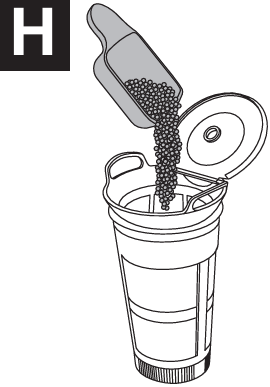
- Open the cold brew filter lid and add coffee (Fig. H). Close the lid when finished.


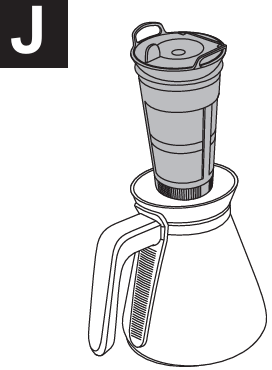
- Remove the carafe lid and fit the cold brew filter into the carafe (Fig. J).

- Place the carafe onto the warming plate.
- Tap the cold brew E icon.
- Use the select/confirm knob to select full or half carafe as required.
- When ready, press the select/confirm knob G to start the brewing cycle.
- To cancel the brewing cycle at any time, touch and hold the cancel B icon for 1 second.
Milk Frother
Frothed milk is used in many barista-style Russell Hobbs 26230-56 Attentive coffee drinks like latte, cappuccino, etc. The built-in milk frother aerates the milk to produce a thick foam, making it lighter in texture and increasing its volume.
- Press the top of the milk frother to release it (Fig. K), then swing the milk frother out.
- Put the milk into a small jug or something similar and hold it under the milk frother until it is immersed in the milk.
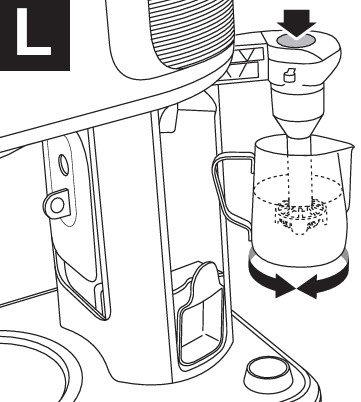
- Press and hold the button on the top of the milk frother to activate it (Fig. L).

Use long presses and make circular motions with the jug until the desired result is achieved.
Cleaning the milk frother after use
- Clean the milk frother after every use.
- Immerse the milk frother in a cup of clean water.
- Press the button several times to activate it.
- Repeat several times if necessary.
- Swivel the milk frother into its compartment and press it until it clicks into place.
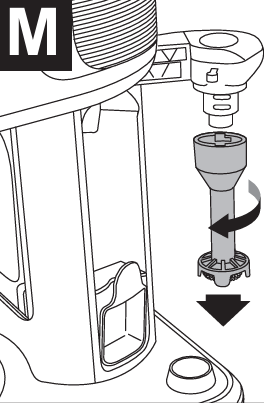
You can also remove the lower section of the milk frother for cleaning. Twist the shaft to the left and pull it away from the button section (Fig. M).

To replace, fit the shaft over the button section and twist it to the right to lock it.
Using the Timer
The timer can be used to make coffee at a predetermined time. The clock needs to be set to the correct time before you can use the timer function.
- Prepare your coffee maker as required.
- Tap the settings L icon.
- Tap the timer P icon. The display will slowly flash.
- Turn the select/confirm knob until the time you want your coffee maker to start is displayed. Turning the knob slowly will increase or decrease the time in 1-minute steps. Turning it quickly will change the time in 15-minute steps.
- Press the select/confirm knob G to accept the time.
- The display will stop flashing and return to show the current time.
- The Timer icon P will be lit to show that you have set the timer.
- To cancel the timer at any time, tap the cancel button.
ANTI Drip
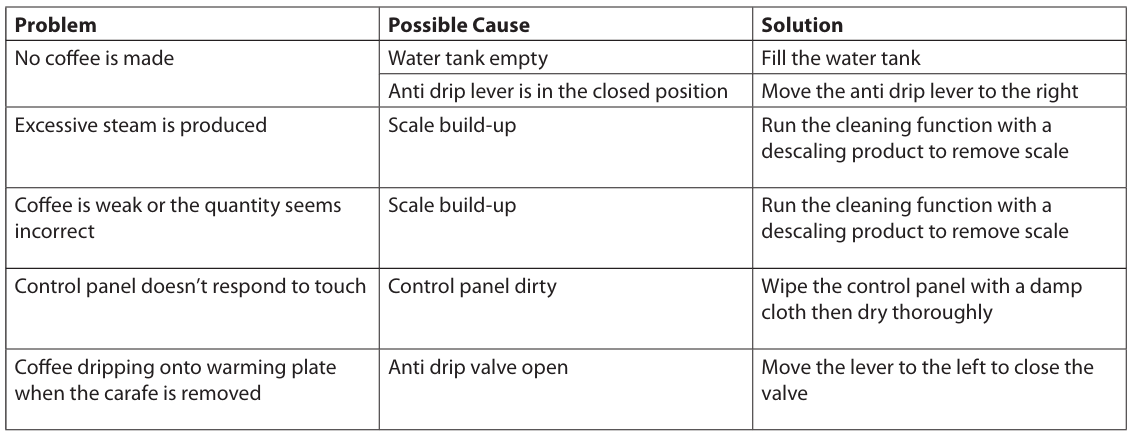
The anti-drip lever closes a valve to prevent any drips from splashing onto the warming plate when you remove the carafe.
- Moving the lever to the right will open the valve, and the icon will go out.
- If you attempt to brew coffee when the lever is in the closed position, your coffee maker will sound an alert tone, and the icon will flash until you open the valve.
Care and Maintenance
Cleaning
- Unplug the appliance and let it completely cool down.
- Clean the exterior surfaces with a slightly damp cloth and then dry them thoroughly.
- Remove the filter and filter holder and empty out the coffee grounds. Wash under running water and dry thoroughly.
- Wipe the filter holder compartment with kitchen paper.
- The bottom cap of the cold brew filter can be removed to assist in cleaning. Twist it clockwise to unlock and remove. Twist it counterclockwise to lock.
Descaling
This is a warning and will not affect coffee making. You can temporarily cancel the warning by tapping the cancel button, Russell Hobbs 26230-56 Attentive but to reset the cycle count, you need to run the cleaning function. We recommend descaling your coffee maker regularly to maintain performance. Never use a descaling product based on mineral acids such as sulphuric acid, hydrochloric acid, sulphamic acid, and acetic acid (e.,g. vinegar). These descalers may damage the machine. Use a descaling product recommended for appliances with plastic parts.
Products returned under guarantee with faults due to scale will be subject to a repair charge.
- Descal your product regularly depending on your water’s lime content and frequency of use.
- Use a proprietary descaling product and follow the manufacturer’s instructions.
- Follow the manufacturer’s instructions and prepare the descaling solution. Add it to the water tank (not exceeding the 10-15 markings), and place the carafe onto the warming plate.
- Tap the settings icon.
- Tap the cleaning cone. The icon will light up.
- Press the select/confirm knob G to start the cleaning cycle.
- Your coffee maker will stop and start during the cleaning process. This is normal. When the water tank is empty, the cycle will stop.
Troubleshooting

Recycling
Always dispose of electrical and electronic products and, where applicable, rechargeable and non-rechargeable batteries at an appropriate official recycling/collection point.
FAQs
Q: How much coffee can the machine brew at once?
With its 1.25-liter capacity, the Attentive Coffee Maker can make roughly ten normal cups of coffee.
Q: Can I pause brewing to pour coffee mid-cycle?
Indeed! You can safely remove the carafe and pour a cup of coffee before the full brewing cycle is finished thanks to the coffee maker’s stop and serve functionality.
Q: How often should I descale the coffee maker?
To preserve optimum performance and flavour, it is advised to descale your coffee maker every one to three months, depending on the water hardness and frequency of use.
Q: Can I use pre-ground coffee or coffee pods?
Only pre-ground coffee is compatible with the Attentive Coffee Maker. It does not work with capsules or coffee pods.
Q: What grind size is best for this coffee maker?
For optimal flavour and extraction, grind your coffee to a medium consistency, much like drip coffee.
Q: Is the warming plate safe to keep the coffee hot?
Indeed, coffee can stay warm on the warming plate for as long as 40 minutes after brewing. If you want to keep coffee hotter for longer, it’s preferable to move it to a thermal carafe to prevent overcooking or harshness.
Q: How do I know when to refill the water tank?
Clear measurement markings are present on the water tank. To prevent overflow while brewing, don’t go over the maximum fill line.
Q: Can I leave water in the tank overnight?
To avoid stale water buildup and lower the chance of bacterial growth, it is best to drain the water tank after usage.