
Close Menu
onyxguides.comonyxguides.com

    Subscribe to Updates

    Get the latest creative news from FooBar about art, design and business.

    What's Hot

    What Is A Mirrorless Cameras

    April 13, 2026

    Camera a7S SONY

    April 13, 2026

    NEBULA D2040R Wireless Satellite Speaker Instruction Guide

    April 13, 2026
    Facebook X (Twitter) Instagram
    onyxguides.comonyxguides.com
    Facebook X (Twitter) Instagram Pinterest
    • Home
    • About us
    • Terms & Conditions
    • Privacy Policy
    • FAQs
    • Contact us
    onyxguides.comonyxguides.com
    Home » CHASING DORY 1080P Full HD Underwater Drone User Manual
    Other

    CHASING DORY 1080P Full HD Underwater Drone User Manual

    By Gabriel SmithMarch 16, 2026Updated:March 28, 2026No Comments2 Mins Read
    Facebook Twitter Pinterest LinkedIn Tumblr WhatsApp Telegram Email
    CHASING-DORY-1080P-Full-HD-Underwater-Drone-featured
    Share
    Facebook Twitter LinkedIn Pinterest Email

    Chasing logo

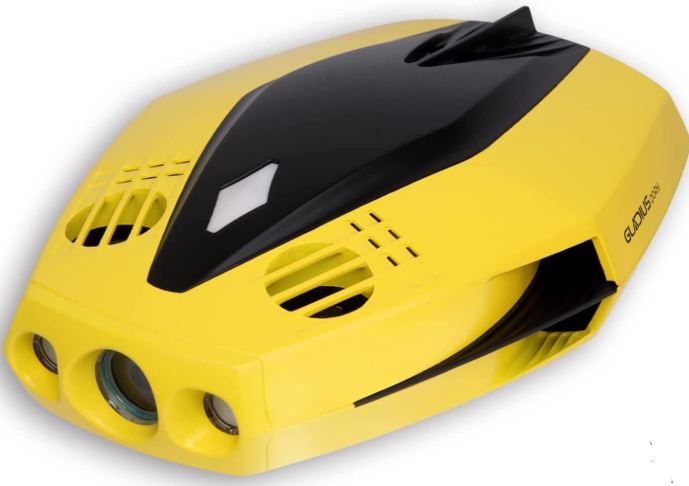
    CHASING DORY 1080P Full HD Underwater Drone

    CHASING-DORY-1080P-Full-HD-Underwater-Drone-product

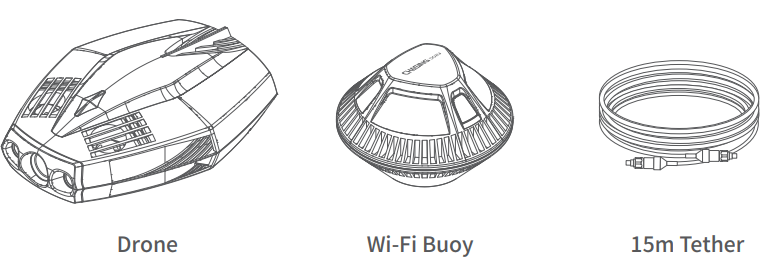
    Main Components

    CHASING-DORY-1080P-Full-HD-Underwater-Drone-figure-1

    Installation & Connection

    Downloadthe  CHASING DORY APP

    Scan the QR code or visit the iOS app store / Google Play to download. (iOS 9.0 / Android 5.0 and above)CHASING-DORY-1080P-Full-HD-Underwater-Drone-figure-2

    Connect the drone and the Wi-Fi Buoy. Insert one end of the tether into the drone and the other end into the Wi-Fi buoy. Securely hand-tighten both couplingbolts.CHASING-DORY-1080P-Full-HD-Underwater-Drone-figure-3
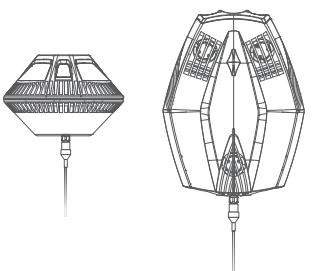
    Booting UpOnce the Dory and the Wi-Fi buoy are connected, the LED lights on the drone will flash,,h and you will hear two self-test sounds. A flashing green light will indicate that both the Dory and Wi-Fi buoy are powered onCHASING-DORY-1080P-Full-HD-Underwater-Drone-figure-4
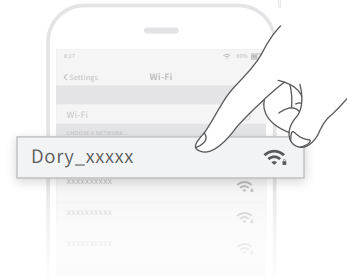
    Wi-Fi Connection: On your mobile device, go to Wi-Fi settings. Click“Dory _xxxxx” network and enterthe password 12345678.

    Registration & Login

    When you open the CHASING DORY App for the first time, please follow the interface prompts to register for an account and log in to the App. A network connection is required during the registration and login process.CHASING-DORY-1080P-Full-HD-Underwater-Drone-figure-5
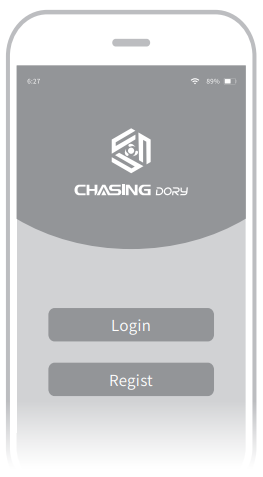
    CHASING DORY App Tutorial

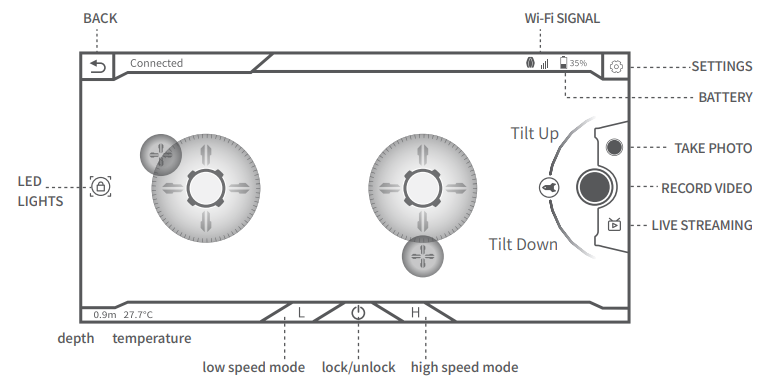
    Open the App, when you see “connected” in the bottom left corner, click “start” on the right. Now you will see the main App interface (below). Click the power button to unlock the drone and use the virtual joystick on screen to control the drone’s movement.CHASING-DORY-1080P-Full-HD-Underwater-Drone-figure-6
    Charging Guidelines

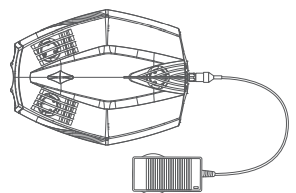
    Power adapter indicator light: A solid red light indicates normal charging is in process. A solid green light indicates a complete charge. CHASING-DORY-1080P-Full-HD-Underwater-Drone-figure-7
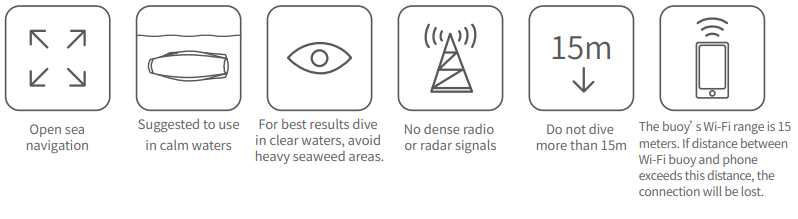
    Navigation Safety

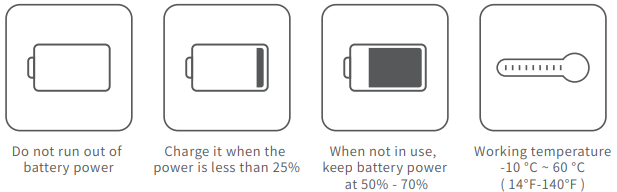
    CHASING-DORY-1080P-Full-HD-Underwater-Drone-figure-8Battery Protection

    CHASING-DORY-1080P-Full-HD-Underwater-Drone-figure-9

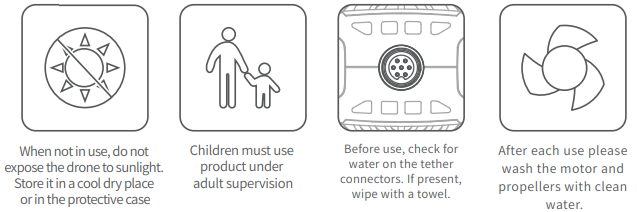
    Others

    CHASING-DORY-1080P-Full-HD-Underwater-Drone-figure-10


    Support

    If you have any questions or technical issues, send an email to the after-sales services of Chasing or contact us on the official website.

    • Website: https://www.chasing.com
    • Address: 506 of Xita in Digital cultural industry base of Shennan 10128 Nanshan, Nantou street, Nanshan District, 518052 Shenzhen.
    Share. Facebook Twitter Pinterest LinkedIn Tumblr Email
    Gabriel Smith

    Related Posts

    What Is A Mirrorless Cameras

    April 13, 2026

    Camera a7S SONY

    April 13, 2026

    NEBULA D2040R Wireless Satellite Speaker Instruction Guide

    April 13, 2026

    AURZEN BOOM mini 4 Inch 1 Smart Projector Instruction Guide

    April 13, 2026

    Dangbei Atom LF5H 1080P Portable Laser Projector User Guide

    April 13, 2026

    Dangbei Mars Pro 2 Smart Projector Instruction Guide

    April 13, 2026
    Add A Comment
    Leave A Reply Cancel Reply

    Don't Miss
    Other

    What Is A Mirrorless Cameras

    April 13, 2026

    Introduction Mirrorless cameras are really cool because they do not have a mirror and optical…

    Camera a7S SONY

    April 13, 2026

    NEBULA D2040R Wireless Satellite Speaker Instruction Guide

    April 13, 2026

    AURZEN BOOM mini 4 Inch 1 Smart Projector Instruction Guide

    April 13, 2026
    Stay In Touch
    • Facebook
    • Twitter
    • Pinterest
    • Instagram
    • YouTube
    • Vimeo

    Subscribe to Updates

    Subscribe to Updates

    Follow us

    Facebook X-twitter Instagram Pinterest

    © 2025 All rights reserved Onyx Guide.