

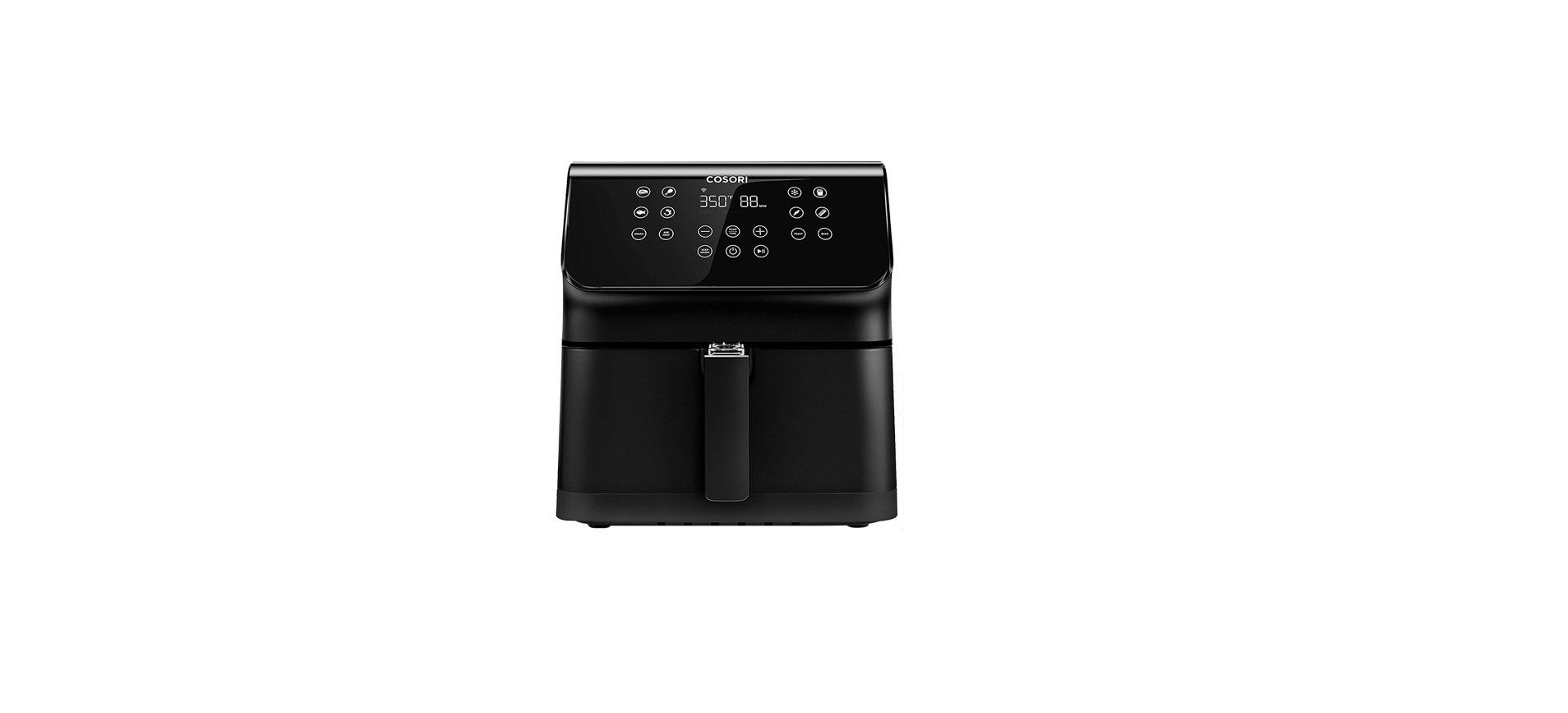

Cosori CS358-AF Smart 5.8 Quart Air Fryer
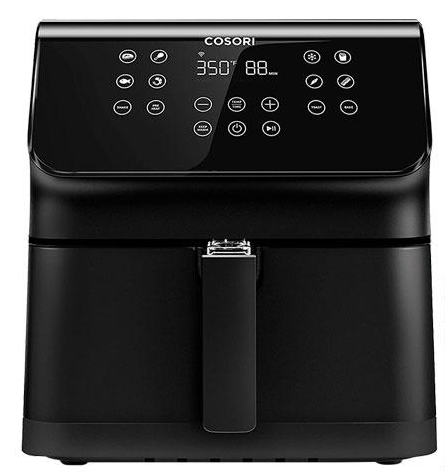
Package Contents
Please read these information carefully before using the “Cosori CS358-AF Smart 5.8 Quart Air Fryer User Manual”
- 1 x Smart 5.8-Quart Air Fryer
- 1 x Recipe Book
- 1 x Quick Reference Guide
- 1 x User Manual
Safety Instructions
Follow basic safety precautions when using your air fryer. Read all instructions.
Key Safety Points
- Do not touch hot surfaces. Use the handle.

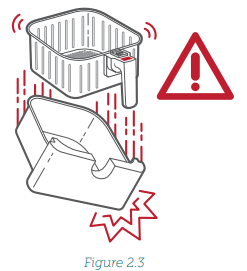
- Only press the basket release button with the baskets resting flat on a counter or any level, heat-resistant surface. The handle is attached to the inner basket, not the outer basket. When you press the basket release button, the outer basket will drop.
 Do not block any ventilation openings. Hot steam is released through openings. Keep your hands and face clear of openings.
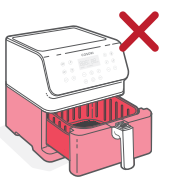
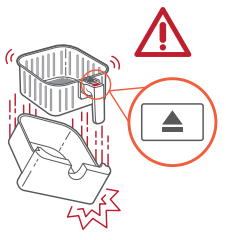
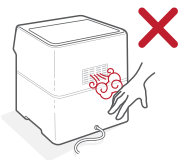
General Safety
Do not immerse the air fryer housing or plug in water or liquid.
- Closely supervise children near your air fryer.
- Unplug when not in use and before cleaning. Allow to cool before putting on or taking off parts.
- Do not use your air fryer if it is damaged, not working, or if the cord or plug is damaged. Contact Customer Support (see page 25).
- Do not use third-party replacement parts or accessories, as this may cause injuries.
- Do not use outdoors.
- Do not place the air fryer or any of its parts on a stove, near gas or electric burners, or in a heated oven.
- Be extremely cautious when moving your air fryer (or removing the baskets) if it contains hot oil or other hot liquids.
- Do not clean with metal scouring pads. Metal fragments can break off the pad and touch electrical parts, creating a risk of electric shock.
- Do not place anything on top of your air fryer.
- Do not store anything inside your air fryer.
- Only use your air fryer as directed in this manual.
- Not for commercial use. Household use only.
Getting to Know
Your Cosori Smart Air Fryer uses rapid 360° air circulation technology to cook with little to no oil for quick, crispy, delicious food with up to 85% fewer calories than deep fryers. With user-friendly, one-touch controls, nonstick baskets, and an intuitive, safe design, the Cosori Smart Air Fryer is the star of your kitchen.
Air Fryer Diagram
- A.Air Inlet
- B. Control Screen
- C. Inner Basket
- D. Outer Basket
- E. Basket Handle
- F. Sliding Button Guard
- G. Basket Release Button
- H. Housing Handle
- I. Air Outlet
- J. Power Cord
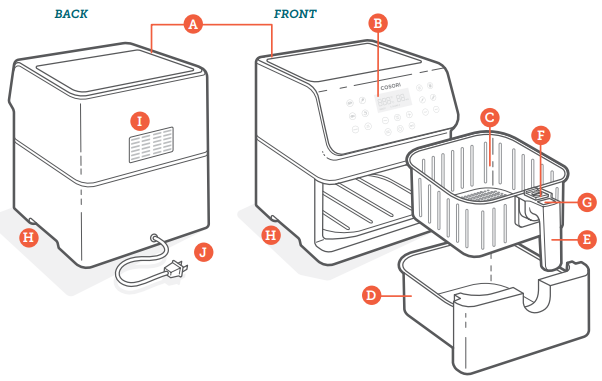
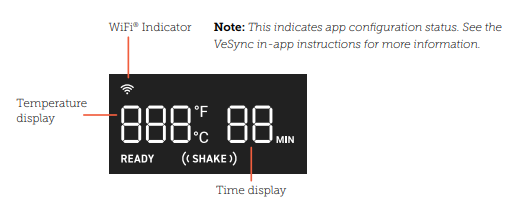
Display Diagram
Note
- When you press a button to use a function or program, it will turn blue to show that it’s active. Pressing again will deselect the function or program. [Figure 1.1]
- To save or reset presets, see Preset Settings (page 13).
Presets
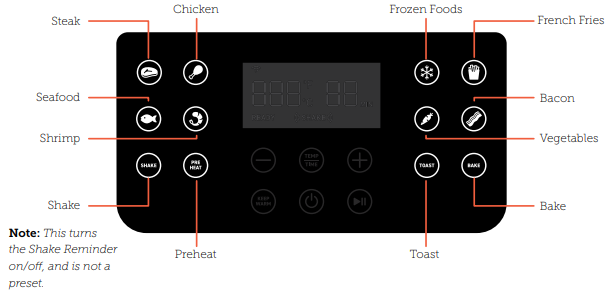
Control Panel
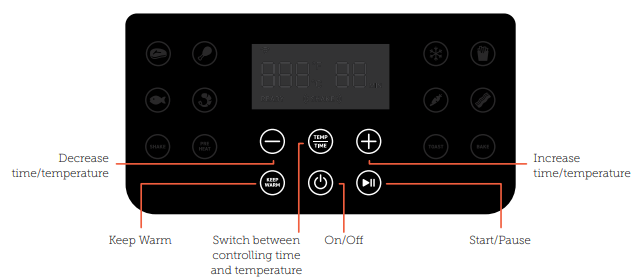
Note: Press and hold to configure your air fryer. See the VeSync in-app instructions for more information.
Display
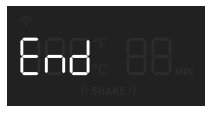
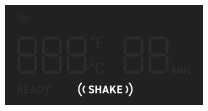
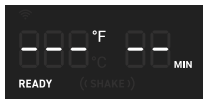
Display Messages
- The cooking program has ended.

- Reminder to shake or flip food.

- The air fryer is preheated and ready to start cooking

Before First Use
Setting Up
- Remove all packaging and temporary stickers from the air fryer.
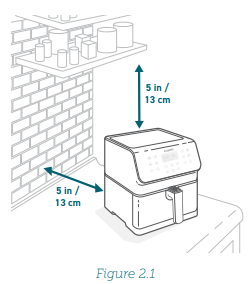
- Place the air fryer on a stable, level, heat-resistant surface. Keep away from areas that can be damaged by steam (such as walls or cupboards).
Note: Leave 5 in / 13 cm of space behind and above the air fryer. [Figure 2.1] Leave enough room to remove the baskets - Pull the basket handle to remove the baskets. Remove all plastic from the baskets.
- Press the basket release button to separate the inner basket from the outer basket.
- Wash both baskets thoroughly, using either a dishwasher or a non-abrasive sponge.
- Wipe the inside and outside of the air fryer with a slightly moist cloth. Dry with a towel.
- Put the baskets back inside the air fryer.

Test Run
A test run will help you become familiar with your air fryer, make sure it’s working correctly, and clean it of possible residues.
- Make sure the air fryer baskets are empty, then plug in the air fryer.
- Press Preheat. The display will show “400°F” and “5 MIN”.
- Press to begin preheating. When preheating is done, the air fryer will beep.
- Pull out the baskets and let them cool for 5 minutes. Then place the empty baskets back in the air fryer.
- Press to select the Steak preset. The display will show “400°F” and “6 MIN”.
- Press Temp/Time twice. The time will blink on the display. Press the – button once to change the time to 5 minutes.
- Press to begin. When finished, the air fryer will beep.
- Pull out the baskets. This time, let the baskets cool completely for 10–30 minutes.
Basket Tips
- Only separate the baskets to clean or after cooking.
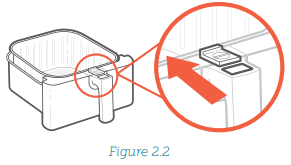
- The button guard protects the release button from being pressed accidentally. Slide the button guard forward to press the basket release button. [Figure 2.2]

- Never press the release button while carrying the baskets.
- Only press the basket release button with the baskets resting on a counter, or any level, heat-resistant surface.
- The handle is attached to the inner basket, not the outer basket. [Figure 2.3] When you press the release button, the outer basket will drop.

Rubber Stopper
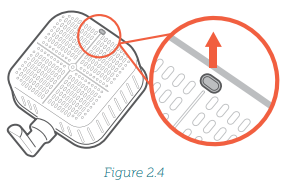
- The inner basket contains a rubber stopper made of safe, FDA-approved material. This stopper prevents the
inner basket from directly Cosori CS358-AF touching the outer basket and, in rare cases, damaging the non-stick coating on the baskets. - The stopper can safely be removed based on user preference. For easy removal, start from the bottom of the inner basket and pull out one side of the stopper at a time. [Figure 2.4]

- If you want to place the Cosori CS358-AF rubber stopper back in the inner basket, first soak it in water. [Figure 2.5] Then push the stopper back in through the bottom of the basket. Push in one side of the stopper at a time.

VeSync App Setup
Note: Due to ongoing updates and improvements, the VeSync app may be slightly different than shown in the manual. In case of any differences, follow the in-app instructions.
- To download the VeSync app, scan the QR code or search “VeSync” in the Apple App Store® or Google Play Store.
Note: For Android™ users, choose “Allow” to use VeSync. - Open the VeSync app. If you already have an account, tap Log In. To create a new account, tap Sign Up. Note: You must create your own VeSync account to use third-party services and products. These will not work with a guest account. With a VeSync account, you can also allow your family and friends to control your smart air fryer.
- Tap + and select your smart air fryer.
- Follow the in-app instructions to set up your smart air fryer.
Note:
- You can change the name and icon at any time by going to the Smart Air Fryer screen and tapping.
- You can use the VeSync app to connect your smart air fryer to Amazon Alexa or Google Assistant™


USE
Note: You can use the VeSync app to monitor cooking, follow in-app recipes, and access additional features.
Preheating
We recommend preheating before placing food into the air fryer, unless your air fryer is already hot. Food will not cook thoroughly without preheating.
- Plug in. Press to turn on the display.
- Press Preheat. The display will show “400°F” and “5 MIN”.
- Optionally, press the + or – buttons to change the temperature. The time will adjust automatically.
Temperature Time
- 400°F / 204°C: 5 minutes
- 390°F / 199°C :5 minutes
- 380°F / 193°C :5 minutes
- 370°F / 188°C :4 minutes
- 360°F / 182°C :4 minutes
- 350°F / 177°C :4 minutes
- 340°F / 171°C :4 minutes
- 330°F / 166°C and below: 3 minutes
- Press to begin preheating.
- When preheating is done, the air fryer will beep 3 times. The display will show the set preheat temperature. [Figure 3.1]

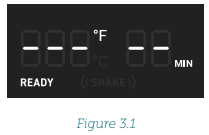
Note: If no buttons are pressed for 3 minutes, the air fryer will clear all settings and go into standby.
Air Frying
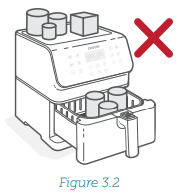
- Do not place anything on top of your air fryer. This will disrupt airflow and cause poor air frying results. [Figure 3.2

- An air fryer is not a deep fryer. Do not fill the baskets with oil, frying fat, or any liquid.
- When taking the baskets out of the air fryer, be careful of hot steam, and do not press the basket release button.
Preset Settings
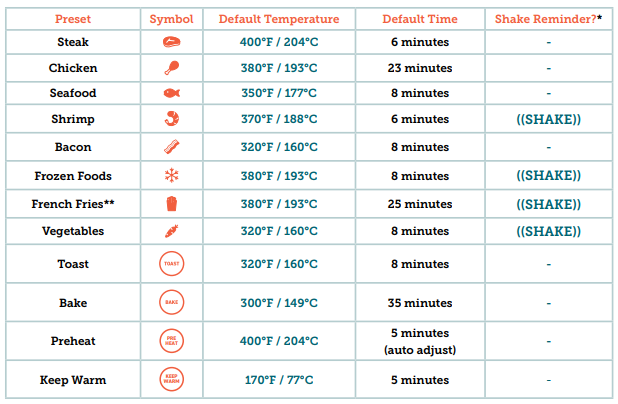
Using a preset is the easiest way to air fry. Presets are programmed with an ideal time and temperature for cooking certain foods.
- You can customize a preset’s time (1–60 minutes), temperature (170°F–400°F / 77 °C–204°C), and Shake Reminder, unless noted.
- To change a preset’s default settings:
- Choose a preset and adjust the time and/or temperature. Optionally, add or remove the Shake Reminder by pressing SHAKE.
- Press and hold the preset icon until the air fryer beeps 1 time.
- Note: You can customize the time for the Shake Reminder using the VeSync app.

Air Frying
- Preheat your air fryer (see page 12).
- When your air fryer displays “READY”, add food to the baskets.
- Select a preset
Note:- You can also set a custom time and temperature without choosing a preset.
- You can use multiple presets in one cooking session using the VeSync app
- Optionally, customize the preset’s temperature and time, and add a Shake Reminder. You can do this anytime during cooking.
- Press Temp/Time to switch between controlling temperature and time. The temperature or time will blink on the display.b. Press the + or – buttons to change the temperature (170°–400°F / 77°–204°C) or time (1–60 minutes).
- Press Temp/Time to switch between controlling temperature and time. The temperature or time will blink on the display.b. Press the + or – buttons to change the temperature (170°–400°F / 77°–204°C) or time (1–60 minutes).
- Press to begin air frying.
- When Shake Reminder is turned on, it will appear halfway through the cooking time (unless customized using the VeSync app). The air fryer will beep 5 times, and ((SHAKE) will blink on the display.
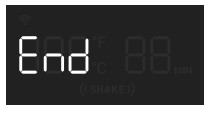
- The air fryer will beep 3 times when finished. The display will show:

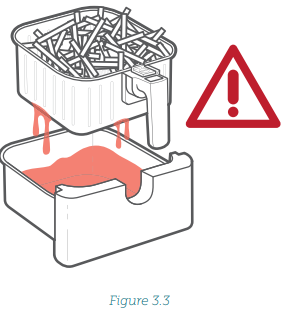
- To avoid splashing, drain oil before replacing the inner basket. [Figure 3.3]
- Allow to cool before cleaning.

Shaking Food
How to Shake
- During cooking, take the baskets out of the air fryer and shake, mix, or flip the food.
- To shake food: 1. Hold the baskets just above a heat-resistant surface for safety purposes. Do not press the basket release button.
- Shake the baskets.B. If the baskets are too heavy to shake:
- Place the baskets on a heat-resistant holder or surface.
- Separate the baskets. Make sure no liquids are dripping from the inner basket.
- Carefully shake the inner basket.
Note: Do not use this method if there is a risk of hot liquids splashing
If the baskets are too heavy to shake and there are hot liquids present:
- Place the baskets on a heat-resistant holder or surface.
- Use tongs to mix or flip the food.
- When you take the baskets out, the air fryer will pause cooking automatically. As a safety feature, the display will turn off until the baskets are replaced.
- When you replace the baskets, cooking will automatically resume.
- Avoid shaking longer than 30 seconds, as the air fryer may start to cool down.
What to Shake
- Small foods that are stacked, such as fries or nuggets, will usually need shaking.
- Without shaking, food may not be crispy or evenly cooked.
- You can flip other foods, such as steak, to ensure even browning
When to Shake
- Shake or flip food once halfway through cooking, or more if desired.
- The Shake Reminder is designed to remind you to check on your food. Tap SHAKE to turn on the Shake Reminder. Certain presets use the Shake Reminder automatically (see Preset Settings, page 13).
- The Shake Reminder will appear halfway through cooking time. This can be changed using the VeSync app.
Shake Reminder
- The Shake Reminder will alert you with 5 beeps, and “((SHAKE))” will blink on the display.
- If you do not remove the baskets, the Shake Reminder will beep again after 1 minute, and the display will show a solid “((SHAKE))”.
- The Shake Reminder will go away once you take out the baskets.
Cooking Guide
Overfilling
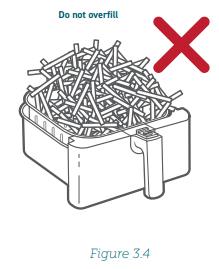
- If the baskets are overfilled, food will cook unevenly.
- Baskets should not be filled over the “MAX” line in the inner basket. [Figure 3.4] Do not pack food.

Using Oil
- Adding a small amount of oil to your food will make it crispier. Use no more than 2 US tbsp / 30 mL of oil.
- Oil sprays are excellent for applying small amounts of oil evenly to all food items.
Food Tips
You can air fry any frozen foods or goods that can be baked in an oven.
- To make cakes, hand pies, or any food with Cosori CS358-AF filling or batter, place the food in a heat-safe container before placing it in the baskets.
- Air frying high-fat foods will cause fat to drip to the bottom of the baskets. To avoid excess smoke while cooking, pour out fat drippings after cooking.
- Liquid-marinated foods create splatter and excess smoke. Pat these foods dry before air frying.
More Functions
Switching Temperature Units
- Press and hold Temp/Time for 3 seconds.
- The air fryer will beep once, Cosori CS358-AF and the temperature unit will change from Fahrenheit to Celsius.
- Repeat to switch back to Fahrenheit.
Pausing
- Press to pause cooking. The air fryer will stop heating and will blink until you press again to resume cooking.
- After 30 minutes of inactivity, the air fryer will turn off.
- This function allows you to pause the cooking program without removing the baskets from the air fryer.
Automatically Resume Cooking
- If you pull out the baskets, the air fryer will pause automatically. The display will turn off temporarily as a safety feature.
- When you return the baskets, the air fryer will automatically resume based on your previous settings.
Automatic Shutoff
If the air fryer has no active cooking programs, it will clear all settings and turn off after 3 minutes of inactivity.
Overheat Protection
- If the air fryer overheats, it will automatically shut down as a safety feature.
- Let the air fryer cool down completely before using it again.
VeSync App Features
The VeSync app allows you to access additional smart air fryer functions, including those listed below.
Remote Control
- All smart air fryer functions can be controlled remotely, except for starting cooking (to comply with UL safety regulations).
- Cooking progress can be monitored from a distance.
Preset Customization
The time at which the Shake Reminder appears during cooking can be customized.
- New custom presets can be created.
Custom Cooking Programs
Multiple presets can be combined to make customized cooking programs for multi-phase cooking.
In-App Recipes
- Pre-programmed recipes made by Cosori’s in-house chefs are available in the app. These recipes automatically set the recommended time and temperature.
- Create and save custom recipes.
Third-Party Voice Control
Compatible with Amazon Alexa and Google Assistant™ •
Note: The VeSync app is continually updated, and app features will expand.
Accessories
You can purchase accessories for your smart air fryer from Cosori’s online store. Go to cosori.com for more information. If you have any questions, please contact Customer Support.
Specifications
- Power Supply AC: 120V, 60Hz
- Rated Power: 1700W
- Capacity: 5.8 qt / 5.5 L (serves 3-5 people)
- Temperature Range: 170°–400°F / 77°–204°C
- Time Range: 1–60 min
- Dimensions: 11.8 x 13.8 x 12.6 in / 30 x 35 x 32 cm
- Weight: 12.3 lb / 5.6 kg
Care & Maintenance
- Turn off and unplug the air fryer. Allow it to cool completely before cleaning. Pull out the baskets for faster cooling.
- Wipe the outside of the air fryer with a moist cloth, if necessary.
- The baskets are dishwasher safe. You can also wash the baskets with hot, soapy water and a non-abrasive sponge. Soak if necessary.
- Clean the inside of the air fryer with a slightly moist, non-abrasive sponge or cloth. Do not immerse in water. [Figure 4.1] If needed, clean the heating coil to remove food debris.
- Dry before using.
Note: Make sure the heating coil is completely dry before turning on the air fryer.
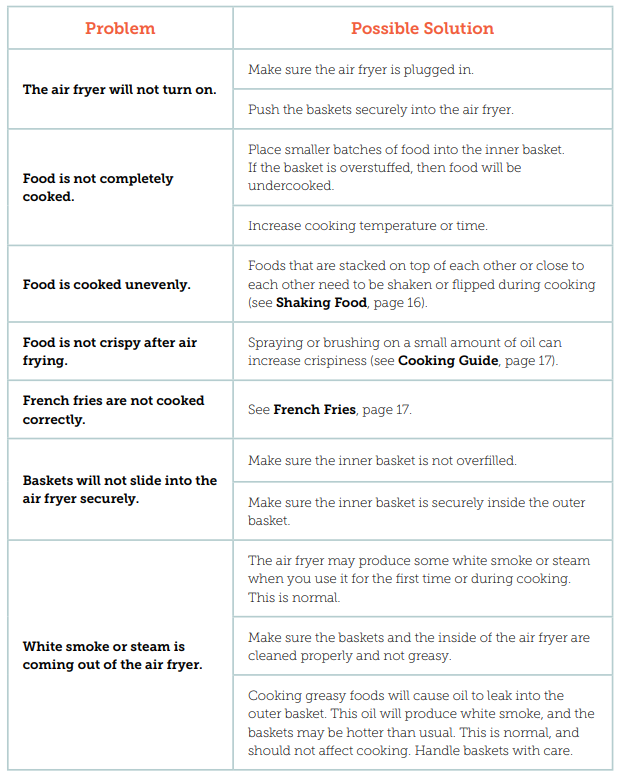
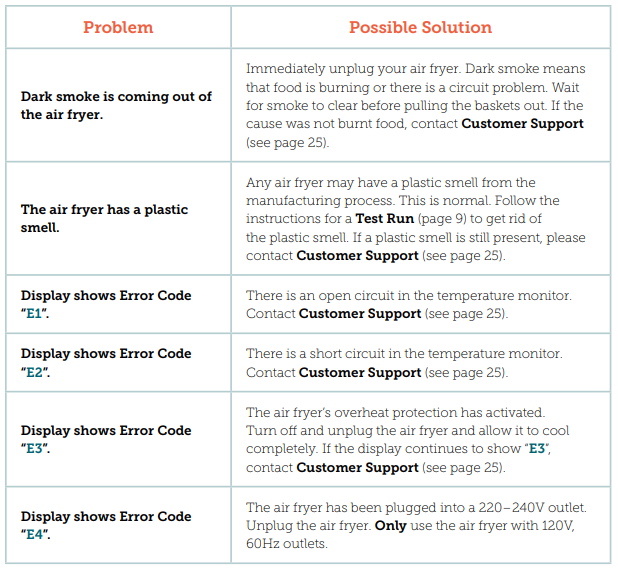
Troubleshooting
FCC Statement
This device complies with Part 15 of the FCC Rules. Operation is subject to the following two conditions:
- This device may not cause harmful interference, and This device must accept any interference received, including interference that may cause undesired operation.
- Any changes or modifications not expressly approved by the party responsible for compliance could void the user’s authority to operate this equipment.
- This equipment has been tested and found to comply with the limits for a Class B digital Cosori CS358-AF device, pursuant to Part 15 of the FCC Rules.
- Reorient or relocate the receiving antenna.
- Connect the equipment to an outlet on a Cosori CS358-AF circuit different from that to which the receiver is connected.
- Increase the separation between the equipment and receiver.
- Consult the dealer or an experienced radio/TV technician for help.
FCC Radiation Exposure Statement
This equipment complies with FCC radiation exposure limits set forth for an uncontrolled environment. End users must follow the specific operating instructions to satisfy RF exposure compliance. To maintain compliance with FCC RF exposure compliance requirements, please follow the operation instructions as documented in this manual. The firmware setting is not accessible by the end user.
Limited One-Year Warranty
Terms & Policy
Arovast Corporation (“Arovast”) warrants this product Cosori CS358-AF to the original purchaser to be free from defects in material and workmanship, under normal use and conditions, for one year from the date of original purchase. Arovast agrees, at our option during the warranty period, to repair any defect in material or workmanship or furnish an equal product in exchange without charge, subject to verification of the defect or malfunction and proof of the date of purchase. There is no other express warranty. This warranty does not apply:
- If the product has been modified from its original condition;
- If the product has not been used by Cosori CS358-AF directions and instructions in the user manual;
- To damages or defects caused by accident, abuse, misuse, or improper or inadequate maintenance;
- To damages or defects caused by the service or repair of the product performed by an unauthorized service provider or by anyone other than Arovast;
- To damages or defects occurring during commercial use, rental use, or any use for which the product is not intended;
- To damages or defects exceeding the cost of the product.
Extend Your Warranty by 1 Year
- Register your product within 14 days of purchase at www.cosori.com/warranty to extend your 1-year warranty by an additional year.
- This warranty is made by: Arovast Corporation 1202 N. Miller St. Suite A Anaheim, CA 93806
Customer Support
If you have any questions or concerns about your new product Cosori CS358-AF, please contact our helpful Customer Support Team.
- Website: Arovast Corporation 1202 N. Miller St., Suite A Anaheim, CA 92806
- Email: support@cosori.com
- Toll-Free: (888) 402-1684
- Websit: https://cosori.com/
Support Hours
Mon–Fri, 9:00 am–5:00 pm PST/PDT
Please have your invoice and order ID ready before contacting Customer Support.
Trademark Information
Amazon, Alexa, and all related logos are trademarks of Amazon.com, Inc. or its affiliates. Google and Google Play are trademarks of Google LLC. Apple App Store is a trademark of Apple Inc. Wi-Fi® is a registered trademark of Wi-Fi Alliance®.