

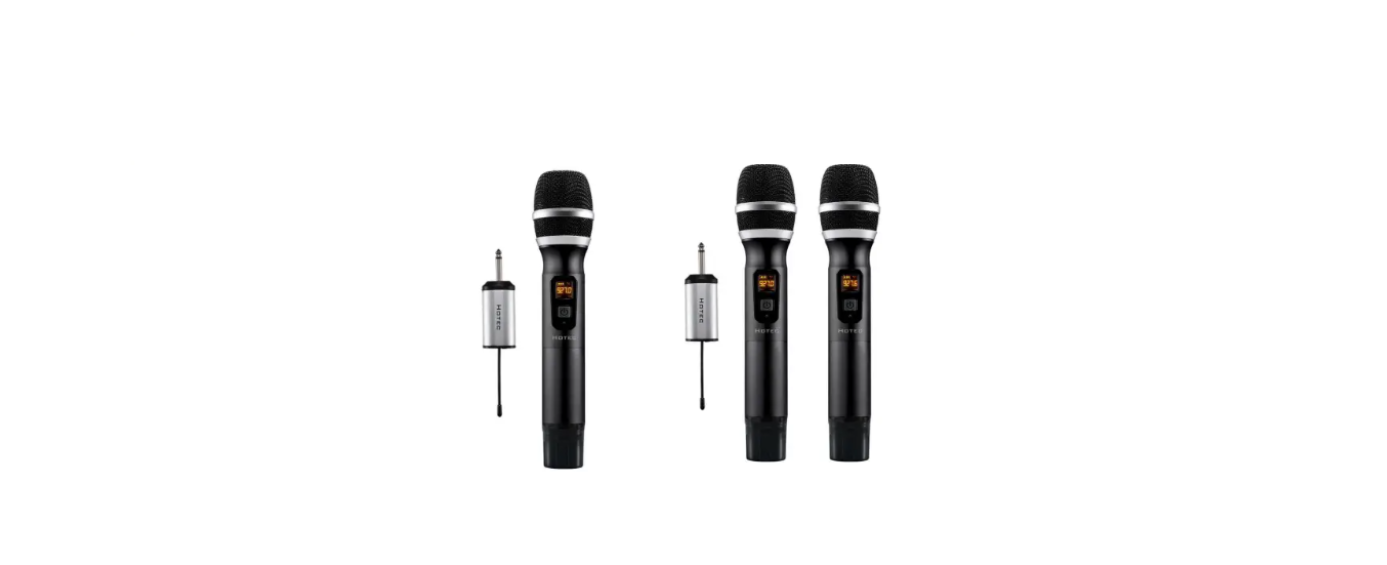

HOTEC H-U06B Wireless Microphone

System Content
H-U06B
- H-U06B Handheld microphone x 1
- H-U06B Mini rechargeable Receiver x 1
- Charging cable x 1 AA battery x 2
- Microphone foam x 1
- Anti-rolling ring x 1
- TS to TRRS cable x 1
- TS to TRS cable x 1
H-U26
- H-U26 Hand held microphone x 2
- H-U26 Mini rechargeable Receiver x 1
- Charging cable x 1
- AA battery x 4 (for microphone)
- Microphone foam x 2
- Anti-rolling ring x 2
- TS to TRRS cable x 1
- TS to TRS cable x 1
Product information
- Charge mini Receiver
Make sure the Receiver is fully charged before use. Use any standard micro USB cable to charge it. - Install batteries for the microphone.
Open the battery compartment of the handheld microphone and install the AA batteries.
Rechargeable Mini Receiver

- Battery low indicator: Battery is low if this indicator becomes Red. Charge the Mini Receiver when the battery is low. When it is fully charged or has sufficient power, the battery low indicator is green.
- Power button: Short-press this button to turn on/off the product.
- USB charging port: Charge the Mini Receiver using the micro USB cable, input is 5V1A or 5V2A.
- AF/RF indicator: When channel A is connected, it is solid Green; when Channel B is connected, it is solid Blue; when both channel A and channel B are connected, it is green-blue (orange).
- Charging Status indicator: This will be Red during charging. When the battery is fully charged, it turns green. Unplug the charger when the battery is fully charged.


- ON/FF: Short-press this button to power on/off the HOTEC H-U06B Wireless Microphone, the handheld microphone
- Battery level indicator: This indicator tells you how much battery is left. Change the battery when the battery level is low.
- Frequency point: This shows what frequency the handheld mic works. Make sure each mic is working on a different frequency.
- Frequency change button: You can find this button when you open the battery compartment. Press this button short to change the frequency in case there is interference. Each press adds 0.4MHz.
Connection Diagram
- Use this wireless microphone to amplify your voice in live performances. Make sure your speaker, mixer, or PA/amplifier has a 1/4” microphone input and a microphone volume control.
- Step 1: Plug the mini Receiver into the 1/4” microphone input of your audio device, like a speaker, mixer, or amplifier.
- Step 2: Turn the microphone volume to minimum HOTEC H-U06B Wireless Microphone before plugging in the mini Receiver to avoid feedback or harsh loopback.
- Step 3: Power on the microphone and Receiver. When you see the RF/AF indicator at the right color, you are ready to use it. If not, follow the troubleshooting steps to pair the Receiver and microphone manually.

- Step 4: Change the microphone volume on your audio device.
Step 5: If there is any interference, short-press the hi-lo button to change the frequency. - Use this wireless microphone to record HOTEC H-U06B Wireless Microphone audio with your phone.e
- Step 1: Connect the TS to the RRS cable to the mini Receiver.
- Step 2: Connect the TS to the TRRS cable to the headphone jack of your phone.
- Step 3: Power on the handheld microphone and Receiver. When you see the RF indicator in the right color, you are ready to use it. See Figure 1.

- Use this wireless microphone to record audio with the camera (See Figure 3)
- Step 1: Please make sure your camera has a mic input.
- Step 2: Connect the TS to TRS adapter to the mini Receiver.
- Step 3: Connect the TS to TRS adapter to the mic input of the camera.
- Step 4: Turn on the mini Receiver and handheld microphone. You are ready to use it when you see the correct RF/AF indicator color.

Product Specification
System
| Modulation Mode | Digital Frequency Modulation |
| Frequency Range | UHF 500~980MHz |
| Preset Frequencies | 32 for CHA & CHB respectively |
| Frequency Response | 75Hz~18kHz ± 3dB |
| Max. Deviation Range | ±50kHz (with level limiting) |
| T.H.D. | < 1.0% @ 1kHz |
| S/N | >98dB |
| Working Range | Up to 100 feet |
| RF Carrier Stability | ±0.005% (-10℃-50℃) |
Receiver
| Dimension | 110*40*23 mm |
| Power Supply | 650 mA |
| Power Consumption | 120 mA |
| Battery Life | 4 hrs after fully charged |
| Recharging Time | About 2 hours (5V/1A) |
Handheld Microphone
| Carrier Frequency Power | 30mw |
| Battery Type | 2 x AA Size |
| Working Time | Up to 6-8 hrs (subject to the AA battery capacity) |
| Dimension | 250 x 55 mm |
| Weight | 0.7 lb |
Troubleshooting
| Issue | Cause | Solution |
| The mic does not sync with the Receiver | The mic lost pairing with the Receiver | Pair the mic and Receiver manually, following the steps below |
| Mic volume is low | This wireless mic system does not support a portable Bluetooth speaker | Please make sure the speaker has a mic input and a mic volume control. Recommend using speakers over 15W or other audio devices such as an audio mixer, |
| amplifiers and speakers like ION Bluetooth speakers or singing machines, or Hotec PA speakers. | ||
| Can this be used with Android/smartphones or DSLR cameras for recording? | Yes, please make sure to use the correct TS to TRRS cable or TS to TRS cable. | |
| Can I sync the microphone for HU26 with the Receiver of H-U06, since my Receiver for H-U26 is broken? | No. Please contact the seller for a replacement if the product is within warranty. | |
| Issue | Cause | Solution |
| Can I use two sets together? Is there any interference with each other? | Yes, you can use two sets working together. Make sure the mics are working at different frequencies to avoid interference. | |
| My mic cuts in and out. What is wrong? | There might be other UHF devices around that cause interference. | If you have several sets of Hotec wireless microphones or other brands that utilize UHF technology, please make sure the one you are using is working at different frequencies from other UHF devices. |
| My product does not work with the Pho. ne | This product works perfectly with the iPhone. First, please make sure the products actually pair with each other. |
Customer service
- Website: http://www.hotec.com
- Ph: 086-13544178467
FAQs
Q: What is the operating range of the H-U06B microphone?
In open areas, the wireless microphone usually operates within 10 to 15 meters (33 to 50 ft). The effective range may be decreased by walls, obstructions, or interference from other devices.
Q: Can the H-U06B microphone be used while charging?
The microphone can be used while it is charging, although over time, this may have a minor impact on battery performance.
Q: Can I use multiple H-U06B microphones simultaneously?
Yes, however, to avoid interference, each microphone needs to be tuned to a different frequency or channel. For guidance on changing channels, consult the receiver’s handbook.
Q: Is the H-U06B microphone waterproof or sweat-resistant?
No, since the microphone is not made to be waterproof, keep it away from water, heavy rain, or excessive moisture.
Q: Can I use the microphone outdoors?
Yes, but make sure it’s dry and shielded from the rain. Depending on nearby obstructions or interference, wireless performance can change.
Q: Can I mount or clip the microphone to a stand?
Yes. Use a standard microphone clip or stand. Ensure the microphone is secured and the antenna (if present) is unobstructed for the best signal performance.
Q: Is the H-U06B suitable for professional events?
Indeed, the H-U06B is appropriate for public speaking, small-stage performances, karaoke, presentations, and teaching. However, for very large venues, think about using many units with frequency control or a professional-grade wireless system.