

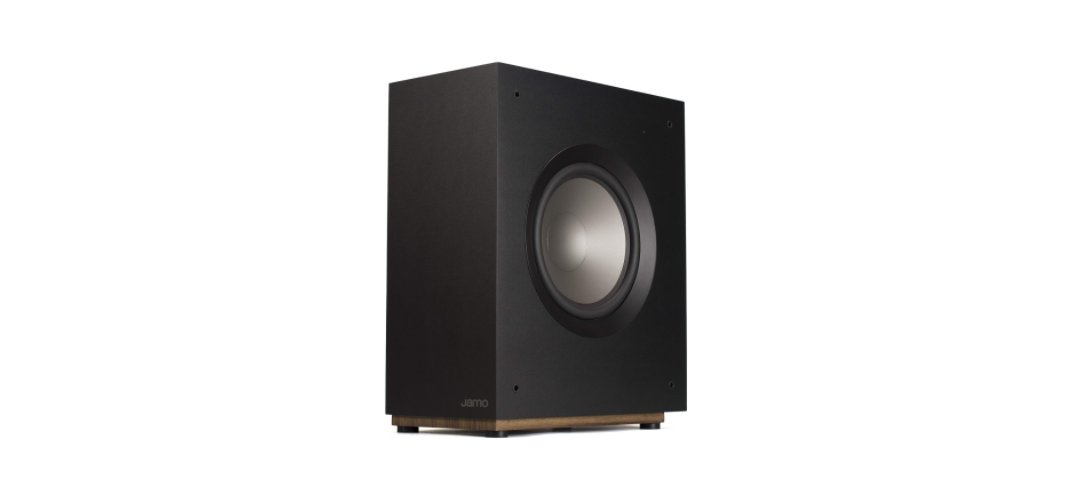

JAMO S 810 SUB Black Active Subwoofer

Inspection
We want your new speaker system to look as good as it did leaving the factory! Please check promptly for any transit damage. Carefully unpack your new speaker system and verify the components against the packing list. In extreme circumstances, items may have become damaged in transit. If any damage is discovered, notify the delivery service and dealer where the system was purchased. Request inspection, and follow their instructions for evaluation. Be sure to keep the product’s original shipping carton.
Placement
Jamo® powered subwoofers are designed to reproduce deep bass and deliver the impact that makes your movies and music come alive. For optimum performance, place your subwoofer in a corner of the room on the same wall as your front channel speakers. (refer to Figure 1).
Corner placement, as suggested above, will increase the amount of bass output, while placing the subwoofer along the middle of a wall, or out in the room, will decrease the amount of bass output.
Experiment with a number of different placement options and control settings to find the one that best suits your particular room and taste. When choosing your subwoofer’s location, keep in mind that you will need to connect the subwoofer’s built-in amplifier to an AC power outlet.

For users looking for alternatives with similar deep bass performance, check out the JAMO C 910 Sub Powered Subwoofer manual for additional setup and placement tips.
Connections & Controls
“LINE IN” Connection – Most of today’s surround receivers (and pre-amplifiers) have a line level subwoofer output labeled Subwoofer Pre Out, Sub Out, SW Out, etc. If you have this output, connect one end of a subwoofer cable to it and connect the other end of the cable to the subwoofer line input labeled LEFT/LFE. This connection allows the subwoofer to operate with both music and surround sound movies (refer to your receiver manual).
Level – If your subwoofer is connected to a Subwoofer Output of a surround receiver, first set the subwoofer volume level control in the receiver to the “halfway” or “0 dB” position. Then increase the volume (or gain) of the subwoofer until the subwoofer’s volume level matches the output of your main speakers.
Lowpass Control
If setting the crossover point in the receiver, turn the Lowpass Filter knob on the subwoofer to the farthest point right (160Hz). Set the crossover point based on the size of the main left/right speakers you are using in the system.
As a general rule, for larger, floorstanding speakers, set the crossover point between 50Hz and 90Hz. If using small bookshelf or “satellite” speakers for the mains, set the crossover point between 90Hz and 150Hz.
If your receiver does not have a crossover point setting, set the Lowpass Filter on the subwoofer instead, within the same recommended settings (see receiver manual for additional speaker setup info).
“PHASE” 0/180 – This control is used to acoustically match the subwoofer’s output to your main speakers. Select the position, either 0° or 180°, in which your subwoofer has more output at the listening position.
Auto ON/OFF
When this switch is in the “AUTO” position, the subwoofer will automatically turn “on” when it senses a signal. It will automatically go into “standby mode” after 15-20 minutes with no signal.
Power LED Indicator
Located on the front baffle, this LED indicates the operating status of the built-in amplifier. The LED will light green when the amplifier is on and receiving a signal. If the LED is dark and not lit, the amplifier is off. For more information on the controls mentioned in this manual and on bass management.


CARE AND CLEANING
Your subwoofer has a durable vinyl finish that should only require dry dusting or cleaning with a dry cloth. Avoid the use of abrasive or solvent-based cleaners and harsh detergents. The brush attachment of your vacuum should remove any dust from your subwoofer enclosure.
Warranty
Klipsch Group, Inc. (KGI) warrants to the original retail purchaser that this product is to be free from defective materials and workmanship for a period of two (2) years on electronics and five (5) years on woofer, cabinet, and non-electrical mechanics, from the date of purchase, if it is properly used and maintained. If this product proves defective in either material or workmanship, KG!, at its option, will (a) repair the product, or (b) replace the product, at no charge for parts or labor.
If the product model is no longer available and cannot be repaired effectively or replaced with an identical model, K, GI at its sole option, may replace the unit with a current model of equal or greater value. In some cases, modification to the mounting surface may be required where a new model is substituted. KGI assumes no responsibility or liability for such modification.
To obtain a repair or replacement under the terms of this warranty, please return to the dealer first, if possible, and the dealer will direct you accordingly for repairs or replacement.
Limitations
- This limited warranty does not cover failure of the product resulting from improper installation, misuse, abuse, accident, neglect, mishandling, or wear from ordinary use or environmental deterioration.
- This limited warranty is null and void for products not used in accordance with KGl’s instructions.
- This limited warranty terminates if you sell or otherwise transfer this product to another party.
The Warranty on this product shall comply with applicable law when sold to a consumer outside of the United States. To obtain any applicable warranty service, please contact the dealer from which you purchased this product or the distributor that supplied this product.
Customer Support
- Ph: 1-800-554-7724
- Email: support@jamo.com
- Website: https://www.jamo.com/
1 Comment
Pingback: JAMO 3A2 All-Weather Satellite Speaker Manual & Setup Guide