

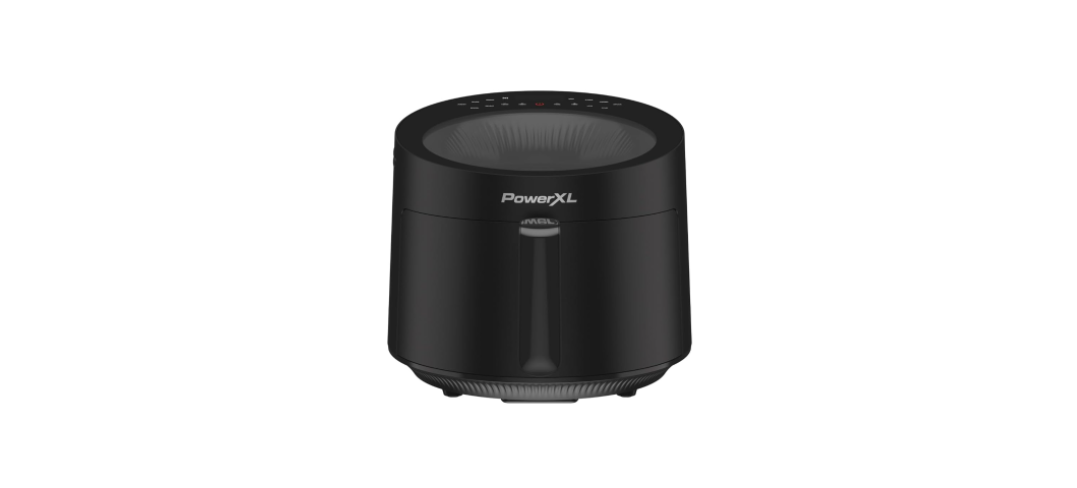

PowerXL AF3052-4SP Series Luminex Light Fryer
Safety Instructions
- Close supervision is necessary when any appliance is used by or near children.
- DO NOT place on or near a hot gas or electric burner or in a heated oven.
- DO NOT place your appliance on a cooktop even if the cooktop is cool, because you could accidentally turn the cooktop on, causing a fire, damaging the appliance, your cooktop, and your home.
- DO NOT place or use this appliance near water.
- When cooking, DO NOT place the appliance against a wall or within 5 inches of other appliances. DO NOT place anything on top of the appliance.
- A fire may occur if this appliance is covered by or touching flammable material, including curtains, draperies, walls, and the like, when in operation.
- DO NOT place the appliance in any container or small confined space while the appliance is heated or in operation.
- ALWAYS operate the appliance on a horizontal surface that is level, stable, and noncombustible with adequate space for airflow.
- DO NOT operate any appliance if it has a damaged cord or plugs, if it is not working properly, or if it has been damaged or dropped.
- Return the appliance to an authorized service facility for examination, repair, or adjustment.
Electric Power
- This appliance should be operated on a dedicated electrical outlet. If the electrical outlet is overloaded with other appliances, your new appliance may not operate properly.
Automatic Shut-Off
- The appliance has a built-in shut-off device that will automatically shut off the appliance when the cooking time has completed. You can manually switch off the appliance by pressing the Power Button. The fan will continue running for 10–20 seconds to cool down the appliance.
Overheating Protection
- Should the inner temperature control system fail, the overheating protection system will be activated, and the appliance will not function. Should this happen, unplug the appliance. Allow time for the appliance to cool completely before restarting or storing.
Electromagnetic Fields
- This appliance complies with all standards regarding electromagnetic fields. If handled properly and according to the instructions in the user manual, the appliance is safe to use based on scientific evidence available today.
Parts & Accessories
- FRY TRAY
- SILICONE BUMPERS*
- FRY BASKET
- HANDLE
- CONTROL PANEL
- HOT AIR OUTLET VENT
- MAIN UNIT HOUSING
- AIR INLET VENT
- POWER CORD
- GRILL PLATE*
- EGG COOKER*
- MESH RACK*
- REHEAT DISH*
- PAPER LINERS*
- KNIFE SET*
Using the Control Panel
- Power Button: Press the Power Button to turn the appliance on and illuminate the control panel. Pressing the Power Button during the cooking cycle will turn the appliance off.
- Cooking Functions: Press the Cooking Function Buttons to choose from six cooking functions. See the Function Chart for the cooking times and temperatures associated with each function.
- Cooking Presets: Press the Cooking Preset Buttons to choose from six cooking presets. See the Preset Chart for the cooking times and temperatures associated with each preset.
- Timer Control Buttons: The + and − symbols enable you to increase or decrease cooking time 1 minute at a time. Keeping the Button held down will rapidly change the time. Time control range: 1– 60 minutes.
- Temperature Control Buttons: The + and − symbols enable you to increase or decrease cooking temperature 5° F at a time. Keeping a button held down will rapidly change the temperature. Temperature control range: 180° F–400° F
- Time and Temperature Display: This display will keep track of the temperature and remaining cook time. Shake Indicator: The Shake Indicator will illuminate when the cooking cycle has reached its halfway point. This halfway timer allows you to shake or flip your food in the appliance, which helps ensure even cooking (see the “Shaking/Flipping” section).
- Start/Pause Button: Once a cooking time and temperature have been selected, press the Start/Pause Button to begin the cooking process. Press the Start/Pause Button again at any point during the cooking process to pause the cooking cycle.
Function Chart
| Function
Name |
Temperature | Time | Shake or Flip?[1] | Preheat[2] |
| Air Fry | 400° F | 18 mins. | Shake | No |
| Bake | 320° F | 20 mins. | No | Yes |
| Roast | 400° F | 10 mins. | Flip | No |
| Grill | 390° F | 20 mins. | Flip | Yes |
| Broil | 400° F | 10 mins. | Flip | No |
| Reheat | 350° F | 4 mins. | No | No |
Preset Chart
| Preset Name | Temperature | Time | Shake or Flip?1 | Preheat2 |
| Fries | 400° F | 22 mins. | Shake | No |
| Chicken | 380° F | 20 mins. | Flip | No |
| Steak | 400° F | 10 mins. | Flip | No |
| Veg | 360° F | 10 mins. | Shake | No |
| Fish | 380° F | 10 mins. | Flip | No |
| Eggs | 300° F | 18 mins. | No | No |
Shake Function Programming
- Halfway through the cooking cycle, the appliance will beep five times, indicating that food can be shaken or flipped over (see “Shaking/Flipping” in the “Instructions for Use” section).
Preheat
- Some cooking functions have a built-in preheating feature. When you select one of these functions, “PrE” will appear on the Time and Temperature Display while the appliance preheats.
- After 3 minutes, the cooking timer will start counting down. The cooking time and temperature are not adjustable while the appliance is preheating.
Instructions for Use
Before First Use
- Read all material, warning stickers, and labels.
- Remove all packing materials, stickers, and labels from the appliance.
- Before initial use, wipe the inside and outside of the appliance with a warm, moist cloth and mild detergent. Handwash all cooking accessories.
- Place the appliance on a heat-resistant surface or use heat protection.
- Do not place the appliance on a surface that is not heat-resistant.
- Ensure that the appliance is used in an area with adequate air circulation. Do not place on the stove top.
- Before cooking food, preheat the appliance for a few minutes to allow the appliance to burn off the manufacturer’s protective coating of oil.
- Wipe the appliance with warm, soapy water and a dishcloth after this burn-in cycle. Before First Use.
Shaking/Flipping
- To ensure even cooking, some foods require shaking or flipping during the cooking process.
- Some of this appliance‘s functions and presets include a halfway timer, which is a timer that will beep, and the Shake Icon on the Control Panel will blink when the cooking cycle has reached its halfway point.
- At the halfway point in the cycle, carefully use oven mitts to remove the hot Fry Basket from the appliance. For food with high moisture content, use tongs to flip the food. Otherwise, gently shake the Fry Basket.
Using the Appliance
- Plug the appliance into a dedicated electrical outlet.
- Pull the Fry Basket out of the appliance. Ensure the Fry Tray has been placed in the Fry Basket.
- Place the ingredients inside the Fry Basket.
- If you are using an accessory, such as the Grill Plate, place the accessory on the Fry Tray before adding ingredients.
- Use the Handle to push the Fry Basket into the appliance.
- Press the Start/Pause Button to begin the cooking process.
- Pull the Fry Basket out of the appliance and place it on a heat-resistant surface.
- When removing food from the Fry Basket, avoid contact with hot excess oil or any hot cooking accessories.
- When cooking multiple batches of food, drain any grease or liquid from the Fry Basket.
General Cooking
| FROZEN FO | OD | |||||
| French fries | 400° F | 22 mins. | ü | |||
| Sweet potato fries | 400° F | 22 mins. | ü | |||
| Chicken nuggets | 400° F | 14 mins. | ü | |||
| CHICKEN | ||||||
| Breaded cutlets | 6 oz | 400° F | 10 mins. | ü | ü | |
| Wings | 400° F | 25 mins. | ü | ü | ||
| Chicken breast | 6 oz | 400° F | 8 mins. | ü | ||
| BEEF | ||||||
| Burgers | 6 oz | 400° F | 10 mins. | ü | ü | |
| Hot dogs | 8 pc | 375° F | 5 mins. | ü | ü | |
| NY strip steaks | 8 oz | 400° F | 12 mins. | ü | ü | |
| Meatballs, 1 inch | 1.5 lb | 375° F | 10 mins. | ü | ü | |
| PORK | ||||||
| Pork chops | 400° F | 12 mins. | ü | ü | ||
| Sausages | 350° F | 15 mins. | ü | ü | ||
| FISH | ||||||
| Salmon filets | 6 oz | 390° F | 12 mins. | ü | ||
| Shrimp (16–20 size) | 12 oz | 390° F | 10 mins. | ü | ü | |
Internal Temperature Meat Chart
| Food | Type | Internal Temp.* |
| Beef & Veal | Ground | 160° F |
| Steaks, roasts: medium | 145° F | |
| Steaks, roasts: rare | 125° F | |
| Chicken & Turkey | Breasts | 165° F |
| Ground, stuffed | 165° F | |
| Whole bird, legs, thighs, wings | 165° F | |
| Fish & Shellfish | Any type | 145° F |
| Lamb | Ground | 160° F |
| Steaks, roasts: medium | 140° F | |
| Steaks, roasts: rare | 130° F | |
| Pork | Chops, ground, ribs, roasts | 160° F |
| Fully cooked ham | 140° F |
Cleaning & Storage
- If you used a Paper Liner during the cooking process, throw the Paper Liner out.
- Remove the Fry Tray from the completely cool Fry Basket.
- Clean the Fry Basket and Fry Try, with hot water, a mild detergent, and a nonabrasive sponge.
- For difficult-to-remove food, soak it in hot, soapy water for 10 minutes.
- There will be some resistance, but keep pushing until the bumpers slide off the Fry Tray.
- To reattach the bumper, slide each bumper onto the slot on the Fry Tray.
- Clean the inside of the appliance with hot water, a mild detergent, and a nonabrasive sponge.
Storage
- Place the cooled, dry appliance in a clean, dry place. Do not stack objects on top of the PowerXL AF3052-4SP Series Luminex Light Fryer.
Troubleshooting
Symptom Possible Cause / Solution
| Food is not fried evenly. | Some foods need to be shaken or flipped during the cooking process. | See the “Shaking/Flipping” section in “Instructions for Use.” |
| The Fry Basket will not slide into the appliance properly. | The Fry Basket is overloaded. | Do not fill the Fry Basket above the Maximum line. |
| The Fry Tray is not placed in the Fry Basket correctly. | Gently push the Fry Tray into the Fry Basket. | |
| Smoke is coming from the appliance. | Too much oil is being used. | Wipe down to remove excess oil. |
| The Fry Basket has grease residue from the previous operation. | Clean the Fry Basket after each use. | |
| French fries are not fried evenly. | Potatoes are not prepared properly. | Consult a recipe for potato type and preparation. |
| Fries are not cut evenly. | Cut fries thinner or reshape fries. | |
| Fries are too crowded. | Spread fries out or cook a smaller batch. | |
| Potatoes are not rinsed properly during preparation. | Pat dry to remove excess starch. |
Two-Year Limited Warranty
(Applies only in the United States and Canada)
For service, repair, or any questions regarding your appliance, call the appropriate 800 number listed within this section. Please DO NOT return the product to the place of purchase. Also, please DO NOT mail the product back to the manufacturer and DO NOT bring it to a service center. You may also want to consult the website listed on the cover of this manual.
What does it cover?
Any defect in material or workmanship provided; however, Empower Brands, LLC’s liability will not exceed the purchase price of the product.
For how long?
Two years from the date of original purchase with proof of purchase.
What will we do to help you?
Provide you with a reasonably similar replacement product that is either new or factory refurbished.
How does state law relate to this warranty?
This warranty gives you specific legal rights. You may also have other rights that vary from state to state or province to province.
What does your warranty not cover?
- Damage from commercial use.
- Damage from misuse, abuse, or neglect.
- Products used or serviced outside the country of purchase.
- Shipping and handling costs associated with the replacement of the product.
- Consequential or incidental damages (please note, however, that some states do not allow the exclusion or limitation of consequential or incidental damages, so this limitation may not apply to you).
Are there additional warranty exclusions?
This includes, without limitation, any warranty claims implicating parties from, or otherwise located in, Cuba, Iran, North Korea, Syria, and the disputed Crimea region.
Customer Service
- Website: www.prodprotect.com /powerxl
- Tel: 1-800-577-1557
- Ph:1-800-738-0245
FAQs
Q: What cooking technology does the Luminex Light Fryer use?
Ans: For quick, consistent frying with little to no oil, the Luminex Light Fryer combines a strong halogen heating element with sophisticated rapid air circulation.
Q: What is the cooking capacity of the AF3052-4SP?
Ans: With its 4.5-quart cooking basket, this model is perfect for cooking for 2-4 people or small families.
Q: How do I operate the fryer’s touch control panel?
Ans: You may manually change the temperature and time or choose from pre-set cooking modes using the user-friendly touch panel. The user manual offers detailed instructions.
Q: What temperature range does the fryer support?
Ans: With a temperature range of 180°F to 450°F, the fryer offers a variety of cooking methods, including high-temperature frying and slow roasting.
Q: Is the cooking basket dishwasher safe?
Ans: Yes, for simple cleanup, the drip tray and basket are dishwasher safe and detachable.
Q: How do I ensure food cooks evenly in the fryer?
Ans: To allow for adequate air circulation, do not pack the basket too full. For optimal outcomes, shake or stir food midway through cooking.
Q: Does the fryer have an automatic shut-off feature?
Ans: Yes, in order to save energy and avoid overcooking, the appliance automatically turns off at the conclusion of the cooking cycle.