

 Tribit BTS30 STORMBOX Portable Wireless Speaker


Safety Instructions
- Avoid dropping the speaker on the floor.
- Do not try to disassemble or repair the speaker unless you are a technician.
- Never expose the speaker to extreme high or low temperatures.
- Stop use immediately if a thunderstorm happens.
- Do not clean its surface with any corrosive cleanser or other chemical solutions.
Package Content

Overview

Connection
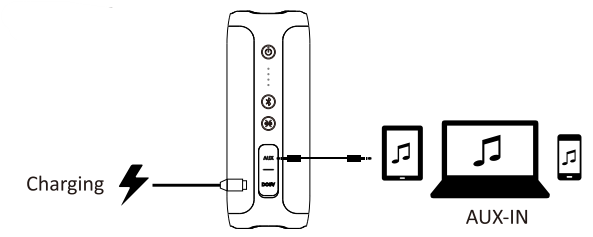
Bluetooth Pairing

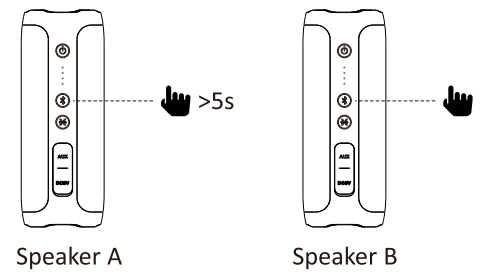
Wireless Daisy Chain with Two StormBox
- Connect the Speaker A and B

- Keep Speaker A and B powered on
- Press the Bluetooth button on Speaker A at least 5s till the tone comes up
- Wait for the Speaker A and B connecting success with tone.
- Pair the Speaker A

- Enjoy music with two StormBox



Buttons


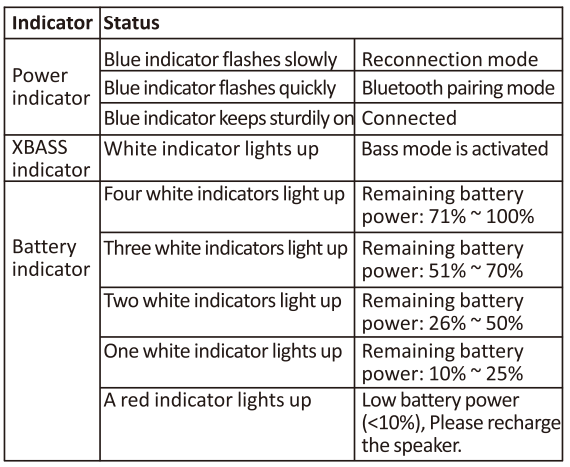
Indicators
Reset
If this speaker has any problem, you can try to press and Hold Volume + and Volume _ buttons simultaneously for 5s to reset this speaker and remove the old pairing in your Bluetooth device, and then pair again.
FCC Statement
Changes or modifications not expressly approved by the party responsible for compliance could void the user’s authority to operate the equipment. This equipment generates uses and can radiate radio frequency energy and, if not installed and used in accordance with the instructions, may cause harmful interference to radio communications. However, there is no guarantee that interference will not occur in a particular installation.
- Reorient or relocate the receiving antenna.
- Increase the separation between the equipment and receiver.
- Consult the dealer or an experienced radio/TV technician for help.
This device complies with part 15 of the FCC rules. Operation is subject to the following two conditions: (1)this device may not cause harmful interference, and (2) this device must accept any interference received, including interference that may cause undesired operation.
IC Caution
This device complies with Industry Canada licence-exempt RSS standard(s). Operation is subject to the following two conditions: (1) This device may not cause interference, and (2) This device must accept any interference, including interference that may cause undesired operation of the device.
Customer Service
- Website: https://tribit.com/
- Ph: +91 9810348155
FAQs
Q: What kind of sound output can I expect?
With dual 45 mm full-range drivers and passive radiators, the StormBox BTS30 can produce up to 24 W total (2 × 12 W), producing rich stereo sound with improved bass.
Q: Is the speaker waterproof or water-resistant? Can I use it outdoors or near a pool?
Indeed. With its IPX7 waterproof classification, the StormBox BTS30 can withstand rain, unintentional splashes, and even a short submersion (up to 1 metre for about 30 minutes) without suffering any harm.
Q: How long does the battery last on a full charge?
The StormBox BTS30’s built-in battery can provide about 20 hours of continuous listening on a full charge (depending on volume level, bass usage, and kind of audio). At 5 V and 2 A, charging from empty usually takes 4 hours.
Q: What devices are compatible with the speaker?
Any Bluetooth-capable device, including computers, tablets, and smartphones. For wireless streaming, the speaker makes use of Bluetooth 4.2 (A2DP, AVRCP, HFP, and HSP).
Q: Can I pair two StormBox BTS30 speakers for stereo or louder audio?
Indeed. The speaker allows you to connect two suitable speakers using “Wireless Daisy Chain” (TWS/stereo pairing), which is fantastic for stereo sound or a broader, louder audio arrangement.
Q: Does the speaker support bass-boost or special sound modes?
Indeed. It has an “XBass” mode that produces a richer, fuller low-end sound thanks to integrated passive radiators and bass augmentation.
Q: Can I take calls or use the speaker as a hands-free device?
You can use the speaker for hands-free calls when a phone is paired with the BTS30 because it has an integrated microphone.
Q: Is the Tribit StormBox BTS30 easy to carry around?
Indeed, it is made to be a portable speaker with a lightweight construction and a carry handle or strap.