

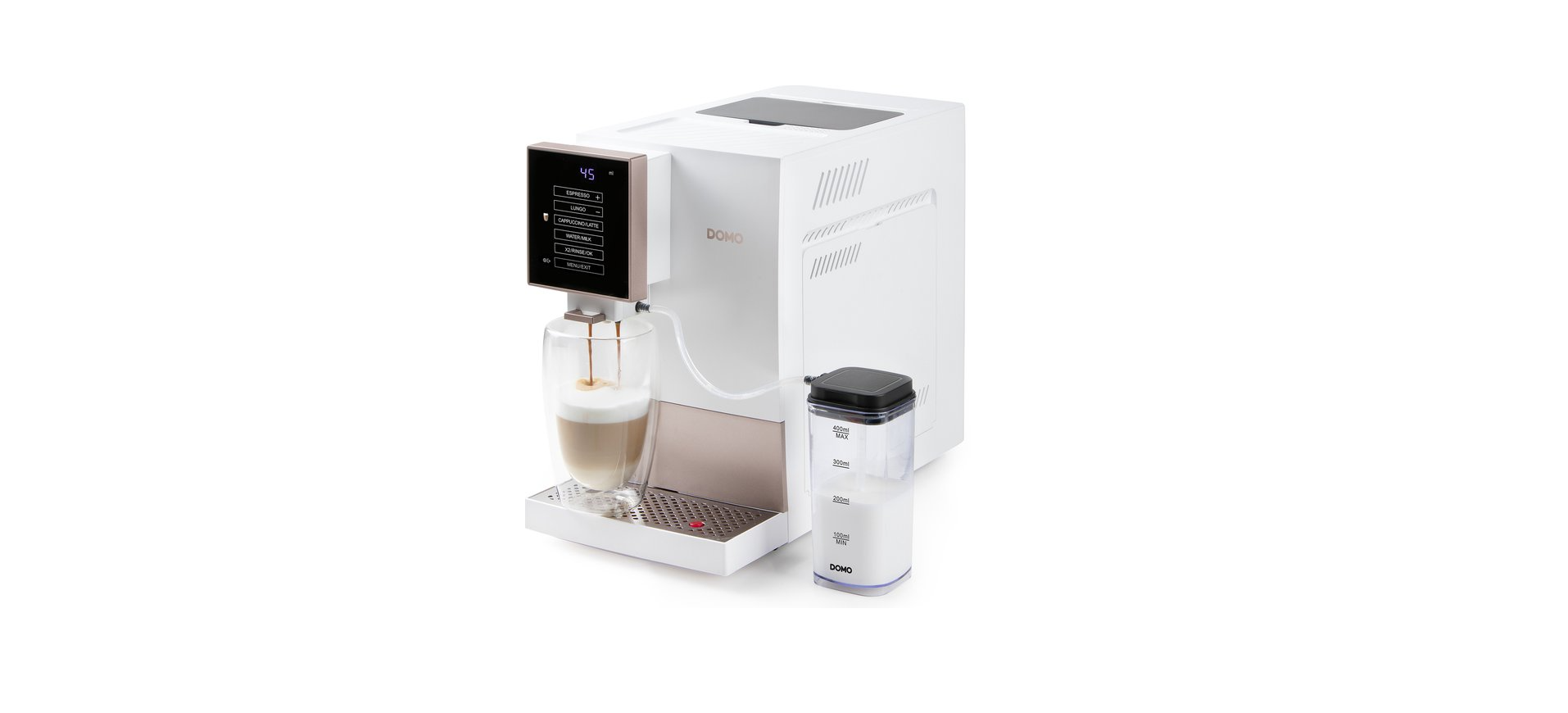

Domo DO742K Fully Automatic Espresso Machine

Safety Instructions
When using electrical appliances, basic safety precautions should always be taken, including the
following:
- Read all instructions carefully. Keep this manual for future reference.
- Make sure children cannot play with the packaging materials.
- This appliance is intended to be used in household and similar applications, such as:
- Staff kitchen areas in shops, offices, and other working environments;
- Farm houses; By clients in hotels, motels, and other residential-type environments;
- Bed and breakfast-type environments.
- Children should be supervised to ensure that they do not play with the appliance.
- Keep the appliance and its cord out of reach of children younger than 16 years.
- The appliance can become hot during use.
- Keep the power cord away from hot parts and don’t cover the appliance.
- Do not touch any hot surfaces; use the handles.
- Do not put the appliance in water or any other liquid.
- Do not use the appliance near any inflammable materials.
- Make sure that the air can circulate freely around the appliance.
Parts
- Water reservoir
- Coffee bean hopper lid
- Coffee bean hopper
- Grind settings dial
- Cup warmer
- Control panel
- Milk connection
- Drip tray grate
- Drip tray
- OverÁow indicator
- Coffee grounds collection tray
- Brewing unit
- Side panel

- On/off button
- Coffee and milk spout
- Milk tank lid
- Milk tank
- Milk nozzle
- Milk supply hose

- Cleaning brushes: 1 Àne and 1 coarse
- Extra milk supply hose
- Set of spare sealing rings

Control Panel

- Temperature indicator
- Time indicator
- Volume indicator
- Weight indicator
- Espresso / Increase
- Lungo or Americano / Decrease
- Cappuccino / Latte
- Water / Milk
- 2 cups / Rinse / ConÀrm
- Settings / Exit, stop, or go to the next step
Indicator Light

Before First Use
- Remove all packaging materials and any promotional stickers.
- Place the appliance on a Áat, stable surface.
- Provide adequate space around the appliance for ventilation.
- Insert the drip tray and coffee grounds collection tray. Make sure these are positioned correctly.

- Remove and clean the water tank. Fill with clean water and place in the espresso machine.
- I never exceed the MAX indicator on the water tank

- Fill the coffee bean hopper.

- Plug the plug into an electrical socket.
- The display will show ‘ON’. The appliance is now in standby mode and ready for use.
- Perform the rinse function one more time before Àrst use.
- Press and hold the RINSE button for 3 seconds to start the rinse function of the espresso machine.
- To turn off the appliance, press and hold the on/off button for 3 seconds.
Using the Device
- Press the on/off button to turn the appliance on. The appliance will automatically heat up and rinse. The display will show ‘ON’. The appliance is now in standby mode and ready for use.
- When the appliance is rinsing, the rinse water will be collected in the drip tray. Empty and clean this tray regularly. When the overÁow rises, it means the drip tray is almost full and needs to be emptied.

- Choose the desired preparation. If adjustments are made to the settings (amount of ground coffee, water, or milk) during preparation, the machine will remember them for the next time.
- To achieve the optimal coffee temperature, we recommend that you preheat your cup using the cup warmer on top of the appliance. You can also store your cups here, so you always have a warmed cup ready to use.

Prepation
- Adjust the height of the coffee spout and place a cup under the spout.
- Press the espresso button. The appliance will now brew an espresso according to the most recent settings (the default setting is 7 g of coffee with 40 ml of water). The quantities of ground coffee and water can be adjusted as the coffee is being prepared:
- Press + or – during grinding to adjust the quantity of ground coffee (the weight indicator “g” lights up and the display shows the current coffee quantity setting in grams).
- Press + or – during coffee preparation to adjust the coffee volume (the volume indicator “ml” lights up and the display shows the current water quantity setting in ml).
Milk
- Fill the milk reservoir with the desired amount of milk.
- Never exceed the MAX indicator on the milk tank.
- Close the lid. Make sure that the milk nozzle is properly connected to the lid.

- Place the milk tank to the right of or next to the drip tray grid.
- Fit the supplied milk supply hose to the milk tank.
- Next, connect it to the milk supply on the right side of the coffee spout.
- You can use scissors to cut the supply hose to the desired length.

- Choose the desired preparation.
Hot Water
- Adjust the height of the coffee spout and place a cup under the spout.
- Press the hot water button briefly.
- The appliance will dispense 200 ml of hot water. If you need less water, press the EXIT button to stop the Áow as soon as you have the desired amount of water.
- If you need more water, press the hot water button again and then the EXIT button as soon as the desired amount of water is obtained.
Dual Preparation
Press the x2 button to brew two cups of coffee in succession. This can be done both prior to brewing the coffee and while the coffee is brewing. The icon will light up on the display. While lit, the appliance will always brew 2x the selected preparation in consecutive order. Press the x2 button again to turn off this function.
Rinsing
- Adjust the height of the coffee spout and place a container under the spout.
- Press and hold the RINSE button for 3 seconds to start the rinse function of the espresso machine.
- This function uses about 60 mL of water and ends automatically after cleaning is completed.
- It is used to remove possible coffee residues in the pipes.
Settings & Configuration
In standby mode, press and hold the MENU button for 3 seconds to open the settings interface. After each step, press the MENU button brieÁy to move to the next step in the settings interface. To return to standby mode, press the MENU button multiple times to quickly move through all the steps. The appliance will automatically return to its standby mode after 15 seconds of inactivity in the settings interface.
Temperature
- The default temperature for the dispensed water is 90 °C. ‘
- Press + or – to adjust this temperature (between 75 °C and 95 °C).
- Press the MENU button brieÁy to move to the next step.
Auto Switching Off
- The display will show the letter A (for automatic) and the set time in minutes.
- The appliance will switch itself off if it hasn’t been used during this set time.
- Press + or – to set the desired time. This period can be from 10 to 30 minutes, in 5-minute increments.
- The default automatic switch-off for this device is set at 20 minutes.
- Press the MENU button brieÁy to move to the next step.
Start Up
The display will show “init”. This setting allows you to return to the factory Domo DO742K Fully Automatic Espresso Machine default settings.
- If this is what you want, press the conÀrmation key (OK) to do so. The appliance will erase all settings and reset to factory defaults. The appliance will then return to standby mode.
- If you do NOT wish to return to factory default settings, brieÁy press the MENU button to move to the next step.
Descaling
- The display shows “desc”, and the icon lights up.
- When the icon lights up during operation, the appliance needs to be descaled.
- Please use a descaler that is suitable for espresso machines. Dissolve the descaler in water.
- To do this, follow the instructions on the packaging of the descaler.
- In standby mode, press and hold the MENU button for 3 seconds.
- Press the conÀrmation button (OK) to start the descaling function. T
- The icon will start to Áash. Once the water tank is empty, rinse it,
- Àll it again with clean water, and insert the tank back into the appliance.
- Empty the collection tray and put it back underneath the coffee spout.
- Repeat this step until the appliance stops dispensing water and the descaling process is Ànished.
- The icon will turn off, and the appliance will return to standby mode.
Adjustment
The grind settings can be adjusted using the dial on the coffee bean hopper.
- Do this only when the grinder is turning; otherwise, the grinder may get Domo DO742K Fully Automatic Espresso Machine damaged. The default setting on the dial is the coarsest. We recommend that you do not change this setting for the Àrst 100 cups.
Cleaning & Maintainance
It is recommended that steps 1-7 be carried out daily. Daily maintenance Domo DO742K Fully Automatic Espresso Machine is important to extend the life of the espresso machine and achieve better results.
- Place a cup under the spout and rinse (see “Rinsing” under “Use”).
- Turn the appliance off and remove the plug from the socket.
- Disconnect the milk supply hose. Clean the milk tank, lid, pipe, and supply hose using warm water and a mild detergent. Rinse thoroughly under running water.
- Remove the milk connector from the coffee spout. Rinse with the Àne brush under running water.
- To clean the internal milk line, you can also Àll the milk tank with clean water and run it through the system using the MILK function.

- Remove the drip tray. Empty the coffee grounds collection tray.
- Using clean water, clean the drip tray, the grate, and the tray. Dry thoroughly.
- Rinse the brewing unit thoroughly under running water and dry it.
- Make sure all the coffee residue is removed. Never clean the brewing unit in the dishwasher!

- Use the cleaning brush to remove coffee residue in and around the internal ground coffee channel.

- Clean the outside and the inside of the housing and the control panel using a soft, damp cloth.
- Rinse the water tank under running water every 3 days.
- Place all parts back in their original position.
Troubleshooting

- The control panel is dirty. Clean the control panel using a soft cloth.
- Check that there is sufficient water in the tank.
- Thoroughly clean all parts. Descale the appliance as described in this manual.
- Check that there is sufficient water in the tank. Check that all parts are correctly inserted.
- Thoroughly clean all parts. Descale the appliance as described in this manual.
- Check that no foreign objects are blocking the grinder. Remove these if present.
- The grinder motor or wiring is faulty. Contact customer service at DOMO or the point of purchase.
- No steam comes out of the steam nozzle. Clean the nozzle thoroughly and try again.
- The milk used is not suitable for frothing. Use high-fat milk.
Environmental Instructions
For more detailed information about the recycling of this product, please contact your local city office, your household waste disposal service, or the shop where you purchased the product.
Warranty
Should you nevertheless experience problems with your device, we sincerely regret this. In that case, we kindly request that you contact our customer service. Our staff will gladly assist you. This appliance has a two-year warranty period. During this period, the manufacturer is responsible for any failures that are the direct result of construction failure.
Warranty period, you can return the device together with your receipt to the shop where you purchased it. The guarantee on accessories and components that are liable to wear and tear is only 6 months. The guarantee and responsibility of the supplier and manufacturer lapse automatically in the following cases.
- In case of incorrect connection, e.g., electrical voltage that is too high.
- In case of incorrect, rough, or abnormal use.
- In case of insufficient or incorrect maintenance.
- In case of repairs or alterations to the device by the consumer or non-authorized third parties.
Customer Support
- Timings: Monday – Thursday: 8.30 – 12.00 and 13.00 – 17.00. Friday: 8.30 – 12.00 and 13.00 – 16.30
- Address: LINEA 2000 – Dompel 9 – 2200 Herentals, Belgium
- Website: http://webshop.domo-elektro.be
- Tel: +32 14 21 71 91