

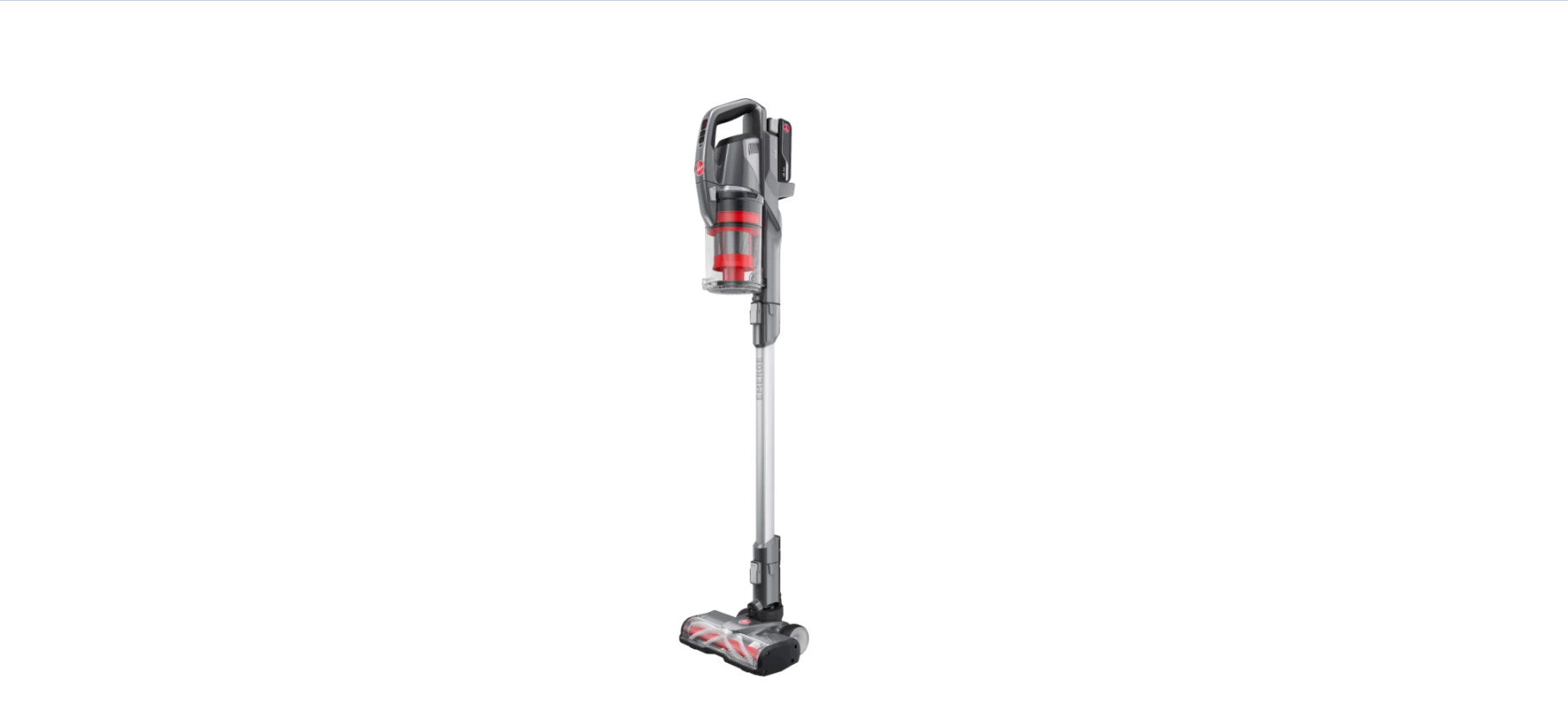

HOOVER F18OPSV22Z Emerge Vacuum Cleaner
Safety Instructions
- Don’t leave the charger plugged in when unattended.
- Don’t use the machine to pick up hot coals, cigarette butts, matches, or smoking hot burning items, or use it in an area where there may be harmful fluids (chlorine, bleach, and ammonia drain cleaner).
- Don’t handle the charger, battery, or use the machine with wet hands.
- Don’t unplug the charger by pulling on the power cord.
- Don’t attempt to remove blockages with sharp objects, as this may cause damage to the machine.
- Don’t charge the battery outdoors, or leave the charger connected to the mains when not in use.
- Don’t overfill the dirt container to avoid blocking the air flow through the machine.
- Always remove the battery from the machine before carrying out any maintenance or if storing it unused for a long period of time.
- Always check that the powered head and accessories are free from damage, dirt, and debris before using.
- This machine does not stay upright without constant support.
Battery Precautions
- Replace the battery with a Hoover ONEPWR battery only. Use of another battery may present a risk of fire or explosion.
- Do not attempt to disassemble the battery, remove any component projecting from the battery terminals, or dispose of it in a fire.
- The battery and charger have no user-serviceable parts. Fire or injury may result.
- Prior to disposal, protect exposed terminals with heavy insulating tape to prevent shorting.
Information
| Technical Specifications | F18OPSV22Z | F18OPSV24H | F18OPSV23H | F18OPSV22J2 | F18OPSV23I | F18OPSV22A2 |
| Product Description | Hoover ONEPWR® Emerge | Hoover ONEPWR® Emerge Essentials | Hoover ONEPWR® Emerge Plus | Hoover ONEPWR® Emerge Pet | Hoover ONEPWR® Emerge Pet Plus | Hoover ONEPWR® Emerge Complete |
| Console Model Number | BH53600ANZV | BH53610ANZV | BH53641ANZV | BH53602ANZV | BH53603ANZV | BH53654ANZV |
| Product Weight (without battery pack) | 2.8kg | 2.8kg | 2.8kg | 3.09kg | 3.09kg | 3.09kg |
| Dust Cup Capacity | 600ml | 600ml | 600ml | 600ml | 600ml | 600ml |
| Runtime* | Up to 45 mins | Up to 45 mins | Up to 45 mins | Up to 45 mins | Up to 90 mins** | Up to 90 mins** |
| Charge Time (per battery) | 3 hours | 3 hours | 3 hours | 3 hours | 3 hours | 2 hours |
| Charger Model Number | BH05000ANZ | BV05115ANZV | BH05000ANZ | BH05000ANZ | F18CHOP21K | BH35200ANZV |
| Battery(s) Included | 1x 4.0Ah | 1x 4.0Ah | 1x 4.0Ah | 1x 4.0Ah | 2x 4.0Ah | 2x 4.0Ah |
| Battery Model Number | BH29040ANZV | BH19240ANZV | BH29040ANZV | BH29040ANZV | BH29040ANZV | BH29040ANZV |
| Battery Voltage | 18V Li-Ion | 18V Li-Ion | 18V Li-Ion | 18V Li-Ion | 18V Li-Ion | 18V Li-Ion |
| Replacement Filter
Part Number |
FOPEMFT22N2 | FOPEMFT22N2 | FOPEMFT22N2 | FOPEMFT22N2 | FOPEMFT22N2 | FOPEMFT22N2 |
Compatible Battery Packs
| MODEL | TYPE | RATED VOLTAGE | RATED CAPACITY | CELL NUMBER |
| F18BTOP21J4 | Li-Ion | 18V | 4.0Ah | 5 |
| BH29040ANZ | Li-Ion | 18V | 4.0Ah | 5 |
| BH29040ANZV | Li-Ion | 18V | 4.0Ah | 5 |
| BH19240ANZV | Li-Ion | 18V | 4.0Ah | 10 |
Parts List

- Carry Handle
- Filter (hidden)
- Dirt Cup Release Button
- Dirt Cup
- Dirt Release Button (hidden)
- Handheld Crevice Tool (hidden)
- Power ON/OFF
- Reduce Suction
- Increase Suction
- Battery Level Indicator Light
- Reach Wand
- Reach Wand Crevice Tool (hidden)
- Floorhead with LED Lights
- Brushbar
- Battery Dock
- 1x ONEPWR 4.0Ah Battery
- ONEPWR Charger1
- 2-in-1 Dusting Brush/Crevice Tool
- Upholstery Tool2
- Wall Mount
- Flexi Crevice Tool3
- ONEPWR Compact Charger4
Assembly

- Fit the dirt cup onto the hooks, then rock it up into the handheld so it secures in place.
- Push the reach wand down onto the floorhead until it clicks into place.
- Push the handheld down onto the reach wand until it clicks into place.

- Lay the base on flat ground. Insert the end of the pole into the base until it clicks into place.
- Insert the charger head into the top of the pole until it clicks into place.
- Attach the power cord to the charger head and press the power cord into the hidden channel.
- Continue pressing the power cord into the channel down the back of the pole.
- Clip the tool accessory onto the pole.

- Choose the desired location, then place the wall mount on the wall.
- Ensure that the mount height allows the floorhead to be positioned flat on the floor when mounted.
- Mark the wall anchor locations. Install the anchors and screw the wall mount to the wall.
- Store the vacuum by firmly pressing the product into the wall mount to secure.
- Accessories can be stored by sliding them onto the top and bottom of the wall mount.
Charging

- Plug in the charger. Attach the battery pack to the charger by aligning the ribs on the battery pack with the grooves in the charger.
- The charger light will flash white to show when the battery is charging.
- The light on the charger will stop flashing and go off when the battery is fully charged.
- Once fully charged, slide the battery off the charger to remove it.

- Plug in the charger. Attach the battery pack(s) to the charger.
- The charger light will flash white to show when the battery is charging.
- The light on the charger will stop flashing and remain on when the battery is fully charged.

- Plug in the charger and place the vacuum onto the charging stand, as shown.
- To charge the spare battery, slide the battery pack into the charger located at the rear of the charger head.
- The charger light will flash white to show when the battery is charging.
- The light on the charger will stop flashing and remain on when the battery is fully charged.
MODEL: F18OPSV24H
- Slide the battery onto the charger.
- The battery lights will flash white to indicate the battery is charging.
- The battery lights will illuminate in turn until all four lights are illuminated and the battery is charged.
- When fully charged, the lights will go out.
- When fully charged, press and hold the side buttons and slide the charger off the battery to remove it.

Operation

- Slide the battery into the machine until it clicks into place.
- Place your foot on the floor. Pull the handle backwards to recline.
- To remove the battery, press both buttons to release.
- ON/OFF power button. Unit turns on in Default mode.
- To increase the runtime for hard floors and everyday messes.
- To increase suction for more embedded messes.
- The battery LED is illuminated WHITE when on and RED when the battery is low.
- During use, press the battery symbol on the battery.
- The lights will illuminate, indicating how much charge is remaining.

Handheld Mode

- Press the release button on the reach wand and pull to separate.
- Push the chosen accessory into the handheld until it clicks into place.
- Accessories can also be attached to the reach wand for cleaning up high.
- Disconnect the floorhead and push the accessory into the reach wand until it clicks into place.
Use
2-in-1 Dusting Brush/Crevice Tool
- Soft-bristle dusting brush for delicate surfaces and skirting boards.
- 2a. For edge cleaning, press the button and push the dusting brush down.
- 2b. For tight and hard-to-reach areas, press the button and pull the dusting brush up to remove it.
- Motorised Pet Tool. While in use, the mini motorised base plate can be rotated so it can be used flat or horizontally for all-angle cleaning.

- The Powered Extension Hose extends to reach confined spaces. Powered for use with the motorised pet tool and floorhead. It can also be used with the upholstery and 2-in-1 dusting brush/crevice tool.
- Upholstery Tool: Ideal for cleaning surfaces such as sofas, chairs, mattresses, and cushions. For more delicate areas, the brush attachment can be removed by unclipping the attachment from the tool.
- Flexi Crevice Tool for cleaning those hard-to-reach areas. Extends and bends for cleaning in awkward gaps.
Cleaning & Maintainance

- Press the button to release the dirt cup.
- Hold the dirt cup over a bin and press the dirt cup release button to empty. Close the dirt cup, then replace it by rocking it back into place.

- Lift the dirt cup cover to access the filter. Lift the filter and separator from the dirt cup.
- Tap the separator over a bin to remove dirt and debris, and wipe over the metal shroud with a dry cloth.

- Pull the tab on the filter to remove it from the separator.
- Wash the filter under running water (40°C max). Leave for at least 24 hours or until fully dry before replacing.
- Refit the separator, making sure that the tabs on the separator fit into the grooves on the dirt cup. Then refit the dirt cup cover.
MODELS: F18OPSV22Z, F18OPSV24H & F18OPSV23H
- Remove the floorhead from the reach wand. Using your fingers or a coin, push and turn the brushbar lock anticlockwise to release the brushbar.
- Pull the brushbar out of the floorhead with the pull tab.
- To remove any threads or hair, cut along the groove of the brushbar.

- Refit the brushbar into the housing and turn the brushbar lock clockwise to lock.
MODELS: F18OPSV22J2, F18OPSV23I & F18OPSV22A2
- Using a coin, push and turn the brushroll lock anticlockwise to unlock the brushroll.
- Lift and rotate the brushroll away from the floorhead assembly.
- Clear debris from the brushroll with a dry cloth. Clear HOOVER F18OPSV22Z Emerge Vacuum Cleaner any dirt/debris from the end caps of the powered nozzle.

- Refit the brushroll into the housing and turn the brushroll lock clockwise to lock.
- Using a coin, turn the brushbar lock anticlockwise to release the brushbar.
- Pull the brushbar out from the brushbar housing.
- To remove any threads or hair, slide the blade of a pair of scissors into the groove on the brushbar and cut along the groove. Clear any dirt/debris inside the housing of the tool.

- Check the inlet for any blockages and use a blunt HOOVER F18OPSV22Z Emerge Vacuum Cleaner object to remove the blockage.
- Refit the brushbar and turn the brushbar lock clockwise to lock.
Checking For Blockages

- Remove the dirt cup and reach wand.
- Check and clear any dirt and debris from the dirt cup and handheld inlet.
- Press the dirt cup release button and remove the dirt cup.
- Check and clear any dirt and debris from behind the dirt cup flap.
- Check the powered floorhead for any blockages and use a blunt object to remove the blockage.

- To test for a blockage in the reach wand or powered hose, drop a small ball of paper into the wand/hose.
- The paper will drop through if the wand/hose is clear.
- Use a broom handle or similar blunt object to remove any blockage.
Troubleshooting
- Check the contents of the box to make sure the HOOVER F18OPSV22Z Emerge Vacuum Cleaner part is definitely included with your machine.
- The motor thermostat may have tripped. Empty the dirt container and check for blockages.
- Clean the filters and allow the machine to cool for approximately 1 hour.
- If you have washed the filters, wait 24 hours to fully dry before placing them back on the machine.
- The brushbar motor sensor in the floorhead or motorised pet tool has been activated.
- To reset, switch the machine off and remove the battery.
- Remove the floorhead/tool from the reach wand/handheld and clear any obstruction.
- Wait 1 minute before refitting the floorhead /tool. And reactivating the machine.
- Install the battery and switch the machine on.
- The dirt cup may be full or blocked. Check the dirt cup and handheld inlet for blockages.
- The filters may be clogged or need replacing. See Cleaning the Filter and Separator section.
- There may be a blockage. See the Checking for Blockages section.
- The floorhead may be blocked. See Removing and Cleaning the Brushbar section.
- The machine, floorhead, and reach wand may HOOVER F18OPSV22Z Emerge Vacuum Cleaner not be correctly fitted. See the Assembly section.
- Battery charge is running low (<20%).
Customer Service
- Website: https://service.hoover.co.uk/
- Tel: 03444 995599