

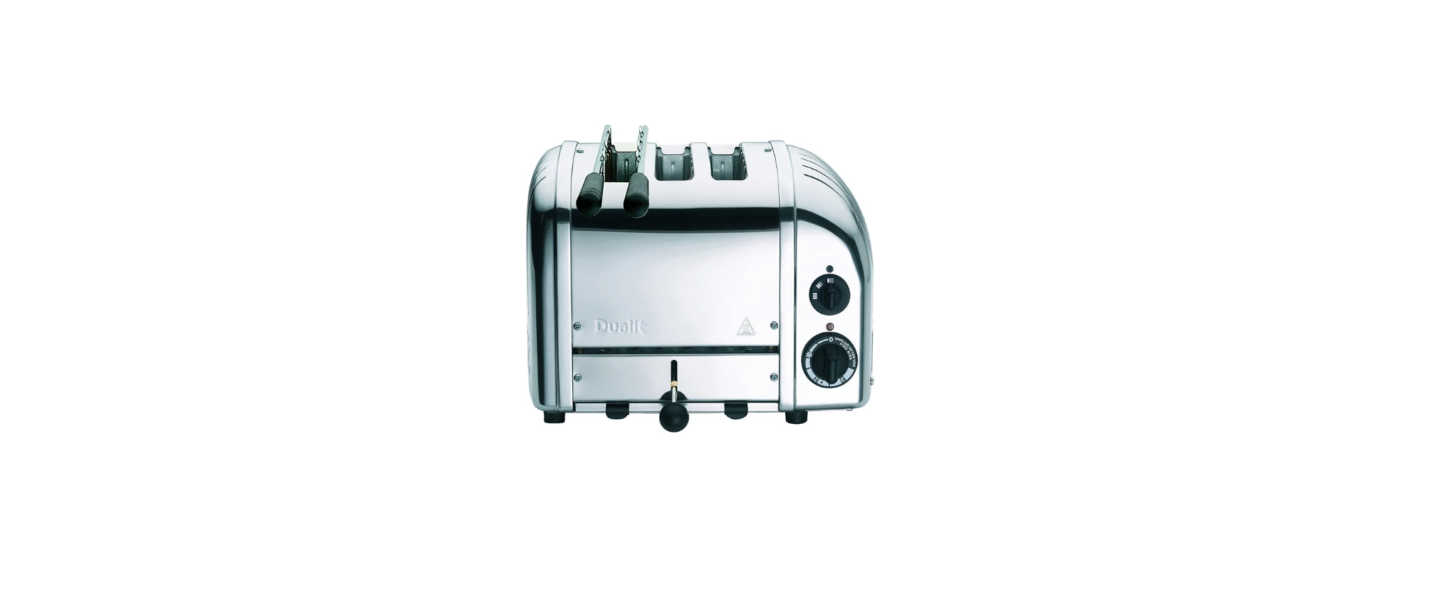

Dualit 3 Slice Vario Classic Toaster

Safety Instructions
- Before plugging in, check that the voltage on the rating label is the same as the mains supply.
- Failure to do this may cause an overload, trip a circuit breaker, or blow a fuse.
- Unplug from the outlet when not in use and before cleaning.
- Allow to cool before putting on or taking off parts.
- Do not insert hands, implements, or any metallic or sharp utensils into the toaster.
- Do not use foods, including tarts and pastries, that may drip fillings or coatings containing sugar when heated in your toaster, as this may cause a fire.
- Do not allow the device to freeze.
- This may compromise electrical safety and will degrade the performance of all lubricants.
- Risk of electric shock and damage.
- Bread may burn; therefore, do not use the toaster near or below combustible material such as curtains.
- If using the appliance close to a wall, ensure this is clad with non-combustible material and adheres.
- Keep the area around the Air Intake clear.
- Do not place anything on top of or near the sides/ underneath the appliance.
- Do not modify the appliance.
- Remove all packaging before use.
- Do not put a pan on top of the toaster or warming rack.
- Risk of fire, electric shock, scalding, or injury to persons.
- Never touch the Conveyor Belt. Risk of injury.
Setting Up
- Do not leave unattended during use; unplug after each use (risk of fire if an unattended appliance is left operating).

- Register your product at dualit.com. This will only take 60 seconds. You will need the product model and serial number that are on the rating label on the base of the product.

- DO NOT STORE OR USE YOUR TOASTER IN AN APPLIANCE GARAGE OR UNDER CUPBOARDS. A fire may occur if incorrectly positioned.

- DO NOT STORE OR USE YOUR TOASTER CLOSE TO CURTAINS OR FLAMMABLE MATERIAL. A fire may occur if incorrectly positioned.

- Place the toaster on an open level surface. Ensure the toaster is positioned at least 20CM CLEAR FROM ANY OVERHANGING CUPBOARDS, WALLS, ceilings, AND behind the toaster.

- Your toaster is fitted with one adjustable foot,ot which may be raised or lowered to compensate for uneven surfaces. The adjustable foot is located on the base of the toaster and is hexagonal; rotate it to adjust the height..

- CRUMB TRAY MUST BE IN PLACE DURING TOASTING.

- Crumbs will accumulate in the crumb tray and could catch fire if the tray is not emptied frequently. Pull out the crumb tray and wipe it clean using a damp cloth. CRUMB TRAY MUST BE IN PLACE BEFORE TURNING ON THE TOASTER AND DURING TOASTING.

- UNPLUG WHEN NOT IN USE.
Toasting Instructions
- Your toaster is fitted with a mechanical timer. Please note this is not a conventional Browning setting. Our Peek & Pop® feature allows you to check the progress of your toast at any time by pushing down on the ejector knob.
- Wholemeal bread takes longer than white bread, fresh bread will take longer than day-old bread, and sweet bread will toast quicker than white bread.
- Remember to adjust your timer to allow for your particular type of bread.
- After the first round of toast, the elements and toaster body will be at full operating temperature; subsequent rounds will take less time to toast.
- The thickest slice of bread that will fit in your toaster is 28mm thick. Forcing bread that is too thick or too long into the slots will be difficult to eject once toasted.
- You may find it easier to use a ‘sandwich cage’ to toast smaller items.
- Inserting, checking, nd removing will all be easier (sold separately).
- When hand-cutting a fresh loaf, cut the slices as evenly as possible.
- Uneven slices will toast unevenly.
- Keep elements free from breadcrumbs and broken pieces of bread.
- If left, these may burn out the elements. With the toaster unplugged, use a soft brush to clean inside your toaster; do not use a knife!
- To reheat recently made toast, set the timer to the ‘defrost’ symbol.
- Cancel toasting manually at any time by rotating the timer back to ‘O. This will not damage your timer.
Know Your Product
- Unpack the box with care, keeping all the packaging materials until you are satisfied that everything is present and in working order.
- Once satisfied, remove any tags from the toaster body and recycle the packaging appropriately.
- Do not remove tags from the cord. You may wish to keep the box to store your appliance.
- All illustrations are for representation only; your model may vary from the illustrations shown..

Accessories
- Convert your toaster into a toasted sandwich maker with this quick and easy-to-use accessory.
- Using a cage also offers greater toasting control for toasting smaller items such as crumpets, scones, teacakes, and uffins.

- The ‘warming rack’ is a universal accessory for all Dualit Classic Toasters.
- Perfect for warming or lightly toasting any bread product that will not fit inside the slots.

- Be mindful that repeated use of the Warming Rack without allowing the toaster to fully cool between cycles may cause the Thermal Protection Device to activate (see page 17)

The Selector
- This avoids uneven toasting and saves energy simultaneously.
- Select the one slice indicator on the ‘selector switch’. The left-hand slot will heat up on both sides.

- Select the two-slice indicator. The two slots on the left will toast on both sides.

- Select the three-slice indicator. The three slots on the left will toast on both sides.

- Select the four-slice indicator. All slots will heat up
Toasting Bread
- THIS IS AN ATTENDED APPLIANCE. Do not leave unattended during use; unplug after each use (risk of fire if an unattended appliance is left operating).

- The toaster will only engage when the power is switched on. Plug the toaster into the wall power socket and turn the power on at the socket.


- Check the progress of your toast at any time by pushing down on the ‘ejector knob’. If you remove your toast before the cycle is complete, cancel the timer and isolate.

- The ‘timer’ will click off to ‘O position. To cancel toasting, manually rotate the ‘timer’ to ‘O. If the neon light remains illuminated after use, immediately isolate the toaster & call the service centre.

- The toast will not pop up, but will keep warm inside the toaster. Press down the ‘ejector knob’ and the toast will pop up ready for serving.
Frozen Bread
- Toast bread directly from the freezer with this handy setting

- Set the ‘selector switch’ to the desired number of slots you require and insert your frozen slices of bread.

- Rotate the ‘timer’ to the defrost symbol and let the timer wind down to ‘0’.

- When the timer stops, wait 20 seconds.

- Your bread will now be defrosted and ready for toasting.

- Set the timer to your preferred setting and continue to toast as if toasting fresh bread.
Making Sandwiches
- The sandwich cage accessory (sold separately) will transform your toaster into a versatile sandwich toaster.

- Use medium sliced bread, lightly butter the OUTSIDE OF EACH SLICE.

- Place your fillings between the unbuttered sides. DO NOT OVERFILL THE SANDWICH. Place the sandwich in the cage.

- Set the ‘selector’ and, starting from the left, insert the cage into the slots. Push down until clamped tightly shut.

- Toast until the sandwich is golden. Setting 3 on the ‘timer’. Adjust for your bread type.

- Allow to rest for a further minute inside the toaster to allow fillings to fully warm. If neothe n light remains illuminated after use, immediately isolate the toaster & call the service centre.

- Remove, cut, and serve. CAUTION: FILLINGS CAN BE HOT.
Cleaning & Care

- Wipe that stainless steel cover with a non-abrasive cloth. A stainless steel cleaner can be used to restore shine to the cover only, but do not use an aggressive cleaner or one that contains ammonia.

- Wipe the aluminium end castings with a damp cloth. Do not use a chemical or abrasive cleaner.

- Crumbs will accumulate in the crumb tray and could catch fire if the tray is not emptied frequently. Pull out the crumb tray and wipe it clean using a damp cloth. Take care when cleaning. CRUMB TRAY MUST BE IN PLACE DURING TOASTING.

- With the toaster unplugged from the power supply, use a SOFT BRUSH to clean inside your toaster; do not use a sharp or metal utensil! Crumbs should be carefully brushed off the elements using only a soft brush; the toaster can be turned upside down, and excess crumbs can be shaken out.
Thermal Protection Device
- Ensure your toaster is situated in an area with at least 10cm of space to the left, right, and back of the toaster.
- Use the toaster clear of overhanging cupboards and away from any flammable materials.

- Always load bread into the toaster starting from the left-hand slot.

- Always use the appropriate setting for the number of slices of bread to be toasted.

- Be mindful of reducing the toasting time if the toaster is already warm from previous use, as the bread toasts faster on the 2nd and 3rd cycles.

- Be mindful that repeated use of the Warming Rack without allowing the toaster to fully cool between cycles may cause the device to activate.

- Always unplug the toaster after use.
Thermal Fuse
- If the toaster neon illuminates, but the Dualit 3 Slice Vario Classic Toaster elements fail to warm up, or if there is an audible ‘click’ above the normal ticking of the timer from the toaster while it is still operating, you may have activated the Thermal Protection Device.
- Before resetting, you must ensure that there is no fault within the appliance. Do not reset unless a qualified electrician has examined the toaster and verified that the Selector Switch, Time, nd all other Components are in good working order.
- The Thermal Protection Device can be reset by allowing the toaster to fully cool, unplugging the toaster from the wall socket, and following the instructions below.
- Resetting the Thermal Protection Device should only be carried out by a qualified electrician. The toaster must be Portable Appliance Dualit 3 Slice Vario Classic Toaster Tested following reset of the Thermal Protection Device.

- Unplug the toaster and allow it to fully cool.

- Remove the crumb tray and toaster base plate to access the fuse.

- The fuse can be located in the rear corner of the toaster body.

- The fuse is reset by depressing the Dualit 3 Slice Vario Classic Toaster small white button on its face.

- Refix the base plate and return the crumb tray.

- The appliance must be Portable Appliance Tested before use.
- Fitting of non-Dualit parts will invalidate the guarantee.
Troubleshooting
| POSSIBLE CAUSE(S) | SOLUTION(S) |
| MY TOASTER IS NOT WORKING: | |
| 2. Your fuse or Thermal Protection Device may have blown, or the timer may need replacing. | 2. Check if the light is glowing red.
If yes, unplug the toaster and call the service centre. If no, your plug fuse may have blown. |
| I GET UNEVEN TOASTING: | |
| 2. End elements take a little longer to warm up than centre elements. | 2.1 Preheat the slots before inserting bread by rotating the timer around, let it wind down to the circle indicator, then insert your bread into the active slots. |
| 2.2 Ensure all active slots have bread inserted when toasting. | |
| 2.3 Once the toaster is at optimum operating temperature, this will no longer occur. | |
| 3. All active slots do not contain bread. | 3. Check that the selector switch is set for the number of slots being used. |
| 4. If the timer is noticeably slow, it may need replacing. | 4. Unplug and do not use the toaster. |
| ONE SIDE OF MY BREAD IS NOT TOASTING: | |
| 1. Elements heat up on both sides. | 1. Remember to insert bread from the very left-hand slot. |
| 2. One or more of the elements may need replacing. | 2. Call the helpline or visit www.dualit.com for replacement elements. |
| SMOKE COMING OUT OF THE SLOTS | |
| 2. The crumb tray might be full. A buildup of crumbs can burn or cause a fire. | 2. Empty the crumb tray. |
| MY TIMER IS NOTICEABLY SLOW OR STICKING | |
| 1. Your timer will need replacing. | 1. Unplug and do not use the toaster. Repair the timer immediately. |
Guarantee
This Guarantee covers both parts and Dualit 3 Slice Vario Classic Toaster labour. Your Guarantee period is as follows: If your conveyor toaster fails within Dualit DCT2T Conveyor Toaster one year from the date of purchase, we will repair or replace it free of charge, except for the elements, provided:
- Dismantling of or interference with the product.
- Operational misuse, wear and tear from the Dualit DCT2T Conveyor Toaster, normal usage, incorrect adjustment, and neglect.
- Before returning any product under this Guarantee, please check that:
- You have followed the product Dualit DCT2T Conveyor Toaster instructions correctly.
- The defect is not due to a blown fuse. Please check and change the plug fuse.
- Please give exact details of the Dualit 3 Slice Vario Classic Toaster nature of the defect.
This Guarantee does not cover any other claims whatsoever, including, without limitation, any liability for incidental, indirect, or consequential damage, nor does it cover any claims for conversion or modification or the costs of repair carried out by any third party without the prior consent of Dualit.
Register Your Product
- Fast and efficient customer service, important safety advice, and access to manuals and product information should you require assistance with your purchase.
- A library of mouth-watering recipes and regular articles, and blogs.
- Be the first to hear about exciting new Dualit products.
- Scan the QR code.

Customer Support
- Call: +44 (0)1293 652 500
- Monday to Friday: 09:00 to 17:00
- Email: info@dualit.com
- Visit: http://www.dualit.com
FAQs
Q: What makes the Dualit Vario Classic Toaster unique?
Ans: The Dualit Vario Classic Toaster is made by hand in the UK and features replacement parts, manually controlled ejector levers, and mechanical timer controls. Because of its long-lasting design, it’s perfect for light business or residential use.
Q: Why doesn’t the toast pop up automatically?
Ans: This is intentional. Toast is kept warm inside the toaster by the manual ejector system until you manually raise it with the lever. This is a distinguishing characteristic of the Vario Classic line.
Q: How do I select how many slots heat up?
Ans: Select one, two, or all three spaces to be active with the slot selector dial. This extends the heating elements’ lifespan and saves electricity.
Q: Can I toast just one slice?
Ans: Indeed. Just lay your bread in the slot on the left (or as directed by the handbook) and set the selector to “1”. This guarantees uniform browning.
Q: How do I use the “bagel” or “bun” setting?
Ans: Turn on the centre elements alone to set the selector to toast the inner side of the bagel or bun (see to the manual for the proper dial setting). Face the cut side towards the central components.
Q: Can I replace the heating elements?
Ans: Indeed! The Vario Classic’s entirely replaceable heating elements, timers, and other components are among its primary characteristics. For parts, get in touch with Dualit or an authorised repair facility.
Q: Why is there a smell during first use?
Ans: As manufacturing residues burn off during initial usage, a slight smell or smoke is typical. It ought to go away after a few cycles.