



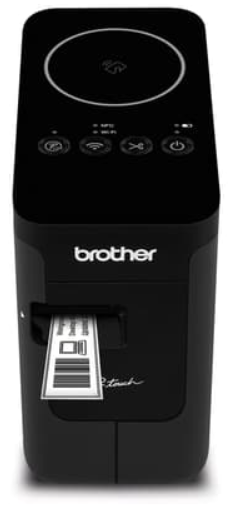
Brother PT-P750W Electronic Labeling System
Saftay Introduction
- Do not use the P-touch labeler in any way or for any purpose not described in this guide.
- Use only Brother TZe tapes with the P-touch labeler. Do not use tapes that do not have the mark.
- Only use a soft, dry cloth to clean the P-touch labeler; never use alcohol or other organic solvents.
- Use a soft wipe to clean the print head; never touch the print head with your fingers.
- Do not put any foreign objects into the tape exit slot, the AC adapter connector, or the battery compartment, etc.
. Many studies of low-level RF exposures have not found any biological effects.
Trademarks and Copyrights
P-TOUCH is a trademark or registered trademark of Brother Industries, Ltd. © 2014 Brother Industries, Ltd. All rights reserved.
Apple, Macintosh, Mac OS, iPhone, iPad, and iPod are trademarks of Apple Inc., registered in the United States and other countries. The names of other software or products used in this document are trademarks or registered trademarks of the respective companies that developed them.
Statement
The purpose of the International ENERGY STAR® Program is to promote the development and popularization of energy-efficient office equipment. As an ENERGY STAR® Partner, Brother Industries, Ltd. has determined that this product meets the ENERGY STAR® guidelines for energy efficiency
Intended Purpose
- Use the rechargeable battery only for its intended purpose. The P-touch labeler and rechargeable battery are designed to function exclusively with each other. Do not insert a different rechargeable battery into the P-touch labeler or insert the rechargeable battery into a different P-touch labeler; fire or damage may result.
- DO NOT charge the rechargeable battery near a fire or in direct sunlight. This could activate the protection circuitry, which is designed to prevent danger from high heat.
- DO NOT allow wires or other metal objects to come into contact with the terminals of the rechargeable battery. This could cause an electrical short and cause metal objects to overheat.
- DO NOT allow the rechargeable battery to come into contact with or to be immersed in water.
- DO NOT use the rechargeable battery with the polarity (+) (-) reversed.
- Liquid (electrolyte) leaking from the P-touch labeler or rechargeable battery may indicate that the rechargeable battery is damaged.
- Do not touch the electrolyte. Immediately rinse liberally with tap water or other clean water and seek the advice of a medical professional.
Tips on Using the Rechargeable Li-ion Battery
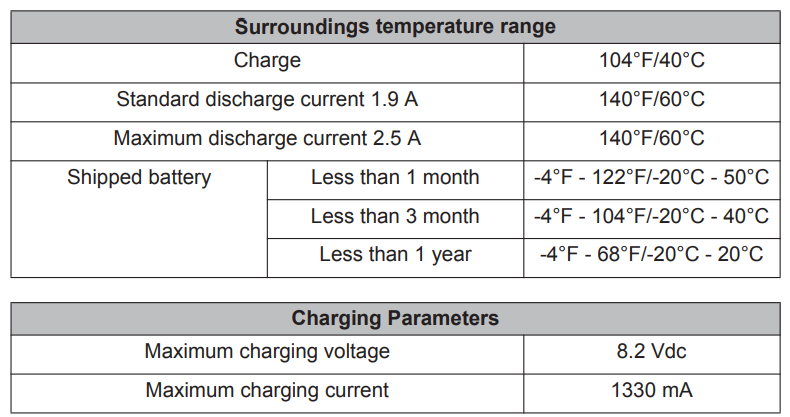
- The rechargeable Li-ion battery charging can take place in 41°F-95°F (5°C-35°C) environments. Charge the rechargeable Li-ion battery in an environment in this temperature range.
Rechargeable Li-ion Battery Characteristics
Understanding the properties of the rechargeable Li-ion battery will allow you to optimize its usage.
- Using or storing the rechargeable Li-ion battery in a location exposed to high or low temperatures may accelerate its deterioration.
Specifications
- Nominal Voltage: DC 7.2 V
- Nominal Capacity: 1850 mAh Rechargeable Li-ion Battery
Installing the Rechargeable Li-ion Battery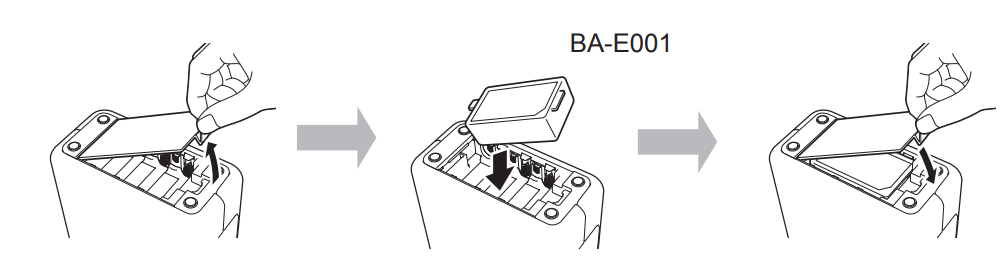
To remove the rechargeable Li-ion battery, reverse the installation procedure.
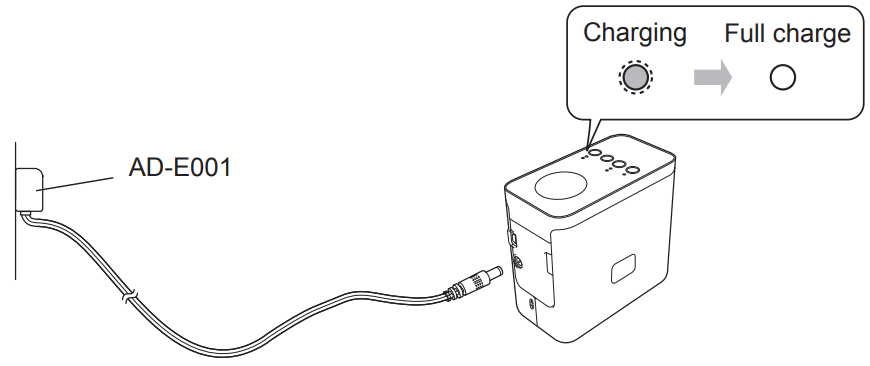
Charging the Rechargeable Li-ion Battery
Stopping the Rechargeable Li-ion Battery Charging
To stop the rechargeable Li-ion battery from charging, disconnect the AC adapter cord.
Unpacking
Parts Description
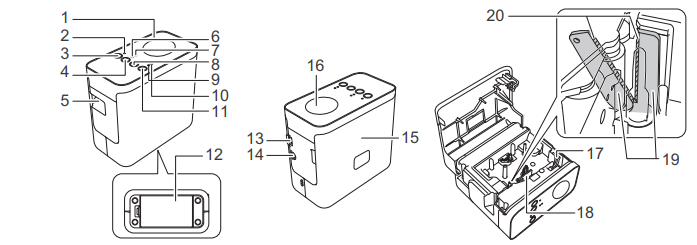
- Top panel
- Editor Lite lamp
- Editor Lite button
- Wireless mode button
- Tape exit slot
- Wi-Fi lamp
- NFC lamp
- Feed & Cut button
- Status lamp
- Battery lamp
Setting 
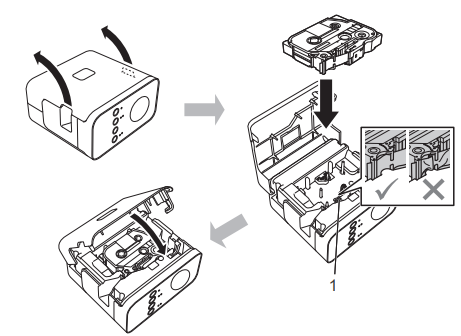
Connecting the Power Supply
Using the AC adapter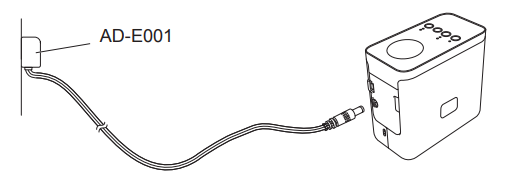
Using the batteries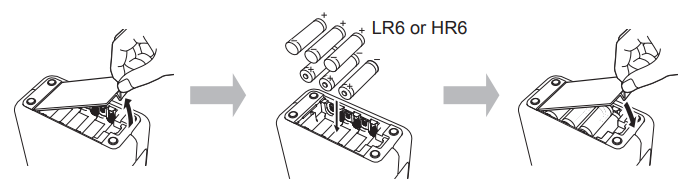
To remove the batteries, reverse the installation procedure.
Turning the On or Off
On: Press the Power button.
Creating a Label using P-touch Editor Lite
- Connect the USB cable to the computer and the PT-P750W

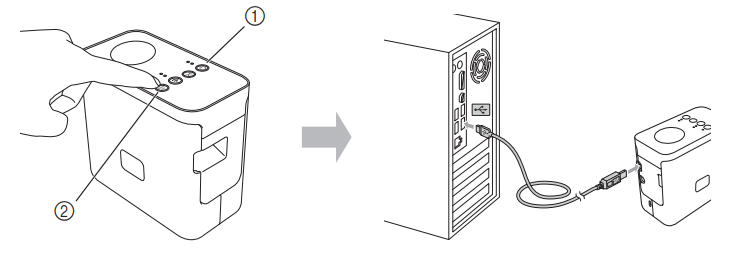
For Windows® 7

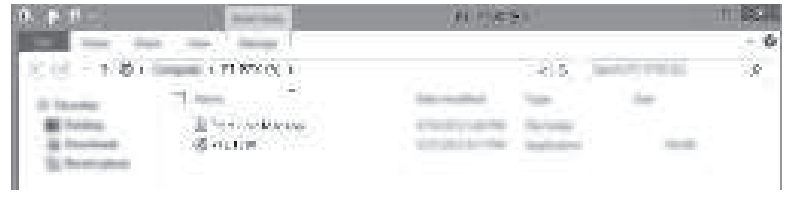
Double-click [PT-P750W] on the desktop and the [P-touch Editor Lite] application icon.

How to Disconnect the P-touch Labeler
For Windows
- To disconnect the P-touch labeler, click the icon in the computer’s task bar (,, or ).
- Click [Safely remove USB Mass Storage Device].
For Macintosh
-
- Select [Eject] from the Context menu.
- Drag and drop it in the Trash.
Brother iPrint&Label
Brother iPrint&Label lets you use your Brother machine’s features directly from your mobile device, without a computer. Simply search for “Brother iPrint&Label” in the App Store or Google Play.
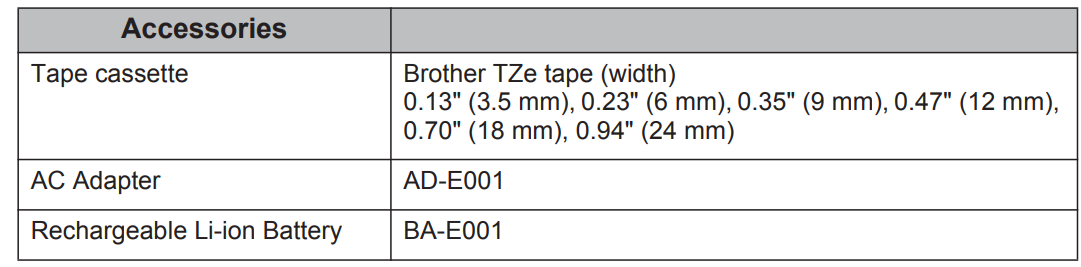
Accessories
Please see the Brother Solutions Center (support.brother.com/) for the latest OS compatibility information.
Definition of the LED Lamp
| Lamp | Condition | |
| Wi-Fi | The green lamp is lit | Connected wirelessly. |
| The green lamp is flashing | Not connected wirelessly. | |
| NFC | Not lit | The Wireless Direct mode is disabled (connections cannot be made). |
| The green lamp is lit | The Wireless Direct mode is enabled (connections can be made). | |
| Green lamp is litĺGoes off briefly.y | An NFC-compatible device was placed near the P-touch labeler (NFC tag data was sent). | |
| The green lamp is flashing. | ||
| STATUS | The green lamp is lit | Power is ON. |
| The green lamp is flashing | Receiving data from the computer. Transferring data. | |
| The orange lamp is lit | The cassette cover is open. Close the cassette cover correctly.
For details on resetting the P-touch labeler, see “How to Reset the P-touch Labeler”. |
|
| The orange lamp is flashing | Cooling (Wait for the temperature to cool down)
Reset in progress. For details on resetting the P-touch labeler, see “How to Reset the P-touch Labeler”. |
|
| The red lamp is lit | The P-touch labeler is booting. | |
| The red lamp is flashing | Red lamp flashes for 0.9-second intervals:
No tape cassette Transmission error Overheating error, Cutter error Red lamp flashes for 0.3-second intervals: System error |
|
| Battery | Not lit | Charging is complete.
The battery is fully charged. |
| The orange lamp is lit | Charging. | |
| The orange lamp is flashing. | Orange lamp flashes slowly:
The remaining battery level is half or low (the lamp flashes faster as the remaining battery level decreases). Orange lamp flashes for 0.5-second intervals: Charge the battery. |
|
Important Information
Should you have questions or need information about your Brother product, we have a variety of support options for you to choose from:
Customer Service
- Telephone: 1-877-BROTHER(1-877-276-8437)
- Fax: 1-901-379-1210
- Website: www.brother-usa.com Supplies/Accessories:
- www.brothermall.com or 1-877-552-6255