

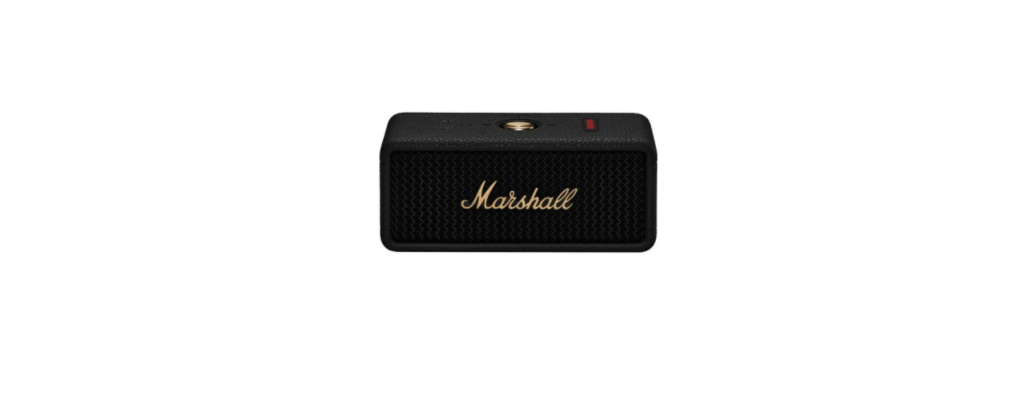

Marshall EMBERTON III Portable Loudspeaker
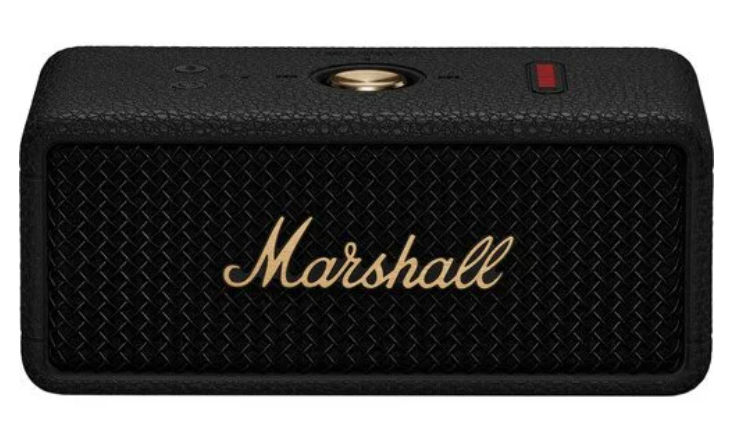
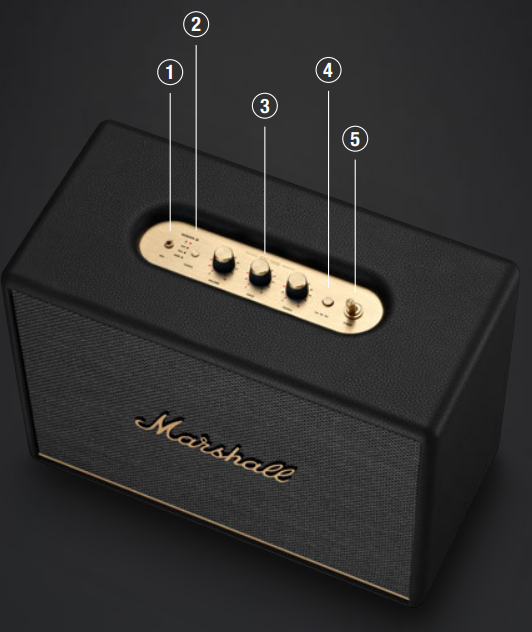
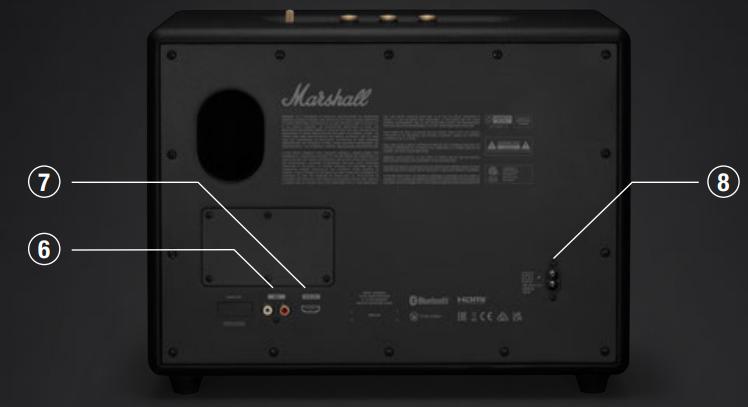
Device Layout
- SOURCE SELECTION Push the source button to toggle between Bluetooth®, AUX, RCA, and HDMI audio sources. 3.5 mm input plug into an analogue audio device with a 3.5 mm stereo jack.
- AUDIO CONTROLS Woburn III includes three controls for adjusting the audio.
- Volume control
- Bass control
- Treble control
- MEDIA CONTROL: Control the audio directly from the top panel when playing via Bluetooth.
- Push to play or pause
- Push right to skip forward
- Push left to skip back
- Hold left or right to rewind or fast forward.
- POWER SWITCH Use the power switch to turn the speaker on or off.

- RCA INPUT (LEFT AND RIGHT) Plug in an RCA audio device, such as an RIAA turntable.
- HDMI ARC INPUT Plug into an HDMI-supported TV.
- POWER INPUT Use the included mains lead to connect Woburn III to the wall socket.
Getting Started
Connect the mains lead to the mains input on your speaker, then connect the mains plug to the wall socket.
- Use the power switch to turn the speaker on.
- Download the Marshall Bluetooth app and follow the in-app instructions to set up your speaker.
- Push and hold the Power button until the speaker turns on.
- Push and hold the Bluetooth button until the LED turns to a slow blue pulse.
- Select EMBERTON III from your audio device’s Bluetooth list.
Pairing New Device
Emberton III can be connected with 2 devices at a time and remembers up to 8 previously paired devices. When in range, it will try to reconnect with the last connected device.
- Push and hold the power button until the speaker turns on.
- Push and hold the Bluetooth button until the LED turns to a slow blue pulse.
- Select EMBERTON III from your audio device’s Bluetooth list.
Resetting the Speaker
A factory reset will reset the speaker to its original settings, excluding any firmware updates.
- Remove EMBERTON III and EMBERTON III [LE] if present, from your sound device’s Bluetooth list.
- Ensure that the speaker is on. Push and hold the Bluetooth button for 7 seconds.
- The Bluetooth indicator turns quickly red, and the speaker restarts.
- The speaker has returned to its factory settings and is ready to be paired.
Bluetooth Pairing
- Use the source button to select Bluetooth.
- Push and hold the source button until the Bluetooth LED pulses red.
- Select WOBURN III from your audio device’s Bluetooth list.
AUX Device
- Connect a 3.5 mm stereo jack to the AUX input on the top of the speaker.
- Connect the other end of the lead to the audio output on your audio source.
- Use the source button to select AUX.
RCA Device
- Connect a lead with RCA jacks to the RCA input on the back of the speaker.
- Connect the other end of the lead to the output on your audio source.
- Use the source button to select RCA.
Connecting HDMI
- Plug an HDMI lead into the HDMI port on the back of Woburn III and the HDMI ARC port on your TV.
- Turn on the speaker and use the source button to select HDMI.
- Turn on your TV and select HDMI ARC audio output and choose PCM (2-channel) as the format.
Network Standby Mode
Woburn III will go into network standby if left unused for 10 minutes to save energy. Interact with any control or button on the top panel, reconnect a Bluetooth device, or play anything via the physical inputs to wake up the speaker.
Factory Reset
- A factory reset will return the speaker to its original settings, excluding any firmware updates.
- Push and hold the media control for more than 10 seconds, and the speaker will reset.
- Remove WOBURN III from your audio device’s Bluetooth list before pairing again.
Control Knob
- Play/pause – push once
- Skip backward/forward – push left/right
- Turn up/down the volume – push up/down
- Receive/end a call – push once
- Reject a call – push twice
Charging the Speaker
- Use the included USB-C cable to connect the speaker to a USB power source (5 V, 3 A).
- The USB-C power input port is located on the right side of the speaker.
Battery Indication
- The 10-segment battery indicator shows the battery charge.
- A rising animation indicates that the battery is charging.
Cleaning the Speaker
Clean your speaker regularly to keep it fresh and last longer. Unplug any leads before cleaning the speaker, and make sure everything is completely dry before plugging in a USB charger. The silicone sleeve can be removed and cleaned separately. Gently clean it and the leads with a lint-free cloth, slightly damp with either:
- water,
- 70% isopropyl alcohol, or
- 75% ethyl alcohol
Carefully clean the speaker mesh and openings with a dry and soft brush or a cotton swab.
- Do not use any sharp or metal objects.
- Do not use compressed air.
- Do not use products containing bleach or hydrogen peroxide.
- Do not submerge the speaker in any cleaning agents.
- Do not rinse the speaker under running water.
Battery Care Instructions
Your speaker comes equipped with high-performance lithium-ion batteries with a life span that is affected by charging and usage. Follow the guidelines below to keep your battery in great condition for as long as possible.
- Avoid using fast chargers if possible. Fast charging causes stress on the battery and will degrade it. Avoid letting the battery drain completely or charging it when it’s already full. Try to keep the charge between 30% and 80%.
- Avoid charging the battery at low temperatures, below 10°C/50°F and using the speaker below 0°C/32°F. Avoid using or charging the speaker in hot and unventilated places, 45°C/113°F and above, such as in a parked car or by a window in direct sunlight.
- If the speaker is stored for a long time, it is recommended to charge the speaker to about half-charge and then do a factory reset. Store the speaker in a cool, dark, and dry place.
- Avoid strong mechanical shocks, such as dropping the speaker on hard surfaces, as it might harm the batteries. Download the Marshall Bluetooth app and select the battery preservation level that best suits you and your speaker.
Troubleshooting
| The speaker does not turn on | The speaker is not connected to the mains electricity supply. | Connect the mains lead to the speaker and a working wall socket. |
| The speaker is not responding | A software problem has occurred. | Unplug the mains power plug from the wall socket, wait for 15 seconds, then plug it in again. |
| There is no audio, or the audio is too low | The wrong audio source is selected. | Use the source button to select the audio source. |
| Volume is set too low on either the audio source or the speaker. | Slightly increase the volume on your audio source or the speaker. | |
| The audio is distorted | Volume is set too high on the audio source. | Turn down the playback volume on the audio source. |
| The volume, bass, or treble is set too high on the speaker. | Lower the volume, bass, or treble on the speaker. |
Warranty
Marshall Electronics warrants to the first consumer that this device will, under normal use, be free from defects in workmanship and materials, when received in its original container, for a period of two years from the purchase date.
- If there is no proof of purchase provided with a warranty claim,
- Marshall Electronics reserves the right not to honor the warranty set forth above.
- This warranty does not apply to the product exterior or cosmetics.
- Misuse, abnormal handling, alteration,s or modifications in design or construction void this warranty.
- Due to constant efforts to improve products and product features, specifications may change without notice.
Customer Support
- Tel: (800) 800-6608
- Website: www.marshall-usa.com