


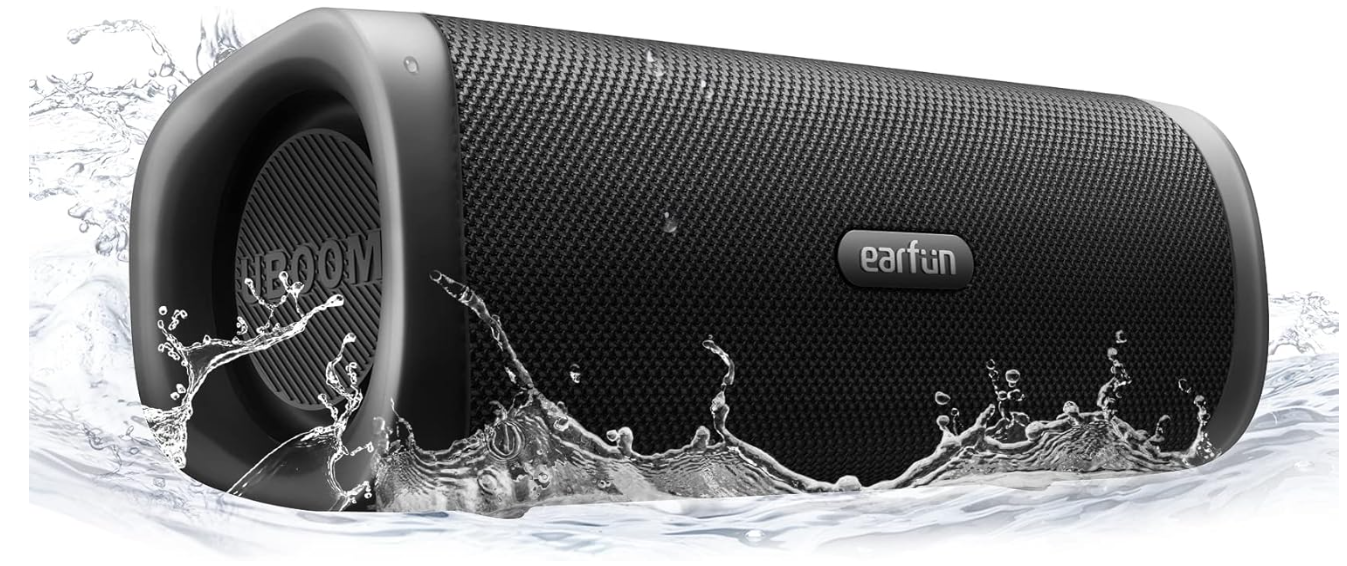
EarFun SP300 UBOOM L Portable Bluetooth Speaker
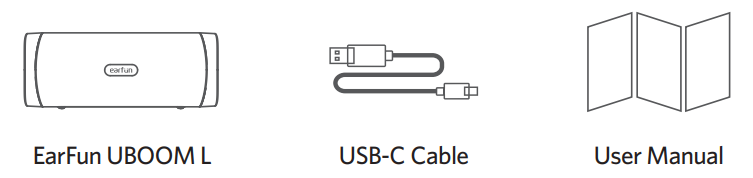
What’s in the Box
Product Diagram
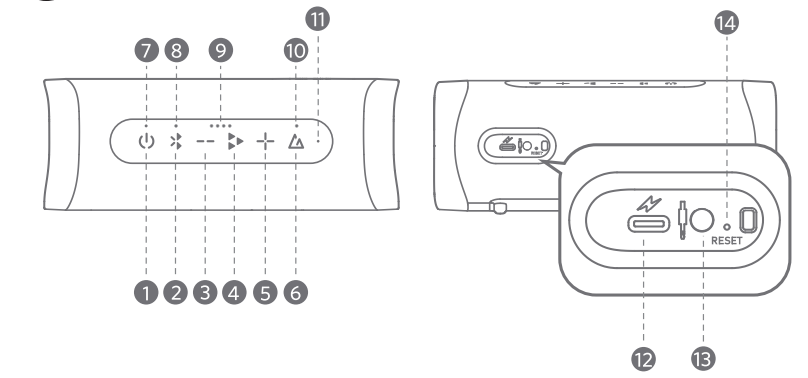
- Power button
- Bluetooth button
- Volume – button
- Play button
- Volume + button
- Sound Mode button
- Power LED indicator
- Video Mode LED indicator
- Battery Level LED indicator
- 10 Sound Mode LED indicator
- Microphone
- USB-C charging port
- 3.5mm Aux input
- Reset hole
Charging
- Clean the USB-C charging port before charging.
- Fully charge the speaker before first use.
- Close the port cover to avoid water damage.
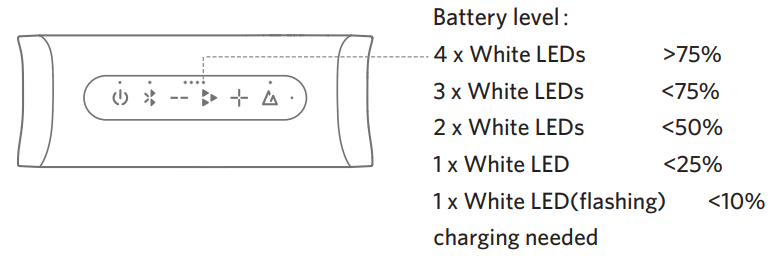
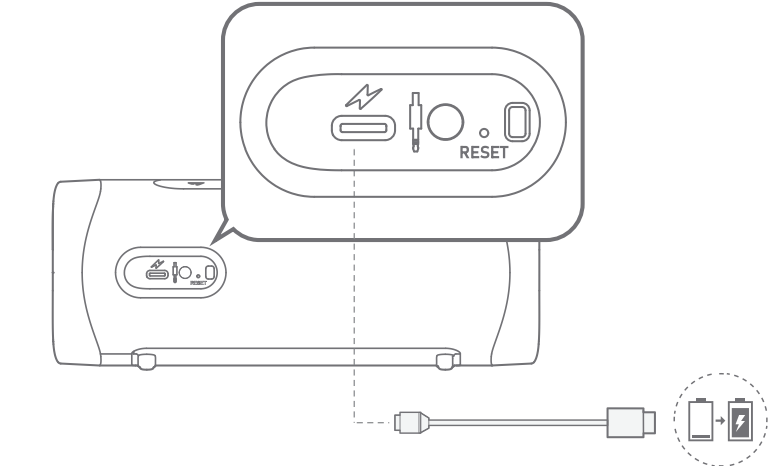
Connect the USB-C cable to the charging port for charging.
Bluetooth Pairing
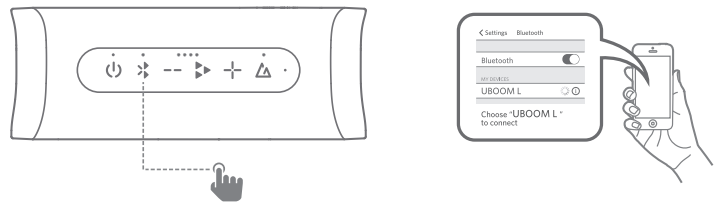
- Step 1: Power on the Speaker, then press the Bluetooth button. The speaker will enter pairing mode.
- Step 2: Activate Bluetooth on your Bluetooth-enabled device and search for other Bluetooth devices.
- Step 3: Select “EarFun UBOOM L” from the list of Bluetooth devices shown(if the password is needed, please type ‘00
True Wireless Stereo Connection with Two Speakers
- Step 1: Pair and connect speaker A to your Bluetooth device.

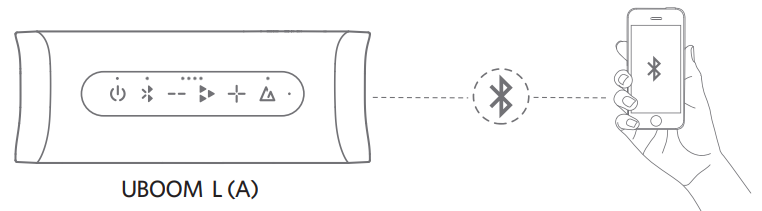
- Step 2: Power on speaker B, and then press and hold the Bluetooth buttons of both speakers (A and B) for at least 3 seconds. When the blue indicators of both speakers flash, both speakers will begin to connect to the same Bluetooth.
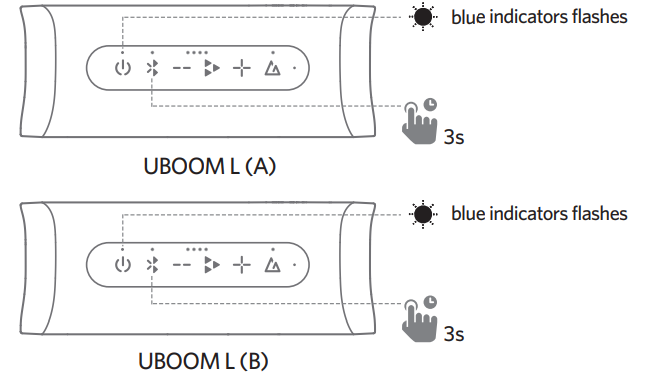
- Step 3: When the indicators stay blue, the two speakers are successfully connected in True Wireless Stereo mode. Speaker A will play the Left channel, and speaker B will play the Right.h

Functions
| Buttons | Operations | Functions | LED Indicators |
| Power button | Press x 1 | Power ON | Blue LED ON |
| Power OFF | Blue LED OFF | ||
| Bluetooth button | Press x 1 | Bluetooth pairing | Blue LED flash |
| Press x 2 | Video mode ON* | White videomode LED ON | |
| Video mode OFF | White videomode LED OFF | ||
| Press and hold for 3s | True Wireless Stereo pairing | Blue LED flash | |
| Play button | Press x 1 | Play/Pause | / |
| Answer/End a call | / | ||
| Press x 2 | Next track | / | |
| Press x 3 | Previous track | / | |
| Press and hold for 2s | Activate the voice assistant. | / | |
| Reject a call | / | ||
| Volume + button | Press or hold | Volume up | / |
| Volume button | Press or hold | Volume down | / |
| Sound mode button | Press x 1 | Outdoor mode | White soundmode LED ON |
| Indoor mode | White soundmode LED OFF | ||
| Press and hold for 2s | True Wireless Stereo mode/Party mode |
Reset and Reconnecting
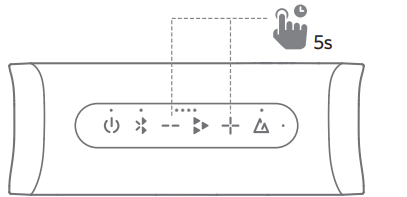
If this speaker becomes disconnected or has another connection problem, you can simultaneously press and hold the “Volume +” and “Volume –” buttons for at least 5 seconds to remove all paired devices from the speaker and remove the old pairing of the speaker in your Bluetooth device, then pair again.
If this speaker crashes, you can try to press and hold the power button for at least 8 seconds to reboot. Also, you can directly put a straightened paper clip or similar item into the reset hole and depress the internal button to reset the speaker and power it on again, and the reset hole is located at the back of the speaker.
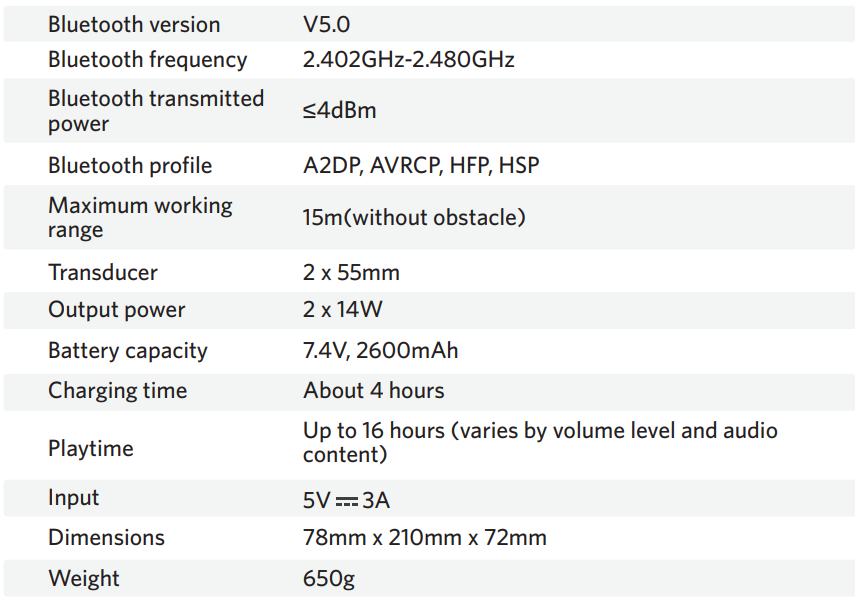
 Specifications
Warranty Conditions
A new product purchased in the Alza.cz sales network is guaranteed for 2 years. If you need repair or other services during the warranty period, contact the product seller directly. You must provide the original proof of purchase with the date of purchase. The following are considered to be a conflict with the warranty conditions, for which the claim may not be recognised:
- Using the product for any purpose other than that for which the product is intended or failing to follow the instructions for maintenance, operation, and service of the product.
- Damage to the product by a natural disaster, the intervention of an unauthorised person or mechanical damage through the fault of the buyer (e.g., during transport, cleaning by inappropriate means, etc.).
- Natural wear and ageing of consumables or components during use (such as batteries, etc.).
- Exposure to adverse external influences, such as sunlight and other radiation or electromagnetic fields, fluid intrusion, object intrusion, mains overvoltage, electrostatic discharge voltage (including lightning), faulty supply or input voltage and inappropriate polarity of this voltage, chemical processes such as used power supplies, etc.
- If anyone has made modifications, alterations to the design or adaptations to change or extend the functions of the product compared to the purchased design or use of non-original components.
WEEE
This product must not be disposed of as normal household waste in accordance with the EU Directive on Waste Electrical and Electronic Equipment (WEEE – 2012/19/EU). Instead, it shall be returned to the place of purchase or handed over to a public collection point for the recyclable waste.
By ensuring this product is disposed of correctly, you will help prevent potential negative consequences for the environment and human health, which could otherwise be caused by inappropriate waste handling of this product. Contact your local authority or the nearest collection point for further details. Improper disposal of this type of waste may result in fines in accordance with national regulations.
FCC Statement
This device complies with Part 15 of the FCC Rules. Operation is subject to the following two conditions. This device may not cause harmful interference. This device must accept any interference received, including interference that may cause undesired operation.
Changes or modifications not expressly approved by the party responsible for compliance could void the user’s authority to operate the equipment. This equipment generates uses and can radiate radio frequency energy and, if not installed and used in accordance with the instructions, may cause harmful interference to radio communications. However, there’s no guarantee that interference will not occur in a particular installation.
- Consult the dealer or an experienced radio/TV technician for help.
- Increase the separation between the equipment and the receiver
- Reorient or relocate the receiving antenna.
Radiation Exposure Statement
This equipment complies with FCC radiation exposure requirements. The device can be used in portable exposure conditions without RF restriction. This device complies with Industry Canada licence-exempt RSS standard(s). Operation is subject to the following two conditions
- This device may not cause interference, and
- This device must accept any interference, including interference that may cause undesired operation of the device.”
EU Declaration of Conformity
Earfun Technology (HK) Limited hereby declares that this equipment complies with the essential requirements and other relevant provisions of Directive 2014/53/EU and RoHS 2011/65/EU Directive.
UK Declaration of Conformity
Hereby, [Earfun Technology (HK) Limited] declares that the radio equipment type [K2] complies with UK Radio Equipment Regulations (SI 2017/1206).
ISED Compliance Statements
This device contains licence-exempt transmitters/receivers (s) that comply with Innovation, Science and Economic Development Canada’s licence-exempt RSS(s). Operation is subject to the following two conditions:
- This device may not cause interference.
- This device must accept any interference, including interference that may cause undesired operation of the device.
This equipment complies with IC RSS-102 radiation exposure limits set forth for an uncontrolled environment.
Customer Service
- Website: www.myearfun.com
- Email: service@myearfun.com
- Ph: +91-99997-92449
10 Comments
Thank you for your sharing. I am worried that I lack creative ideas. It is your article that makes me full of hope. Thank you. But, I have a question, can you help me?
Can you be more specific about the content of your article? After reading it, I still have some doubts. Hope you can help me.
Your article helped me a lot, is there any more related content? Thanks!
Thank you for your sharing. I am worried that I lack creative ideas. It is your article that makes me full of hope. Thank you. But, I have a question, can you help me? https://accounts.binance.com/en-NG/register-person?ref=YY80CKRN
Thank you for your sharing. I am worried that I lack creative ideas. It is your article that makes me full of hope. Thank you. But, I have a question, can you help me? https://accounts.binance.com/register-person?ref=IXBIAFVY
Can you be more specific about the content of your article? After reading it, I still have some doubts. Hope you can help me.
Thank you for your shening. I am worried that I lack creative ideas. It is your enticle that makes me full of hope. Thank you. But, I have a question, can you help me? https://www.binance.com/register?ref=IHJUI7TF
I don’t think the title of your article matches the content lol. Just kidding, mainly because I had some doubts after reading the article.
Can you be more specific about the content of your article? After reading it, I still have some doubts. Hope you can help me.
Thank you for your sharing. I am worried that I lack creative ideas. It is your article that makes me full of hope. Thank you. But, I have a question, can you help me?