

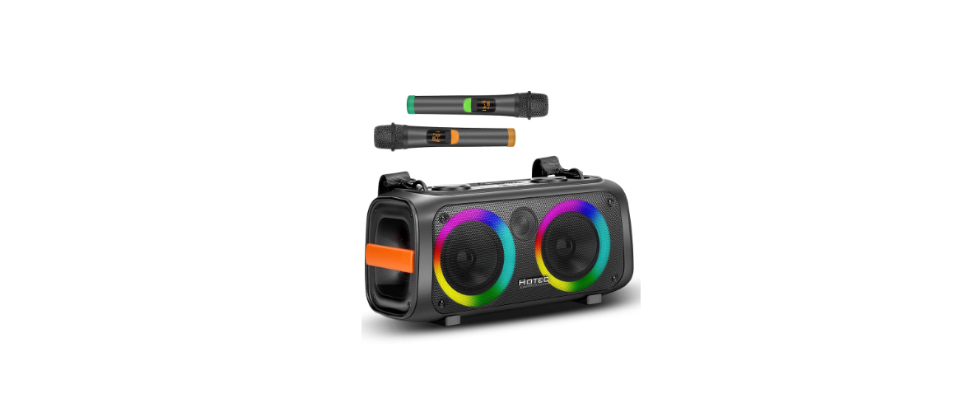

HOTEC AP-W117 Bluetooth Multimedia Speaker
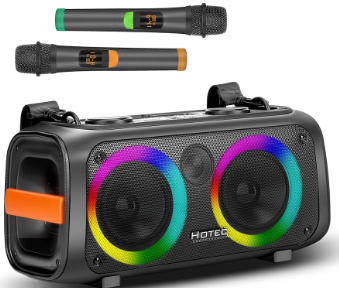
Introduction
Thanks for purchasing the Hotec portable Bluetooth speaker. We encourage you to take a few minutes to read this manual to help you enjoy the product. You will find the description of the product and the step-by-step instructions to use the product. Read and understand all the safety instructions before using this product. If you have any questions about this product, the installation, or the operation, please contact the seller or distributor for assistance.
Safety Instructions
- Read all warnings. Follow all instructions.
- This device should not be exposed to dripping or splashing.
- No objects filled with liquid, such as vas, es, should be placed on top of the device.
- Do not block any ventilation openings.
- Minimum distance of 30cm around the device must be maintained.
- Do not install this device near any heat sources, such as radiation that produces heat.
- No naked flame sources, such as lighted candles, should be placed on the device.
- Protect the power cord from being walked on or pinched, particularly at plugs, convenience receptacles, and the point where they exit from the device.
- Unplug this device during lightning storms or when unused for a long duration.
Paking List
- AP-W117 speaker 1
- Wireless Handheld microphone 2
- Microphone Anti-rolling rings 2
- Type-C charging cable 1
- Remote control 1
- AUX cable 1
- Belt 1
- User guide
Product Overview
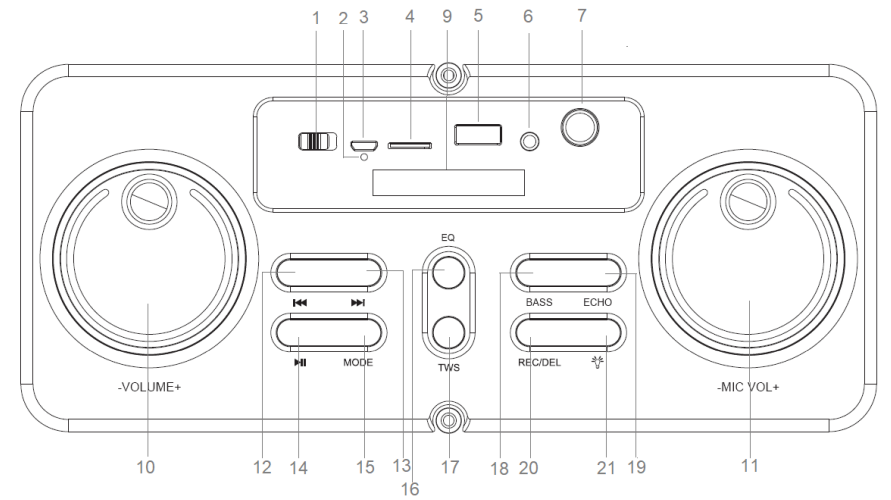
- POWER: Push the power switch to the right to power on the speaker and push to the left to power off the speaker.
- Charging status indicator: Solid red light during charging, and the light is off when fully charged.
- Type C charging port: Connect the USB cable to the unit and plug it into any USB charger.
- TF card music: Insert the memory card to play back your stored music. MP3 format is supported, capacity up to 3 GB (FAT32)
- USB music: Connect to a USB storage device to play back your stored music.
- AUX IN: Connect to the external device with the AUX IN cable.
- MIC IN: Insert a microphone with a 1/4” mic jack to sing along while listening to music or give a speech.
- IR for remote
- LED display
- Speaker Volume Control: Rotate to change speaker volume in Bluetooth mode, USB/TF Card, or AUX mode
- Mic Volume Control: Rotate to change the microphone volume
- Short-press to select the previous track in Bluetooth/USB/TF Card/AUX mode.
- Short-press to select the next track in Bluetooth/USB/TF Card/AUX mode.
- Short-press to play/pause the music.
- MODE: Short-press to select the model between USB/TF/AUX/Bluetooth modes.
- EQ: Short-press to select indoor or outdoor mode
- TWS: Power on two AP-W117 speakers and select the Bluetooth mode; the two speakers will pair up automatically.
- BASS: Short-press to set the speaker bass. 4 levels are available. The bass level is indicated in the LED display.
- ECHO: Short press to change the mic ECHO effects.
- REC/DEL: Short-press to enable recording. During recording, ECHO should be turned to a minimum. Long-press to delete the recorded file.
- Light mode button. Short button to select different lighting modes.
Remote Control
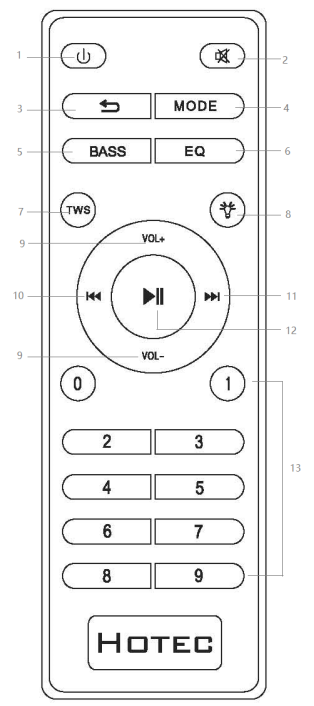
- Power button: Power on/off the speaker
- MUTE: In USB/TF/FM/AUX/Bluetooth mode, short-press it to mute/unmute the speaker.
- Cycle button: In USB/TF card music status, short-press it to toggle among four playback sequencing modes.
- MODE: Switch between USB/TF/BT/AUX.
- BASS: Short-press to set the speaker bass. 4 levels are available. The bass level is indicated in the LED display.
- EQ: Short-press to switch between INDOOR and OUTDOOR mode.
- TWS: Power on two AP-W117 speakers and select the Bluetooth mode; the two speakers will pair up automatically.
- Light mode button. Short button to select different lighting modes.
- Vol+/-: Short-press to increase/decrease the speaker volume.
- Functions as “ ” on the speaker.
- Functions as “ ” on the speaker.
- Functions as “ ” on the speaker.
- Numeric Keys 0~9: In USB/TF card reading status, to play Track 12, just input numbers “1” and “2”, and in 2 seconds the system will go to Track 12 and start playback. Any input of a number larger than the total number of available tracks is invalid.
Microphone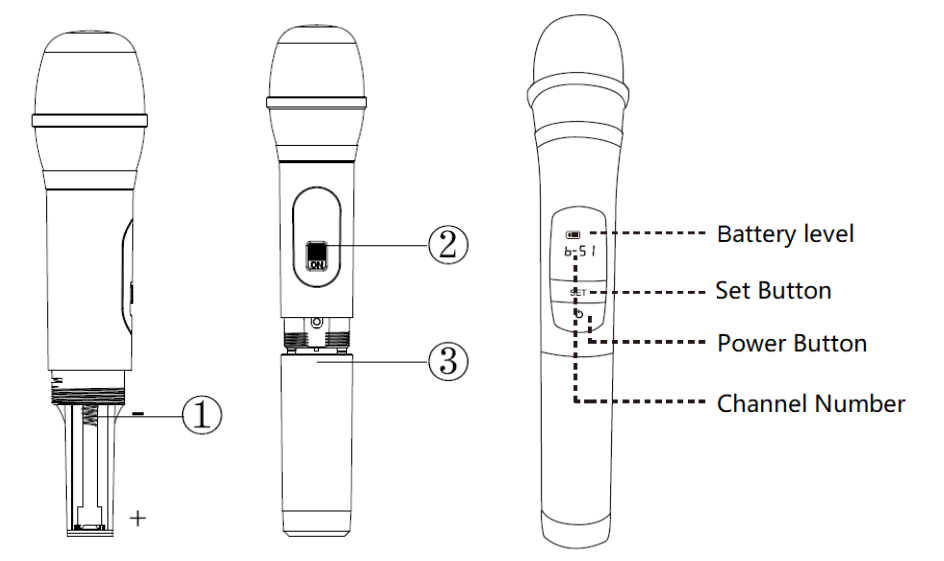
- Battery installation position: Please note the positive and the negative poles.
- Microphone power switch
- Battery cover: Clockwise to open and counterclockwise to close. Microphone Operation
The two microphones that come with the speaker work with the speaker wirelessly.
- Install the AAA-size battery in the correct HOTEC AP-W117 Bluetooth Multimedia Speaker direction 2. Push the power switch to power on/off the microphone
- Change the battery when the battery level is low.
- Change the frequency in case there is interference. Here is how.
- Power on one microphone
- Hold and press the SET button until you see the mic LCD screen start to flash.
- Before the LCD screen stops blinking, short-press the SET button to change the frequency, wait for about 5 seconds until the screen stops blinking.
- The receiver inside the speaker syncs with the microphone at the selected frequency.
- Repeat the above process to change the frequency of the other mic.
Basic Operations
Turning the Device On/Off
Press the Power button to the Right to turn on the speaker, and press it to the left to power off the speaker. When the device is powered on, the LED will be on.
Selecting Mode
To change the functional modes, short-press the MODE button to switch between Bluetooth/FC/AUX/USB/TF modes.
Speaker Volume Control
Rotate the volume dial for the speaker to increase or decrease the music volume to the desired level. The maximum volume level is 30.
Microphone
Microphone input is available for all modes. Two handheld HOTEC AP-W117 Bluetooth Multimedia Speaker microphones (included) are connected to the speaker wirelessly. There is an additional 1/4” mic input. Connect your additional microphone to the 1/4” mic jack on the top panel of the device.
Rotate the mic volume control button to increase or decrease the microphone volume. To record, insert a storage device (USB or TF card) and short-press the “REC/DEL” button to start recording. During recording, turn the ECHO to minimum. Please maintain HOTEC AP-W117 Bluetooth Multimedia Speaker a proper distance between the speaker and the microphone to avoid feedback.
Line In Music
Connect your audio device to the device with the AUX IN cable. The device will start playing music automatically from the device connected. Change the volume to your desired level.
TF Card Music
Press the MODE button short to select “TF” mode. Music stored in your TF card will start playing.
USB Music
Press the MODE button short to select “USB”. Insert a USB stick, and the device will read and play the music in your USB storage automatically. Press the button to pause the music, press it again to resume playing. Short key to play the previous track. Short-press to go to the next track.
Bluetooth Operation
Short Press MODE button to select Bluetooth mode. Place the Bluetooth-enabled device within 10 10-meter range (30 feet). Turn on the Bluetooth function on your Bluetooth-enabled device and search for “AP-W117” and then connect it. If required, input “0000” as the password. Once the pairing is completed, the device will start playing the music from your Bluetooth-enabled device.
- Press the button to pause the music, press it again to resume playing.
- Short-press to play the previous track.
- Short-press to go to the next track
TWS Mode
You can pair two AP-W117 speakers to share music. Turn on both the speakers simultaneously. Long-press the TWS button to pair the two speakers with each other. Turn on the Bluetooth function on your Bluetooth-enabled device and search for AP-W117. Connect it to your Bluetooth device to enjoy the stereo sound effect.
Specification
| MODEL NUMBER | AP-W117 |
| Speaker size | Dual 4” woofer + One 2” Tweeter |
| Rated Power | 40W |
| Frequency Response | 20Hz-20KHz |
| S/N | ≥80dB (A) |
| THD | >10% |
| Battery | 7.4V 6000mAh |
| Product Dimension | 383 x 161 x 196 mm, 15 x 6.3 x 7.7 inch |
| Color | Black |
| Speaker charging time | 6-7 hours |
| Play time | 3-10 hours |
Troubleshooting
| Trouble | Possible Cause and Solution | |
| The speaker does not power on | Charge the speaker and then power it on after charging. Reset the power switch and power on the speaker. | |
| No sound comes from the speaker. | Increase the speaker volume by dialing the speaker volume knob. Unmute the speaker from the remote control. Increase the volume of the Bluetooth-enabled device that connects to the speaker via Bluetooth. Press the Mode button on the speaker or the remote control to select the AUX mode if the music is streamed via AUX. Check and change the AUX cable. Change to another music/track. | |
| No sound from the external microphone | Make sure the external mic is plugged into the 1/4” mic input completely. Increase the mic volume by dialing the mic volume knob. Install the battery in the microphone in the right direction, and power on the mic. | |
| Bluetooth connection
failure |
–
– |
Short-press the Mode button to select the Bluetooth mode. Restart your Bluetooth-enabled device and pair it again. |
| – | Disconnect the speaker from the previously paired. deviceBluetooth-enableddthe device before you connect the speaker to a new Bluetooth-enabled device. | |
| – | Make sure the speaker and the music source are within 10 meters (30 feet) of each other. | |
| Audio signal cuts in and out | – | Keep the speaker and the music source within 10 meters (30 feet) and make sure there are no obstacles in between |
| – | Check and make sure the music source works properly and there is no interference. | |
| Mic audio quality is too bad.d | – | Change the Echo of the mic. |
| Others | – | Please contact Hotec customer service via email:
support@sz-hotec.com |
Customer service
- Website: http://www.hotec.com
- Ph: 086-13544178467
FAQs
Q: Can I use the speaker without Bluetooth?
Indeed. AUX input is also supported by the HOTEC AP-W117. The speaker will instantly transition to wired mode if you just attach a 3.5mm audio cable from your device to the AUX port.
Q: How long does the battery last?
Depending on volume and usage, the HOTEC AP-W117 can normally play music continuously for six to eight hours on a full charge.
Q: Can I answer phone calls using this speaker?
Indeed. A microphone is integrated inside the HOTEC AP-W117. The speaker’s multifunction button can be used to accept or reject calls when it is paired with Bluetooth.
Q: Can I connect multiple devices at the same time?
No, only one Bluetooth connection at a time is supported by the HOTEC AP-W117. Disconnect the first device before pairing the second to switch devices.
Q: Does the speaker support TF/microSD cards or USB drives?
Indeed. Playback from TF cards or USB drives is supported by the HOTEC AP-W117 (if the model has the ports). The speaker will immediately enter external storage mode when you insert the card or drive.
Q: Can I use the speaker outdoors or in wet conditions?
There is no waterproofing for the HOTEC AP-W117. Steer clear of water, rain, and high humidity. Only use it outside when it’s dry.
Q: Can I use the speaker while it’s charging?
Indeed. You can listen to music while the HOTEC AP-W117 is charging because it enables pass-through usage. Using it while charging, however, can cause the charging process to take a little longer.