

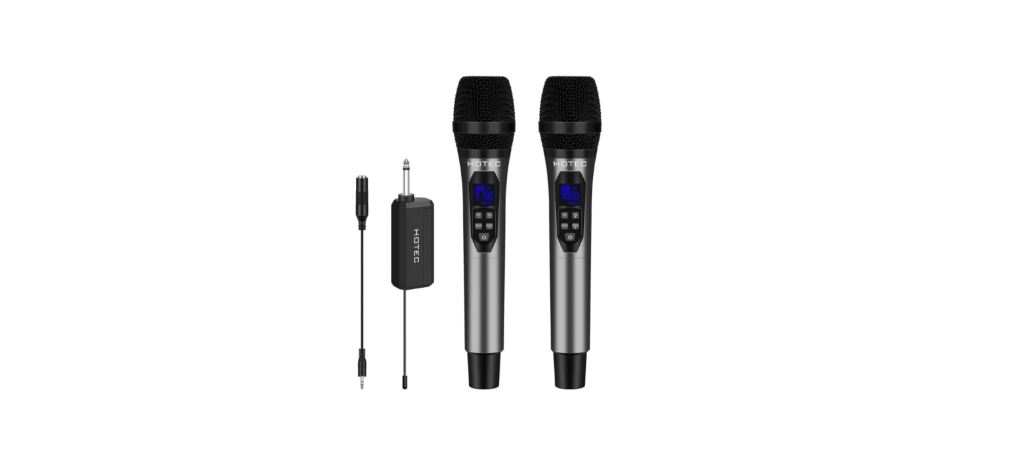

Hotec H-A3 Wireless Dual Handheld Microphone

Product Introduction
Thanks for purchasing the Hotec UHF Wireless microphone. Please read the following instructions carefully before use. The Hotec UHF wireless microphone operates between902-928MHz, with a total of 32 selectable frequencies in each microphone. This handheld microphone system, powered by AA batteries, is ideal for vocal transmission over PA systems, mixers, active speakers, and amplifiers. The receiver uses a rechargeable battery.
System Content
H-A3
- H-A3 Handheld microphone x2
- H-A3 Mini rechargeable Receiver x 1
- Charging cable x 1
- AA battery x 4 (for Microphone)
- 18650 Battery x 1 (for Receiver)
- Microphone foam x 2
- Anti-rolling ring x 2
- TS to TRS cable x 1
Preparation Before Use
- Charge the Mini Receiver
Ensure the Receiver is fully charged before use. Use a standard type C charging cable. - Install batteries for the microphone.
Open the battery compartment of the handheld microphone and install AA batteries. - Check and make sure the microphone and receiver are connected
Power on both the mini Receiver and the handheld microphones.
Rechargeable Mini Receiver
Receiver

- Antenna
- RF Indicator
- Solid blue: CHA microphone connected.
- Solid green: CHB microphone connected.
- Type C Charging Port For charging the receiver (input5V1A or 5V2A).
- Battery Low Indicator
- Red: when the battery is low,
- Solid blue: when fully charged.
- Power Button: Turn the receiver on/off.
- 1/4” Audio Jack Connect to the 1/4” input of a speaker, mixer, or amplifier.
- Battery Cover
Handheld Microphone

- Display Screen
Shows battery level, frequency, and channel number. - Volume Down Button
Decreases mic volume (range: U00toU20). - Volume Up Button
Increases mic volume. - Echo + Button
Increases echo (range: E00 to E07). - Echo – Button
Decreases echo. - Power Button
Power the microphone on/off. - CH + Button
Increases frequency by 0.4MHz per press. - CH – Button
- Decreases frequency by 0.4MHz per press.
How To Use
This wireless mic does not have a built-in speaker; it must be connected to an external sound source like a PA, amplifier, karaoke speaker, or mixer. Ensure your audio devicehasa1/4” or 3.5 mm microphone input.
- Plug the mini Receiver into the 1/4” microphone input of your audio device. Use the included TS to TRS cable if your input is 3.5 mm.
- Turn the microphone volume to the receiver to avoid feedback.
- Power on the microphone and receiver. If the R-Indicator shows the correct color, you’re ready to use it. If not, follow the troubleshooting steps to pair them manually.
- Adjust the microphone volume from either the microphone or your audio device.
- Adjust the echo if necessary.
- If there is interference, change the frequency by pressing the frequency change button.
Specification
System spec
- Modulation Mode: Digital Frequency Modulation
- Frequency Range: UHF 500~980MHz
- Preset Frequencies: 32
- Frequency Response: 75Hz~18kHz ± 3dB
- Max. Deviation Range: ±50kHz (with level limiting)
- T.H.D: < 1.0%@1kHz
- S/N: >98dB
- Working Range: Up to 160 feet
- RF Carrier Stability: ±0.005%(-10℃-50℃)
Receiver Spec
- Dimension: 4.5 x 1.3 x 0.9 inch(115x34x24mm)
- Power Supply: 2000 mA
- Power Consumption: 230 mA
- Battery Life: 10 hours after fully charged
- Recharging Time: About 4 hours (5V/1A)
Handheld Microphone Spec
- Power consumption: 140mA
- Battery Type: 2 x AA Size
- Working Time: Up to 6-8 hours (subject to the battery capacity)
- Dimension: 10 x 2.1 inch (250 x 55mm)
Troubleshooting
| Issue | Cause | Solution |
| The mic does not sync with the Receiver | The mic lost pairing with the Receiver | Pair the mic and Receiver manual, following the steps below. Turn off the unpaired microphone, hold the power button and the CH + button until the LCD flashes. Turn on the Receiver. The RF indicator will flash briefly. Turn off the microphone, then turn it back on. The mic and receiver should be connected. Adjust the frequency by pressing the CH+ or CH- button. |
| No sound from
Bluetooth speaker |
The speaker likely does not support mic input. | Use speakers with a mic input. |
| Mic volume is low | Increase the volume using the Vol+ button or your audio device. | |
| Mic echo is too heavy. | Adjust the echo using the echo+ or echo- button. | |
| Can I use two sets together? Are they interfering with each other? | Yes, you can use two sets working together. Make sure the mics are working at different frequencies to avoid interference. | |
| My mic cuts in and out. What is wrong? | There might be other UHF devices around that cause interference. | If you have several sets of Hotec wireless microphones or other brands that utilize UHF technology, please make sure the one you are using is working at different frequencies from other UHF devices. |
| How to change the frequency? | Open the mic battery compartment, locate the CH+ or CH- button, and adjust the frequency by 0.4MHz per press. |
Customer service
- Website: http://www.hotec.com
- Ph: 086-13544178467.