

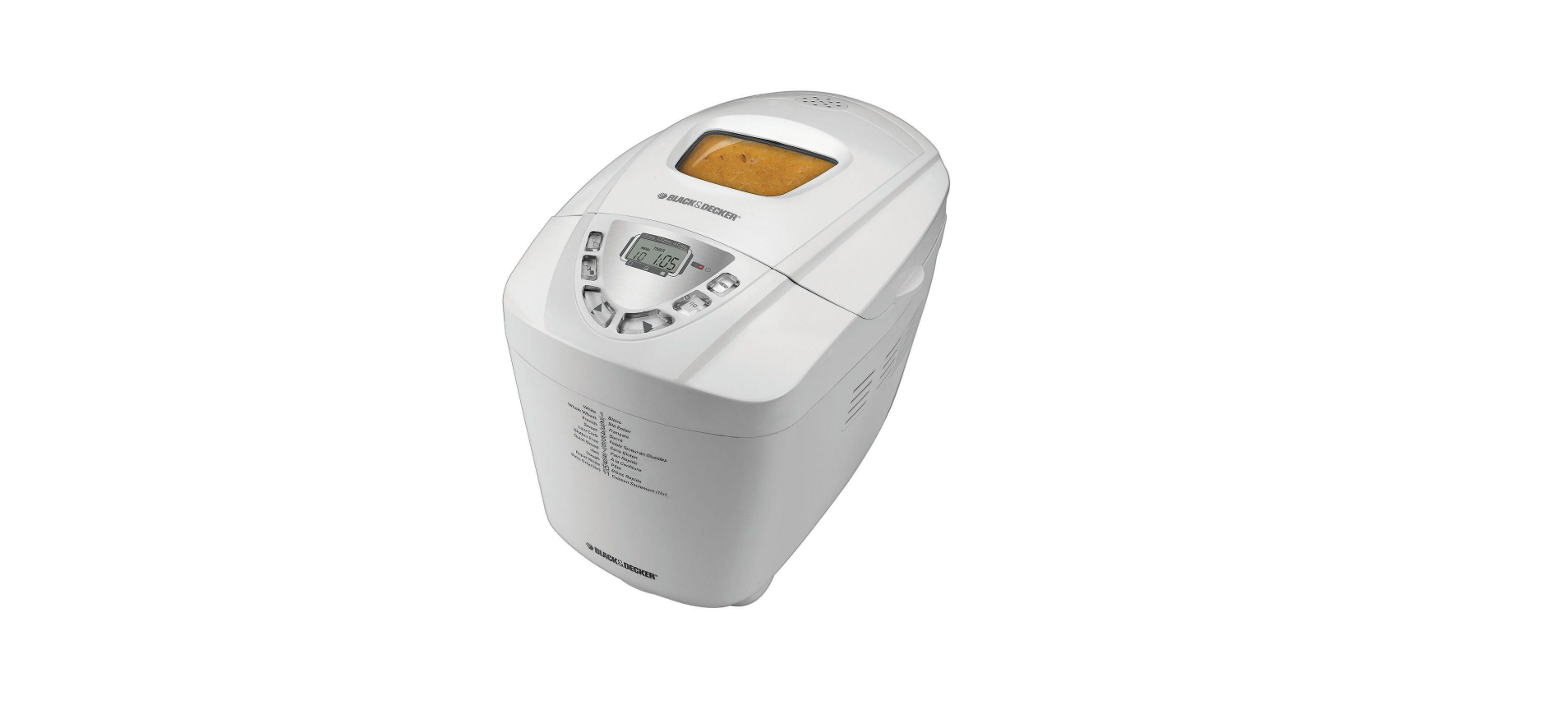

Black & Decker B6000C Automatic Bread Maker

Safety instructions
When using electrical appliances, basic safety precautions should always be followed, including the following:
- DO NOT leave unattended with children or pets.
- KEEP this appliance and cord away from children.
- Close supervision is necessary when any appliance is used by or near children.
- ALWAYS place the appliance on a flat, heat-resistant surface.
- DO NOT place on or near a hot gas or electric burner or in a heated oven.
- DO NOT operate the appliance in an enclosed space or under hanging cabinets.
- DO NOT let the cord hang over the edge of the table or counter or touch hot surfaces.
- DO NOT use this appliance for anything other than its intended use.
- NEVER use an outlet below the counter. DO NOT use the appliance outdoors.
- UNPLUG the appliance from the outlet when not in use and before cleaning.
- Allow the appliance to cool before attaching or removing parts.
- Do not reach into the liquid if the appliance is plugged in and immersed.
- Do not immerse or rinse cords or plugs in water or other liquids.
- The appliance’s outer surfaces may become hot during use.
- Wear oven mitts when handling hot surfaces and components.
- When cooking, DO NOT place the appliance against a wall or other appliances.
- Leave at least 5 inches of free space on the top, back, and sides, and above the appliance.
- If you are unsure, place a trivet or hot pad under the appliance before using it.
- This appliance is intended for normal household use only.
- It is NOT INTENDED for use in commercial or retail environments.
Description

- Lid
- Viewing window
- Lid handle
- Steam vent
- Digital display
- Control panel
- Nonstick bread pan (Part # B6000C-01)
- Kneading paddles (Part # B6000C-02)
- Wire handle
- Baking chamber
- Measuring cup (Part # B6000C-03)
- Measuring spoon (Part # B6000C-04)
Control Panel

- Digital Display
Shows the following:- The number for each program setting selection (1 – 11) with preprogrammed baking time
- Crust colour (Light, Medium or Dark)
- Loaf size (1.5-lb., 2-lb. or 3-lb.)
- Minute-by-minute countdown of the remaining time for the selected program
- Menu Button
Press this button to select the baking cycle you want. A beep sounds each time you press the button. - Start/Stop (I/O) Button
Press to begin the cycle and to display the total time for the selected bread to be completed. - Timer Buttons
Press these buttons to set the time for a delay bake (up to 13-hour delay). - Crust Colour Button
Let you choose your preferred crust colour: light, Medium, or Dark. - Loaf Size Button
Press to select the loaf size (1.5-lb., 2-lb. or 3-lb.). - Red LED indicator light:
Start/Stop (I/O) indicator
Program Settings
The following program settings will make it easy for you to make a great variety of bread dough and preserves. For each selected setting, the baking time has been preprogrammed. The recipes provided on pages 20 –35 will help you determine which program setting you should use.
How to Use
This product is for household use only.
Follow the directions
- The liquid is always the first ingredient to be placed in the bread pan.
- Dry ingredients follow, and the yeast is added last.
- Make a small indentation in the centre of the flour and place the yeast there.
- This is especially important when using the delay-bake function to avoid activating the yeast too soon.
Measure carefully
- Use the appropriate measuring tools and measure carefully.
- The measuring cup included should be used for dry measurement only.
- Measure liquids in a glass or plastic measuring cup designed for liquids.
- Use measuring spoons for liquid and dry ingredients. Evel off with a metal spatula or the back of a knife.
Keep it fresh
- Use fresh ingredients at room temperature. In Canada, use All-Purpose Flour or Bread Flour; in the USA, use Bread Flour. Use yeast that has an expiration date of at least 6 months in the future.
- Avoid using perishable ingredients (such as milk, butter or margarine, eggs and cheese, fruit, or fresh herbs) when using the delay-bake function.
Perfect dough
- In very humid weather, bread may require a little more flour. Check the bread toward the end of the first rise.
- If it seems sticky, add 1 or 2 tablespoons of flour to the second kneading cycle until the dough forms a smooth ball.
- If the bread seems very dry or knocks in the kneading cycle, sprinkle room-temperature water into the bowl, 1 teaspoon at a time, until the dough forms a smooth ball.
Look, but don’t open.
- The glass on the cover is there to monitor the process.
- Do not open the lid during the baking process. In the initial mixing, you may open the cover to use a rubber spatula to blend in any ingredients that have stuck to the sides of the bread pan or to add ingredients at the “add ingredient” beep.
Patience
- Wait at least 20 minutes before slicing freshly baked bread; it will still be deliciously warm but easier to slice.
- If you like a crisp crust, remove the bread as soon as the baking cycle is complete.
- To make another loaf of bread, let the unit cool completely.
Save it for another day.
- To freeze freshly baked bread, cool completely on a wire rack.
- Wrap securely in plastic wrap and then foil. To serve, remove from foil and defrost.
- For that freshly baked flavour, reheat in the oven.
Adding ingredients
- All functions allow for the addition of ingredients, such as dried fruits and nuts; the beep sounds just before kneading is complete.
- This happens about 25 minutes (8 minutes for Rapid White) into the program.
Avoid delay
- The delay-bake function cannot be used for Rapid White or the Dough setting.
- It is not recommended for Whole Wheat, Quick Bread, or Jam.
Test the water
- For most breads, use water that is 80°F to 90°F (26.6 °C to 32.2 °C); for Rapid White breads, use water at 110°F to 120°F (43.3 °C to 48.8 °C).
Choosing crust colour
- The first time bread is baked, select the light setting. If you like a darker crust, make a note and select a darker crust for future breads on that cycle. There is a 30-minute delay on the whole wheat program.
Some noteworthy solutions
If bread is:
- Too brown – select a lighter crust.
- Too light – select a darker crust and do not open the unit during the baking cycle.
- Too coarse – make sure you add salt.
- Too heavy – use less flour (1 tsp. at a time).
- Too low – use less flour or more yeast or water that is not too hot, or check the date on your yeast.
- Too high – try less yeast (¼ tsp. at a time).
- Collapses in the centre – the dough is too wet, the flour is not strong enough, or the amount is too great for the unit.
High-Altitude Baking
- In high-altitude areas (over 3,000 feet), dough tends to rise faster, as there is less air pressure.
- Therefore, less yeast is necessary. For more information on High Altitude Baking guides.
How to Use
- Remove all packing material and any stickers from the product.
- Remove and save literature.
- Please go to www.prodprotect.com/applica to register your warranty.
- Your bread machine is partially assembled in the box.
- Take the appliance apart:
To Remove Baking Pan
- Using the lid handle, lift and open the lid (B).

- Grasp the sides of the bread pan and pull straight up to remove (C).

- Wash all removable parts as instructed in the CARE AND CLEANING section of this manual. This will remove any traces of dust or residue left from manufacturing and shipping.
- Place on a dry countertop. Make sure you have enough space above the unit to open the lid.
Attaching KneadingPaddless
- Align the flat side of the hole in each kneading paddle with the flat side of the shaft (D).

- Push the paddle down firmly onto the shaft to secure it in place.
READY TO BAKE
- Add ingredients in the order listed: liquid, then dry, then yeast (always add last).
- To measure liquids, use a see-through standard measuring cup and check the measurement at eye level or use an angled measuring cup.
- When measuring dry ingredients, use standard dry measuring cups or measuring spoons and level off with the straight edge of a knife or metal spatula.
- Use room temperature ingredients.
- Make a small indentation with the back of a spoon or your finger on the top of the dry ingredients and add the yeast to the indentation (E).

- Do not let the yeast touch the liquid below. This is especially important when the baking cycle has a delayed start.
Settings
Insert Bread Pan
- Insert the bread pan into the unit and push down firmly until it is securely in place.
- Close the lid and plug the unit into an electrical outlet.
- The unit beeps, and program setting 1 (White) displays as the default setting.
Select Settings (F)
- Press MENU to select the appropriate program setting according to recipe instructions (F1).
- Press the crust colour button to select the desired crust (light, Medium, or Dark) (F2).
- We recommend selecting the Light setting the first time you bake bread.
- The arrow on the screen moves to each selection every time you press the key.
- Press the loaf size button to select the desired loaf size (1.5 lb, 2 lb., or 3 lb.) (F3).

Kneading/Baking Cycle
- Press the I/O button (F4). The power indicator light will come on to show that the appliance is running. There is a 30-minute delay for Whole Wheat. The glass window lets you watch the process of the bread as it is black and decker b6000c mixed, kneaded, and baked.
- If additional ingredients are in the recipe, listen for the beep near the end of the kneading cycle for about 25 minutes (8 minutes for Rapid White).
After Baking
- When the baking cycle is complete, you hear a beep. Press the I/O button; the red LED light turns off. For best results, remove the bread immediately after the baking process is complete. Open the lid and, using oven mitts, pull the pan straight up and out to remove (G).
- Invert the bread pan over a wire rack and shake to remove the bread. If necessary, use a nonstick spatula, inserted along the sides of the pa,n to loosen the bread (H).

- Turn the bread right side up, black and decker b6000,c and let it cool for about 20 minutes before slicing (J).
- If paddles remain in the bread, allow the bread to cool.
- Turn it on its side and pull the paddles out.
- It may be necessary to use a paring knife to remove baked bread from around the paddle.
- Use care to avoid scratching the nonstick coating on the paddles (K).
Functions
Keep Warm Function
- The keep-warm function automatically begins when the baking cycle is completed.
- Bread can be kept warm for up to one hour.
- After one hour, remove the bread as instructed under section 4, After Baking.
Delay-Bake Timer
- You can set the timer to delay the completion of your bread for up to 13 hours.
To Set the Timer
- Add your recipe ingredients, black and Decker B6000C, to the bread pan.
- Avoid perishable foods, such as milk, butter or margarine, eggs, and cheese.
- Select your settings. Set the amount of time you want your bread to be ready. For example, if you set the timer at 8:00 p.m. in the evening and you want to wake up to fresh bread at 6:00 a.m., that is 10 hours.
- Use the ▲ button to increase the time in 10-minute increments until the display shows 10:00. This means that your bread will be completed in 10 hours (6:00 a.m.). If necessary, use the ▼ button to decrease the time.
Care and Cleaning
This product contains no user-serviceable parts. Refer service to qualified service personnel.
- After each use, unplug the unit and let it cool.
- If the kneading paddles remain in the bread pan, grip the kneading paddle and pull straight out to remove.
- If you have trouble removing the black Decker B6000C kneading paddle from the appliance, add enough warm water to cover the paddle in the bread pan and allow it to soak for 10 – 15 minutes to loosen the blades.
- Wash the bread pan and kneading paddles in warm, soapy water or the dishwasher.
- Wipe the outside of the unit with a damp cloth. Do not immerse in water or other liquids.
Storage
- Make sure the unit is unplugged, clean, and dry. Store the unit with the lid closed. Do not place heavy objects on the lid.
Two-Year Limited Warranty
Applies only in the United States and Canada.
What does it cover?
- Any defect in material or Black And Decker RC3303 3-Cup Rice Cooker workmanship provided; however, Applica’s liability will not exceed the purchase price of the product.
For how long?
- One year after the date of original purchase.
What will we do to help you?
- Provide you with a reasonably similar replacement product that is either new or factory refurbished.
How do you get service?
- Save your receipt as proof of the date of sale.
What does your warranty not cover?
- Damage from commercial use
- Products used or serviced outside the country of purchase
- Shipping and handling costs associated with the replacement of the unit
How does state law relate to this warranty?
- This warranty gives you specific legal rights, and you may also have other rights that vary from state to
state or province to province.
Customer Service
- Website: https://support.blackanddecker.com/
- Timings: Monday–Friday, 8:00 a.m. – 5:00 p.m.
- Ph: +1-800-544-6986