

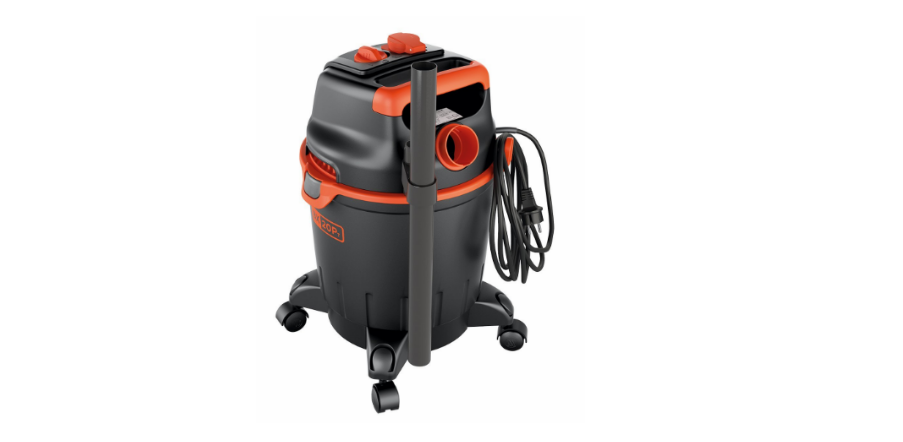

Black & Decker BXVC20PTE Vacuum Cleaner
Safety Instructions
- All electrical conductors MUST BE PROTECTED from jets or splashes of water.
- The electric supply connection must be made by a qualified electrician and comply with IEC 603641.
- Either a residual current device that will cut off the power supply if the leakage current to earth exceeds 30 mA for 30 ms or a ground fault interrupt device must be installed.
- DURING start-up, the appliance may generate interference in the electrical system.
- The use of a residual current breaker (RCB) will provide additional protection for the operator (30 mA).
- Use only approved electrical extension leads with suitable conductor cross-sections.
- Always turn off the switch when leaving the appliance unattended.
- Before carrying out any work on the appliance, REMOVE the plug.
- Maintenance and/or repair of electrical components MUST be carried out by qualified staff.
- Before each use, and periodically, CHECK that screws are tight and all appliance components are in good condition; inspect for broken or worn parts.
- To ensure the appliance’s safety, only use the manufacturer’s genuine parts, or other parts which carry its approval.
- Unsuitable extension cables can be dangerous.
- If an extension cable is used, it must be suitable for outdoor use, and the connection must be kept dry and off the ground.
- The use of a power cable reel that keeps the socket at least 60 mm above the ground is strongly recommended.
- Switch the appliance off and disconnect it from the power source before any assembly, maintenance, storage, or transport operations.
Before First Use
The appliance is intended for use as a multi-purpose vacuum cleaner, in compliance with the descriptions and safety precautions contained in these instructions. This appliance is designed for household use only and must not be utilized for industrial or commercial purposes. The appliance conforms to the IEC 60335-1 and IEC 60335-2-2 standards.
Main Components
- A1 Starter device
- A2 Suction union
- A3 Blower connection
- A4 Handle
- A5 Power cable stowing hook (where featured)
- A6 Catches
- A7 Power cable with plug
- A8 Castor wheels
- A9 Vacuum cleaner tank
- A10 Cover with motor
- A11 Accessories holder (where featured)
- A12 Liquid drain plug (where featured)
- C1 Power tool socket (where featured)
Accessories
- B1 Filter holder
- B2 Filter
- B3 Hose
- B4 Power tool adapter
- B5 Pipe
- B6 Floor nozzle
- B6a Dust insert
- B6b Liquid insert
- B7 Nozzle
- B8 Nozzle
- B9 Nozzle
- B10 Fabric filter
Installation
All installation and assembly operations must be performed with the appliance disconnected from the mains power supply
Assembly
When unpacking, check for any missing accessories or damage to the contents. If damage caused in transit is found, notify your dealer at once. Lift the cover with the motor (A10) off the appliance, release the catches (A6), and take out the accessories supplied, checking that the filters (B2 – B10) are fitted correctly.
Fitting the castor wheels
Turn the vacuum cleaner tank (A9), with the cover off, upside down on a firm horizontal surface. Fit the wheel hubs (A8) into the holes provided and press fully down to secure the wheels in the correct position
Fitting the Accessories
Connect the hose (B3) to the intake (A2) or the blower outlet (A3), depending on the type of operation required.
(For models with this feature). Then complete the sequence with the accessories required for the type of cleaning job planned. Use the tubes (B5) and the nozzles (B6-B7-B8-B9) depending on the type of cleaning and the surface to be cleaned. The nozzles (B6-B7-B8-B9) can be fitted straight onto the hose (B3).
Electrical Connection
Check that the electricity supply voltage and frequency (V/Hz) correspond to those specified on the data plate
Use of extension cables
Use cables and plugs with an “IPX4” protection level. The cross-section of the extension cable should be proportionate to its length; the longer it is, the greater its cross-section should be.
Power tool socket (where featured)
Connect the hose (B3) to Black & Decker BXVC20PTE Vacuum Cleaner the power tool’s suction socket. Operate the power tool using the additional socket (C1) (For models with this feature)
Using the Appliance
Controls
Starter device (A1). Set the starter device switch to ON/I). If there is a pilot light on the starter device, it should light up. Set the starter device switch on (OFF/0) to stop the appliance. If there is a pilot light on the starter device, it should go out.
Start-up
Dry suction. Only work with the filters (B2 – B10) dry! Before using them, check the filters for damage and replace them if necessary. To suck up dry dirt, adjust the floor nozzle as appropriate and fit the corresponding accessories (Use the brush B6a).
Filter bag
- For fine dust, sand, etc., replace the filter bag often.

Sucking in liquids
If foam forms or liquid overflows, switch the appliance off at once or disconnect the mains plug! Do not use a filter bag (either paper or fabric)!.
Working with power tools.
The assembly sequence is illustrated. For appliances with an integral power socket: connect the power tool plug to the socket on the appliance. Switch on the appliance (master switch turned L to ) and start working. Warning: As soon as the power tool switches on, the suction fan starts up after a 0.5-second delay. 
Blower Function
For cleaning inaccessible Black & Decker BXVC20PTE Vacuum Cleaner points or where suction is not possible, such as removing leaves from gravel. Fit the suction hose to the connection provided. The blower function is now active. For more effective blowing, the use of the nozzle B8 is recommended.
- Stopping operation (Pauses)
Switch off the appliance. Connect the floor nozzle in the stowed position. - Finishing work
Switch off the appliance. Disconnect the plug. - Empty the tank
For dry dirt and dust: remove the nozzle from the appliance and empty the tank. For liquids: use the drain screw
Cleaning
Open the vacuum cleaner by Black & Decker BXVC20PTE Vacuum Cleaner, releasing the catches (A6). Turn the cover of the appliance (A1) upside down and remove the filters B1 and B2. Rinse carefully under running water and leave to dry. Do not reassemble until dry
Cleaning the Fabric Filter
Open the vacuum cleaner by releasing the catches (A6). Remove the filter B10. Empty the filter, rinse carefully under running water, and leave to dry. Do not reassemble until dry
Replacing the Paper Filter
Open the vacuum cleaner by releasing the catches (A6). Remove the full filter, throw it away, and fit a new one.
Storage
After finishing work, clean the appliance and then put it and the accessories away as shown in Store the appliance in a dry place.
Troubleshooting

Warranty
(Applies only in the United States and Canada)
What does it cover?
- Any defect in material or Black And Decker RC3303 3-Cup Rice Cooker workmanship provided; however, Applica’s liability will not exceed the purchase price of the product.
For how long?
- One year after the date of original purchase.
What will we do to help you?
- Provide you with a reasonably similar replacement product that is either new or factory refurbished.
How do you get service?
- Save your receipt as proof of the date of sale.
What does your warranty not cover?
- Damage from commercial use
- Products used or serviced outside the country of purchase
- Shipping and handling costs associated with the replacement of the unit
How does state law relate to this warranty?
- This warranty gives you specific legal rights, and you may also have other rights that vary from state to
state or province to province.
Customer Service
- Website: https://support.blackanddecker.com/
- Timings: Monday–Friday, 8:00 a.m. – 5:00 p.m.
- Ph: +1-800-544-6986