

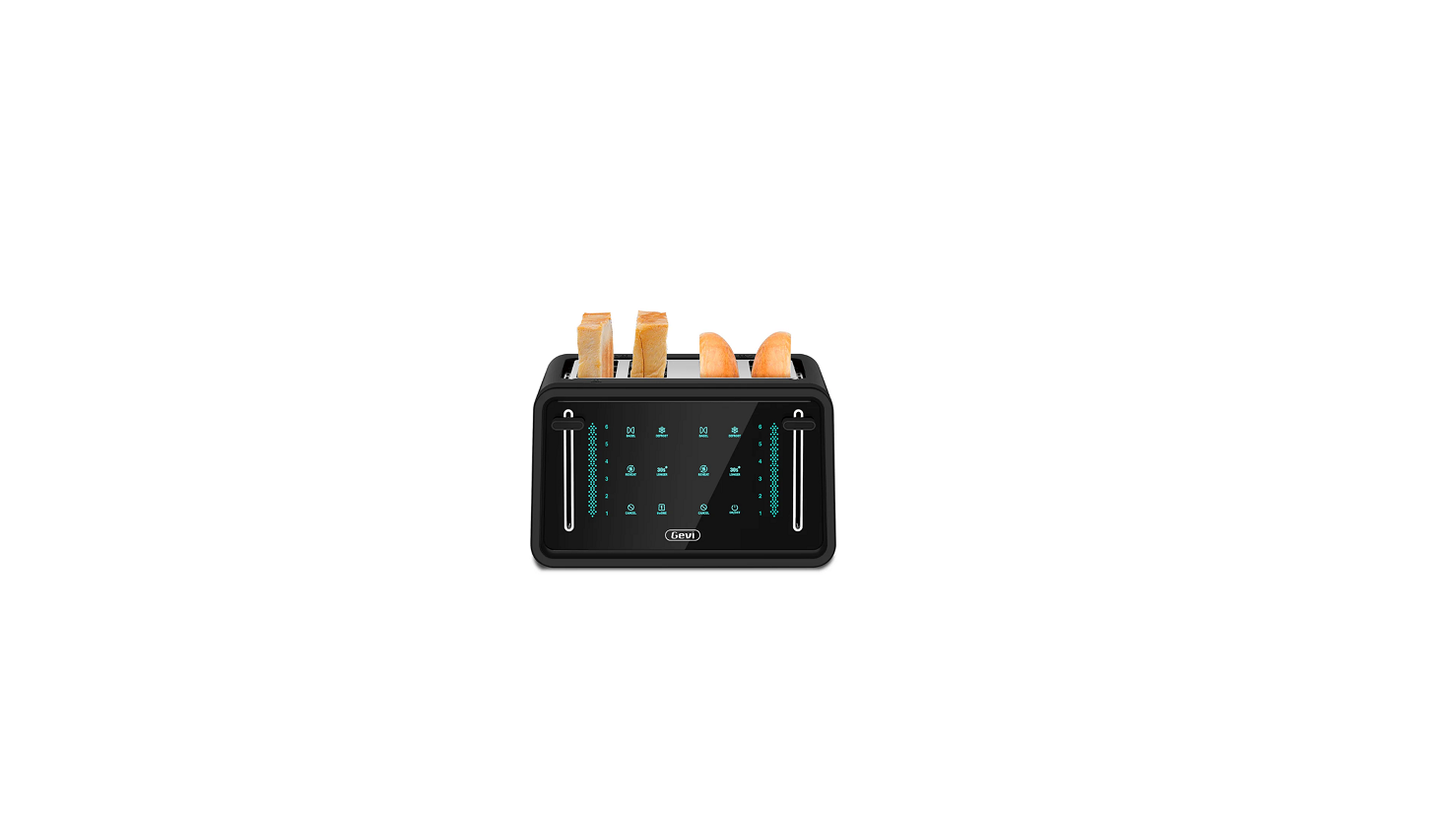

GEVI GETAE402-U LED Display 4-Slice Toaster
Safety Instructions
- Make sure that your outlet voltage corresponds to the voltage stated on the rating label of the toaster.
- Do not touch a hot surface. Use handles or knobs only.
- Close supervision is necessary when it is used by or near children.
- Unplug the unit from the outlet when not in use and before cleaning.
- Return the appliance to the nearest authorized service facility for examination, repair, or adjustment.
- Do not let the cord hang over the edge of he table or counter, or touch a hot surface.
- Do not place on or near a hot gas or electric burner, or in a heated oven.
- Do not operate the appliance for purposes other than its intended use.
- Do not use outdoors.
- Be extremely careful when moving the appliance containing hot oil or other hot liquids.
- Then unplug from the wall outlet.
- Do not insert oversized food, metal foil packages, or utensils into the toaster as they may cause fire or electric shock.
- Using accessories not recommended by the manufacturer may cause injuries.
- Don’t attempt to dislodge food when the toaster is plugged in.
- Be sure to take out the bread carefully after toasting to avoid injury.
- Do not operate when unattended.
FEATURES AND FUNCTIONS
- Electrical parameters: 120V ~ 60Hz 1800W

Dual Control Panels
- Two separate control panels allow you to toast different bread types at the same time perfectly.
Control Lever with Observation Function
- Press down the lever to begin toasting. Lift the lever at any time and observe the browning shade status without interrupting the toasting cycle.
Browning Shade Settings
- Touch a number (1‒6) to select your desired browning level.
Countdown Progress
- During operation, the progress mode will count down and let you know the browning rate.
Toast (Not Show)
- It is designed to toast two sides of the bread.
Bagel
- It is designed to toast the cut side of the bagel slightly more than the other side.
Defrost
- It is a longer cycle designed to first defrost and then toast the bread to the desired browning shade.
Reheat
- It is designed to reheat the bread without toasting the browning shade.
Longer
- It is designed to extend the toasting time by 30 seconds.
TheONE
- It is designed to evenly toast both sides of one slice of bread. The icon on the top of the toaster will show where to put the bread when only a slice of bread is toasted. Set the shade to a brighter setting than usual.
Cancel
- It will stop the toasting process and automatically lift the bread.
On/Off
- Press to turn touchscreen controls on or off.
PRODUCT INTRODUCTION
FOR THE FIRST USE
As there is manufacturing residue or oil remaining in the toaster or heat element, it usually emits an odor for the first use. It is normal and will not occur after several tse. Before toasting the first slice of bread, it is strongly suggested to operate the appliance according to the instructions below, without bread.
Operation
- The toaster is operated at 120V ~ 60Hz, rated power 1800W (Each 900W for Left / Right toaster).
- Plug in the power cord. All the icons will be shown fully bright in 2 seconds.
- After 2 seconds, the screen will remain on the Power button.
- Press the Power button, the screen will display the number “6” and its countdown progress, all bright, other icons display half bright, as the default setting is toast function with a 6 shade setting.
- Insert slice(s) of bread.
- Set the browning level. Choose the desired shade setting number 1‒6. Browning degree
Reference as follows:- SETTING 1-2 3-4 5-6
- COLOR light medium dark
- Select desired bread functions: Toast(Not Show), Bagel, Defrost,theONE, or Reheat.
Toast Function (Not Show)
- It is a default function if you did not choose any bread GEVI GETAE402-U LED Display 4-Slice Toaster function icons, which is designed to toast both sides of the bread.
Bagel Function
- It is designed to toast the cut side of the bagel slightly more than the other side. The icon will be fully bright when selected and semi-bright when not selected. A directional icon “ ”located on the top of the toaster shows you the correct way to insert your bagel. (The cut side should always face away from the center of the pair of toasting slots.
Defrost Function
- It is a longer cycle designed to first defrost and then toast the bread to the desired browning. The icon will be fully bright when selected and semi-bright when not selected.
Reheat Function
- It is designed to reheat the bread without selecting the brown shade setting. The icon will be fully bright when selected and semi-bright when not selected. All the brown shade numbers will be extinguished, and the whole countdown progress will be fully bright.
Longer Function
- It is designed to extend the toasting time by 30 seconds. This function can be selected before and during the toasting cycle. The icon will change from half-bright to full-bright.
- At the same time, the countdown progress will add a higher shadow to the extra countdown time (unless the countdown progress is already at the top).
- After the 30-second cycle is completed, the originally selected browsing shade cycle will resume.
The ONE Function
- It is designed to evenly toast both sides of one slice of bread. The icon on the top of the toaster shows where to put the bread when toasting one slice only.
- Set the shade to a brighter setting than usual. The icon will be fully bright when selected, and half-bright when not selected.
To Begin Toasting
Press the carriage lever until it locks in the down position, and toasting will begin. Under Toast/Bagel/Defrost/theONE function, the Screen Changes.
- The bread function icons and brown shade number GEVI GETAE402-U LED Display 4-Slice Toaster with its countdown progress that has been chosen will be fully bright (e.g., Bagel, 5 shade settings.
- The other brown shade setting number will be semi-bright (e.g., Number 1/2/3/4/6).
- The other bread function icons ( e.g., Defrost, Reheat,theONE ) will be extinguished.
- Longer, Cancel, On/Off icons will be semi-bright for choice.
Under the Reheat function, the Screen Changes:.
- Other bread function icons and all the shade setting numbers will be extinguished.
- The whole countdown process will be fully bright.
- Cancel, On/Off icons will be highlighted for selection.
You can lift the lever at any time and observe the browning shade status without interrupting the toasting cycle. To Stop the Cycle When the toasting cycle is finished, the toast will be raised. If you wish to stop the cycle before it is finished, simply touch the Cancel or On/Off button. After use, release the device from the electrical outlet.
Sleep Mode
After 5 minutes with no operation, the control panels will turn off, leaving only the On/Off icon. The control panels become invisible when the unit is in Sleep mode. To wake up your screen, simply touch the icon or press the start lever to the lower position. (In this case, the electromagnetic does not work to heat the heating element).
Memory Feature
After waking up from the sleep mode, the screen will display what icons you had selected last time, which is convenient, as you don’t need to remember your choice. But after unwinding the power cord and powering up again, the screen will return to the default mode ( toast function with 6 shade settings).
CLEAN AND MAINTENANCE
- Disconnect the power supply before cleaning.
- Wipe the outside with a dry cloth after the toaster cools down; never use metal polish.
- Pull out the crumb tray at the bottom of the toaster and empty it.
- If you use the toaster frequently, clean the accumulated bread crumbs at least once a week.
- Make sure the crumb tray is completely closed before using the toaster again.
- When not in use or storage, the power cord may be wound under the bottom of the toaster.
Dear Gevi customer
Thanks for purchasing our Gevi products. Gevi has focused on creating perfect home appliances for our customers. In the past few years, it took us time to do lots of GEVI GETAE402-U LED Display 4-Slice Toaster research and many prototypes to achieve our goal. We would like to give you a different user experience. If you want FAQs and more information, please feel free to contact us.