

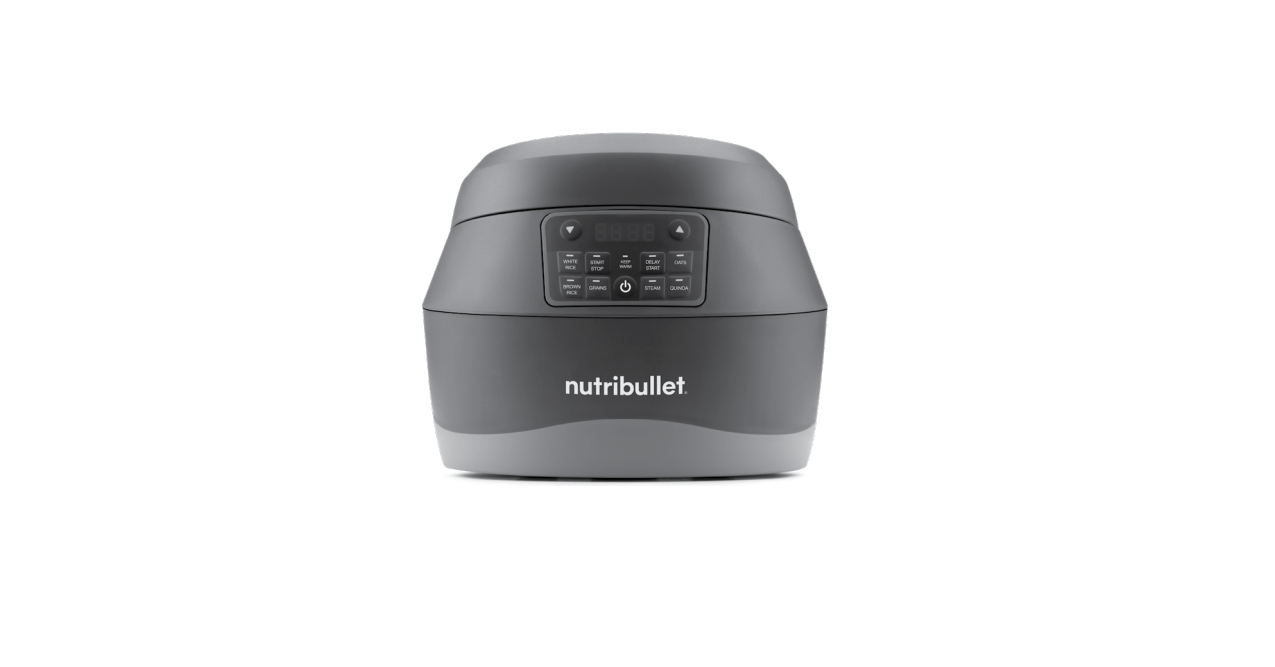

Nutribullet NBG50100 Everygrain Cooker
Safety Instructions
- The use of attachments not recommended or sold by NutriBullet® may cause fire, electric shock, or injury.
- This appliance is for household use only.
- Do not use this appliance for anything other than its intended use.
- Do not use in moving vehicles or boats.
- Do not let the power cord hang over the edge of a table or countertop.
- Do not let the power cord touch hot surfaces, or become knotted or tangled.
- Do not touch hot surfaces.
- Do not place the cooker on or near a hot gas or electric burner, or in a heated oven.
- Extreme caution must be used when moving an appliance containing hot food or hot liquids.
- To reduce the risk of electrical shock or injury, cook only in a removable cooking pot or steaming pan. Do not pour liquid into the base.
- Always attach the plug to the appliance first, and then plug the cord into the wall outlet.
- To disconnect, press the power button to power “OFF”, then remove the plug from the wall outlet.
- Remove and safely discard any packaging material or promotional labels before using this appliance for the first time.
- To eliminate a choking hazard for young children, remove and safely discard the protective cover fitted to the power plug of this appliance.
- Always make sure the unit is properly and completely assembled before connecting to a power outlet and operating.
- Ensure that the surface where the appliance operates is stable, level, clean, and dry.
What’s included
- cooker base

- 10-cup cooking pot

- steaming basket

- rice/grain measuring scoop

- rice spatula

- power cord

Assembly guide
- steaming basket

- cooking pot

- sealing panel
- steam vent
- condensation collector
- control panel
- cooking base

Control panel
The EveryGrain ™ Cooker features 5 Auto-Cook Programs, plus a Steam program if you’re steaming food.
To select a Cooking program
- Select one of the 5 auto-cook programs by pressing the button of the cooking program you desire on the control panel, located on the front of the unit.
White Rice

- This cooking program yields light, fluffy results, whether you’re cooking jasmine, basmati, or sushi rice.
Brown Rice

- This setting delivers expertly cooked brown rice every time. Fill the Cooking Pot to the Brown Rice Line for Whole Grain Brown Rice and for Indian and Pakistani Brown Basmati Rice.
Oats
- Whether steel-cut or rolled, this cooking program turns your oats into creamy, comforting porridge. Use a 1:2 ratio of oats to water for rolled oats, or measure your oats using the Measuring Scoop.
Quinoa
- This superfood is a seed, which makes it high in protein and other nutrients. Quinoa comes in white, black, brown, or multicolored.
Grains
- Many ancient grains, such as amaranth, farro, spelt, buckwheat, and millet, offer many health benefits as well as great flavor and texture.
To Use the Steam Program
- Press Steam if you’re only steaming food. The timer will show 0:00. Press (or press and hold) the up/down arrows to adjust steaming time in 1-minute increments.
Steam
- The EveryGrain ™ cooker lets you steam foods in one of two ways: you can steam items and cook grains simultaneously, or you can steam items on their own.
Keep Warm

- All programs will automatically switch to Keep Warm once the cooking program has completed, for up to 3 hours. This will keep your grains at an ideal temperature for when you are ready to eat.
Start/Stop
- Use the Start/Stop button to start a cooking cycle after choosing a program, cancel a cooking program, or end the Keep Warm stage.
Delay Start

- After selecting your desired cooking program, you can choose to delay cooking for up to 12 hours! This will ensure grains or rice are ready on your schedule.
Inner pot markings
- On the inside of the EveryGrain™ Cooking Pot, some markings serve as a useful cooking guide, indicating how much water to put in the pot for the grain type and number of scoops you’re cooking.
Number Inside a Circle

- Indicates how many scoops of grains (how much uncooked food) you’re putting into the pot.
Line Connected to a Circle

- Indicates how much water you should put into the pot for that amount of grain.
Assembly & Use
Before first use
- Before using your NutriBullet® EveryGrain™ Cooker for the first time, please take a moment to perform the steps below.
Unpack
- Open the box and remove the appliance with its various components, placing all parts on a flat, level, and dry surface.
Clean
- The Steaming Basket, Spatula, and Measuring Scoop are all dishwasher safe, or you can rinse them with warm, soapy water to clean.
Assembly
- Place the Cooker Base unit on a clean, dry, level surface, like a countertop or table.

- Open the Cooker Lid by pressing the round button located on the front of the lid. The lid will open and stay in this open position until manually closed.

- Insert the Cooking Pot into the Cooker Base. Make sure the Cooking Pot is seated on top of the inner heating plate, located inside the Cooker Base at the bottom.

- Close the Cooker Lid by pushing it all the way down until it clicks to indicate it’s fully closed and locked.

- If you wish to steam food, either with or without ingredients in the pot, place the Steaming Basket into the Cooking Pot.

- Attach the Power Cord to the Cooker Base. Insert the plug into an outlet. An audible beep will be heard when the cooker is plugged in, and the Power Button will light up.

Usage instructions
- Place food into the Cooking Pot and add water. Put up to 5 scoops of rice or other grains, or up to 4 scoops of quinoa or oats into the Cooking Pot and then add water.

- Open the Cooker Lid and insert the Cooking Pot into the Cooker Base. Push the button on top of the Cooker Lid to open it.

- If desired, place food into the Steaming Basket and insert the basket into the Cooking Pot. You can steam foods using the Steaming Basket, with or without grains cooking in the pot.

- When you press the Power Button, the cooker turns on, the Power Button illuminates blue, and your available cooking programs will illuminate white, indicating they are now able to be selected.

- Select a program (cooking program or Steam program). See pages 8-11 for detailed information.

- If you press Delay Start, a default time (2:00) is displayed on the timer, indicating 2 hours until cooking or steaming starts. To adjust the Delay Start time, press the up/down arrows.

- Press the Start/Stop button to begin the cooking or steaming process. Press again to stop. After selecting a cooking program or a Steam Nutribullet NBG50100 Everygrain Cooker program.

- While the unit is cooking or steaming, the control panel screen shows lines moving in a cascading pattern, which indicates that your program is active and the unit is working to complete it.

- When cooking/steaming is complete, the unit enters the Keep Warm program. The cooker will remain in the Keep Warm program for up to 3 hours.

- When you’re ready, remove your food and enjoy (or store for later). Dispose of any leftover food in the pot/basket, then clean the pot/basket and Nutribullet NBG50100 Everygrain Cooker other accessories.
Tips & tricks
- Clean the outside of the Cooking Pot before putting it into the Cooker Base.
- Unplug the appliance when not in use for a prolonged period of time.
- Make sure the power is off, the unit is unplugged, and the cooker has completely cooled down before cleaning, moving, or storing this product.
Care & maintenance
The Steaming Basket, Spatula, and Measuring Scoop are dishwasher safe or can be cleaned by rinsing in warm, soapy water.
- STEP 1: After cooking is completed, remove contents from the Cooking Pot or Steaming Basket (to store or eat).
- STEP 2: Dispose of any leftover food in the Cooking Pot or Steaming Basket, and rinse the pieces in warm, soapy water (or place the Steaming Basket in the dishwasher).
- STEP 3: Once the unit has cooled down completely, clean the inner heating plate with a clean, damp cloth.
- Clean the Cooking Pot, the Steaming Basket (if used), and the heating plate after each use.
- Regular cleaning helps keep food residue from building up inside the pot or basket.
- If food sticks inside the Cooking Pot, soak the pot with water for a while before cleaning.
- Clean the Sealing Panel, Steam Vent, and Condensation Collector thoroughly every time you use the Cooker.
- Use a damp cloth or sponge and warm, soapy water to wipe the Sealing Panel and Condensation Collector clean.
- Remove the Steam Vent plug and rinse with warm water. Clean the inside of the Steam Vent with a damp cloth.
How to store
- Before storing or moving the unit, make sure the power is off.
- The unit has cooled down, and the unit is unplugged. Store unit upright in a cool, dry location.
- Keep the accessories and the power Nutribullet NBG50100 Everygrain Cooker cord with the cooker.
Troubleshooting
Problem/Solution
- The Cooker does not power on
- Make sure the Power Cord is plugged into an electrical outlet.
- An audible beep will be heard when the appliance is plugged in.
- The Power Button will be illuminated blue, indicating it needs to be pressed in order to turn on the unit.
- The cooker will not operate (lid open)
- The unit won’t operate if the Cooker Lid is not fully closed and locked.
- Make sure the lid is all the way down; listen for a click to ensure the lid is fully closed and locked.
- The cooker will not operate (no cooking program or Steam program selected).
- The unit won’t operate if you have not selected a cooking program or a Steam program.
- Decide on a cooking program or a Steam program, then press its button on the control panel.
- Food sticks inside the Cooking Pot, hard Nutribullet NBG50100 Everygrain Cooker to clean.
- Soak inside of pot with water for a while before cleaning.
- Water should loosen stuck food residue over time. Hot water is even more effective, and hot soapy water should be the most effective.
1 Year Warranty
Limited Warranty
- NutriBullet, LLC (“NutriBullet”) warrants this NutriBullet® against defects in materials and workmanship for one year from the date of original retail purchase.
- A replacement product assumes the remaining warranty of the original product.
- A repaired product has a one-year warranty from the date of repair.
Obtaining Warrabty Service
- Before sending your product for limited warranty service, please make sure to keep a copy of all relevant documents for your files (receipt, etc.).
Exclusions & Limitations
- This limited warranty extends only to the Nutribullet NBG50100 Everygrain Cooker original consumer purchaser and is not transferable.
- In addition, proof of purchase must be demonstrated.
- NutriBullet shall not be liable for any incidental or consequential damages for breach of this limited warranty or any implied warranty on this product.
- This limited warranty gives you specific legal rights, and you may also have other rights which vary from state to state.
- NutriBullet is not liable for any damage to products not covered by this warranty (e.g., cups, book, User Guide).
- This warranty gives you specific legal rights, and you may also have other rights that vary by state or province.
Warranty registration
The registration will enable us to contact you in the unlikely event of a product safety notification.

Customer Support
- Website: nutribullet.com;
- Tel: 1 (800) 523-5993.