

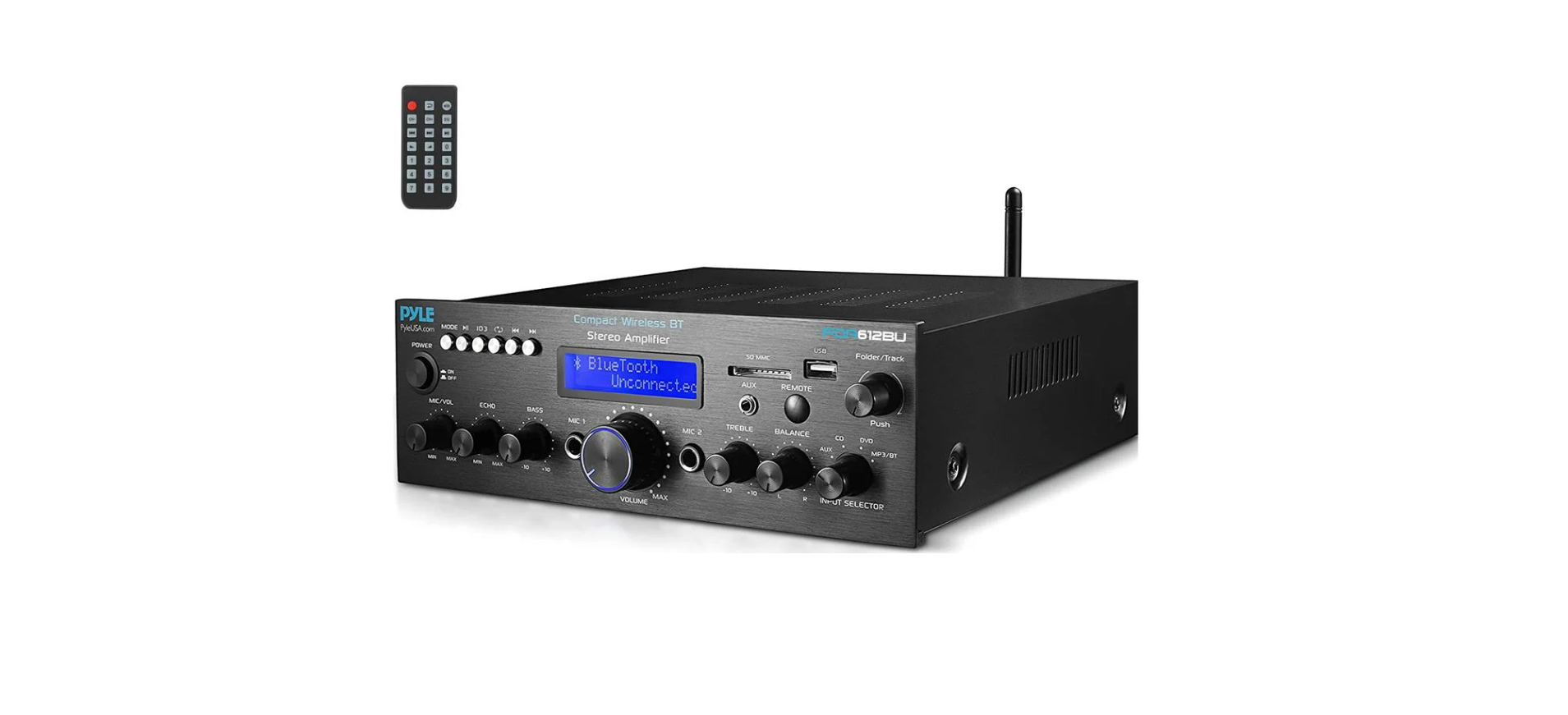

Pyle PDA29BU Wireless BT Stereo Power Amplifier

Safety Instructions
The exclamation point within an equilateral triangle is intended to alert the user to the presence of important operating and maintenance (servicing) instructions in this manual.
- Read these instructions thoroughly before using this item.
- Keep these instructions for future reference.
- Heed all warnings. Follow all instructions. Clean only with a dry cloth.
- Do not defeat the safety purpose of the polarized or grounding-type plug.
- A polarized plug has two blades with one wider than the other.
- A grounding plug has two blades and a round grounding prong.
- The wide blade or third prong is provided for your safety.
- Unplug the unit during lightning storms or when unused for long periods of time.
- Once all the equipment is ON, slowly raise the volume or level controls to their proper positions.
- If you detect smoke or a strange smell coming from the unit.
- If water or any metal object is immersed or dropped into the device.
- If the unit has been dropped or damaged.
- If the supply cord or plug is damaged.
- If the unit fails to operate properly (No sound comes out of the speakers).
- Do not drop metal or combustible objects into the ventilation slot.
- During lightning storms or when unused for long periods of time
- When unplugging the power cord, do not pull on the cord itself but pull on the plug.
- Do not install this equipment in a confined or built-in space.
- Only install the equipment in a well-ventilated and open location.
- Do not expose the product to Pyle PDA29BU Wireless BT Stereo Power Amplifier moisture for a long period of time to avoid fire or electric shock.
Functional Description
Front & Rear Panel
- AC 220V Power switch
- SD card slot
- Treble adjustment knob
- The USB socket
- Bass control knob
- Function display window
- Microphone volume control
- Microphone 1 input jack
- Microphone 2 input jack
- Volume adjustment knob
- MP3 function button
- MODE: signal input conversion: Select the previous song: Select the next song: MP3, for play or pause. In the FM Mode, click to automatically search the station. : All or single repeat model

- Audio input interface
- Left and right Output
- DC power supply 12V/5A input jack
- BT and FM antenna
- Power Input Cable

BT Connection
- Press the MODE button and enter Wireless BT mode. Blue light will flash on the screen.
- Search for the Wireless BT device and find the Bluetooth name “PYLEUSA” or “BT”.
- Select the “PYLEUSA” or “BT” Wireless BT name and wait for the device to pair.
- The unit will make a sound confirming that the devices have successfully paired, and the Blue light will stop flashing.
- Once paired, you can play music from your Wireless BT device. You can also use the control buttons on the unit to select the tracks from your Wireless Bluetooth device.
FM Radio Control
- Press the MODE button and enter FM Radio mode; the FM frequency will be displayed on the screen.
- Please turn the FM radio antenna and lengthen it to the longest position.
- Press the Play/Pause button, and it will auto scan and store FM Radio stations from 87.5Mhz to 108Mhz.
- Press the NEXT/PREV button to select the FM station.
Remote Control Function
- Press this button to turn ON or OFF the MP3
- When in the FM mode, press these two buttons to select the previous or next channel.
- Press these two buttons to select the previous or next track in USB or SD, or Wireless BT mode.
- Volume up or down
- Press the numbers to select the tracks directly. The unit takes 1-2 seconds to respond in USB or SD mode.
- Press this button to enter repeat mode.
- Press this button to select the playing mode, such as USB/SD/FM/WIRELESS B.T
- EQ function: Select a preset mode of the equalizer that is designed accordingly.
- Play and pause function for MP3.

Features
- Compact and Powerful Mini Amp System
- BT Receiver for Wireless Audio Streaming Ability
- RCA (L/R) Audio Input
- USB/SD/FM playing
- Connect & Stream Audio from External Devices
- Push-Type Speaker L/R Terminals
- Front Panel Rotary Controls
- Power ON / OFF Switch
- LED Indicator Light
- Configurable Treble, Bass, and Volume Adjustment
- LED Display
- With Wireless BT Antenna to Improve BT Distance
- With FM Antenna to Improve FM Sensitivity
- MIC Input
- Stereo Amplifier System
- Remote Control
BT Connectivity
- Simple & Hassle-Free Pairing Ability
- Works with All of Today’s Latest Devices (Smartphones, Tablets, Laptops, Computers, etc.)
- Wireless BT Network Name: ‘PyleUSA’
- Wireless BT Version: 5.0
- Wireless Range: 40’+ ft.
Technical Specifications
- Power Supply: 100WX2 Max
- 10% RMS at 8-Ohm Impedance: 8WX2
- Signal-to-Noise Ratio: 75dB
- Frequency Response: 20Hz – 20kHz
- Input Sensitivity: 200mV
- T.H.D.: 0.1%
- Signal-to-Noise Ratio: 75dB
- Power Cable Length: 4.9 ft.
- Tone Controls: Bass & Treble: +/-10dB (100Hz/10kHz)
- Power Fuse: 1 A, 250V Fast-Acting (5 x 20mm)
- Battery Operated Remote, Requires (1) x CR-2025 Button Cell Battery, Included
- Dimensions (W x H x D): 7” x 6.2” x 2.4” -in

Customer Support
- Email: support@pyleusa.com
- Tel: (718) 535-1800
- Working Hours: Mon–Thurs 9:00–17:00 EST | Fri 9:00–14:00 EST | Sat–Sun Closed