

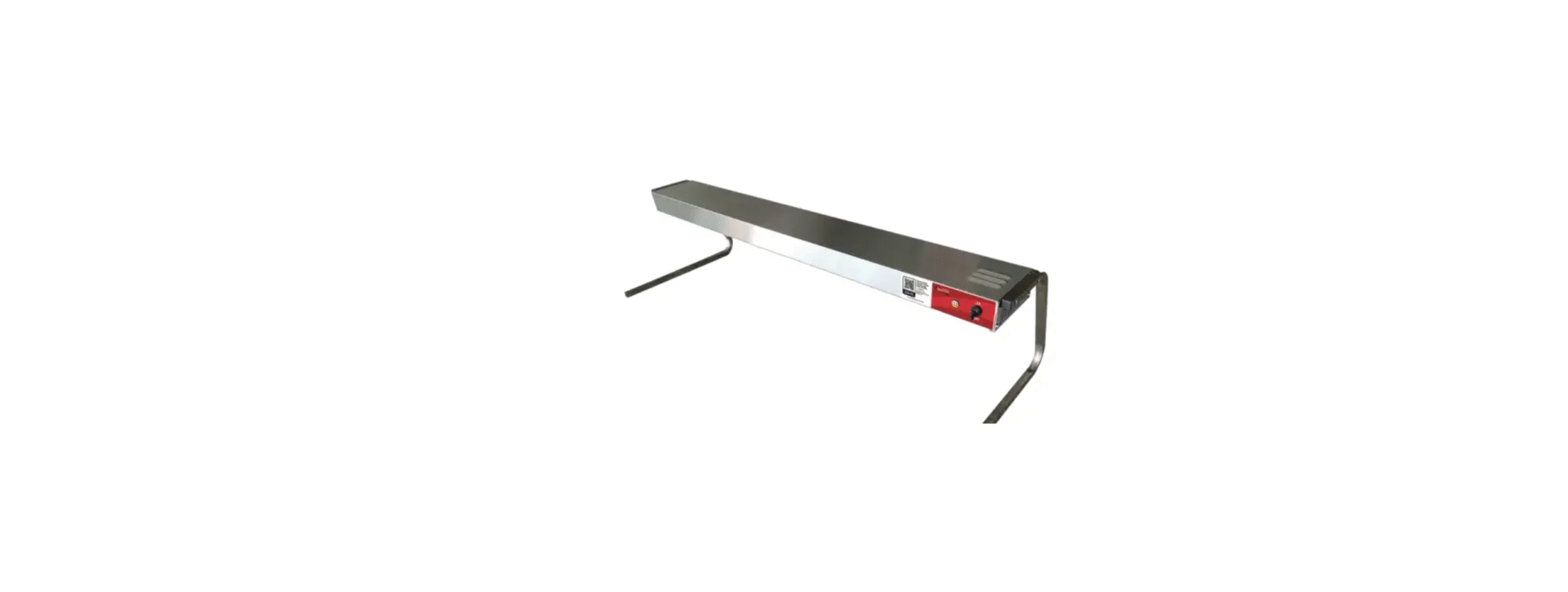

AVANTCO 177SW24INCPA Strip Warmers

Safety Instructions
- When handling, keep the cabinet upright with the inclination not exceeding 45 degrees. Do not invert the machine or lay it horizontally.
- There are rotating components in this ice machine. Do not insert slim objects into ventilation or exhaust ports, or serious mechanical damage and injury may occur.
- Do not store volatile or flammable substances in this ice machine, as it may result in an explosion or fire.
- Do not store any sundries or freeze any food in the storage bin. Keep the ice scoop clean.
- An insufficient base may cause the equipment to fall over and cause injury.
- There should be sufficient ventilation space around the ice machine.
- Clean the ice storage bin and the food area inside with a sponge soaked in warm water and soap. Then, rinse with potable water and dry
- Connect the machine to the water supply using the 3/4″ inlet fitting supplied with the machine. It is
recommended to install a water ball valve (not supplied with this machine) on the water supply line. - Connect the drain line to the drain connector.
- Confirm the power requirements stated in the machine’s nameplate; ensure that the power supply meets the requirements.
- Turn off the switch on the power line and connect the machine to the power source.
Initial Setup
Inspect The Packaging
- Examine the exterior of the packaging for any signs of damage that might have occurred during shipping.
Unboxing
- Open the packaging with care. Use scissors or a box cutter to cut open the box, ensuring you do not damage the strip warmer or its components.
Remove All The Components
- Extract the equipment and any included accessories from the box.
Additional Accessories
- Some strip warmers come with additional accessories like chains, mounting brackets, and sneeze guards. Familiarize yourself with their proper placement and use. These accessories can all be purchased separately. See installation instructions for how to install these accessories.
Space To Breathe
- This strip warmer needs at least 10” of clearance from food for adequate ventilation. Strip warmers generate heat, and maintaining proper ventilation is vital for consistent performance and the appliance’s longevity. See installation instructions below.
Professional Installation
- If the strip warmer is hardwired, a certified and insured A A foodservice equipment technician is required to install.
Installation
- Do not install strip warmers less than 12” above combustible surfaces.
- Install strip warmers with a minimum distance of 3” from a combustible wall or adjacent surface.
- Failure to provide proper spacing may result in heat damage to electrical components.
- Depending on your model, 10” – 18” is the recommended mounting height.
- Installation of two or more separate units with less than 3” between housing may result in
premature failure of parts. - Failure to provide proper spacing may result in heat damage to electrical components.

Under Shelf Mounting Installation Instructions
- Position the unit on a flat surface with the heating element facing down.
- Remove the two hanger tab screws and hanger tabs. These items will not be needed.
- Remove the two upper plate screws.
- Align the adjustable angle bracket with the end plate mounting holes on the unit. Secure the angle bracket with the previously removed end plate screws.
- Fasten the angle brackets to the underside of the shelf using appropriate fasteners. See the diagram below for reference.
- Drill four holes on the underside of a shelf, and use fasteners to install the brackets to the underside of the shelf.

Installing
Chain-Suspended Units
- Prepare the overhead mounting system for the “S” hooks. Ensure the system is secure and is set up so the unit will be suspended at a level, safe, and proper distance from walls, counters, and food.
- Loosen, but do not remove, the screws securing the hanger tabs on each end of the unit.
- Rotate the tabs up, then tighten the AVANTCO 177SW24INCPA Strip Warmers the screws securely.
- Securely attach one of the 6″ (152 mm) connecting chains between each pair of hanger tabs.
- Attach an “S” hook to the center of each connecting chain.
- Carefully lift the unit and attach the “S” hooks on each end of the unit to the overhead mounting system. Ensure the unit is level. See diagram for reference.

Installing Optional Accessories and Legs
- Optional C-Legs or T-Legs (purchased separately) can be installed on all models for portable use.
- Only 120V models with a power cord and plug connection should be mounted onto T-Legs or
C-Legs. Do not mount units longer than 72” on T-Legs or C-Legs. - Position the unit on a flat surface with the heating element facing up.
- Remove the two hanger tab screws and hanger tabs. These items will not be needed.
- Remove the two upper plate screws.
- Align the mounting holes on the legs with the end plate mounting holes on the unit. Secure the
legs with the previously removed end plate screws.
Operation
Start-Up Procedure
If the strip warmer comes with a cord and plug, AVANTCO 177SW24INCPA Strip Warmers plug the cord into a grounded electrical outlet of the correct voltage. Electrical shock can occur if the appliance is not grounded.
- For strip warmers with toggle controls, flip the switch to the “ON” position. Turn units “OFF” when not in use.
- For strip warmers with infinite controls, the control dial is used as the “ON” switch and to set the desired setting. Rotate the dial to the desired setting that works best for the food you are serving. The indicator light illuminates while the strip warmer is on and shuts off when the power is off.
Cleaning
Unplug
- Always unplug the strip warmer from the electrical outlet before cleaning for safety purposes, minimizing the risk of electrical shocks.
Gloves
- Wearing gloves is recommended. This helps protect your hands from grease and/or any sharp edges and keeps the strip warmer and cleaner.
Water Temperature
- Use warm water combined with a gentle dish detergent to clean any removable parts.
Soft Sponge
- Always use a non-abrasive sponge to prevent scratching any of the strip warmer’s surfaces.
- Do not immerse in water or other AVANTCO 177SW24INCPA Strip Warmers liquids.
Maintenance
- Turn off and disconnect the machine from the power source.
- Inspect the plug and cord for any indications of excessive wear, which may encompass discoloration, burn marks, cuts, and tears.
- Check the integrity of electrical cords and plug points.
- If any issues are detected, consult the “Troubleshooting” section or the service provider for recommended actions or replacements.
- Disconnect the power supply and wait until the unit has cooled.
- Unscrew the lightbulb from the unit and replace it with a new, specially coated incandescent or optional halogen bulb.
PROFESSIONAL SERVICING
- Schedule an annual service appointment with a certified technician.
- The technician will perform a comprehensive inspection, checking electrical components.
- Any worn-out or damaged parts will be AVANTCO 177SW24INCPA Strip Warmers.
Troubleshooting
| Issue | Reason | Solution |
| The unit is turned “ON,” but there is no heat. | No power to the unit. | Check the circuit breaker and reset as necessary. |
| The switch is defective. | Contact the authorized service agent. | |
| Wiring is open. | Contact the authorized service agent. | |
| Heating element defective. | Contact the authorized service agent. | |
| The heat is inadequate. | The unit is mounted too high above the target. | Lower unit, putting effective heat closer to the target. |
| Excessive air movement around the strip heater target area. | Restrict or redirect air movement (air conditioning duct or exhaust fan) away from the unit. | |
| Incorrect power supply (low). | Check the power supply to the unit, making sure it matches the rating on the unit. If the power supply is incorrect, change to match the rating. | |
| Heat is excessive. | The unit is mounted too close to the target area. | Check to see that the installation is within specifications for type/model. Increase the mounting height if too close. |
| Voltage supply too high. | Check the power supply to the unit, making sure it matches the rating on the unit. If the power supply is incorrect, change to match the rating. |
Customer Service
- Website: https://www.avantcorefrigeration.com/
- Tel: 717-381-4844