Close Menu
onyxguides.comonyxguides.com

    Subscribe to Updates

    Get the latest creative news from FooBar about art, design and business.

    What's Hot

    How To Change Password Of Wi-Fi Router TP-Link

    March 16, 2026

    CHASING DORY 1080P Full HD Underwater Drone User Manual

    March 16, 2026

    BARCO QDX Rental Laser Projectors Instruction Manual

    March 13, 2026
    Facebook X (Twitter) Instagram
    onyxguides.comonyxguides.com
    Facebook X (Twitter) Instagram Pinterest
    • Home
    • About us
    • Terms & Conditions
    • Privacy Policy
    • FAQs
    • Contact us
    onyxguides.comonyxguides.com
    Home » HIGHPOINT SSD7104/SSD7204 RAID Controller Installation Guide
    HIGHPOINT

    HIGHPOINT SSD7104/SSD7204 RAID Controller Installation Guide

    By Gabriel SmithSeptember 29, 2025Updated:September 30, 2025No Comments3 Mins Read
    Facebook Twitter Pinterest LinkedIn Tumblr WhatsApp Telegram Email
    HIGHPOINT-SSD7104-SSD7204-RAID-Controller-featured
    Share
    Facebook Twitter LinkedIn Pinterest Email

    HIGHPOINT-logo

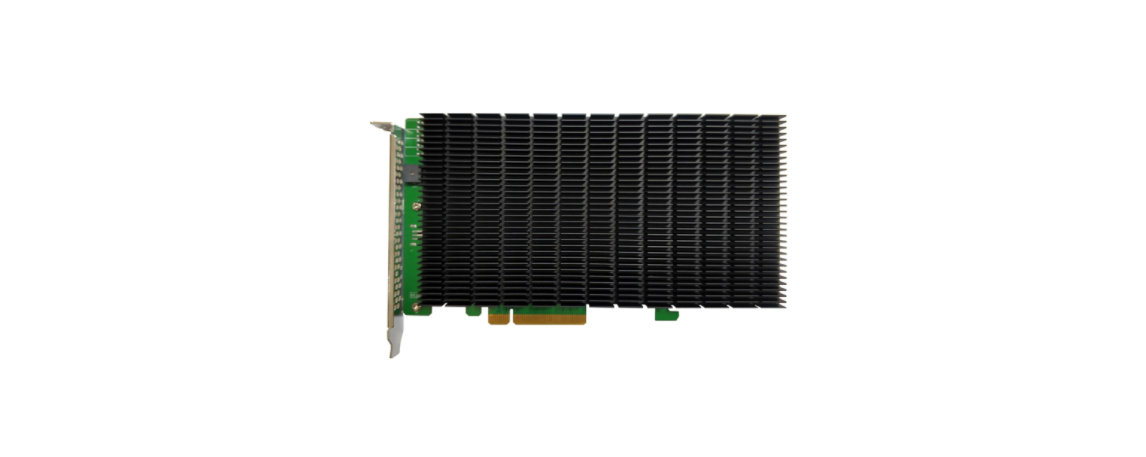
    HIGHPOINT SSD7104/SSD7204 RAID Controller

    HIGHPOINT-SSD7104-SSD7204-RAID-Controller-Product

    Introduction

    This guide includes hardware descriptions of the SSD7104 and SSD7204 NVMe RAID controllers, explains how to safely install NVMe SSDs into each HIGHPOINT SSD7104/SSD7204 RAID Controller card, and provides a series of Resource links for additional installation guides, compatibility lists, and software updates.

    Kit Content
    • SSD7104 Controller Card
    • Quick Installation Guide
    • SSD7204 Controller Card
    • Quick Installation Guide

    Data RAID Prerequisites

    1. You must have at least one NVMe SSD installed in the SSD7104/SSD7204 controller.
    2. The SSD7104 must be installed into a PCIe 3.0 and 4.0 x16 lanes.
    3. The SSD7204 must be installed into a PCIe 3.0 and 4.0 x8 or x16 lanes.
    4. Operating system
      • Windows 10 / Windows 2016 / Windows 2019
      • A Linux Distribution with Kernel 3.10 and later
      • macOS 10.13 and later
    5. A motherboard that can support UEFI modes. Please check the SSD7104 Compatibility List and SSD7204 Compatibility List for recommended motherboards.
    • SSD7104 Hardware 

    Front ViewHIGHPOINT-SSD7104-SSD7204-RAID-Controller-Fig-1

    • SSD7204 Hardware

    Front ViewHIGHPOINT-SSD7104-SSD7204-RAID-Controller-Fig-2

    Installation

    1. On the rear of the SSD7204, remove the six screws that secure the unit’s heat sink to the PCB. After removing the screws, carefully remove the heat sink from the SSD7204.
    2. These 4 screws are used to install the NVMe SSDs. The SSD7204 can support any M.2 form factor (2242, 2260, 2280, and 22110).
    3. Please remove the screws on the right side of SSD7204
    4. Gently insert the SSD into the slot.
    5. Refasten the screw to secure the SSD. Repeat Steps 3 to 5 to install the remaining SSD.
      The following example shows four SSD 970 EVO Plus installed into Ports 1 and .;
    6. Replace the heat sink after installing all SSDs
    7. On the rear of the SSD7204, refasten the six screws that were removed in step 1.
      • Resources

        Various manuals, guides, and FAQs are available for the SSD7749M2NVMe RAID AIC. In addition, we recommend visiting the Software Downloads webpage for the latest drivers and RAID Management software.

        • For Software Downloads, Documentation, and more product information
        • Visit: https://www.highpoint-tech.com/nvme-individual/ssd7749m2
        • FAQ & Troubleshooting
        • Visit:  http://helpjuice.com

    Other Reference Information

    SSD7104 User Guide – How To Set Up & Monitor RAID Array

    • https://highpoint-tech.com/USA_new/series-ssd7104-resource.htm

    SSD7204 User Guide – How To Set Up & Monitor RAID Array

    • https://highpoint-tech.com/USA_new/series-ssd7204-resource.htm

    FAQ & Troubleshooting

    • https://highpoint-tech.com/USA_new/support-faq-nvme.htm

    Customer Support

    If you encounter any problems while utilizing the SSD7749M2 or have questions about this or any other HighPoint Technologies, Inc. product, feel free to contact our Customer Support Department.

    • Web Support: https://www.highpoint-tech.com/support-and-services HighPoint Technologies, Inc.
    • websites: https://www.highpoint-tech.com

    FAQs

    Q: What type of PCIe slot is required for these controllers?

    Ans: Depending on the model, insert the controller into a Gen3 or Gen4 PCIe x16 slot. Steer clear of chipset-connected slots to guarantee maximum bandwidth.

    Q: What kind of SSDs are supported?

    Ans: Both controllers support M.2 NVMe SSDs (M-key, 2280 length). There is no support for SATA M.2 drives.

    Q: Is RAID configuration hardware-based or software-based?

    Ans: Using the built-in tools in HighPoint, you may construct and manage arrays that are RAID 0, 1, 5, 10, or JBOD.

    Q: Can I use these controllers in HBA (non-RAID) mode?

    Ans: Indeed. Both variants can function in pass-through mode, which exposes every SSD to the OS directly.

    Q: Are these controllers hot-swappable?

    Ans: It is not possible to hot-swap M.2 NVMe discs.

    Q: Do these controllers require additional cooling?

    Ans: Indeed. Both types have a significant heat-generating capacity while under load. To avoid thermal throttling, make sure there is active airflow across the GPU and SSDs.

    Buy HighPoint SSD7104 SSD7204 Online HighPoint PCIe 3.0 x16 NVMe RAID Controller HighPoint SSD7104 RAID Controller HighPoint SSD7104/SSD7204 NVMe RAID Card HighPoint SSD7204 RAID Controller
    Share. Facebook Twitter Pinterest LinkedIn Tumblr Email
    Gabriel Smith

      Related Posts

      HIGHPOINT SSD7502 2x M.2 Port to PCIe 4.0×16 Installation

      September 29, 2025

      HIGHPOINT SSD7104F 4x M.2 Port to PCIe 3.0×16 Installation

      September 29, 2025

      HIGHPOINT R1120 4x U.2 Port to PCIe 3.0×16 Installations

      September 29, 2025

      HIGHPOINT Rocket 1580 8x U.2 Port Quick Installation Guide

      September 29, 2025

      HIGHPOINT SSD7540 & SuperMicro X11QPH+ Instruction Manual

      September 29, 2025

      HIGHPOINT RocketU 1244C PCIe 3.0 10Gbs HBA User Manual

      September 29, 2025
      Add A Comment

      Comments are closed.

      Don't Miss
      Other

      How To Change Password Of Wi-Fi Router TP-Link

      March 16, 2026

      Introduction The TP-Link router is used for several purposes. Because it is dependable and simple…

      CHASING DORY 1080P Full HD Underwater Drone User Manual

      March 16, 2026

      BARCO QDX Rental Laser Projectors Instruction Manual

      March 13, 2026

      CHRISTIE D4K2560 High Frame 4K Projector Instruction Guide

      March 13, 2026
      Stay In Touch
      • Facebook
      • Twitter
      • Pinterest
      • Instagram
      • YouTube
      • Vimeo

      Subscribe to Updates

      Subscribe to Updates

      Follow us

      Facebook X-twitter Instagram Pinterest

      © 2025 All rights reserved Onyx Guide.