


HIGHPOINT SSD7502 2x M.2 Port to PCIe 4.0×16

System Requirements
PC Requirements
- System with a free PCIe 4.0 x16 or PCIe 3.0 x16 slot
- Windows 10, Windows Server 2016 or later, Microsoft Hyper-V
- Linux kernel 3.10 and later
- MacOS 10.13 and later
SSD7502 Kit Content
- SSD7502 Controller Card
- Quick Installation Guide
- Low Profile Bracket
SSD7502 Hardware
Front View


On the rear of the SSD7502, remove the four screws that secure the unit’s heat sink to the PCB.
After removing the screws, carefully remove the heat sink from the SSD7502.
After removing the casing, carefully turn it over to view the thermal pad. The blue film must be removed from the pad before reinstalling the panel. This film protects the pad from damage and foreign objects before installation, but will also prevent the pad from transferring heat away from the NVMe SSDs and controller componentry.

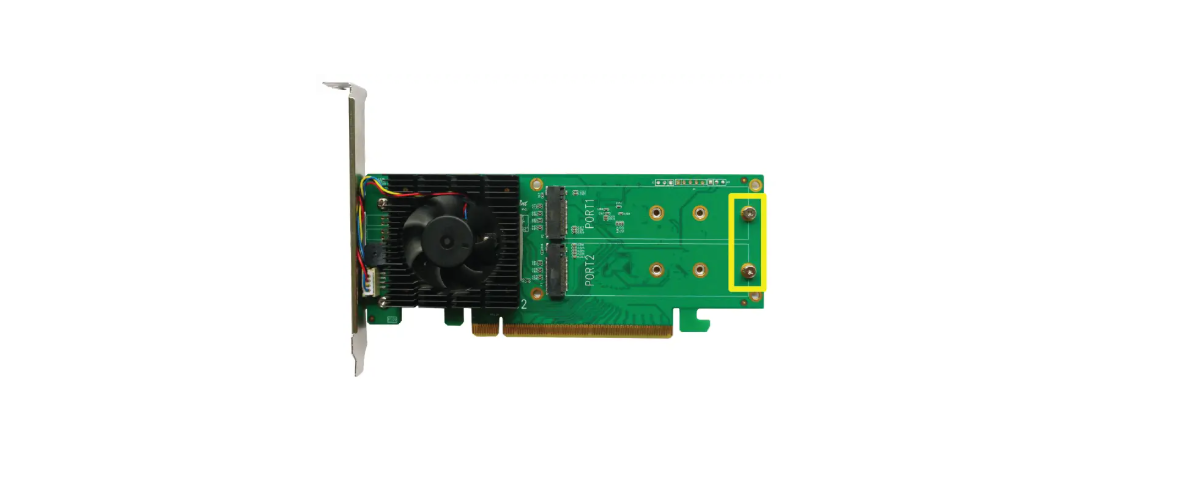
These 2 screws are used to install the NVMe SSSDs

Please remove the screws on the HIGHPOINT SSD7502 2x M.2 Port to PCIe 4.0×16 right side of SSD7502
Gently insert the SSD into the slot. Refasten the screw to secure the SSD.
 Repeat Steps 3 to 5 to install the remaining SSD.
Replace the heat sink after installing all SSDs
On the rear of the SSD7502, refasten the 4 screws that were removed in step 1.
Resources
Various manuals, guides, and FAQs are available for the SSD7749M2NVMe RAID AIC. In addition, we recommend visiting the Software Downloads webpage for the latest drivers and RAID Management software.
- For Software Downloads, Documentation, and more product information
- Visit: https://www.highpoint-tech.com/nvme-individual/ssd7749m2
- FAQ & Troubleshooting
- Visit: http://helpjuice.com
Customer Support
If you encounter any problems while utilizing the SSD7749M2 or have questions about this or any other HighPoint Technologies, Inc. product, feel free to contact our Customer Support Department.
- Web Support: https://www.highpoint-tech.com/support-and-services HighPoint Technologies, Inc.
- websites: https://www.highpoint-tech.com