

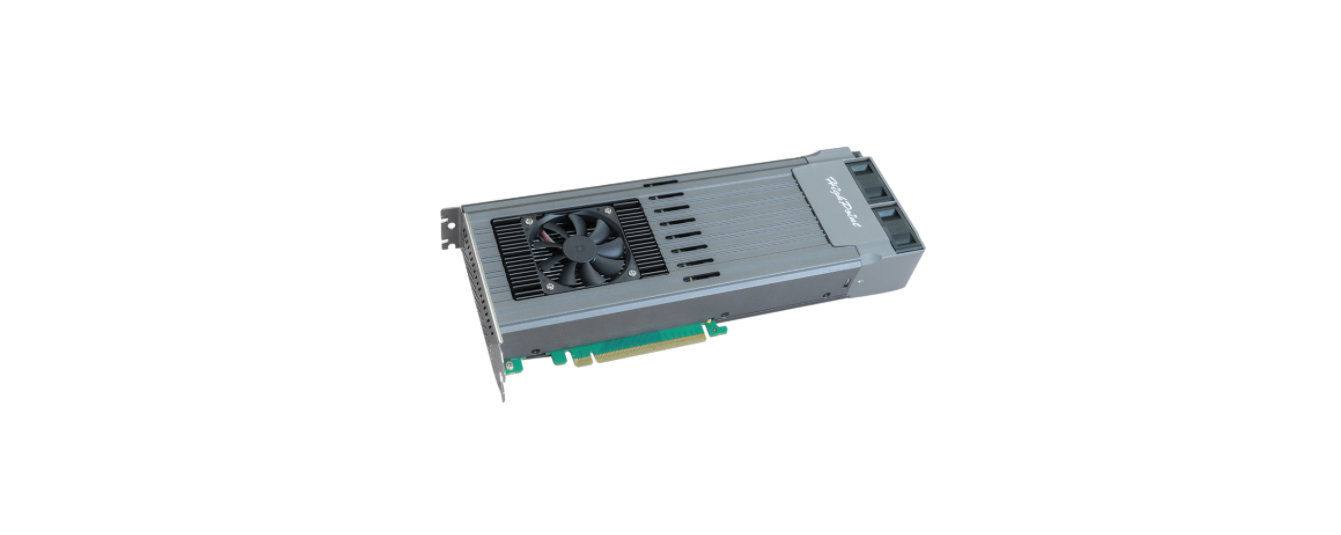

HIGHPOINT SSD7749M2 16x M.2 Port

System Requirements
PC Requirements
- PC platform with a free physical PCIe 4.0 (3.0 or 5.0) x16slot
- Form factor: Full-Height, Full-Length, Dual-Width
Operating System
- Windows 11, 10 / Server 2022, 2019, 2016 / Microsoft Hyper-V
- RHEL/ Debian/ Ubuntu/ Fedora/ Proxmox/ RockyLinux(Linux kernel 3.10 and later)
Kit Content
- 1x SSD7749M2
- 1x Quick Installation Guide
- 16x M.2 rubbers
- SSD7749M2 Hardware
Front View
- NVMe SSD Tray
Front View
- NVMe SSD Tray
Rear View
Hardware Installation
- Use a wired ESD wrist strap that is properly grounded.
- Unpack and remove the SSD7749M2 and check it for damage. If it appears damaged, please get in touch with HighPoint Technical Support.
- Apply pressure at the mark to release the lock, and turn it counterclockwise.


- Gently remove the NVMe SSD Tray from the SSD7749M2.

- Confirm the direction of the rubber (pointing to the right).

- Gently insert the NVMe SSD into the M.2 port of the NVMe SSD Tray.

- Press the right side of the rubber to align it and insert it into the retention hole on the end of the NVMe SSD.

- Rotate the direction of the rubber so that it points to the left to secure the NVMe SSD better.

- After installing all NVMe SSDs, carefully insert the NVMe Trays into the slots.


- Align the fan module and press down to secure.

- Shut down the system and disconnect the AC power cord.

- Connect the SSD external power HIGHPOINT SSD7749M2 16x M.2 Port supply.
- Insert the SSD7749M2 into the system’s openPCIe3.0/4.0/5.0 x16 slot.

- When finished, turn on the power to the system.
Resources
Various manuals, guides, and FAQs are available for the SSD7749M2NVMe RAID AIC. In addition, we recommend visiting the Software Downloads webpage for the latest drivers and RAID Management software.
- For Software Downloads, Documentation, and more product information
- Visit: https://www.highpoint-tech.com/nvme-individual/ssd7749m2
- FAQ & Troubleshooting
- Visit: http://helpjuice.com
Customer Support
If you encounter any problems while utilizing the SSD7749M2 or have questions about this or any other HighPoint Technologies, Inc. product, feel free to contact our Customer Support Department.
- Web Support: https://www.highpoint-tech.com/support-and-services
- HighPoint Technologies, Inc. websites: https://www.highpoint-tech.com
FAQs
Q: What is the HIGHPOINT SSD7749M2 used for?Ans:
Professional workstations and servers can now have high-capacity storage and lightning-fast data transfer thanks to the SSD7749M2, a high-performance NVMe RAID controller that supports up to 16 M.2 NVMe SSDs.
Q: Do the M.2 slots support both NVMe and SATA M.2 drives?
Ans: No. The SSD7749M2 is limited to supporting M-Key PCIe/NVMe M.2 SSDs. There is no support for SATA M.2 drives.
Q: Is hot-swapping supported?
Ans: No, hot-swapping is not supported by the SSD7749M2. Before removing or replacing M.2 drives, always make sure the system is completely turned down.
Q: Is UEFI boot supported from RAID volumes?
Ans: Depends on how UEFI is implemented and the motherboard. UEFI boot from NVMe RAID is supported by some systems but not by others. Examine the documentation for the motherboard and do compatibility tests.
Q: Can I install fewer than 16 drives? Will it still work?
Ans: It is modular, indeed. One to sixteen NVMe SSDs can be installed. The populated ports are dynamically recognised by the controller. To begin, you do not have to fill every slot.
Q: Does this card work in macOS systems (like Mac Pro)?
Ans: Yes, technically, but only with drivers that work with macOS and restricted boot support. Perfect for PCIe expansion chassis-based external enclosures. Before committing, check out HighPoint’s macOS-specific tools.
Q: Can I use this for ZFS, Btrfs, or other software-defined storage systems?
Ans: Of course. Configure all discs in JBOD mode and send them to the OS-based storage layer of your choice if you prefer software RAID or filesystems with snapshot/versioning capabilities (such as ZFS).