

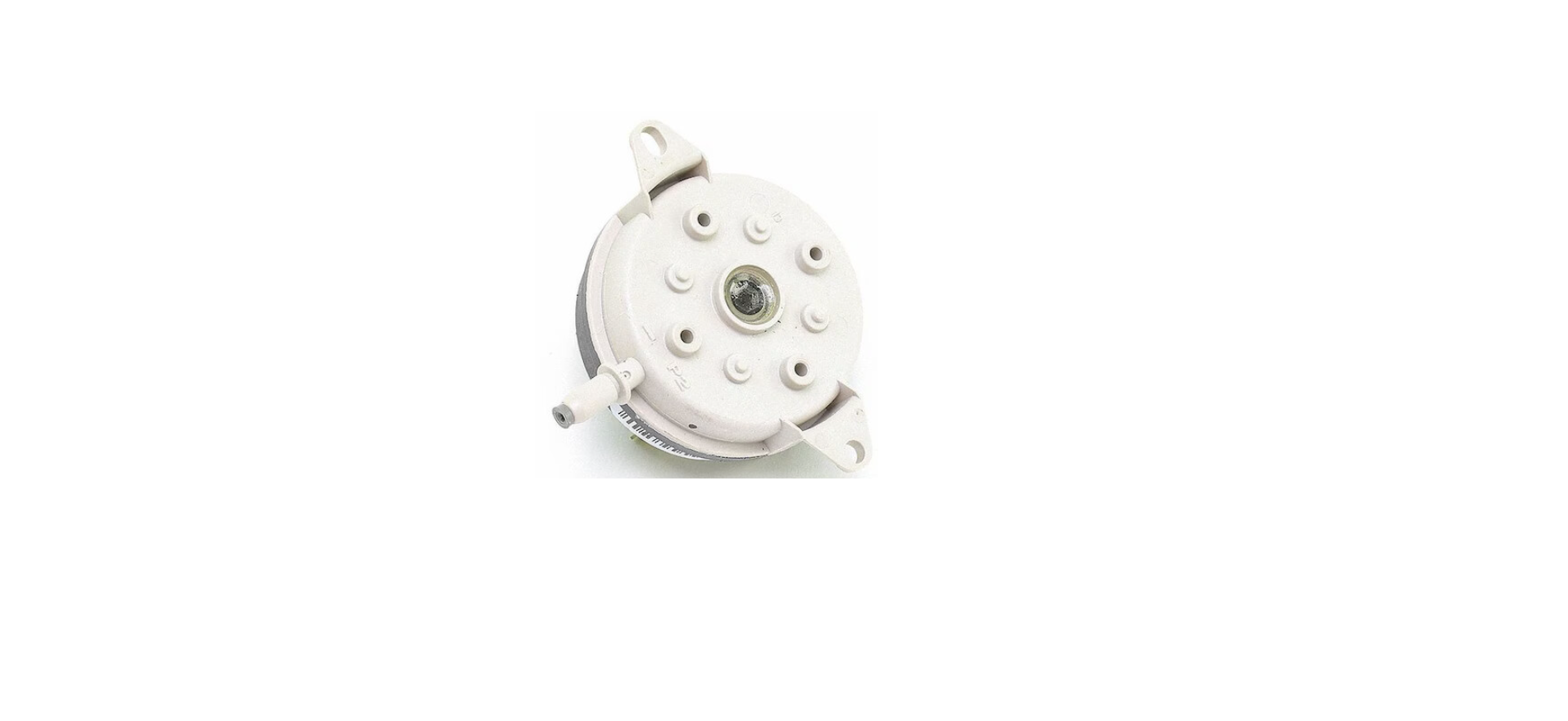

Renzor RP-PRESS-SW Pressure Switch Kit

Components
Ensure that all components listed in Figure 1 and listed in Table 1 are available before beginning installation.
Replacement Pressure Switch Kit

| Table 1. Replacement Pressure Switch Kit (PN 93033) Components | ||||
| Item No. | Component | Description | PN (Quantity | |
| 1 | Wire assembly | 93034 (1) | ||
| 2 | Pressure switch | 0.58-inch | 204327 (1) | |
| 3 | Sheet metal screw | #10 × 1/2 | 11813 (2) | |
| 4 | Locknut | Brass | 122852 (1) | |
| 5 | Panel nut | Hex, silver-colored | 261957 (1) | |
| 6 | Tube | Sensing | 171750 (1) | |
| 7 | Silicone tubing | Red, 3/16 ID × 11 inches long | 133117 (1) | |
Installation
Replace the pressure switch as follows. Item numbers in parentheses refer to Figure 1.
- Turn OFF the gas and electric power.
- Remove the entrance access panel and upper vent panel to expose the vent assembly and electrical junction box.
- Remove existing switch:
Do not disconnect the wires in the junction box.
- For model RP
- Disconnect the pressure switch wires.
- Remove the screws that secure the existing pressure switch and remove the switch. Reinstall the screws to plug the holes.
- Remove the existing sensing tube and aluminum tubing.
- Model RPV
- Disconnect the sail switch wires.
- Remove the screws that secure the sail switch and the sail switch mounting bracket, and remove the switch and bracket from the vent housing.
- Install replacement sensing tube (6)
- Locate the hole where the original sensing tube (RP models) was located or where the sail switch (RPV models) was located, and position the replacement sensing tube (6) inside the venter housing with the end sloped downward (see Figure 2).

- Secure the sensing tube (6) to the venter housing using a brass locknut (4) outside of the housing and a hex panel nut (5)
inside of housing.
- Locate the hole where the original sensing tube (RP models) was located or where the sail switch (RPV models) was located, and position the replacement sensing tube (6) inside the venter housing with the end sloped downward (see Figure 2).
Install replacement pressure switch (2)
- Position switch (2) inside junction box (see Figure 2) with tubing barb on top. Using switch (2) as a template, mark and carefully drill a 3/8-inch (minimum) hole in the top of the junction box.
- With pressure switch (2) tubing barb through hole in top of junction box, secure switch to junction box using two sheet metal screws (3).
- The recommended position of the pressure switch and sensor is inside the junction box with the tubing barb toward the top. If installing the switch inside the junction box is not possible, install the switch on the duct side wall near the junction box.
- Connect the sensing tube (6) to the pressure Renzor RP-PRESS-SW Pressure Switch Kit switch (2) using silicone tubing (7). Ensure that both connections are secure. Connect the replacement wiring assembly (1) as follows:
- For RP models, connect existing wires in the junction box to the replacement pressure switch (2) or disconnect existing wiring in the junction box and make identical connections to the wire assembly (1).
- For RPV models, disconnect and discard the sail switch wiring and make identical connections to the wire assembly (1).
- Connect wires from the junction box to the pressure switch (2) as follows: red wire to the normally closed (NC) terminal, black wire to the normally open (NO) terminal, and white wire to the common (C) terminal.
- Reinstall the upper vent panel. Turn ON the gas and electric power. Light the heater in accordance with the lighting instructions. Check for proper operation. Reinstall the center access panel. The heater is ready to be returned to normal service.
Pressure Switch Kit
- If a replacement pressure switch is required for a model RP unit manufactured before December 1991, this kit provides a new, smaller switch, a sensor, and easier-to-install flexible tubing.
- For model RPV series 3 and 5 units, this kit is designed to replace the originally-installed sail switch with a pressure-activated switch. The function of both switches is to provide combustion air.
- Refer to the installation manual provided with the heater for important safety information.
Limited Warranty
Reznor LLC warrants to the original owner-user that this product will be free from defects in material and workmanship. This warranty is limited to twelve (12) months from the date of original installation, whether or not actual use begins on that date, or eighteen (18) months from the date of shipment, whichever occurs first.
Manufacturer Replacement Parts Limited Warranty
Reznor LLC warrants replacement parts for thirty (30) days after installation or thirteen (13) months from the date of shipment, whichever occurs first.
Customer Support
- Website: www.reznorhvac.com
- Ph: 800-695-1901
FAQs
Q: What is the purpose of the RP-PRESS-SW Pressure Switch Kit?
The kit is intended to upgrade or replace the pressure switch in Reznor heating units that are compatible with it. By alerting the control board when unusual pressure conditions arise, the pressure switch ensures safe operation by keeping an eye on the system’s air or gas pressure.
Q: Which Reznor units are compatible with this kit?
Certain Reznor RPV, SC, and SCA units are compatible with the RP-PRESS-SW kit. Prior to installation, always check your model and serial number with the manufacturer or the kit instructions.
Q: Can this kit be installed without prior HVAC experience?
No, improper installation could result in a voided warranty, safety risks, or system malfunction. Installation should only be done by a certified HVAC specialist.
Q: Does replacing the pressure switch affect system performance?
The switch restores regular monitoring and safety functionality when fitted appropriately. It doesn’t change efficiency, heating capacity, or airflow. Operational problems could result from improper installation.
Q: What is the function of the tubing connected to the pressure switch?
The vent or blower housing sends pressure signals to the switch through the tubing. The switch may malfunction due to leaks, kinks, or obstructions, which could result in safety lockouts or system shutdown.
Q: Can I reuse the old tubing when installing the new switch?
The state of the tube determines this. To guarantee accurate pressure monitoring and stop leaks, Reznor advises replacing tubing if it exhibits wear, cracks, or distortion.