

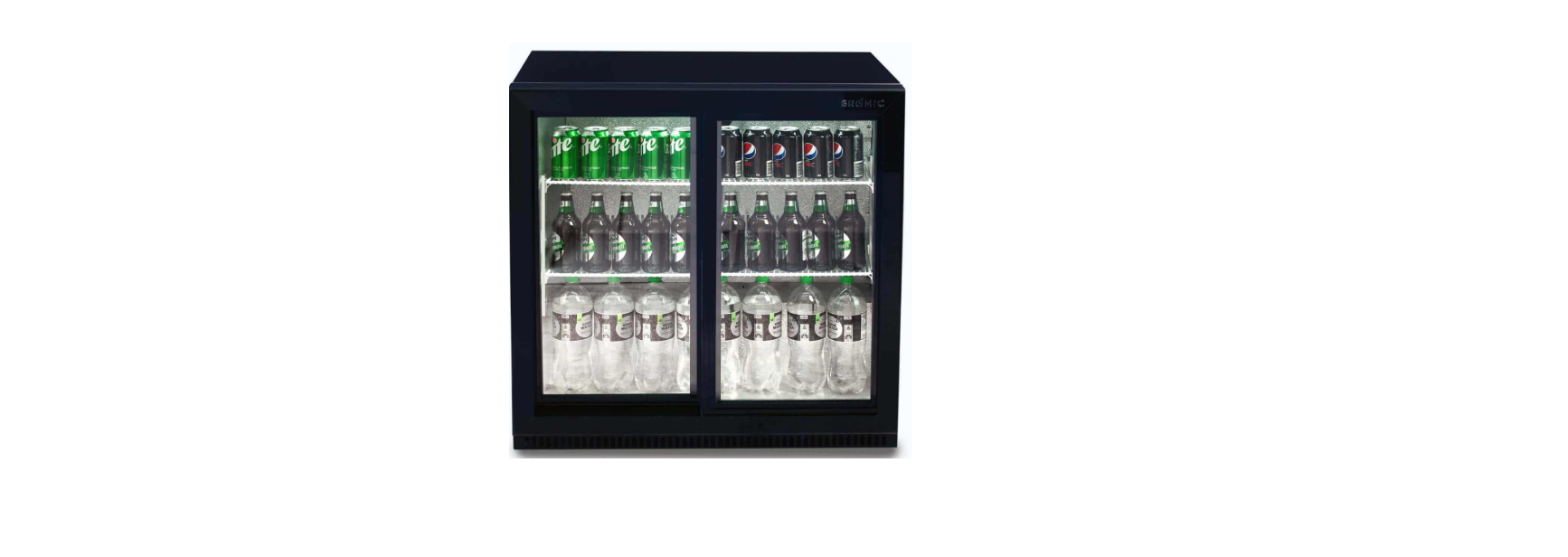

BROMIC 3736070-1 Back Bar Display Fridge

Safety Instructions
- Use this appliance only as described in this manual.
- Any other use not recommended by the manufacturer may cause fire, electric shock, or injury.
- The manufacturer is not responsible for any damage that could happen from improper use.
- Check the appliance for damage.
- Do not operate a damaged unit.
- Check for damage to the appliance regularly.
- Keep packaging material out of each child’s reach.
- Children should be carefully supervised to ensure that they do not play with the appliance.
- Do not attempt to alter the appliance in any manner.
- Please pay attention to the maximum load limit when filling the shelves.
- All work on electrical equipment must be carried out by a qualified and licensed technician only.
- Do not perform maintenance until the appliance has been turned off and the power disconnected.
- Do not operate the appliance with panels, covers, or guards removed.
- Keep the air intake and outlets free of obstructions.
- Do not use the appliance outdoors.
- If the appliance has not been used or will not be used for a long period, disconnect the power supply.
- The refrigerant used in all appliances covered by this manual is flammable.
Installation
- Do not install the cabinet outdoors.
- Locate the appliance in a dry, well-ventilated place.
- The unit must be positioned on a level surface.
- Do not install in the vicinity of heating radiators or other heat sources.
- Do not install the appliance where it is exposed to direct sunlight.
- Do not install the appliance where it is exposed to warm draughts or open doors.
- Keep the air intake and outlets free of obstructions.
- Adequate allowance should be made for door openings.

Ventilation
- Allow 150mm clearance between walls and the appliance.
- Ensure that the condenser fan is free to take in ambient air from the room.
- Adherence to minimum clearances is necessary
Power Supply
- See the rating label inside the cabinet for supply voltage, frequency, and current draw.
- Do not turn off the power before consulting the person responsible.

Operation
- Connect the appliance to the mains power supply and turn the Power switch on.
- Allow the unit to operate for 1 hour to cool the compartment before placing items in the cabinet.
- The LED indicates that the refrigeration circuit is operating.
- During the start-up delay (3 minutes), the LED is flashing
- The LED indicates that the refrigeration circuit is defrosting
Manual Defrost
- This cabinet features automatic defrost. However, should the appliance require an additional defrost, press SET and hold the DEFROST button for 6 seconds.
- Automatic defrost cycles occur every 6 hours and last 20 minutes (factory default). To stop the Defrost, press SET and hold the DEFROST button for 6 seconds.
Setting the temperature
 Press the button.
- Press or arrow key within 6 seconds to adjust the set point.
- Press the key again or wait 6 seconds.
- Set the controller setpoint to 2C for M2 temperature class requirements (-1°C to +7°C) suitable for drinks and non perishable goods storage
- Set the controller setpoint to 0C for M1 temperature class performance (-1°C to +5°C) suitable for food storage and perishable goods.
Start-up
- Clean the interior surface with a soft cloth and warm water before loading.
- Ensure there is free circulation of air between the products.
- Do not block the evaporator fan.
- Do not overstock the refrigerator.
- Keep refrigerator door openings to a minimum. • Some products are sensitive to ultraviolet (UV) light. Please see the storage guidelines from the manufacturer before removing from packaging.
- Do not block the internal air vents or fans when loading the cabinet. This can reduce cooling performance.
Maintainance
Cleaning the Cabinet
- Remove the products and transfer to a suitable location prior to cleaning the inside of the cabinet.
- Do not use any aggressive or abrasive cleaning agents.
- Never use a water hose or a high-pressure jet to clean.
- Do not use sharp or pointed objects for cleaning.
- Clean the inside and outside of the appliance with a clean, damp cloth or with a neutral cleanser.
- Dry all surfaces with a dry cloth.
- Never use polishing powder, soap powder, benzine, oil, or hot water, as these will damage the painting and plastic components.
- Preventing the build-up of oil and sediments will increase the longevity of the unit. 10
- Check the power cord for cracks and damage. If damaged, contact Bromic Service.ce
Spcifications

Troubleshooting

Diposal
The refrigerant used and contained within a hermetically tight circuit is environmentally friendly and does not contain chlorine and has zero ODP.
- Before disposal, render it unserviceable by disconnecting the power plug and severing the power cable.
- Consult your local authorities or authorised dealers for details of collection and disposal facilities.
- Children are often unable to recognise the dangers associated with commercial refrigeration equipment.
- The refrigerant used in all appliances covered by this manual is flammable.
Warranty
Warranty Terms vary across the range. Please ensure you are familiar with the Terms and Conditions that apply to the purchase of your Bromic product by referring to the Warranty Policy included with your purchased product.
Customer Support
- Website: www.bromicgroup.com/
- Tel: 1300 276 642
FAQs
Q: What is the ideal operating temperature range for the BROMIC 3736070-1 Back Bar Fridge?
Ans: For best results, the internal temperature should be between +1°C and +10°C.
Q: How do I adjust the temperature on the display fridge?
Ans: Usually found inside the unit, the digital control panel allows you to change the temperature. For detailed instructions, see the handbook, as firmware versions may cause subtle variations in settings.
Q: Is this fridge suitable for outdoor use or harsh environments?
Ans: No, the BROMIC 3736070-1 is solely intended for use in indoor business settings. The equipment may sustain damage and lose its warranty if exposed to rain, intense sunshine, or excessive humidity.
Q: How often should I clean the condenser coil?
Ans: To maintain ideal cooling performance and energy efficiency, it is BROMIC 3736070-1 Back Bar Display Fridge advised to clean the condenser coil with a soft brush or hoover every three months.
Q: How do I replace the interior LED light?
Ans: First, turn off the power to the device. After that, access the LED cover, detach the fitting, and install the replacement LED by following the instructions in the handbook.