

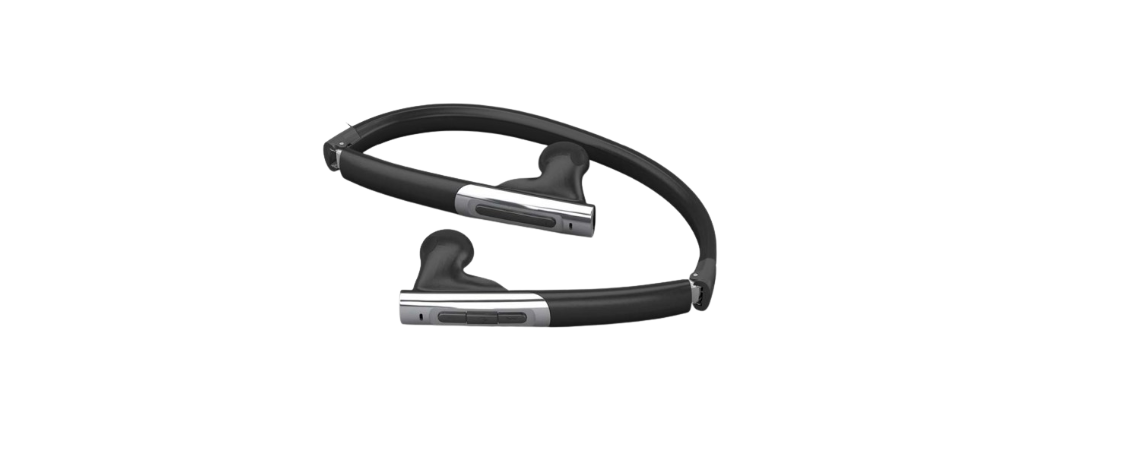

K-Mate BTH010 Bluetooth Stereo Headset

Before Use
Bluetooth wireless communication technology
- Bluetooth is a standard of close-range radio-communication technology that was developed by Ericsson, IBM, Intel, Nokia, and Toshiba.
- With Bluetooth technology, we can achieve the highest transmission rate among cell phones, computers, printers, PD, As, and other devices.
- The max transmission range of class II is 10 meters, while the max transmission range of class I can reach up to 100 meters.
About BTH010
- BTH010 is a Bluetooth stereo headset. Its folding and retractable design is very easy to take with you. It supports the following Bluetooth profiles:
- HSP —— Headset Profile
- HFP —— Hands-free Profile
- A2DP—— Advanced Audio Distribution Profile
- AVRCP—Audio/Video Remote Control Profile
- Pairing with a Bluetooth cell phone or PDA supporting the HFP profile.
- Answer a call, end a call, and reject a call
- Redial last number
- Voice dial
- Adjust the volume
- Call transfer between the headset and your Bluetooth cell phone
- Microphone mute
- Pairing with a Bluetooth music device or Bluetooth transmitter supporting the A2DP profile
- Enjoy music wirelessly
- Adjust the volume
- Remote control pause/play
- Remote control previous/next track
- Easy to switch between calls and music, you will not miss an incoming call while listening to music.
- Every time the headset is turned on, it will connect to the last connected device automatically.
Parts Description
- Previous track
- Multi-function button(MFB)
- Next track
- LED indicator

- String
- Folding and retractable string
- Right loudspeaker
- Left loudspeaker
- Microphone
- Micro USB — Charging jack

- Volume + — Volume up
- Volume – — Volume down

Charging the headset
- The headset comes with a built-in rechargeable battery. Prior to using it, it is recommended to charge the battery fully for the first time.
- When the headset is low power, the red LED flashes twice, and the headset emits three “Dong” tones every 20 seconds. Please recharge the battery of the headset.
Using a travel charger
- Connect the charger to a standard power outlet and the charger plug to the charging jack of the headset.
- The red LED is on while charging. It takes about 2 hours to charge the battery fully. When charging is completed, the red LED will be off.
Using a USB cable
- Connect the USB cable to a computer USB port and the USB cable plug to the charging jack of the headset. The red LED is on while charging.
- It takes about 2 hours to charge the battery fully. When charging is completed, the red LED will be off.
How to use
Turning on/off the headset
| Function | Operation | LED indicator | Indication tone |
| Turning on the headset | Press and hold MFB for
3~5 seconds until blue LED flashes |
Blue LED is on for 1 second | A long “DI” tone |
| Turning off the headset | Press and hold MFB for
3~5 seconds until red LED flashes |
Red LED is on for 1 second | A long “DI” tone |
How to enter pairing mode
Pairing the headset with Bluetooth devices
| Function | Operation | LED indicator | Indication tone |
| Entering pairing
mode |
Ensure the headset is turned off; otherwise, turn it off first and then press and hold MFB for 5~7 seconds untilthe the LED flashes red and blue alternately. | LED flashes red and blue alternately | Two short “DU” tones |
Pairing the headset with a Bluetooth cell phone
Prior to using the headset for the first time, you have to pair it with a Bluetooth-enabled cell phone. The pairing procedures are subject to different models of cell phones. Please refer to your cell phone user’s manual for further information. The general pairing procedures are as follows:
- Place the headset and Bluetooth cell phone where they are easily viewable by no more than 1 meter apart.
- Enter the headset’s pairing mode (please refer to “How to enter pairing mode.;
- Activate your cell phone’s Bluetooth function and set your cell phone to search for Bluetooth devices. After the search is completed, select “BTH010” from the Bluetooth device list.
- According to the indication, enter password or PIN No:”0000” and press ” Yes” or “confirm”;
- After successful pairing, select “BTH010” in the Bluetooth device list, and press “connect”.
- After a successful connection, the blue LED flashes twice every 5 seconds.
Pairing the headset with a Bluetooth transmitter
You can connect the headset to a Bluetooth transmitter to enjoy music wirelessly. Hereby, take the BTT001 iPod Bluetooth transmitter for example. The pairing procedures are as follows.
- Place the headset and the Bluetooth transmitter where they are easily viewable by no more than 1 meter apart;
- Enter the headset’s pairing mode (Please refer to “How to enter pairing mode).
- Turn on the Bluetooth transmitter. It will search for Bluetooth devices automatically and send a pairing request.
- When the headset requests to enter a PIN No., the transmitter will respond “0000” automatically;
- After successful pairing and connecting, the blue LED will flash twice every 5 seconds.

Multi-pairing
The headset can connect with two devices at most. One is a Bluetooth cell phone with HFP profile, and another is a Bluetooth music device with A2DP profile. If you want to finish the multi-pairing, please refer to the following steps.
- Firstly, pair the headset with a Bluetooth transmitter (refer to “pairing the headset with a Bluetooth transmitter.;
- Turn off the Bluetooth transmitter.
- Pair and connect the headset with a Bluetooth cell phone (refer to “pairing the headset with a Bluetooth cell phone”).
- Turn on the Bluetooth transmitter, and it will connect to the headset automatically.
Re-connecting with a Bluetooth device
Automatic connecting
- Every time the headset is turned on, it will connect to the last connected device automatically.
Manual connecting
- When the headset is in standby mode and doesn’t connect to any devices, short-press press MFB button twice to connect the headset to the last connected device.
Wearing the headset
The string of the headset is folding and retractable; please adjust the K-Mate BTH010 Bluetooth Stereo Headset according to actual use. The logo “L” of the headset represents the left ear, the Logo “R” of the headset represents the right ear. Please wear the headset according to the instructions of the Logo.
Making a call with the headset
| Function | Status of the headset | Operation | Indication tone |
| Voice dial | Standby mode | Press and hold for 2 seconds until you hear the indication tone | A short tone |
| Redial last number | Standby mode | Quickly press MFB twice | A short tone |
| Volume up | During a call | Short or Long press volume + | |
| Volume down | During a call | Short or Long press volume – | |
| Answer a call | Incoming ring | Short-press MFB | A short tone |
| Reject a call | Incoming ring | Press and hold MFB for 2 seconds until hearing the indication tone | A short tone |
| End a call | During a call | Short-press MFB | A long tone |
| Call transfer | During a call | Press and hold MFB for 2 seconds until hearing the indication tone | A long tone |
| Microphone mute | During a call | Quickly press MFB twice | 2 falling tones |
| Cancel mute | During a call (Mute) | Quickly press MFB twice | 2 rising tones |
Music Playback
After connecting the headset to a Bluetooth cell phone or Bluetooth transmitter supporting A2DP, you can enjoy music with the headset.
| Function | Status of the headset | Operation |
| Volume up | Playing music | Short or Long press volume + |
| Volume down | Playing music | Short or Long press volume – |
| Pause | Playing music | Short-press MFB |
| Play | Pausing | Short-press MFB |
| Previous track | Playing music | Press the button once |
| Next track | Playing music | Press the button once |
LED indicator
When the headset is charging
| LED indicator | Status of the headset |
| Red LED is on | Charging in progress |
| Red LED is off | Finish charging |
When the headset is connected to a Bluetooth device
| LED indicator | Status of the headset |
| LED flashes red and blue
alternately |
Pairing mode |
| Blue LED flashes once every 3 seconds | Standby mode (not connected with a Bluetooth device) |
| Blue LED flashes twice every 5 seconds | Standby mode (connected with a Bluetooth device) |
| Blue LED flashes twice every 4 seconds | Incoming call |
| Blue LED flashes once every 2 seconds | During a call |
Indication tone
| Indication tone | Status of the headset |
| Emits 2 tones every 5 seconds | During a call (Microphone mute) |
| Emits 3 “Dong” tones every 20 seconds | Low power |
Care and Maintenance
Read the following recommendations before using the headset. Following these, you will be able to enjoy the product for many years.
- Do not expose the headset to liquid, moisture, or humidity to avoid the product’s internal circuit being affected.
- Don’t use abrasive cleaning solvents to clean the headset.
- Do not expose the headset to extremely high or low temperatures, as this will shorten the life of electronic devices, destroy the battery, or distort certain plastic parts.
- Don’t dispose of the headset in a fire, as it will result in an explosion
- Don’t expose the headset to contact with sharp objects, as this will cause scratches and damage.
- Don’t let the headset fall onto the floor. The internal circuit might get damaged.
- Don’t attempt to disassemble the headset, K-Mate BTH010 Bluetooth Stereo Headset, as it may get damaged if you are not a professional.
In case the headset doesn’t function properly, send it to the store where you bought it. The staff will help you solve the problem.
Specifications
- Bluetooth specification: Bluetooth V2.1+EDR
- Bluetooth profiles: Headset, Handsfree, A2DP, and AVRCP
- Operating distance: 10 meters, Class II
- Working time: Music: Up to 5 hours, Talk: Up to 6 hours
- Standby time: Up to 120 hours
- Charing input voltage: DC: +5.0±0.25VA
- Charging time: Approx. 2 hours
- Dimensions: 158×148×26mm
- Weight: Approx. .40
FCC Statements
This equipment generates, uses, and can radiate radio frequency energy and, if not installed and used following the instructions, may cause harmful interference to radio communications.
However, there is no guarantee that interference will not occur in a particular installation.
If this equipment does cause harmful interference to radio or television reception, which can be determined by turning the equipment off and on, the user is encouraged to try to correct the interference by one or more of the following measures:
- Reorient or relocate the receiving antenna.
- Increase the separation between the equipment and receiver.
- Connect the equipment into an outlet on a circuit different from that to which the receiver is connected.
- Consult the dealer or an experienced radio/TV technician for help.
This device complies with part 15 of the FCC rules. Operation is subject to the following two conditions:
- This device may not cause harmful interference, and
- This device must accept any interference received, including
Interference that may cause undesired operation. Changes or modifications to this unit not expressly approved by the party responsible for compliance could void the user’s authority to operate the equipment.
Customer Support
- 86-0760-88320910
- E Bldg., Fuwan Ind.Zone, Fuwan Nan Rd. , Zhongshan, China, Jining, Shandong, China
- https://kmate8.goldsupplier.com/